Waffle Chart
A waffle chart encodes proportions as colored cells in a rectangular grid. Where a pie chart encodes data as angles, a waffle chart encodes it as area — making it easier to estimate percentages at a glance, especially at multiples of 5% on a 10×10 grid.
Waffle charts are popular in infographic and policy contexts where the audience may find pie slices hard to compare, and they pair naturally with a unit label like "■ = 100 people" to communicate absolute counts.
Import path: kuva::plot::waffle::{WafflePlot, FillOrder, CellShape}
Basic usage
Add categories with .with_category(label, value, color). Values are proportional — only their relative sizes matter. The grid is filled using Largest Remainder (Hamilton) rounding so the total filled cells always equals exactly rows × cols.
#![allow(unused)]
fn main() {
use kuva::plot::waffle::{WafflePlot, FillOrder, CellShape};
use kuva::backend::svg::SvgBackend;
use kuva::render::render::render_multiple;
use kuva::render::layout::Layout;
use kuva::render::plots::Plot;

let waffle = WafflePlot::new()
    .with_category("Treated",   45.0, "#2196F3")
    .with_category("Partial",   30.0, "#FF9800")
    .with_category("Untreated", 25.0, "#F44336")
    .with_legend("Status")
    .with_show_percents();

let plots = vec![Plot::Waffle(waffle)];
let layout = Layout::auto_from_plots(&plots).with_title("Treatment Coverage");
let svg = SvgBackend.render_scene(&render_multiple(plots, layout));
std::fs::write("waffle.svg", svg).unwrap();
}
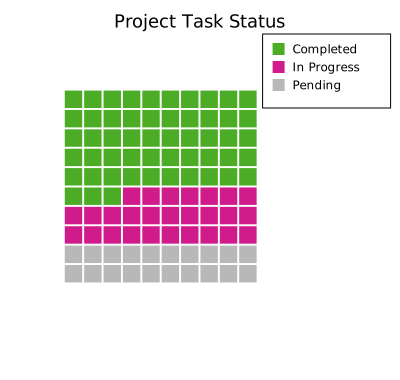
Grid size and aspect ratio
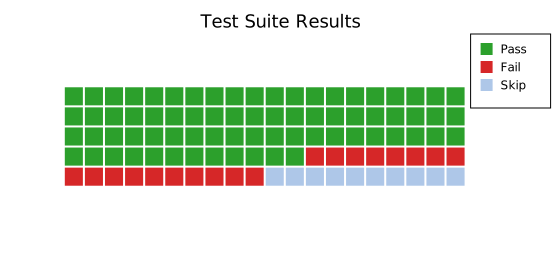
The default is a 10×10 grid (100 cells), which cleanly maps 1 cell per percent. Adjust with .with_grid(rows, cols) for different aspect ratios.
#![allow(unused)]
fn main() {
use kuva::plot::waffle::WafflePlot;
use kuva::render::plots::Plot;
use kuva::render::layout::Layout;
use kuva::render::render::render_multiple;

// 5 rows × 20 cols = 100 cells, wide aspect ratio
let waffle = WafflePlot::new()
    .with_grid(5, 20)
    .with_category("Agree",        52.0, "#4CAF50")
    .with_category("Neutral",      21.0, "#9E9E9E")
    .with_category("Disagree",     27.0, "#F44336")
    .with_legend("Response")
    .with_show_percents();

let plots = vec![Plot::Waffle(waffle)];
}
Circle cells
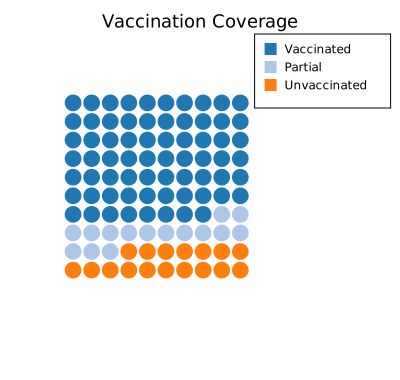
Use .with_shape(CellShape::Circle) for a bubbly, more modern infographic style.
#![allow(unused)]
fn main() {
use kuva::plot::waffle::{WafflePlot, CellShape};
use kuva::render::plots::Plot;
use kuva::render::layout::Layout;
use kuva::render::render::render_multiple;
use kuva::backend::svg::SvgBackend;

let waffle = WafflePlot::new()
    .with_shape(CellShape::Circle)
    .with_gap(0.15)
    .with_category("Yes",     63.0, "#2ca02c")
    .with_category("No",      37.0, "#d62728")
    .with_legend("Vote")
    .with_show_percents();

let plots = vec![Plot::Waffle(waffle)];
let layout = Layout::auto_from_plots(&plots).with_title("Survey Result");
let svg = SvgBackend.render_scene(&render_multiple(plots, layout));
}
Fill direction
FillOrder controls where the first cell is placed and in which direction the grid fills. Use RowMajorBottomLeft to fill upward like a progress bar, or ColMajorTopLeft for column-first layout.
#![allow(unused)]
fn main() {
use kuva::plot::waffle::{WafflePlot, FillOrder};
use kuva::render::plots::Plot;
use kuva::render::layout::Layout;
use kuva::render::render::render_multiple;

// Bottom-up fill — reads like a "filled" progress bar
let waffle = WafflePlot::new()
    .with_fill_order(FillOrder::RowMajorBottomLeft)
    .with_category("Complete", 68.0, "#1f77b4")
    .with_category("Remaining", 32.0, "#aec7e8")
    .with_legend("Progress")
    .with_show_percents();

let plots = vec![Plot::Waffle(waffle)];
}
Unit label and absolute counts
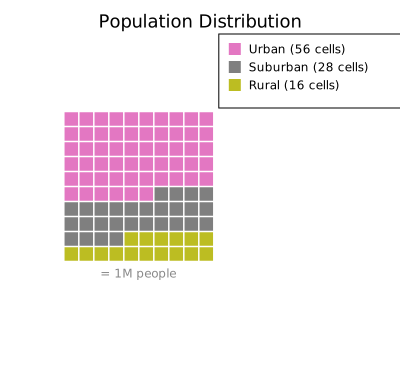
When each cell represents a fixed number, add a .with_unit_label() annotation below the grid and .with_show_counts() to append cell counts to legend entries.
#![allow(unused)]
fn main() {
use kuva::plot::waffle::WafflePlot;
use kuva::render::plots::Plot;
use kuva::render::layout::Layout;
use kuva::render::render::render_multiple;
use kuva::backend::svg::SvgBackend;

// A population of 10,000: each cell = 100 people
let waffle = WafflePlot::new()
    .with_category("Vaccinated",    7800.0, "#2ca02c")
    .with_category("Unvaccinated",  2200.0, "#d62728")
    .with_legend("Status")
    .with_show_percents()
    .with_show_counts()
    .with_unit_label("■ = 100 people");

let plots = vec![Plot::Waffle(waffle)];
let layout = Layout::auto_from_plots(&plots).with_title("Vaccination Coverage (n = 10,000)");
let svg = SvgBackend.render_scene(&render_multiple(plots, layout));
}
WafflePlot API reference
WafflePlot builders
| Method | Default | Description |
|---|---|---|
WafflePlot::new() | — | 10×10 grid, square cells, row-major top-left, 10% gap |
.with_category(label, value, color) | — | Add a proportional category |
.with_categories(iter) | — | Add multiple (label, value, color) at once |
.with_grid(rows, cols) | 10, 10 | Set grid dimensions |
.with_rows(n) | 10 | Set number of rows |
.with_cols(n) | 10 | Set number of columns |
.with_gap(f) | 0.1 | Gap between cells as fraction of cell size |
.with_fill_order(FillOrder) | RowMajorTopLeft | Fill direction and starting corner |
.with_shape(CellShape) | Square | Cell shape: Square or Circle |
.with_empty_color(css) | "#e8e8e8" | Color for unfilled background cells |
.with_legend(label) | — | Attach a legend (one entry per category) |
.with_show_percents() | — | Append (xx.x%) to legend entries |
.with_show_counts() | — | Append (N cells) to legend entries |
.with_unit_label(s) | — | Annotation below the grid (e.g. "■ = 100 people") |
FillOrder variants
| Variant | Description |
|---|---|
RowMajorTopLeft | Left-to-right, top-to-bottom (reading order, default) |
RowMajorBottomLeft | Left-to-right, bottom-to-top (progress bar style) |
ColMajorTopLeft | Top-to-bottom, left-to-right (column first) |
ColMajorBottomLeft | Bottom-to-top, left-to-right |
CellShape variants
| Variant | Description |
|---|---|
Square | Filled rectangle (default) |
Circle | Filled circle inscribed in the cell |
See also: Pie Chart for the classic part-to-whole chart, Population Pyramid for another proportion-focused layout.
CLI
Waffle chart — proportional grid of filled squares (or circles), one cell per unit.
Input: one row per category with label, value, and optionally color columns.
| Flag | Default | Description |
|---|---|---|
--label-col <COL> | 0 | Category label column |
--value-col <COL> | 1 | Proportional value column |
--color-col <COL> | — | Per-category color column (CSS strings); defaults to category10 palette |
--rows <N> | 10 | Number of grid rows |
--cols <N> | 10 | Number of grid columns |
--gap <F> | 0.1 | Gap between cells as a fraction of cell size |
--shape <SHAPE> | square | Cell shape: square or circle |
--show-percents | off | Append percentage to legend labels |
--show-counts | off | Append cell count to legend labels |
--legend <LABEL> | — | Add a legend |
kuva waffle data.tsv --label-col category --value-col value --color-col color

kuva waffle data.tsv --label-col category --value-col value \
    --shape circle --show-percents --legend "Energy Mix" \
    --title "Energy Sources"
See also: Shared flags — output, appearance.