Date & Time Axes
kuva plots use f64 for all axis values. Dates and times are represented as Unix timestamps in seconds, and the DateTimeAxis type tells the renderer how to format and space tick marks on a date axis.
Three helpers are exported from the prelude:
| Symbol | Description |
|---|---|
ymd(y, m, d) | Unix timestamp for a calendar date at midnight UTC |
ymd_hms(y, m, d, h, min, s) | Unix timestamp for a date + time UTC |
DateTimeAxis | Axis configuration: tick unit, step, and strftime format string |
Quick start
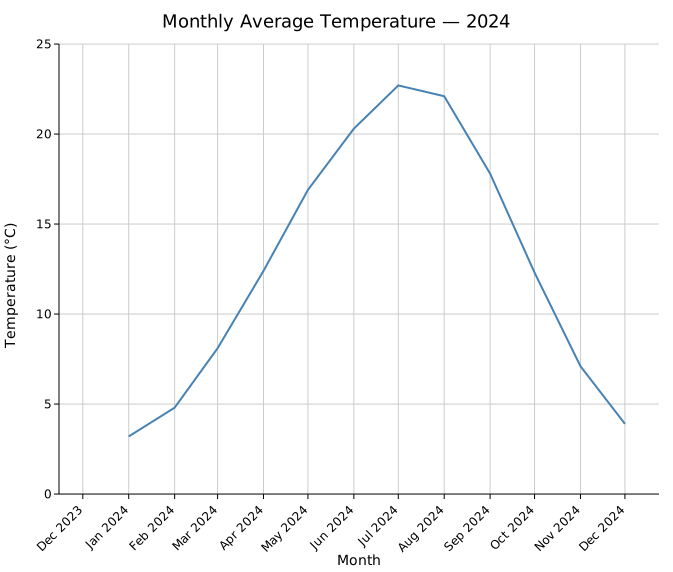
Convert your dates to f64 with ymd(), pass them as the x (or y) coordinate, and attach a DateTimeAxis to the layout:
#![allow(unused)]
fn main() {
use kuva::prelude::*;

// Monthly temperature readings
let data: Vec<(f64, f64)> = vec![
    (ymd(2024,  1, 1),  3.2),
    (ymd(2024,  2, 1),  4.8),
    (ymd(2024,  3, 1),  8.1),
    // ...
];

let plot = LinePlot::new()
    .with_data(data)
    .with_color("steelblue");

let plots = vec![Plot::Line(plot)];
let layout = Layout::auto_from_plots(&plots)
    .with_title("Monthly Temperature")
    .with_x_label("Month")
    .with_y_label("°C")
    .with_x_datetime(DateTimeAxis::months("%b %Y"));

let svg = render_to_svg(plots, layout);
}
DateTimeAxis constructors
Each constructor takes a strftime-style format string for tick labels. The format is passed directly to chrono's NaiveDateTime::format.
| Constructor | Tick unit | Typical format |
|---|---|---|
DateTimeAxis::years(fmt) | 1 year | "%Y" |
DateTimeAxis::months(fmt) | 1 month | "%b %Y" |
DateTimeAxis::weeks(fmt) | 1 week (Mon) | "%b %d" |
DateTimeAxis::days(fmt) | 1 day | "%Y-%m-%d" |
DateTimeAxis::hours(fmt) | 1 hour | "%H:%M" |
DateTimeAxis::minutes(fmt) | 1 minute | "%H:%M" |
DateTimeAxis::auto(min, max) | auto-selected | auto |
.with_step(n) on any constructor places a tick every n units instead of every 1:
#![allow(unused)]
fn main() {
// Tick every 2 months
DateTimeAxis::months("%b").with_step(2)
}
Auto mode
DateTimeAxis::auto(min, max) inspects the axis range (in seconds) and selects an appropriate unit and format automatically. It is convenient when you don't know the data range ahead of time:
#![allow(unused)]
fn main() {
let min = data.iter().map(|(x, _)| *x).fold(f64::MAX, f64::min);
let max = data.iter().map(|(x, _)| *x).fold(f64::MIN, f64::max);

let layout = Layout::auto_from_plots(&plots)
    .with_x_datetime(DateTimeAxis::auto(min, max));
}
Scatter plot with dates
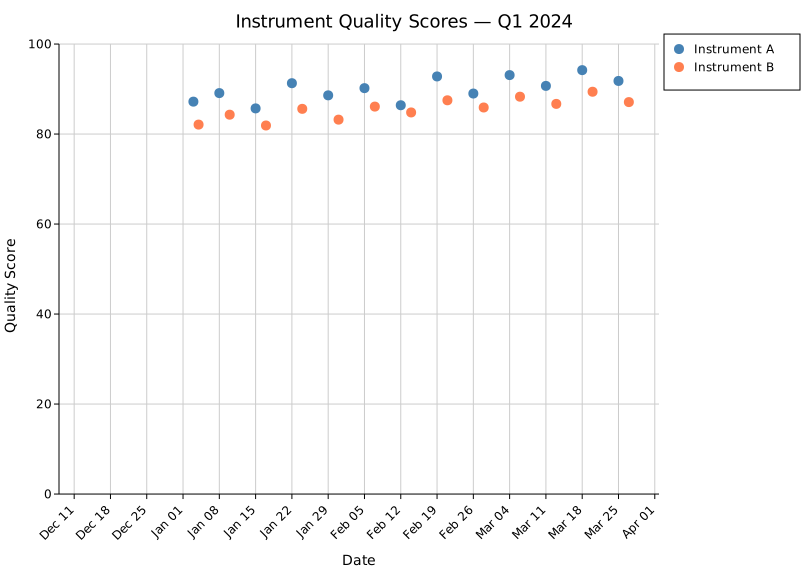
ymd() works the same for scatter plots — each point's x coordinate is a timestamp:
#![allow(unused)]
fn main() {
use kuva::prelude::*;

let measurements: Vec<(f64, f64)> = vec![
    (ymd(2024, 1,  3), 87.2),
    (ymd(2024, 1, 15), 85.7),
    (ymd(2024, 2,  5), 90.2),
    // ...
];

let plot = ScatterPlot::new()
    .with_data(measurements)
    .with_color("steelblue")
    .with_size(5.0);

let plots = vec![Plot::Scatter(plot)];
let layout = Layout::auto_from_plots(&plots)
    .with_x_datetime(DateTimeAxis::weeks("%b %d"))
    .with_x_tick_rotate(-45.0);
}
Multi-series with dates
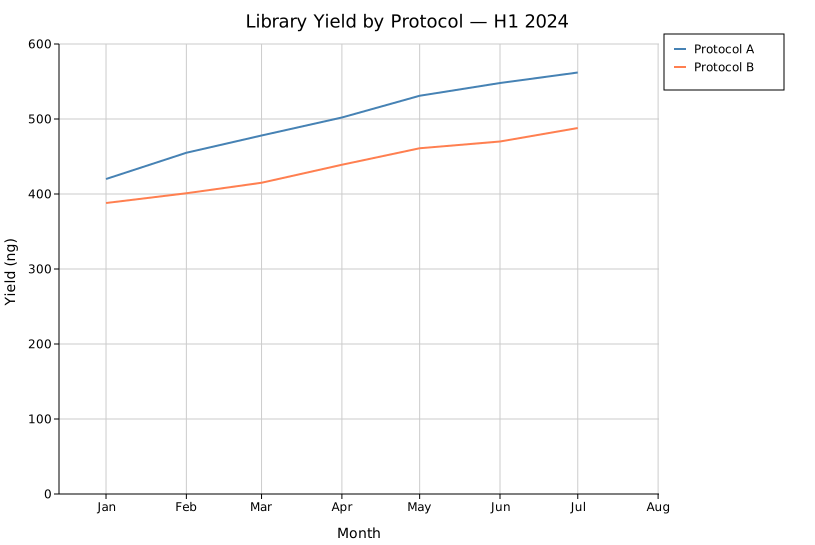
Add .with_legend("name") to each plot to get a legend; the layout shows it automatically:
#![allow(unused)]
fn main() {
use kuva::prelude::*;

let plots = vec![
    Plot::Line(
        LinePlot::new()
            .with_data(series_a)
            .with_color("steelblue")
            .with_legend("Protocol A"),
    ),
    Plot::Line(
        LinePlot::new()
            .with_data(series_b)
            .with_color("coral")
            .with_legend("Protocol B"),
    ),
];

let layout = Layout::auto_from_plots(&plots)
    .with_x_datetime(DateTimeAxis::months("%b"));
}
Sub-day granularity
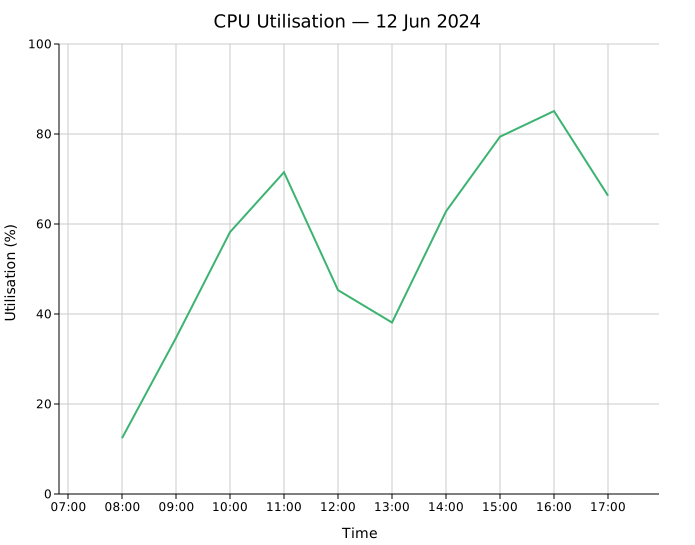
For hourly or finer data, use ymd_hms() and a matching DateTimeAxis:
#![allow(unused)]
fn main() {
use kuva::prelude::*;

let data: Vec<(f64, f64)> = vec![
    (ymd_hms(2024, 6, 12,  8, 0, 0), 12.4),
    (ymd_hms(2024, 6, 12,  9, 0, 0), 34.7),
    (ymd_hms(2024, 6, 12, 10, 0, 0), 58.2),
    // ...
];

let layout = Layout::auto_from_plots(&plots)
    .with_x_datetime(DateTimeAxis::hours("%H:%M"));
}
Applying to the y-axis
with_y_datetime() works identically to with_x_datetime() for plots where time is on the vertical axis:
#![allow(unused)]
fn main() {
let layout = Layout::auto_from_plots(&plots)
    .with_y_datetime(DateTimeAxis::days("%Y-%m-%d"));
}
Converting from other date libraries
kuva stores dates as Unix timestamps (seconds, f64). Converting from any date library is straightforward:
chrono:
#![allow(unused)]
fn main() {
use chrono::NaiveDate;
let ts = NaiveDate::from_ymd_opt(2024, 6, 1).unwrap()
    .and_hms_opt(0, 0, 0).unwrap()
    .and_utc()
    .timestamp() as f64;
}
time crate:
#![allow(unused)]
fn main() {
use time::{Date, Month, PrimitiveDateTime, Time};
let dt = PrimitiveDateTime::new(
    Date::from_calendar_date(2024, Month::June, 1).unwrap(),
    Time::MIDNIGHT,
);
let ts = dt.assume_utc().unix_timestamp() as f64;
}
std::time::SystemTime:
#![allow(unused)]
fn main() {
use std::time::{SystemTime, UNIX_EPOCH};
let ts = SystemTime::now()
    .duration_since(UNIX_EPOCH)
    .unwrap()
    .as_secs_f64();
}
From the CLI
kuva scatter and kuva line accept --x-date-format <FMT> to parse the X column as a date/time directly from a TSV/CSV file, instead of converting to timestamps beforehand:
kuva line prices.tsv --x date --y close --x-date-format "%Y-%m-%d"
See CLI → Date/time X axis for the full flag reference (tick unit, tick format, and tick step overrides).