Box Plot
A box plot (box-and-whisker plot) displays the five-number summary of one or more groups of values. Boxes show the interquartile range (Q1–Q3) with a median line; whiskers extend to the most extreme values within 1.5×IQR of the box edges (Tukey style). Individual data points can optionally be overlaid as a jittered strip or beeswarm.
Import path: kuva::plot::BoxPlot
Basic usage
Add one group per category with .with_group(label, values). Groups are rendered left-to-right in the order they are added.
#![allow(unused)]
fn main() {
use kuva::plot::BoxPlot;
use kuva::backend::svg::SvgBackend;
use kuva::render::render::render_multiple;
use kuva::render::layout::Layout;
use kuva::render::plots::Plot;

let plot = BoxPlot::new()
    .with_group("Control",     vec![4.1, 5.0, 5.3, 5.8, 6.2, 7.0, 5.5, 4.8])
    .with_group("Treatment A", vec![5.5, 6.1, 6.4, 7.2, 7.8, 8.5, 6.9, 7.0])
    .with_group("Treatment B", vec![3.2, 4.0, 4.5, 4.8, 5.1, 5.9, 4.3, 4.7])
    .with_group("Treatment C", vec![6.0, 7.2, 7.5, 8.1, 8.8, 9.5, 7.9, 8.2])
    .with_color("steelblue");

let plots = vec![Plot::Box(plot)];
let layout = Layout::auto_from_plots(&plots)
    .with_title("Box Plot")
    .with_y_label("Value");

let scene = render_multiple(plots, layout);
let svg = SvgBackend.render_scene(&scene);
std::fs::write("boxplot.svg", svg).unwrap();
}
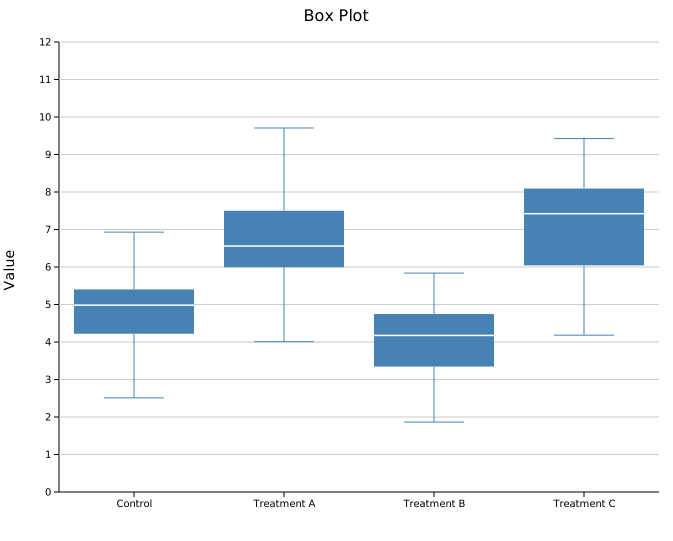
What the box shows
| Element | Meaning |
|---|---|
| Bottom of box | Q1 — 25th percentile |
| Line in box | Q2 — median (50th percentile) |
| Top of box | Q3 — 75th percentile |
| Lower whisker | Smallest value ≥ Q1 − 1.5×IQR |
| Upper whisker | Largest value ≤ Q3 + 1.5×IQR |
Values outside the whisker range are not drawn automatically — use an overlay to show them.
Point overlays
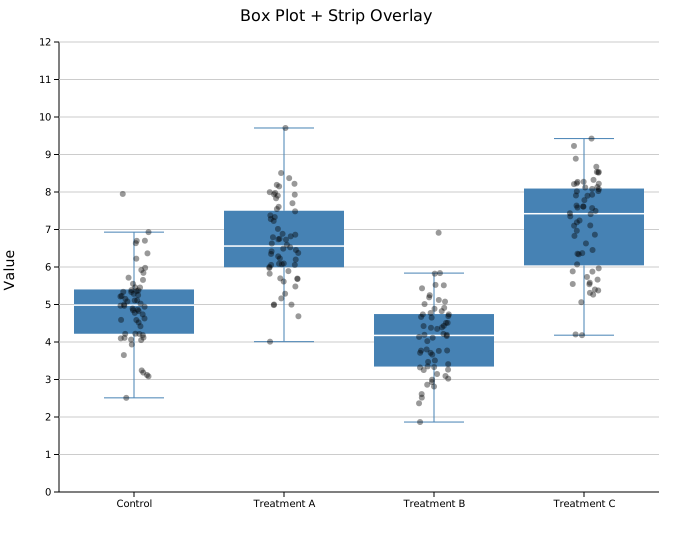
Overlaying the raw data on top of each box makes the sample size and distribution shape immediately visible. Both modes accept an optional color and point size.
Jittered strip
.with_strip(jitter) scatters points randomly within a horizontal band. The jitter argument controls the spread width (in data-axis units; 0.2 is a reasonable starting value).
#![allow(unused)]
fn main() {
use kuva::plot::BoxPlot;
use kuva::render::plots::Plot;

let plot = BoxPlot::new()
    .with_group("Control",     vec![/* values */])
    .with_group("Treatment A", vec![/* values */])
    .with_color("steelblue")
    .with_strip(0.2)
    .with_overlay_color("rgba(0,0,0,0.4)")
    .with_overlay_size(3.0);
}
Beeswarm
.with_swarm_overlay() uses a beeswarm algorithm to spread points horizontally to avoid overlap. This gives a clearer picture of data density and is particularly useful for smaller datasets (roughly N < 200 per group).
#![allow(unused)]
fn main() {
use kuva::plot::BoxPlot;
use kuva::render::plots::Plot;

let plot = BoxPlot::new()
    .with_group("Control",     vec![/* values */])
    .with_group("Treatment A", vec![/* values */])
    .with_color("steelblue")
    .with_swarm_overlay()
    .with_overlay_color("rgba(0,0,0,0.4)")
    .with_overlay_size(3.0);
}
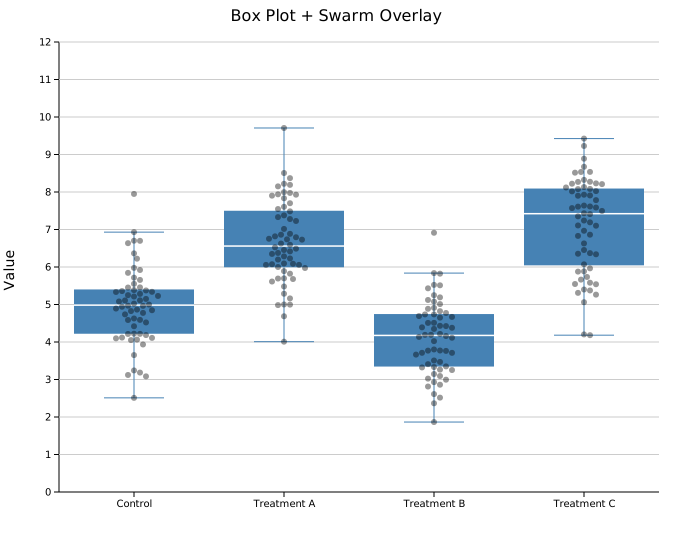
A semi-transparent overlay_color is recommended so the box remains visible beneath the points.
Per-group colors
Color each group independently within a single BoxPlot using .with_group_colors(). Colors are matched to groups by position — the first color applies to the first group added, and so on. The uniform .with_color() value is used as a fallback for any group without an entry. All elements of a group (box, whiskers, caps) share the same color.
#![allow(unused)]
fn main() {
use kuva::plot::BoxPlot;
use kuva::backend::svg::SvgBackend;
use kuva::render::render::render_multiple;
use kuva::render::layout::Layout;
use kuva::render::plots::Plot;

let plot = BoxPlot::new()
    .with_group("Control",     samples(5.0, 1.0, 60, 1))
    .with_group("Treatment A", samples(6.5, 1.2, 60, 2))
    .with_group("Treatment B", samples(4.2, 0.9, 60, 3))
    .with_group("Treatment C", samples(7.1, 1.5, 60, 4))
    .with_group_colors(["steelblue", "tomato", "seagreen", "goldenrod"]);

let plots = vec![Plot::Box(plot)];
let layout = Layout::auto_from_plots(&plots)
    .with_title("Box Plot — Per-group Colors")
    .with_y_label("Value");

let svg = SvgBackend.render_scene(&render_multiple(plots, layout));
}
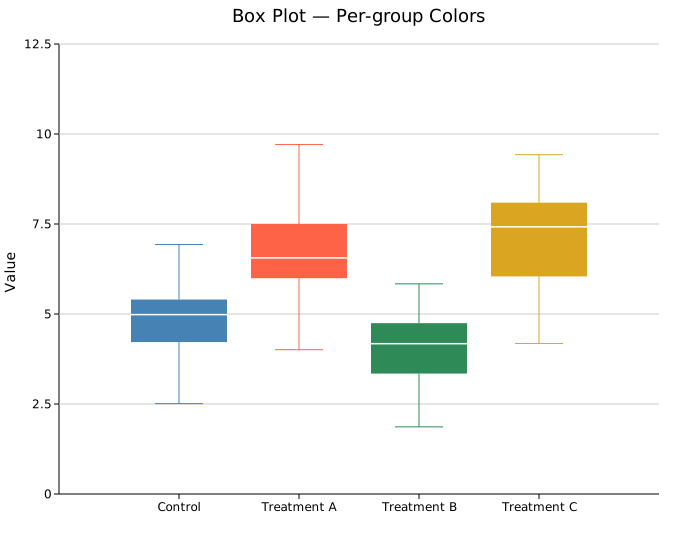
A partial list is also valid — groups beyond the list length fall back to the uniform .with_color() value:
#![allow(unused)]
fn main() {
use kuva::plot::BoxPlot;
let plot = BoxPlot::new()
    .with_group("Control",     vec![/* values */])
    .with_group("Treatment A", vec![/* values */])
    .with_group("Treatment B", vec![/* values */])
    .with_color("steelblue")          // fallback for groups 1 and 2
    .with_group_colors(["tomato"]);   // only group 0 gets this color
}
Legend note: the legend entry uses the uniform
.with_color()value. For a fully labeled per-group legend, create oneBoxPlotper group and attach.with_legend()to each, then use aLayout::with_palette()to auto-assign colors.
Horizontal mode
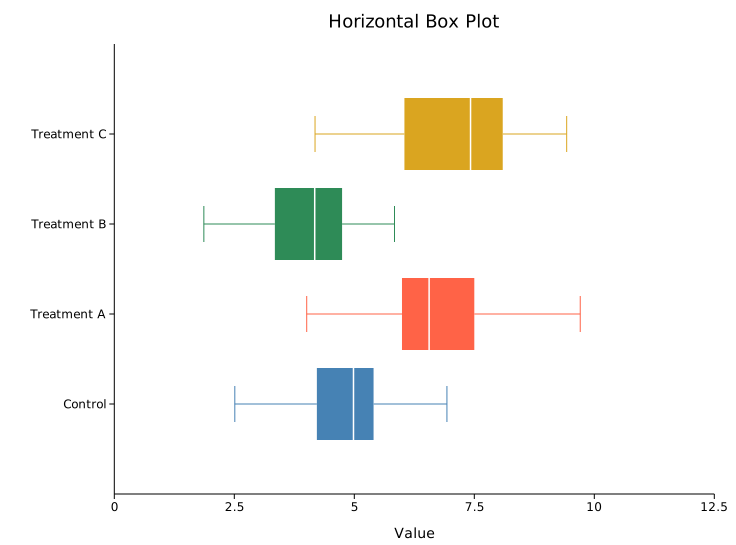
.with_horizontal(true) rotates the chart so categories appear on the Y-axis and values on the X-axis.
#![allow(unused)]
fn main() {
use kuva::plot::BoxPlot;
use kuva::render::layout::Layout;
use kuva::render::plots::Plot;
use kuva::render::render::render_multiple;
use kuva::backend::svg::SvgBackend;

let plot = BoxPlot::new()
    .with_group("Control",     vec![4.1, 5.0, 5.3, 5.8, 6.2, 7.0])
    .with_group("Treatment A", vec![5.5, 6.1, 6.4, 7.2, 7.8, 8.5])
    .with_group("Treatment B", vec![3.2, 4.0, 4.5, 4.8, 5.1, 5.9])
    .with_group("Treatment C", vec![6.0, 7.2, 7.5, 8.1, 8.8, 9.5])
    .with_group_colors(["steelblue", "tomato", "seagreen", "goldenrod"])
    .with_horizontal(true);

let plots = vec![Plot::Box(plot)];
let layout = Layout::auto_from_plots(&plots)
    .with_title("Horizontal Box Plot")
    .with_x_label("Value");

let svg = SvgBackend.render_scene(&render_multiple(plots, layout));
}
API reference
| Method | Description |
|---|---|
BoxPlot::new() | Create a box plot with defaults |
.with_group(label, values) | Add a group; accepts any Into<f64> iterable |
.with_color(s) | Box fill color (CSS color string) |
.with_group_colors(iter) | Per-group fill colors; falls back to .with_color for out-of-range indices |
.with_width(f) | Box width as a fraction of the category slot (default 0.8) |
.with_legend(s) | Attach a legend label |
.with_strip(jitter) | Overlay jittered strip points; jitter is horizontal spread width |
.with_swarm_overlay() | Overlay beeswarm points (spread to avoid overlap) |
.with_overlay_color(s) | Color for overlay points (default "rgba(0,0,0,0.45)") |
.with_overlay_size(r) | Radius of overlay points in pixels (default 3.0) |
.with_horizontal(bool) | Rotate chart: categories on Y-axis, values on X-axis (default false) |
See also: Violin Plot for the full density shape, Raincloud Plot for box + density + points combined, Strip Plot for the raw points alone.
CLI
Box-and-whisker plot. Groups are taken from one column; values from another.
Input: two columns — group label and numeric value, one observation per row.
| Flag | Default | Description |
|---|---|---|
--group-col <COL> | 0 | Group label column |
--value-col <COL> | 1 | Numeric value column |
--y <COL>[,<COL>…] | — | Comma-separated columns; each column becomes a separate group (column name = group label). Overrides --group-col + --value-col when 2+ columns given |
--color <CSS> | steelblue | Box fill color (uniform, all groups) |
--group-colors <CSS,...> | — | Per-group colors, comma-separated; falls back to --color for unlisted groups |
--overlay-points | off | Overlay individual points as a jittered strip |
--overlay-swarm | off | Overlay individual points as a non-overlapping beeswarm |
--horizontal | off | Render groups on the Y-axis, values on the X-axis |
kuva box samples.tsv --group-col group --value-col expression

kuva box samples.tsv --group-col group --value-col expression \
    --overlay-swarm --color "rgba(70,130,180,0.6)"

kuva box samples.tsv --group-col group --value-col expression \
    --group-colors "steelblue,tomato,seagreen,goldenrod,mediumpurple"

# multi-column: each numeric column is a group
kuva box data.tsv --y col_a,col_b,col_c

# horizontal layout
kuva box samples.tsv --group-col group --value-col expression --horizontal
See also: Shared flags — output, appearance, axes, log scale.