Candlestick Plot
A candlestick chart visualises OHLC (open, high, low, close) data. Each candle encodes four values for a single period:
- The body spans from open to close. Green = close above open (bullish); red = close below open (bearish); gray = close equals open (doji).
- The wicks extend from the body to the period high (upper wick) and low (lower wick).
An optional volume panel shows trading volume as bars below the price chart.
Import path: kuva::plot::CandlestickPlot
Basic usage
Add candles one at a time with .with_candle(label, open, high, low, close). Labels are placed on the x-axis as category ticks and candles are spaced evenly.
#![allow(unused)]
fn main() {
use kuva::plot::CandlestickPlot;
use kuva::backend::svg::SvgBackend;
use kuva::render::render::render_multiple;
use kuva::render::layout::Layout;
use kuva::render::plots::Plot;

let plot = CandlestickPlot::new()
    .with_candle("Nov 01", 142.50, 146.20, 141.80, 145.30)  // bullish
    .with_candle("Nov 02", 145.40, 147.80, 143.50, 144.10)  // bearish
    .with_candle("Nov 03", 144.10, 144.90, 142.20, 144.10)  // doji
    .with_candle("Nov 04", 143.80, 148.50, 143.20, 147.90)  // bullish
    .with_candle("Nov 05", 147.90, 150.20, 146.30, 149.80); // bullish

let plots = vec![Plot::Candlestick(plot)];
let layout = Layout::auto_from_plots(&plots)
    .with_title("Daily OHLC — November")
    .with_x_label("Date")
    .with_y_label("Price (USD)");

let svg = SvgBackend.render_scene(&render_multiple(plots, layout));
std::fs::write("candlestick.svg", svg).unwrap();
}
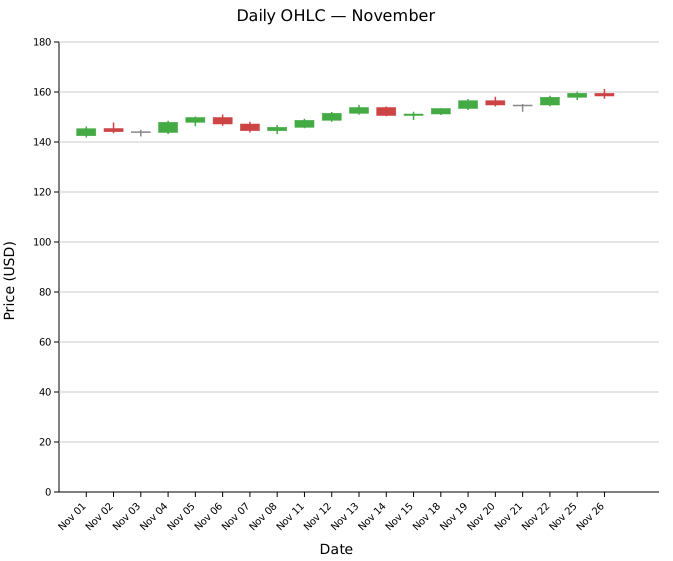
Twenty trading days showing the full mix of bullish, bearish, and doji candles. The overall upward trend is visible from the rising body positions — two doji sessions (Nov 03 and Nov 21) mark brief pauses in the move.
Volume panel
Attach volume data with .with_volume(iter) then call .with_volume_panel() to render a bar sub-panel below the price chart. Volume bars are colored to match their candle (green for up days, red for down days).
#![allow(unused)]
fn main() {
use kuva::plot::CandlestickPlot;
let plot = CandlestickPlot::new()
    .with_candle("Nov 01", 142.50, 146.20, 141.80, 145.30)
    .with_candle("Nov 02", 145.40, 147.80, 143.50, 144.10)
    // ... more candles ...
    .with_volume([1_250_000.0, 980_000.0 /*, ... */])
    .with_volume_panel();
}
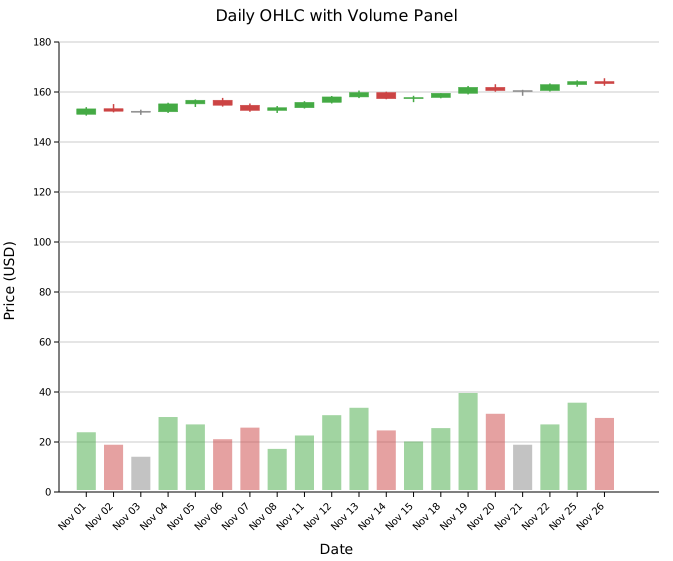
The volume panel occupies the bottom 22 % of the chart area by default. Adjust with .with_volume_ratio(f) — for example .with_volume_ratio(0.30) gives the panel 30 % of the height.
Custom colors
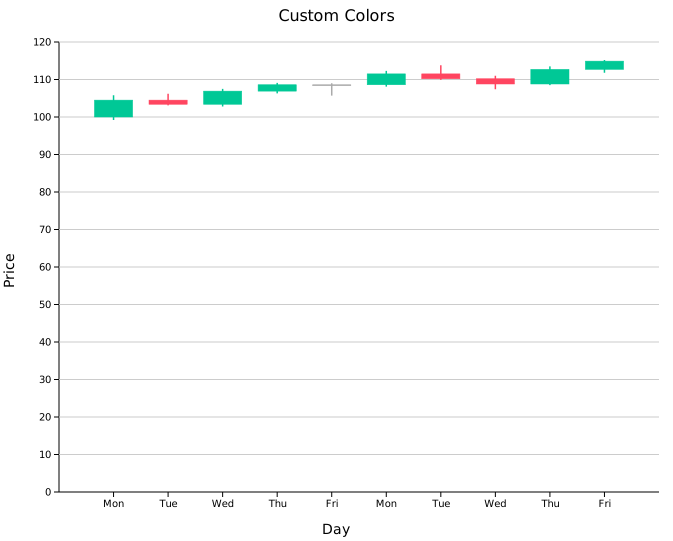
Replace the default green/red/gray with any CSS color string using .with_color_up(), .with_color_down(), and .with_color_doji().
#![allow(unused)]
fn main() {
use kuva::plot::CandlestickPlot;
let plot = CandlestickPlot::new()
    .with_color_up("#00c896")     // teal green
    .with_color_down("#ff4560")   // bright red
    .with_color_doji("#aaaaaa")   // light gray
    .with_candle("Mon", 100.0, 105.8, 99.2, 104.5)
    .with_candle("Tue", 104.5, 106.2, 103.1, 103.4)
    // ...
    ;
}
Numeric x-axis
.with_candle_at(x, label, open, high, low, close) places a candle at an explicit numeric x position, enabling uneven spacing and a true numeric axis. This is useful for quarterly, monthly, or any irregularly spaced data.
When using this mode, set .with_candle_width(w) to a value in data units smaller than the spacing between candles (e.g. 0.15 for quarterly data spaced 0.25 apart).
#![allow(unused)]
fn main() {
use kuva::plot::CandlestickPlot;
let plot = CandlestickPlot::new()
    // x = fractional year; candles spaced 0.25 apart
    .with_candle_at(2023.00, "Q1'23", 110.5, 118.0, 110.0, 116.8)
    .with_candle_at(2023.25, "Q2'23", 116.8, 122.0, 115.5, 121.0)
    .with_candle_at(2023.50, "Q3'23", 121.0, 125.5, 119.0, 120.2)
    .with_candle_at(2023.75, "Q4'23", 120.2, 128.0, 119.8, 127.0)
    .with_candle_width(0.15);
}
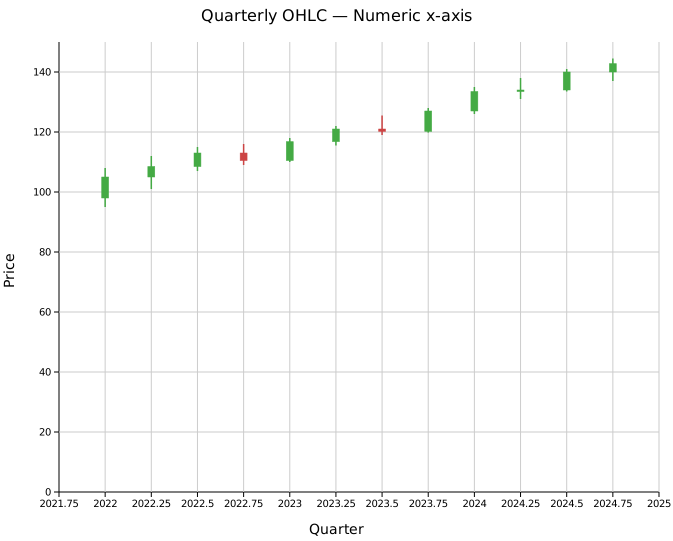
Twelve quarters (2022 Q1 – 2024 Q4) on a continuous fractional-year axis. The x-axis tick marks are placed at round numeric values rather than category slots.
Legend
.with_legend(label) adds a legend box inside the plot area identifying the series.
#![allow(unused)]
fn main() {
use kuva::plot::CandlestickPlot;
let plot = CandlestickPlot::new()
    .with_candle("Jan", 100.0, 108.0, 98.0, 106.0)
    .with_candle("Feb", 106.0, 112.0, 104.0, 110.5)
    .with_legend("ACME Corp");
}
Sizing
| Method | Default | Description |
|---|---|---|
.with_candle_width(f) | 0.7 | Body width as fraction of slot (categorical) or in data units (numeric) |
.with_wick_width(px) | 1.5 | Wick stroke width in pixels |
.with_volume_ratio(f) | 0.22 | Fraction of chart height used by the volume panel |
API reference
| Method | Description |
|---|---|
CandlestickPlot::new() | Create a plot with defaults |
.with_candle(label, o, h, l, c) | Append a candle at the next categorical position |
.with_candle_at(x, label, o, h, l, c) | Append a candle at an explicit numeric x position |
.with_volume(iter) | Attach volume values to existing candles (in order) |
.with_volume_panel() | Enable the volume bar sub-panel |
.with_volume_ratio(f) | Panel height as fraction of total chart (default 0.22) |
.with_candle_width(f) | Body width — fraction of slot or data units (default 0.7) |
.with_wick_width(px) | Wick stroke width in pixels (default 1.5) |
.with_color_up(s) | Bullish candle color (default green) |
.with_color_down(s) | Bearish candle color (default red) |
.with_color_doji(s) | Doji candle color (default #888888) |
.with_legend(s) | Add a legend box with the given label |
See also: Gantt Chart for another time-boxed bar layout, Waterfall Chart for running-total bars.
CLI
OHLC candlestick chart.
Input: label, open, high, low, close columns (and optionally volume).
| Flag | Default | Description |
|---|---|---|
--label-col <COL> | 0 | Period label column |
--open-col <COL> | 1 | Open price column |
--high-col <COL> | 2 | High price column |
--low-col <COL> | 3 | Low price column |
--close-col <COL> | 4 | Close price column |
--volume-col <COL> | — | Optional volume column |
--volume-panel | off | Show volume bar panel below price chart |
--candle-width <F> | 0.7 | Body width as a fraction of slot |
--color-up <CSS> | green | Bullish candle color |
--color-down <CSS> | red | Bearish candle color |
--color-doji <CSS> | #888888 | Doji candle color |
kuva candlestick candlestick.tsv \
    --label-col date --open-col open --high-col high \
    --low-col low --close-col close

kuva candlestick candlestick.tsv \
    --label-col date --open-col open --high-col high \
    --low-col low --close-col close \
    --volume-col volume --volume-panel
See also: Shared flags — output, appearance, axes, log scale.