Contour Plot
A contour plot draws iso-lines (or filled iso-bands) on a 2D scalar field, connecting all points that share the same z value. It is well suited for visualising any continuous surface: density functions, spatial expression gradients, topographic elevation, or any field that varies over an x–y plane.
Import path: kuva::plot::ContourPlot
Basic usage — iso-lines from a grid
Supply a pre-computed grid with .with_grid(z, x_coords, y_coords). z[row][col] is the scalar value at position (x_coords[col], y_coords[row]). By default, n_levels evenly spaced iso-lines are drawn (default 8).
#![allow(unused)]
fn main() {
use kuva::plot::ContourPlot;
use kuva::backend::svg::SvgBackend;
use kuva::render::render::render_multiple;
use kuva::render::layout::Layout;
use kuva::render::plots::Plot;

// Build a 60×60 Gaussian grid over [-3, 3]²
let n = 60_usize;
let coords: Vec<f64> = (0..n)
    .map(|i| -3.0 + i as f64 / (n - 1) as f64 * 6.0)
    .collect();
let z: Vec<Vec<f64>> = coords.iter()
    .map(|&y| coords.iter()
        .map(|&x| (-(x * x + y * y) / 2.0).exp())
        .collect())
    .collect();

let cp = ContourPlot::new()
    .with_grid(z, coords.clone(), coords)
    .with_n_levels(10)
    .with_line_color("steelblue")
    .with_line_width(1.2);

let plots = vec![Plot::Contour(cp)];
let layout = Layout::auto_from_plots(&plots)
    .with_title("Iso-line Contours — Gaussian Peak")
    .with_x_label("x")
    .with_y_label("y");

let svg = SvgBackend.render_scene(&render_multiple(plots, layout));
std::fs::write("contour.svg", svg).unwrap();
}
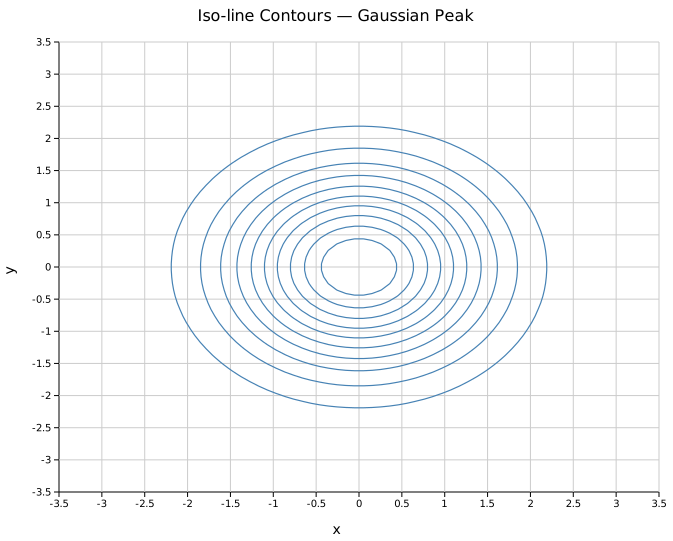
Ten evenly spaced iso-lines trace the nested ellipses of the Gaussian peak. A fixed line color is used here; without .with_line_color() each iso-line would be colored by the active colormap.
Filled contours
.with_filled() fills each band between adjacent iso-levels using the colormap. .with_legend(label) enables a colorbar in the right margin.
#![allow(unused)]
fn main() {
use kuva::plot::ContourPlot;
use kuva::render::plots::Plot;
let cp = ContourPlot::new()
    .with_grid(z, xs, ys)
    .with_n_levels(9)
    .with_filled()
    .with_legend("Density");
}
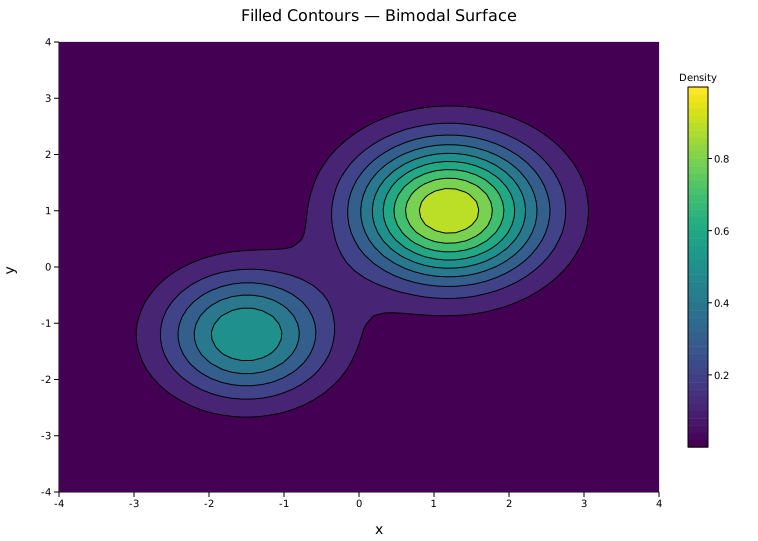
A bimodal surface with two overlapping peaks. The Viridis colormap maps low z values to purple/blue and high values to yellow. The colorbar on the right shows the full z range.
Scattered input — IDW interpolation
.with_points(iter) accepts an iterator of (x, y, z) triples at arbitrary positions — no regular grid required. The values are interpolated onto an internal 50×50 grid using inverse-distance weighting (IDW) before iso-lines are computed. This is the natural input mode for spatial data such as tissue sample coordinates or irregular sensor readings.
#![allow(unused)]
fn main() {
use kuva::plot::{ContourPlot, ColorMap};
use kuva::render::plots::Plot;
// 121 sample points from a bimodal function
let pts: Vec<(f64, f64, f64)> = (-5..=5)
    .flat_map(|i| (-5..=5).map(move |j| {
        let (x, y) = (i as f64, j as f64);
        let z = (- ((x - 1.5) * (x - 1.5) + (y - 1.5) * (y - 1.5)) / 4.0).exp()
              + 0.7 * (- ((x + 2.0) * (x + 2.0) + (y + 1.5) * (y + 1.5)) / 3.0).exp();
        (x, y, z)
    }))
    .collect();

let cp = ContourPlot::new()
    .with_points(pts)
    .with_n_levels(8)
    .with_filled()
    .with_colormap(ColorMap::Inferno)
    .with_legend("Value");
}
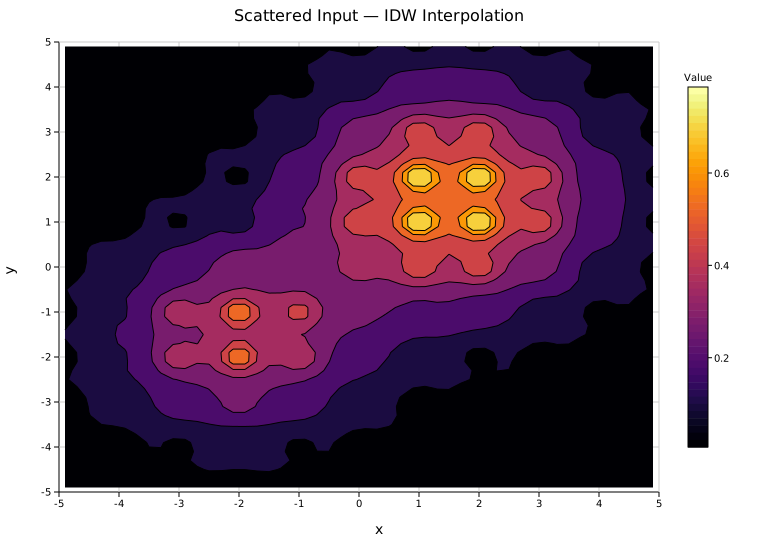
The Inferno colormap with filled bands on IDW-interpolated data. Denser point clouds produce sharper interpolations; the 50×50 internal grid is fixed regardless of input count.
Explicit iso-levels
.with_levels(&[…]) pins the iso-lines to specific z values. This overrides n_levels. Use it when lines should correspond to meaningful thresholds — specific expression cutoffs, probability contours, or fixed elevation intervals.
#![allow(unused)]
fn main() {
use kuva::plot::ContourPlot;
use kuva::render::plots::Plot;
let (z, xs, ys) = (vec![vec![0.0f64]], vec![0.0f64], vec![0.0f64]);
let cp = ContourPlot::new()
    .with_grid(z, xs, ys)
    .with_levels(&[0.1, 0.25, 0.5, 0.75, 0.9])
    .with_line_color("darkgreen")
    .with_line_width(1.5);
}
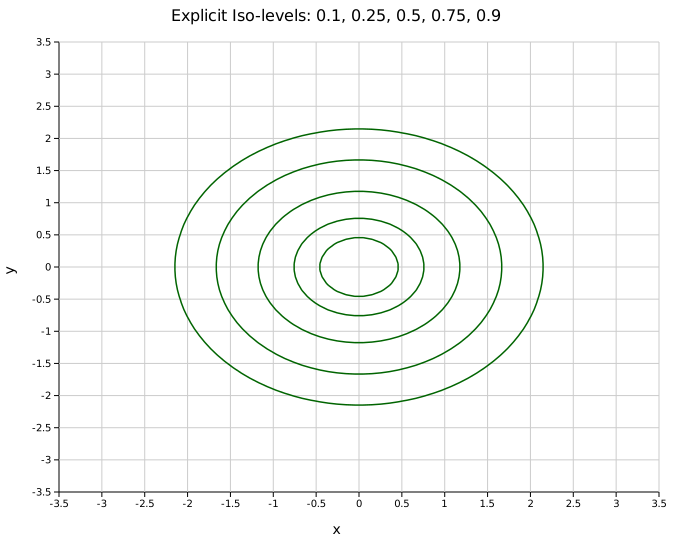
Five explicit iso-lines at z = 0.1, 0.25, 0.5, 0.75, 0.9 on the same Gaussian. The innermost ring at 0.9 is very tight around the peak; the outermost at 0.1 reaches almost to the grid boundary.
Line color
By default each iso-line is colored using the active colormap. .with_line_color(s) overrides this with a single fixed color for all lines — useful for clean black-and-white figures or when the colormap is reserved for a filled background.
#![allow(unused)]
fn main() {
use kuva::plot::ContourPlot;
let (z, xs, ys) = (vec![vec![0.0f64]], vec![0.0f64], vec![0.0f64]);
let cp = ContourPlot::new()
    .with_grid(z, xs, ys)
    .with_line_color("navy")    // all iso-lines in navy
    .with_line_width(1.2);
}
Color maps
.with_colormap(map) selects the colormap (default Viridis). The same ColorMap variants available for heatmaps apply: Viridis, Inferno, Grayscale, and Custom.
#![allow(unused)]
fn main() {
use kuva::plot::{ContourPlot, ColorMap};
let (z, xs, ys) = (vec![vec![0.0f64]], vec![0.0f64], vec![0.0f64]);
let cp = ContourPlot::new()
    .with_grid(z, xs, ys)
    .with_filled()
    .with_colormap(ColorMap::Inferno)
    .with_legend("Density");
}
API reference
| Method | Description |
|---|---|
ContourPlot::new() | Create a plot with defaults |
.with_grid(z, xs, ys) | Regular grid input: z[row][col] with coordinate vectors |
.with_points(iter) | Scattered (x, y, z) input — IDW interpolated to 50×50 grid |
.with_n_levels(n) | Number of auto-spaced iso-levels (default 8) |
.with_levels(&[…]) | Explicit iso-level values — overrides n_levels |
.with_filled() | Enable filled color bands between iso-levels |
.with_colormap(map) | Color map: Viridis, Inferno, Grayscale, Custom (default Viridis) |
.with_line_color(s) | Fixed color for all iso-lines (default: derive from colormap) |
.with_line_width(px) | Iso-line stroke width in pixels (default 1.0) |
.with_legend(s) | Colorbar label (filled mode) or line legend entry (line mode) |
See also: Heatmap for the raw gridded values, 2D Histogram for binned point density, Scatter Plot for the underlying x/y/z points.
CLI
Contour plot from scattered (x, y, z) triplets.
Input: three columns — x coordinate, y coordinate, scalar value.
| Flag | Default | Description |
|---|---|---|
--x <COL> | 0 | X column |
--y <COL> | 1 | Y column |
--z <COL> | 2 | Scalar value column |
--levels <N> | 8 | Number of contour levels |
--filled | off | Fill between contour levels |
--colormap <NAME> | viridis | Color map (filled mode) |
--line-color <CSS> | — | Line color (unfilled mode) |
--legend <LABEL> | — | Show legend entry |
kuva contour contour.tsv --x x --y y --z density

kuva contour contour.tsv --x x --y y --z density \
    --filled --levels 12 --colormap inferno
See also: Shared flags — output, appearance, axes, log scale.