Chord Diagram
A chord diagram arranges N nodes around a circle and connects them with ribbons whose widths are proportional to flow magnitudes from an N×N matrix. Each node occupies an arc on the outer ring; arc length is proportional to the node's total flow. It is well suited for showing pairwise relationships in network data — co-occurrence, migration, regulatory influence, or any square flow matrix.
Import path: kuva::plot::ChordPlot
Basic usage
Supply an N×N matrix with .with_matrix() and node labels with .with_labels(). The diagram renders in pixel space — no x/y axis system is used. A title set on the Layout is still shown.
#![allow(unused)]
fn main() {
use kuva::plot::ChordPlot;
use kuva::backend::svg::SvgBackend;
use kuva::render::render::render_multiple;
use kuva::render::layout::Layout;
use kuva::render::plots::Plot;

// Co-clustering proximity scores between PBMC cell types
let matrix = vec![
    //         CD4T   CD8T    NK   Bcell   Mono
    vec![   0.0, 120.0,  70.0,  40.0,  25.0],  // CD4 T
    vec![ 120.0,   0.0,  88.0,  32.0,  18.0],  // CD8 T
    vec![  70.0,  88.0,   0.0,  15.0,  35.0],  // NK
    vec![  40.0,  32.0,  15.0,   0.0,  10.0],  // B cell
    vec![  25.0,  18.0,  35.0,  10.0,   0.0],  // Monocyte
];

let chord = ChordPlot::new()
    .with_matrix(matrix)
    .with_labels(["CD4 T", "CD8 T", "NK", "B cell", "Monocyte"]);

let plots = vec![Plot::Chord(chord)];
let layout = Layout::auto_from_plots(&plots)
    .with_title("PBMC Cell Type Co-clustering");

let svg = SvgBackend.render_scene(&render_multiple(plots, layout));
std::fs::write("chord.svg", svg).unwrap();
}
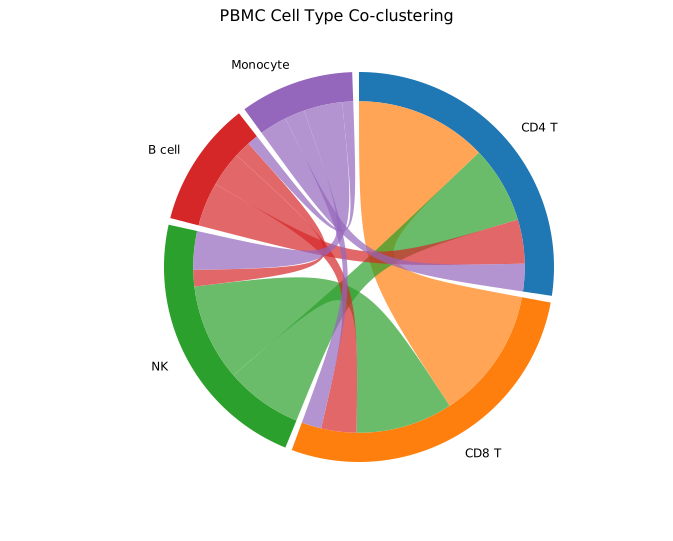
The symmetric matrix means each ribbon has equal width at both ends. The CD4 T–CD8 T ribbon is the widest because those two cell types have the highest co-clustering score (120); B cell–Monocyte is the thinnest (10). Colors come from the default category10 palette.
Asymmetric (directed) flows
When matrix[i][j] ≠ matrix[j][i], flows are directed — for example regulatory influence, migration counts, or transition probabilities. The ribbon is thicker at the source end (high outgoing flow) and thinner at the target end.
Use .with_colors() to assign explicit per-node colors, and .with_legend() to show a color-coded node legend.
#![allow(unused)]
fn main() {
use kuva::plot::ChordPlot;
use kuva::render::plots::Plot;
// Directed regulatory influence between five transcription factors
let matrix = vec![
    vec![ 0.0, 85.0, 20.0, 45.0, 10.0],  // TF1 → others
    vec![15.0,  0.0, 65.0, 30.0,  8.0],  // TF2 → others
    vec![30.0, 12.0,  0.0, 75.0, 25.0],  // TF3 → others
    vec![ 5.0, 40.0, 18.0,  0.0, 90.0],  // TF4 → others
    vec![50.0,  8.0, 35.0, 12.0,  0.0],  // TF5 → others
];

let chord = ChordPlot::new()
    .with_matrix(matrix)
    .with_labels(["TF1", "TF2", "TF3", "TF4", "TF5"])
    .with_colors(["#e6194b", "#3cb44b", "#4363d8", "#f58231", "#911eb4"])
    .with_gap(3.0)
    .with_legend("Transcription factors");
}
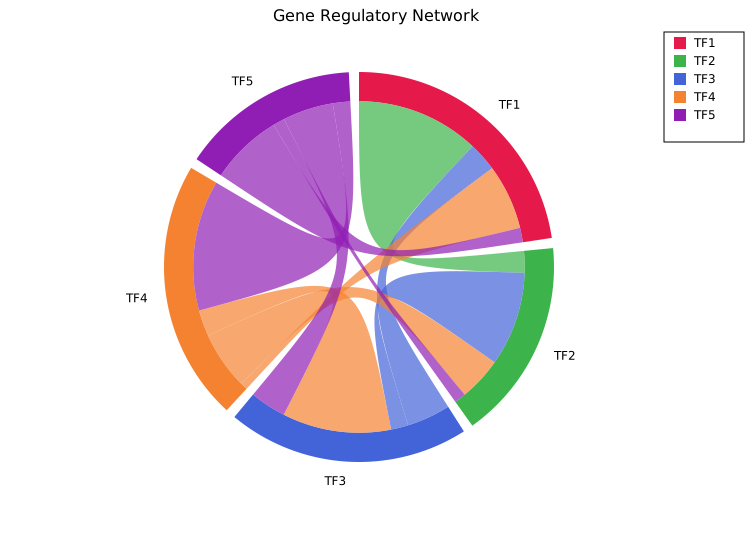
TF4→TF5 (90) and TF1→TF2 (85) are the strongest regulatory edges. Asymmetry is visible — the TF4→TF5 ribbon is much thicker at the TF4 end than the TF5→TF4 end (5). The legend in the top-right corner maps each color to its node label.
Gap and opacity
.with_gap(degrees) controls the white space between adjacent arc segments (default 2.0°). Larger gaps make individual nodes easier to distinguish at the cost of compressing arc lengths.
.with_opacity(f) sets ribbon transparency (default 0.7). Reducing opacity helps readability when many ribbons overlap in the centre.
#![allow(unused)]
fn main() {
use kuva::plot::ChordPlot;
let matrix = vec![vec![0.0_f64; 5]; 5];
let chord = ChordPlot::new()
    .with_matrix(matrix)
    .with_labels(["CD4 T", "CD8 T", "NK", "B cell", "Monocyte"])
    .with_gap(6.0)       // default 2.0 — wider arc separation
    .with_opacity(0.45); // default 0.7 — more transparent ribbons
}
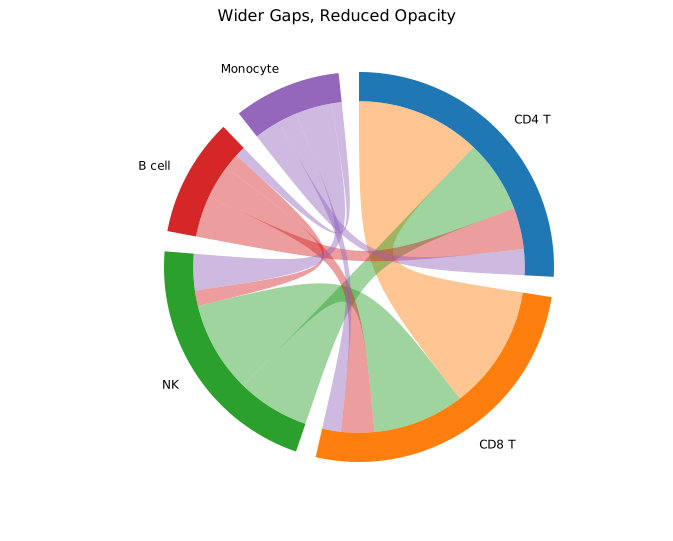
The same co-clustering data as the basic example. Wider gaps make each cell type's arc clearly separate; the lower opacity lets the arc ring show through the ribbon bundle in the centre.
Matrix layout
The N×N matrix convention:
| Entry | Meaning |
|---|---|
matrix[i][j] | Flow from node i to node j |
matrix[i][i] | Self-loop (typically 0.0 — not rendered) |
| Symmetric matrix | Undirected relationships (co-occurrence, correlation) |
| Asymmetric matrix | Directed flows (migration, regulation, transitions) |
Arc length for node i is proportional to the row sum of matrix[i]. In a symmetric matrix this equals the column sum, so arcs represent total pairwise interaction strength.
Colors
Without .with_colors(), node colors are assigned automatically from the category10 palette (cycling for more than ten nodes). Supply explicit per-node colors to match publication figures or color-blind-safe palettes:
#![allow(unused)]
fn main() {
use kuva::plot::ChordPlot;
let chord = ChordPlot::new()
    .with_matrix(vec![vec![0.0, 1.0], vec![1.0, 0.0]])
    .with_labels(["Group A", "Group B"])
    .with_colors(["#377eb8", "#e41a1c"]);   // ColorBrewer blue / red
}
API reference
| Method | Description |
|---|---|
ChordPlot::new() | Create a chord plot with defaults |
.with_matrix(m) | N×N flow matrix: m[i][j] = flow from node i to node j |
.with_labels(iter) | Node labels — one per row/column |
.with_colors(iter) | Per-node fill colors (default: category10 palette) |
.with_gap(deg) | Gap between arc segments in degrees (default 2.0) |
.with_opacity(f) | Ribbon fill opacity 0.0–1.0 (default 0.7) |
.with_legend(s) | Enable a per-node color legend |
See also: Sankey Diagram for staged, directional flow instead of pairwise, Network Plot for a general graph layout.
CLI
Chord diagram for pairwise flow data.
Input: square N×N matrix — first column is the row label (ignored for layout), header row supplies node names.
region        Cortex  Hippocampus  Amygdala …
Cortex        0       320          13       …
Hippocampus   320     0            210      …
| Flag | Default | Description |
|---|---|---|
--gap <DEG> | 2.0 | Gap between arcs in degrees |
--opacity <F> | 0.7 | Ribbon opacity |
--legend <LABEL> | — | Show legend |
kuva chord chord.tsv

kuva chord chord.tsv --gap 3.0 --opacity 0.5 --legend "connectivity"
See also: Shared flags — output, appearance, axes, log scale.