Network Plot
A network (graph) plot visualises nodes connected by edges, laid out with a force-directed (Fruchterman-Reingold), Kamada-Kawai, or circular algorithm. It is well suited for showing gene regulatory networks, protein-protein interactions, social graphs, or any pairwise relationship data. Edge weight can control stroke width, edges can be directed (arrowheads) or undirected, and nodes can be coloured by group.
Import path: kuva::plot::NetworkPlot
Basic usage
Supply edges with .with_edge(source, target, weight). Nodes are auto-created from edge endpoints. The force-directed layout places connected nodes closer together.
#![allow(unused)]
fn main() {
use kuva::plot::NetworkPlot;
use kuva::backend::svg::SvgBackend;
use kuva::render::render::render_multiple;
use kuva::render::layout::Layout;
use kuva::render::plots::Plot;

let net = NetworkPlot::new()
    .with_edge("TP53", "MDM2", 0.95)
    .with_edge("TP53", "BAX", 0.82)
    .with_edge("TP53", "CDKN1A", 0.78)
    .with_edge("MDM2", "TP53", 0.88)
    .with_edge("BRCA1", "TP53", 0.65)
    .with_edge("BRCA1", "RAD51", 0.72)
    .with_edge("RAD51", "BRCA2", 0.68)
    .with_edge("BRCA2", "BRCA1", 0.55)
    .with_edge("MYC", "CCND1", 0.91)
    .with_edge("MYC", "CDK4", 0.74)
    .with_edge("CCND1", "CDK4", 0.83)
    .with_labels();

let plots = vec![Plot::Network(net)];
let layout = Layout::auto_from_plots(&plots)
    .with_title("Gene Interaction Network");

let svg = SvgBackend.render_scene(&render_multiple(plots, layout));
std::fs::write("network.svg", svg).unwrap();
}
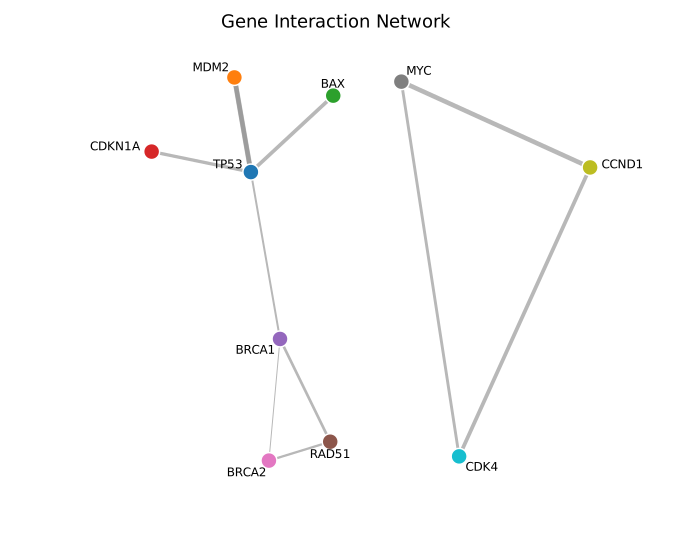
Edge thickness is proportional to weight. The Fruchterman-Reingold layout clusters tightly connected nodes (the TP53-MDM2 hub) while spacing out loosely connected components.
Directed edges
Use .with_directed() to draw arrowheads indicating edge direction — useful for regulatory networks, citation graphs, or state machines.
#![allow(unused)]
fn main() {
use kuva::plot::NetworkPlot;
use kuva::render::plots::Plot;
let net = NetworkPlot::new()
    .with_edge("TP53", "MDM2", 0.95)
    .with_edge("MDM2", "TP53", 0.88)
    .with_edge("CDK4", "RB1", 0.79)
    .with_edge("RB1", "E2F1", 0.86)
    .with_edge("E2F1", "MYC", 0.62)
    .with_directed()
    .with_labels();
}
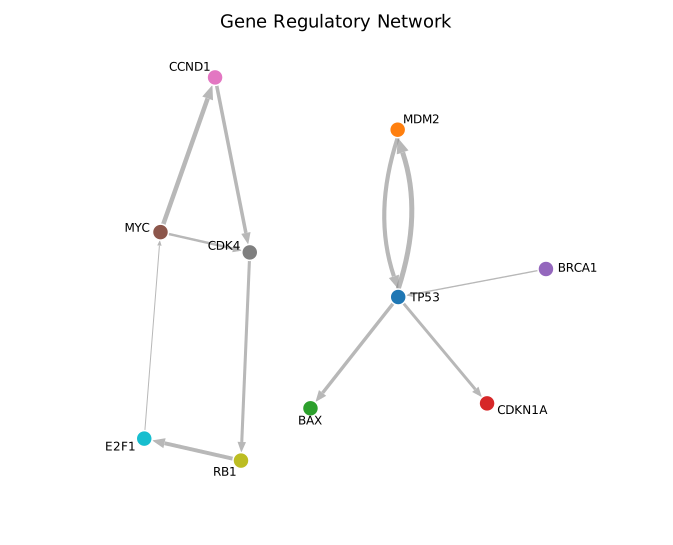
Arrowheads point from source to target. Reciprocal edges (TP53 <-> MDM2) are drawn as two separate arrows. Edge lines stop at the node boundary so arrowheads are clearly visible.
Grouped nodes with legend
Assign nodes to groups with .with_node_group() for automatic colour-coding. Use .with_legend() to display a colour key. Combine with .with_layout(NetworkLayout::Circle) for a circular arrangement.
#![allow(unused)]
fn main() {
use kuva::plot::network::{NetworkPlot, NetworkLayout};
use kuva::render::plots::Plot;
let net = NetworkPlot::new()
    .with_edge("TP53", "MDM2", 0.95)
    .with_edge("BRCA1", "RAD51", 0.72)
    .with_edge("MYC", "CCND1", 0.91)
    .with_edge("TP53", "RB1", 0.45)
    .with_node_group("TP53", "DNA damage")
    .with_node_group("MDM2", "DNA damage")
    .with_node_group("BRCA1", "DNA repair")
    .with_node_group("RAD51", "DNA repair")
    .with_node_group("MYC", "Cell cycle")
    .with_node_group("CCND1", "Cell cycle")
    .with_node_group("RB1", "Cell cycle")
    .with_layout(NetworkLayout::Circle)
    .with_labels()
    .with_legend("Pathway");
}
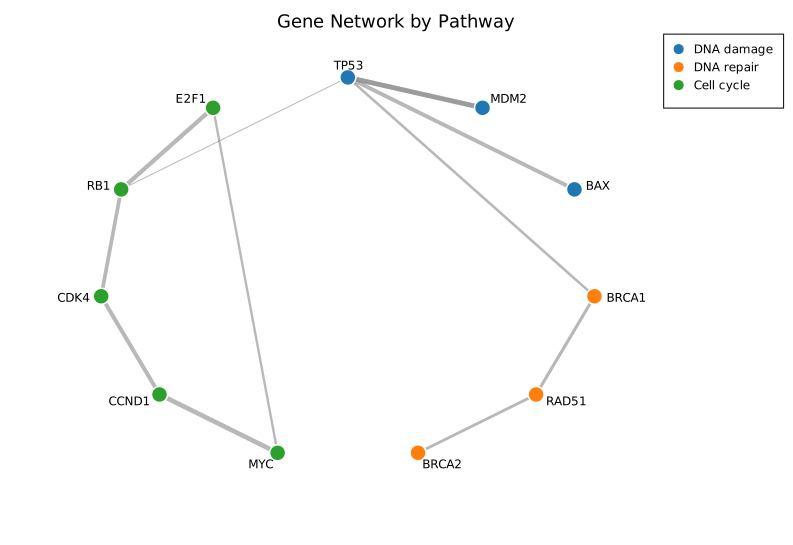
Nodes are coloured by group using the category10 palette. The legend maps each colour to its group label. The circle layout spaces nodes evenly around the perimeter.
Input formats
Edge list (builder API)
The primary input: call .with_edge(source, target, weight) or .with_edges(iter). Nodes are auto-created from edge endpoints.
Adjacency matrix
Use .with_matrix(matrix, labels) to build from an N×N matrix. Non-zero entries become edges; the value is the weight. For undirected graphs (default), only the upper triangle is read.
#![allow(unused)]
fn main() {
use kuva::plot::NetworkPlot;
let matrix = vec![
    vec![0.0, 1.0, 1.0],
    vec![1.0, 0.0, 1.0],
    vec![1.0, 1.0, 0.0],
];
let net = NetworkPlot::new()
    .with_matrix(matrix, ["A", "B", "C"]);
}
Layout algorithms
| Layout | Method | Description |
|---|---|---|
| Force-directed | NetworkLayout::ForceDirected (default) | Fruchterman-Reingold: connected nodes attract, all nodes repel. Best for most graphs. Uses Barnes-Hut approximation for n > 256. |
| Kamada-Kawai | NetworkLayout::KamadaKawai | Stress-based: Euclidean distances reflect graph-theoretic distances. Better for small-medium graphs. |
| Circle | NetworkLayout::Circle | Nodes evenly spaced on a circle. Deterministic and clean for small/medium graphs. |
User-supplied positions can pin individual nodes with .with_node_position(label, x, y) in normalised [0, 1] space; unpinned nodes are placed by the layout algorithm.
Self-loops
Self-loops (source == target) are rendered as a small arc pointing outward from the graph centre. They work with both directed (arrowhead) and undirected modes.
API reference
| Method | Description |
|---|---|
NetworkPlot::new() | Create a network plot with defaults |
.with_edge(src, tgt, w) | Add an edge (auto-creates nodes) |
.with_edge_color(src, tgt, w, color) | Add an edge with explicit colour |
.with_edge_label(src, tgt, w, label) | Add an edge with a midpoint label |
.with_edge_styled(src, tgt, w, color, label) | Add an edge with both colour and label |
.with_edges(iter) | Bulk-add (src, tgt, weight) edges |
.with_matrix(m, labels) | Build from N×N adjacency matrix |
.with_node(label) | Declare a node explicitly |
.with_node_color(label, c) | Set a node's colour |
.with_node_size(label, s) | Set a node's radius |
.with_node_group(label, g) | Assign a node to a group |
.with_node_shape(label, shape) | Set marker shape (Circle, Square, Triangle, Diamond) |
.with_node_position(label, x, y) | Pin a node at (x, y) in [0, 1] space |
.with_directed() | Draw arrowheads on edges |
.with_layout(alg) | Set layout algorithm (ForceDirected, KamadaKawai, or Circle) |
.with_node_radius(px) | Base node radius in pixels (default 8.0) |
.with_edge_opacity(f) | Edge opacity 0.0-1.0 (default 0.6) |
.with_labels() | Show node labels |
.with_repel_labels() | Push overlapping labels apart |
.with_legend(s) | Show a per-group colour legend |
.with_label_size(px) | Override label font size |
See also: Sankey Diagram for directed flow between stages, Chord Diagram for symmetric pairwise flows.
CLI
Network / graph diagram from an edge list or adjacency matrix.
Edge-list input (default): two columns for source and target nodes, with an optional weight column.
source	target	weight
TP53	MDM2	0.95
TP53	BAX	0.82
MDM2	TP53	0.88
Matrix input (--matrix): square N×N matrix — first column is the row label, header row supplies node names.
node	TP53	MDM2	BAX
TP53	0	0.95	0.82
MDM2	0.88	0	0
BAX	0	0	0
| Flag | Default | Description |
|---|---|---|
--matrix | off | Read input as N×N adjacency matrix |
--source-col <COL> | 0 | Source node column (index or name) |
--target-col <COL> | 1 | Target node column (index or name) |
--weight-col <COL> | — | Edge weight column |
--group-col <COL> | — | Node group column for colouring |
--directed | off | Draw arrowheads on edges |
--layout <ALG> | force | Layout algorithm: force, kk (Kamada-Kawai), or circle |
--node-radius <PX> | 8.0 | Node circle radius in pixels |
--opacity <F> | 0.6 | Edge opacity |
--labels | off | Show node labels |
--repel-labels | off | Push overlapping labels apart |
--legend <LABEL> | — | Show legend |
kuva network edges.tsv --source-col source --target-col target

kuva network edges.tsv --source-col source --target-col target \
    --weight-col weight --directed --labels --legend "interaction"

kuva network --matrix matrix.tsv --layout circle --labels
See also: Shared flags — output, appearance, axes, log scale.