Sankey Diagram
A Sankey diagram arranges nodes in columns and connects them with tapered ribbons whose widths are proportional to flow magnitude. It is well suited for showing multi-stage flows — energy transfer, budget allocation, data processing pipelines, or any directed network where quantities must be conserved through each stage.
Import path: kuva::plot::SankeyPlot
Basic usage
Add directed links with .with_link(source, target, value). Nodes are created automatically from the label strings; column positions are inferred by tracing the flow graph from left to right.
#![allow(unused)]
fn main() {
use kuva::plot::SankeyPlot;
use kuva::backend::svg::SvgBackend;
use kuva::render::render::render_multiple;
use kuva::render::layout::Layout;
use kuva::render::plots::Plot;

let sankey = SankeyPlot::new()
    .with_link("Input", "Process A", 50.0)
    .with_link("Input", "Process B", 30.0)
    .with_link("Process A", "Output X", 40.0)
    .with_link("Process A", "Output Y", 10.0)
    .with_link("Process B", "Output X", 10.0)
    .with_link("Process B", "Output Y", 20.0);

let plots = vec![Plot::Sankey(sankey)];
let layout = Layout::auto_from_plots(&plots)
    .with_title("Energy Flow");

let svg = SvgBackend.render_scene(&render_multiple(plots, layout));
std::fs::write("sankey.svg", svg).unwrap();
}
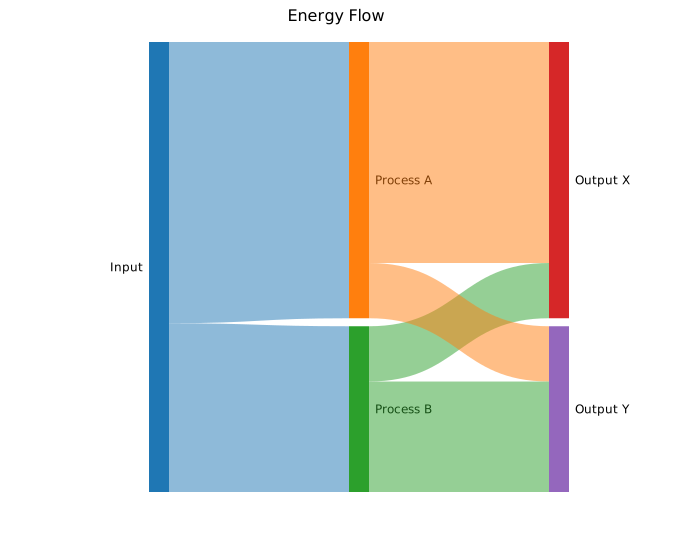
Node heights are proportional to the larger of incoming and outgoing flow at each node. Colors come from the default category10 palette. Each label is printed to the left or right of its column.
Node colors & legend
Set per-node fill colors with .with_node_color(label, color). Call .with_legend("") to enable the legend; each node's name becomes an entry label automatically.
#![allow(unused)]
fn main() {
use kuva::plot::SankeyPlot;
use kuva::backend::svg::SvgBackend;
use kuva::render::render::render_multiple;
use kuva::render::layout::Layout;
use kuva::render::plots::Plot;

let sankey = SankeyPlot::new()
    .with_node_color("Input",     "#888888")
    .with_node_color("Process A", "#377eb8")
    .with_node_color("Process B", "#4daf4a")
    .with_node_color("Output",    "#984ea3")
    .with_link("Input",     "Process A", 40.0)
    .with_link("Input",     "Process B", 30.0)
    .with_link("Process A", "Output",    35.0)
    .with_link("Process B", "Output",    25.0)
    .with_node_width(24.0)
    .with_legend("Stage");

let plots = vec![Plot::Sankey(sankey)];
let layout = Layout::auto_from_plots(&plots)
    .with_title("Node Colors & Legend");

let svg = SvgBackend.render_scene(&render_multiple(plots, layout));
}
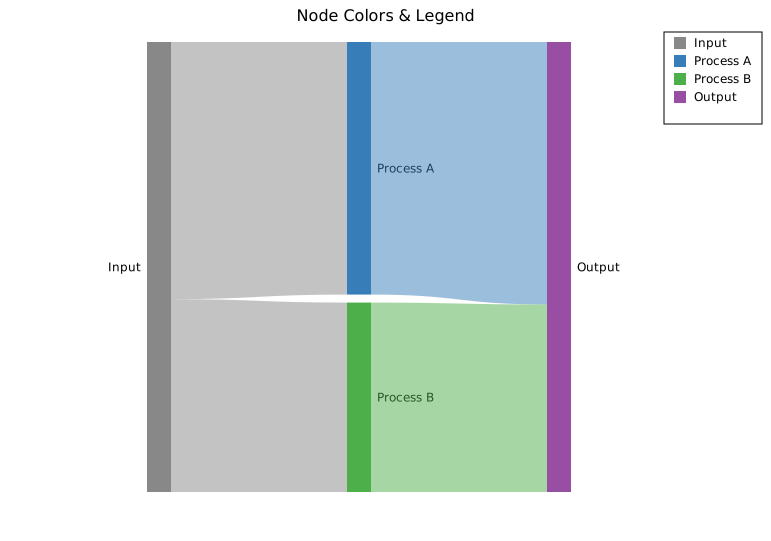
Ribbons inherit the source node color by default. To color nodes without linking them first (e.g. to control palette order), use .with_node(label) to declare a node explicitly before adding links.
Link coloring
Gradient ribbons
.with_gradient_links() renders each ribbon as a linear gradient from the source node color to the target node color.
#![allow(unused)]
fn main() {
use kuva::plot::SankeyPlot;
use kuva::backend::svg::SvgBackend;
use kuva::render::render::render_multiple;
use kuva::render::layout::Layout;
use kuva::render::plots::Plot;

let sankey = SankeyPlot::new()
    .with_node_color("Budget",    "#e41a1c")
    .with_node_color("R&D",       "#377eb8")
    .with_node_color("Marketing", "#4daf4a")
    .with_node_color("Ops",       "#ff7f00")
    .with_node_color("Product A", "#984ea3")
    .with_node_color("Product B", "#a65628")
    .with_link("Budget",    "R&D",       40.0)
    .with_link("Budget",    "Marketing", 25.0)
    .with_link("Budget",    "Ops",       35.0)
    .with_link("R&D",       "Product A", 25.0)
    .with_link("R&D",       "Product B", 15.0)
    .with_link("Marketing", "Product A", 15.0)
    .with_link("Marketing", "Product B", 10.0)
    .with_link("Ops",       "Product A", 20.0)
    .with_link("Ops",       "Product B", 15.0)
    .with_gradient_links()
    .with_link_opacity(0.6);

let plots = vec![Plot::Sankey(sankey)];
let layout = Layout::auto_from_plots(&plots)
    .with_title("Budget Allocation — Gradient Ribbons");

let svg = SvgBackend.render_scene(&render_multiple(plots, layout));
}
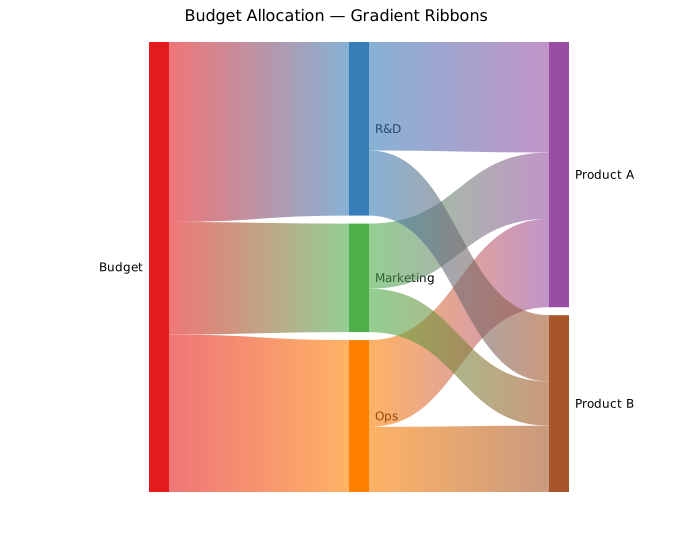
Per-link colors
For full control, supply a color on each link individually with .with_link_colored(), then call .with_per_link_colors() to activate that mode:
#![allow(unused)]
fn main() {
use kuva::plot::SankeyPlot;
let sankey = SankeyPlot::new()
    .with_link_colored("Budget", "R&D",       40.0, "#377eb8")
    .with_link_colored("Budget", "Marketing", 25.0, "#e41a1c")
    .with_link_colored("Budget", "Ops",       35.0, "#4daf4a")
    // …remaining links…
    .with_per_link_colors()
    .with_link_opacity(0.55);
}
Bulk link loading
.with_links() accepts any iterator of (source, target, value) triples, which is convenient when links come from a data file or computed table:
#![allow(unused)]
fn main() {
use kuva::plot::SankeyPlot;
let edges: Vec<(&str, &str, f64)> = vec![
    ("A", "B", 10.0),
    ("A", "C", 20.0),
    ("B", "D", 10.0),
    ("C", "D", 20.0),
];

let sankey = SankeyPlot::new().with_links(edges);
}
Column layout
By default, columns are assigned by propagating each node one step further right than its leftmost source (BFS order). Use .with_node_column(label, col) to pin specific nodes to explicit columns when the automatic layout is incorrect — for example, when a node should appear in a later column despite having an early source:
#![allow(unused)]
fn main() {
use kuva::plot::SankeyPlot;
let sankey = SankeyPlot::new()
    .with_node_column("Input",  0)
    .with_node_column("Middle", 1)
    .with_node_column("Output", 2)
    .with_link("Input",  "Middle", 80.0)
    .with_link("Input",  "Output", 20.0)   // skip link — goes directly to col 2
    .with_link("Middle", "Output", 80.0);
}
Alluvium mode and ordering
For multi-stage categorical data, build a Sankey from full alluvia instead of pairwise edges. .with_alluvium() records one path across ordered axes, automatically creates axis-specific node IDs, and accumulates adjacent edge weights:
#![allow(unused)]
fn main() {
use kuva::plot::SankeyPlot;
let sankey = SankeyPlot::new()
    .with_axis_names(["tissue", "cluster", "sex"])
    .with_alluvium(vec!["B CELL", "4", "male"], 9.0)
    .with_alluvium(vec!["BRAIN", "1", "female"], 1.0)
    .with_alluvium(vec!["HEART", "3", "male"], 3.0)
    .with_crossing_reduction()
    .with_left_coloring()
    .with_node_order_seed(42);
}
Use .with_alluvia(iter) to bulk-load alluvia from an iterator of (strata, value) rows.
How crossing-reduction ordering works
The crossing-reduction algorithm minimises ribbon crossings by finding the best vertical stacking order of nodes within each column. The column sequence itself is always preserved exactly as you specified (left to right: tissue → cluster → sex in the example above).
Internally, the algorithm:
- Builds a pairwise distance matrix over all nodes where two nodes with high co-occurrence in alluvia are assigned a short distance.
- Runs a TSP heuristic (nearest-neighbour insertion + 2-opt) over that matrix to find a node cycle that clusters co-occurring nodes together.
- Tries every rotation of the cycle, extracts the resulting within-column node ordering for each rotation, computes the weighted crossing objective (counting ribbon crossings weighted by flow), and keeps the rotation with the lowest score.
Lode stacking within nodes: when multiple ribbons enter or leave a single node (e.g. T CELL and B CELL both flowing into cluster "4"), the ribbon segments are stacked inside that node in the same top-to-bottom order as their sources in the adjacent column. This prevents unnecessary criss-crossing at the node boundary.
Ordering modes
| Method | Behaviour |
|---|---|
.with_node_order(SankeyNodeOrder::Input) | Preserve insertion order within each column (default) |
.with_crossing_reduction() | TSP-based weighted crossing reduction |
.with_neighbornet() | Use the neighbornet cycle backend instead of the TSP heuristic |
.with_node_order_seed(seed) | Fix the RNG seed for reproducible results (default 42) |
CrossingReduction is a good general-purpose choice. Neighbornet can produce different orderings on data with tree-like co-occurrence structure; try both when the default layout is cluttered.
Coloring modes
| Method | Behaviour |
|---|---|
.with_node_coloring(SankeyNodeColoring::Label) | One palette color per unique label, shared across all columns (default) |
.with_left_coloring() | Each node inherits the color of its dominant left-side parent; new palette colors are allocated when no parent exceeds the cutoff |
.with_palette(colors) | Override the fallback color list used by either mode |
.with_left_color_cutoff(f) | Minimum parent-share (0.0–1.0) required for color inheritance in left mode (default 0.5) |
Bioinformatics example
A 4-stage variant filtering pipeline: raw variants pass QC, get classified by confidence level, and are split into variant types or discarded.
#![allow(unused)]
fn main() {
use kuva::plot::SankeyPlot;
use kuva::backend::svg::SvgBackend;
use kuva::render::render::render_multiple;
use kuva::render::layout::Layout;
use kuva::render::plots::Plot;

let sankey = SankeyPlot::new()
    .with_node_color("Raw Variants", "#888888")
    .with_node_color("QC Pass",      "#4daf4a")
    .with_node_color("QC Fail",      "#e41a1c")
    .with_node_color("High Conf",    "#377eb8")
    .with_node_color("Low Conf",     "#ff7f00")
    .with_node_color("SNP",          "#984ea3")
    .with_node_color("Indel",        "#a65628")
    .with_node_color("Filtered Out", "#cccccc")
    .with_link("Raw Variants", "QC Pass",       8000.0)
    .with_link("Raw Variants", "QC Fail",       2000.0)
    .with_link("QC Pass",      "High Conf",     6000.0)
    .with_link("QC Pass",      "Low Conf",      2000.0)
    .with_link("High Conf",    "SNP",           4500.0)
    .with_link("High Conf",    "Indel",         1200.0)
    .with_link("High Conf",    "Filtered Out",   300.0)
    .with_link("Low Conf",     "SNP",            800.0)
    .with_link("Low Conf",     "Filtered Out",  1200.0)
    .with_link_opacity(0.45)
    .with_legend("Stage");

let plots = vec![Plot::Sankey(sankey)];
let layout = Layout::auto_from_plots(&plots)
    .with_title("Variant Filtering Pipeline");

let svg = SvgBackend.render_scene(&render_multiple(plots, layout));
}
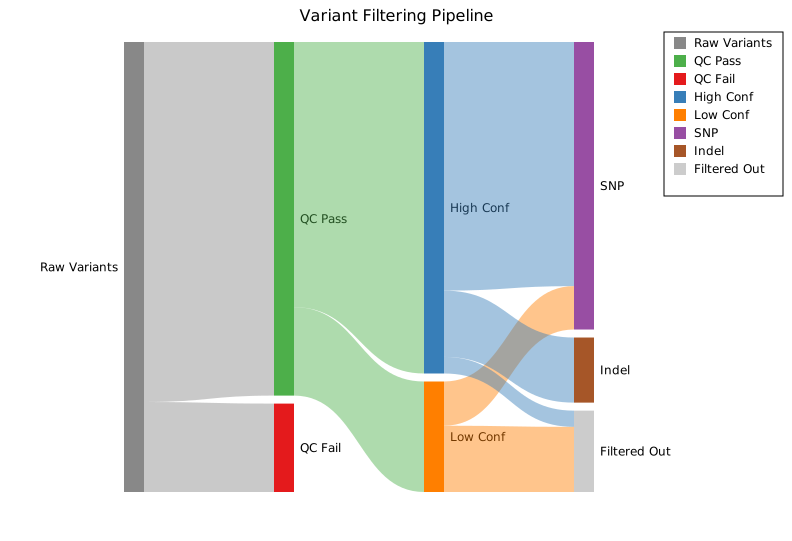
API reference
| Method | Description |
|---|---|
SankeyPlot::new() | Create a Sankey plot with defaults |
.with_link(src, tgt, val) | Add a directed link; auto-creates nodes from labels |
.with_link_colored(src, tgt, val, color) | Add a link with an explicit ribbon color |
.with_links(iter) | Bulk-add links from (source, target, value) triples |
.with_axis_names(iter) | Set display names for ordered alluvium axes |
.with_alluvium(strata, value) | Add one weighted alluvium spanning ordered axes |
.with_alluvia(iter) | Bulk-add weighted alluvia |
.with_node(label) | Declare a node without adding a link |
.with_node_color(label, color) | Set a node's fill color (CSS color string) |
.with_node_column(label, col) | Pin a node to a specific column (0-indexed) |
.with_node_width(px) | Node rectangle width in pixels (default 20.0) |
.with_node_gap(px) | Minimum vertical gap between nodes in a column (default 8.0) |
.with_gradient_links() | Ribbons fade from source to target color |
.with_per_link_colors() | Use per-link color set by .with_link_colored() |
.with_node_order(order) | Choose Input, CrossingReduction, or Neighbornet node ordering |
.with_crossing_reduction() | Use the default weighted crossing-reduction ordering |
.with_neighbornet() | Use neighbornet ordering |
.with_node_order_seed(seed) | Set the ordering RNG seed |
.with_node_coloring(mode) | Choose Label or Left coloring |
.with_left_coloring() | Propagate colors left-to-right from dominant parents |
.with_palette(palette) | Override the fallback Sankey palette |
.with_left_color_cutoff(f) | Set the left-color dominant-parent threshold |
.with_link_opacity(f) | Ribbon fill opacity 0.0–1.0 (default 0.5) |
.with_legend("") | Enable the legend; one entry per node, labeled with the node name |
SankeyLinkColor variants
| Variant | Behavior |
|---|---|
Source | Ribbon inherits the source node color (default) |
Gradient | SVG linearGradient from source to target color |
PerLink | Color from .with_link_colored() per ribbon |
SankeyNodeOrder variants
| Variant | Behavior |
|---|---|
Input | Preserve insertion order within each column (default) |
CrossingReduction | Reduce weighted crossings using the default alluvial ordering backend |
Neighbornet | Use the neighbornet backend for cycle generation |
SankeyNodeColoring variants
| Variant | Behavior |
|---|---|
Label | Reuse one palette color per visible label (default) |
Left | Propagate colors left-to-right from dominant parents |
See also: Network Plot for a general node/edge graph, Chord Diagram for circular pairwise flows.
CLI
Sankey / alluvial flow diagram.
kuva sankey supports two input modes:
- Edge-list Sankey input: source node, target node, flow value.
- Wide alluvium input: one ordered
--axis-colper stage, plus an optional--value-col.
| Flag | Default | Description |
|---|---|---|
--axis-col <COL> | repeatable | Ordered alluvium axis columns; switches the parser into wide alluvium mode |
--source-col <COL> | 0 | Source node column |
--target-col <COL> | 1 | Target node column |
--value-col <COL> | 2 | Flow value column |
--link-gradient | off | Fill each link with a gradient from source node colour to target node colour |
--opacity <F> | 0.5 | Link opacity |
--legend <LABEL> | — | Show legend |
--node-order <MODE> | input | Node ordering within columns: input, crossings, or neighbornet |
--node-order-seed <N> | 42 | RNG seed for crossing-reduction ordering |
--coloring <MODE> | label | Node coloring mode: label or left |
--flow-labels | off | Show absolute flow values on ribbons |
--flow-percent | off | Show each ribbon as a percent of source outflow |
--flow-label-format <FMT> | auto | Flow label number format: auto, sci, integer, fixed2 |
--flow-label-unit <UNIT> | — | Unit suffix appended to absolute flow labels |
--flow-label-min-height <F> | 8.0 | Minimum ribbon height required to render a label |
Edge-list mode
Use classic source-target-value input when your flow table is already stored as edges:
kuva sankey sankey.tsv \
    --source-col source --target-col target --value-col value

kuva sankey sankey.tsv \
    --source-col source --target-col target --value-col value \
    --link-gradient --legend "read flow"
Alluvium mode
Use repeated --axis-col flags for ordered categorical stages. kuva will build full alluvia, aggregate adjacent links, and optionally apply wompwomp-style ordering and left-to-right color propagation:
kuva sankey alluvium.tsv \
    --axis-col tissue --axis-col cluster --axis-col sex \
    --value-col count \
    --node-order crossings \
    --node-order-seed 42 \
    --coloring left \
    --title "Ordered Alluvium"

kuva sankey alluvium.tsv \
    --axis-col tissue --axis-col cluster --axis-col sex \
    --value-col count \
    --node-order neighbornet \
    --coloring label \
    --title "NeighborNet Alluvium"
--node-order crossings uses a TSP-based weighted crossing-reduction algorithm: it builds a co-occurrence distance matrix, finds a node cycle via nearest-neighbour + 2-opt, then tries every rotation to minimise the weighted ribbon-crossing count. The axis column order you specify with --axis-col is always preserved exactly — only the vertical stacking of nodes within each column is changed.
--node-order neighbornet switches to the neighbornet backend for cycle generation; try it when the default layout is still cluttered, especially on data with tree-like co-occurrence structure.
--coloring left propagates colors from dominant parents left-to-right; --coloring label assigns one palette color per visible label.
See also: Shared flags — output, appearance, axes, log scale.