Phylogenetic Tree
A phylogenetic tree (dendrogram) visualises evolutionary or hierarchical relationships between taxa. kuva supports three branch styles (rectangular, slanted, circular), four orientations, phylogram mode for branch-length-accurate layouts, clade coloring, and support value display. Trees can be constructed from Newick strings, edge lists, pairwise distance matrices, or scipy/R linkage output.
Import path: kuva::plot::PhyloTree
Basic usage
Parse a Newick string with PhyloTree::from_newick(). Branch lengths are optional; support values on internal nodes are read automatically. Call .with_support_threshold(t) to display any support value ≥ t on the plot.
#![allow(unused)]
fn main() {
use kuva::plot::PhyloTree;
use kuva::backend::svg::SvgBackend;
use kuva::render::render::render_multiple;
use kuva::render::layout::Layout;
use kuva::render::plots::Plot;

let tree = PhyloTree::from_newick(
    "((TaxonA:1.0,TaxonB:2.0)95:1.0,(TaxonC:0.5,TaxonD:0.5)88:1.5,TaxonE:3.0);"
)
.with_support_threshold(80.0);   // show internal node values ≥ 80

let plots = vec![Plot::PhyloTree(tree)];
let layout = Layout::auto_from_plots(&plots)
    .with_title("Rectangular Tree");

let svg = SvgBackend.render_scene(&render_multiple(plots, layout));
std::fs::write("phylo.svg", svg).unwrap();
}
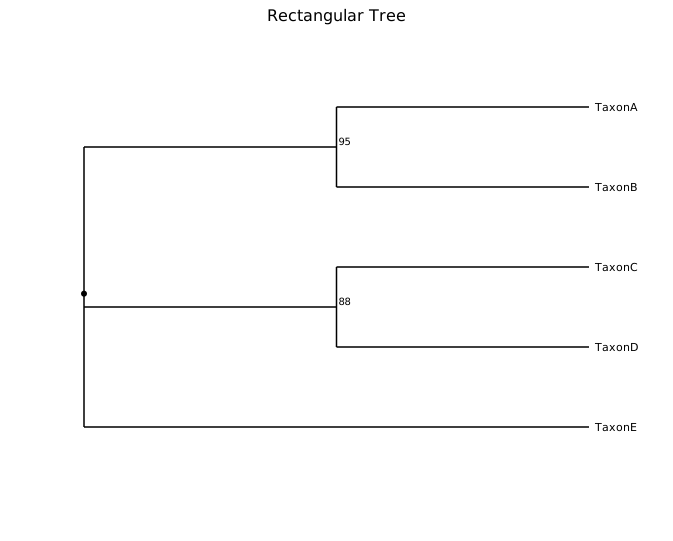
The default layout is rectangular branches, root on the left, leaves on the right (cladogram mode — all leaves aligned). Support values are drawn beside their internal node.
Phylogram mode
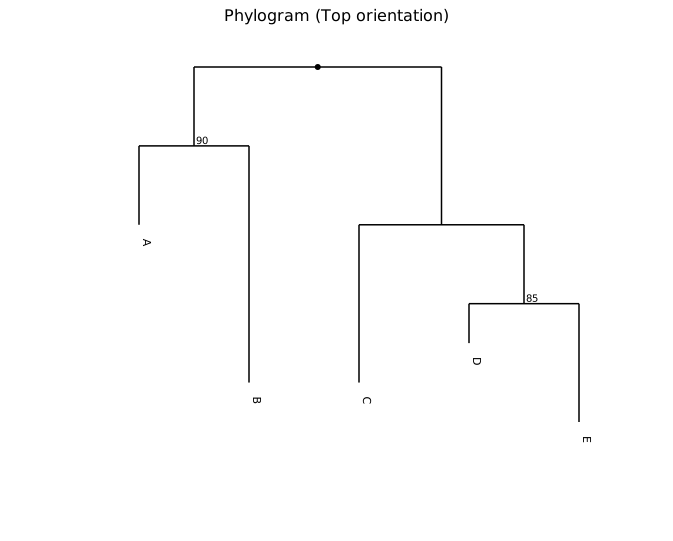
In cladogram mode (the default) all leaves are aligned regardless of branch length. Enable phylogram mode with .with_phylogram() to position each node according to the accumulated branch lengths from the root, so edge lengths directly represent evolutionary distance.
#![allow(unused)]
fn main() {
use kuva::plot::{PhyloTree, TreeOrientation};
use kuva::backend::svg::SvgBackend;
use kuva::render::render::render_multiple;
use kuva::render::layout::Layout;
use kuva::render::plots::Plot;

let tree = PhyloTree::from_newick(
    "((A:1.0,B:3.0)90:1.0,(C:2.0,(D:0.5,E:1.5)85:1.0):2.0);"
)
.with_orientation(TreeOrientation::Top)
.with_phylogram()
.with_support_threshold(80.0);

let plots = vec![Plot::PhyloTree(tree)];
let layout = Layout::auto_from_plots(&plots)
    .with_title("Phylogram (Top orientation)");

let svg = SvgBackend.render_scene(&render_multiple(plots, layout));
}
Circular layout
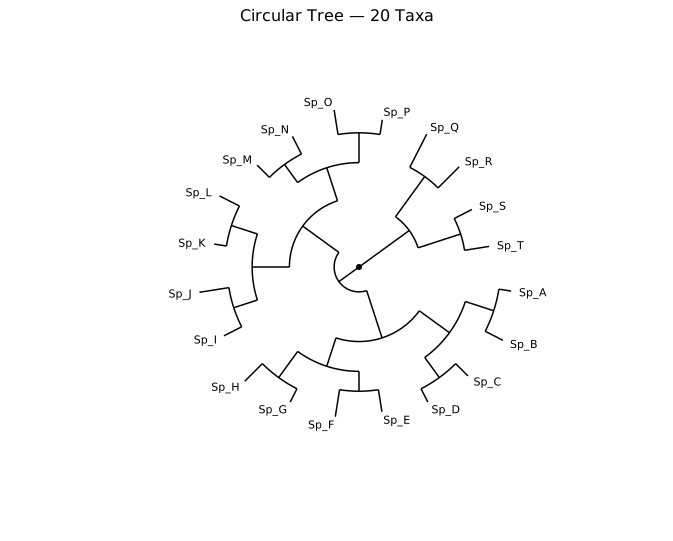
.with_branch_style(TreeBranchStyle::Circular) projects the tree radially — the root is at the centre and leaves fan outward. This style is especially useful for large trees where a linear layout becomes tall.
#![allow(unused)]
fn main() {
use kuva::plot::{PhyloTree, TreeBranchStyle};
use kuva::backend::svg::SvgBackend;
use kuva::render::render::render_multiple;
use kuva::render::layout::Layout;
use kuva::render::plots::Plot;

let newick = concat!(
    "(((((Sp_A:0.05,Sp_B:0.08):0.12,(Sp_C:0.07,Sp_D:0.06):0.10):0.15,",
    "((Sp_E:0.09,Sp_F:0.11):0.08,(Sp_G:0.06,Sp_H:0.10):0.13):0.12):0.20,",
    "(((Sp_I:0.08,Sp_J:0.12):0.10,(Sp_K:0.05,Sp_L:0.09):0.11):0.15,",
    "((Sp_M:0.07,Sp_N:0.08):0.09,(Sp_O:0.10,Sp_P:0.06):0.12):0.14):0.18):0.10,",
    "((Sp_Q:0.15,Sp_R:0.12):0.20,(Sp_S:0.08,Sp_T:0.10):0.18):0.25);"
);

let tree = PhyloTree::from_newick(newick)
    .with_branch_style(TreeBranchStyle::Circular)
    .with_phylogram();

let plots = vec![Plot::PhyloTree(tree)];
let layout = Layout::auto_from_plots(&plots)
    .with_title("Circular Tree — 20 Taxa");

let svg = SvgBackend.render_scene(&render_multiple(plots, layout));
}
Clade coloring
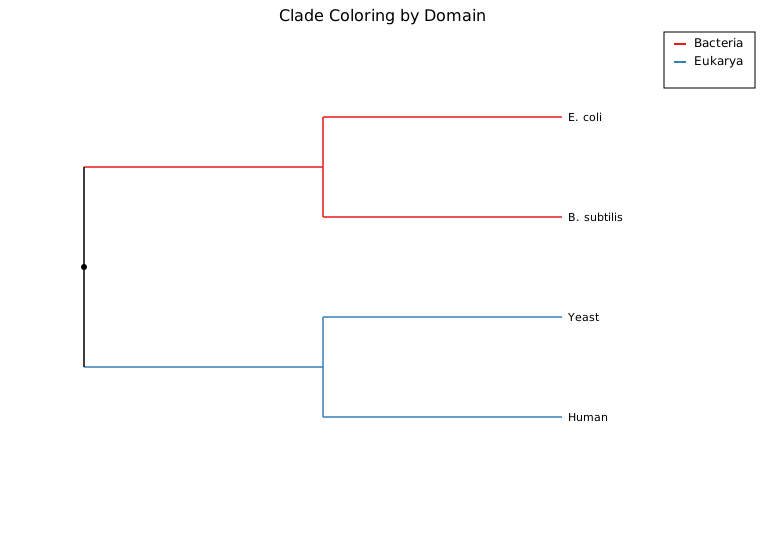
.with_clade_color(node_id, color) colors the entire subtree rooted at node_id. Call .with_legend("") to enable the legend; each colored clade gets an entry labeled with its node's name (or "Node N" for unnamed internal nodes).
When building a tree with from_edges(), node IDs are assigned in order of first appearance across all (parent, child, length) tuples — the first unique label encountered becomes node 0, the second node 1, and so on.
#![allow(unused)]
fn main() {
use kuva::plot::PhyloTree;
use kuva::backend::svg::SvgBackend;
use kuva::render::render::render_multiple;
use kuva::render::layout::Layout;
use kuva::render::plots::Plot;

let edges: Vec<(&str, &str, f64)> = vec![
    ("root",     "Bacteria",    1.5),  // root=0, Bacteria=1
    ("root",     "Eukarya",     2.0),  //         Eukarya=2
    ("Bacteria", "E. coli",     0.5),
    ("Bacteria", "B. subtilis", 0.7),
    ("Eukarya",  "Yeast",       1.0),
    ("Eukarya",  "Human",       0.8),
];

let tree = PhyloTree::from_edges(&edges)
    .with_clade_color(1, "#e41a1c")   // Bacteria subtree
    .with_clade_color(2, "#377eb8")   // Eukarya subtree
    .with_legend("Domains");

let plots = vec![Plot::PhyloTree(tree)];
let layout = Layout::auto_from_plots(&plots)
    .with_title("Clade Coloring by Domain");

let svg = SvgBackend.render_scene(&render_multiple(plots, layout));
}
UPGMA from a distance matrix
PhyloTree::from_distance_matrix(labels, dist) clusters taxa by UPGMA and returns a rooted ultrametric tree. The distance matrix must be square and symmetric; diagonal values are ignored.
#![allow(unused)]
fn main() {
use kuva::plot::PhyloTree;
use kuva::backend::svg::SvgBackend;
use kuva::render::render::render_multiple;
use kuva::render::layout::Layout;
use kuva::render::plots::Plot;

let labels = ["Wolf", "Cat", "Whale", "Human"];
let dist = vec![
    //         Wolf  Cat   Whale Human
    vec![0.0,  0.5,  0.9,  0.8],  // Wolf
    vec![0.5,  0.0,  0.9,  0.8],  // Cat
    vec![0.9,  0.9,  0.0,  0.7],  // Whale
    vec![0.8,  0.8,  0.7,  0.0],  // Human
];

let tree = PhyloTree::from_distance_matrix(&labels, &dist)
    .with_phylogram();

let plots = vec![Plot::PhyloTree(tree)];
let layout = Layout::auto_from_plots(&plots)
    .with_title("UPGMA Tree from Distance Matrix");

let svg = SvgBackend.render_scene(&render_multiple(plots, layout));
}
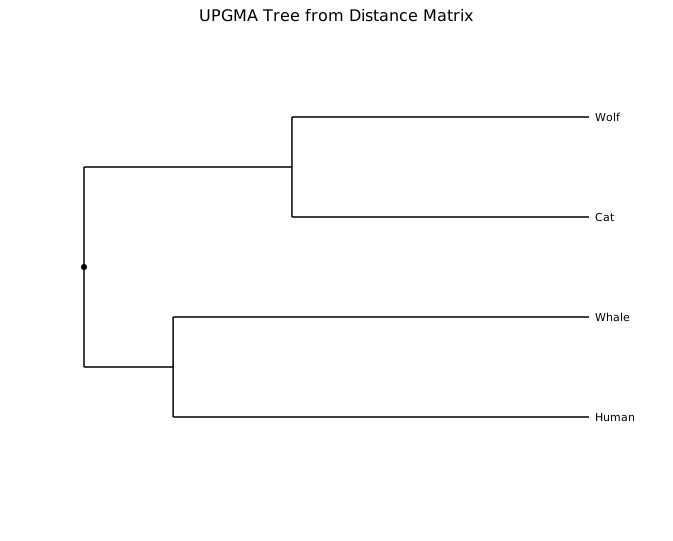
Wolf and Cat cluster first (distance 0.5), reflecting their close relationship; Whale and Human share the next merge (0.7) before joining the carnivore clade.
Scipy / R linkage input
PhyloTree::from_linkage(labels, linkage) accepts the output format of scipy.cluster.hierarchy.linkage or R's hclust. Each row is [left_idx, right_idx, distance, n_leaves]. Leaf indices 0..n-1 correspond to labels; merge nodes use indices n...
#![allow(unused)]
fn main() {
use kuva::plot::PhyloTree;
let labels = ["A", "B", "C", "D"];
// linkage matrix produced by scipy or R
let linkage: &[[f64; 4]] = &[
    [0.0, 1.0, 0.5, 2.0],   // merge leaf 0 (A) + leaf 1 (B) at d=0.5
    [2.0, 3.0, 0.7, 2.0],   // merge leaf 2 (C) + leaf 3 (D) at d=0.7
    [4.0, 5.0, 1.2, 4.0],   // merge node 4 + node 5 at d=1.2
];

let tree = PhyloTree::from_linkage(labels, linkage).with_phylogram();
}
Orientations
Four root positions are available via TreeOrientation:
| Variant | Root position |
|---|---|
Left | Left edge — leaves fan rightward (default) |
Right | Right edge — leaves fan leftward |
Top | Top edge — leaves hang downward |
Bottom | Bottom edge — leaves grow upward |
#![allow(unused)]
fn main() {
use kuva::plot::{PhyloTree, TreeOrientation};
let tree = PhyloTree::from_newick("((A:1,B:2):1,C:3);")
    .with_orientation(TreeOrientation::Top);
}
Branch styles
| Variant | Shape |
|---|---|
Rectangular | Right-angle elbow at the parent depth (default) |
Slanted | Single diagonal segment from parent to child |
Circular | Polar / radial projection |
#![allow(unused)]
fn main() {
use kuva::plot::{PhyloTree, TreeBranchStyle};
let slanted = PhyloTree::from_newick("((A:1,B:2):1,C:3);")
    .with_branch_style(TreeBranchStyle::Slanted);
}
Heatmap alignment
leaf_labels_top_to_bottom() returns leaf labels in the exact top-to-bottom render order. Use this to align a paired heatmap's rows with the tree leaves.
The key steps are:
- Call
Heatmap::with_labels(row_labels, col_labels)to record which label belongs to each row of the data matrix. - Call
Heatmap::with_y_categories(leaf_order)with the top-to-bottom leaf order. This reorders the data rows so that the first leaf appears at the top of the heatmap. Internally,row_labelsis stored in bottom-to-top order to match the y-axis convention. - Pass
heatmap.row_labels.clone().unwrap()toLayout::with_y_categories()to display the axis tick labels in the matching order.
#![allow(unused)]
fn main() {
use kuva::plot::{Heatmap, PhyloTree};
use kuva::prelude::*;

let labels_str = ["Wolf", "Cat", "Whale", "Human"];
let labels: Vec<String> = labels_str.iter().map(|s| s.to_string()).collect();

let dist = vec![
    vec![0.0, 0.5, 0.9, 0.8],  // Wolf
    vec![0.5, 0.0, 0.9, 0.8],  // Cat
    vec![0.9, 0.9, 0.0, 0.7],  // Whale
    vec![0.8, 0.8, 0.7, 0.0],  // Human
];

let tree = PhyloTree::from_distance_matrix(&labels_str, &dist).with_phylogram();
let leaf_order = tree.leaf_labels_top_to_bottom(); // top-to-bottom tree order

let heatmap = Heatmap::new()
    .with_data(dist)
    .with_labels(labels, vec![])     // record original row order
    .with_y_categories(leaf_order);  // first leaf → top of heatmap

// row_labels is stored bottom-to-top — pass directly to Layout
let layout_cats = heatmap.row_labels.clone().unwrap();

let tree_plots = vec![Plot::PhyloTree(tree)];
let heatmap_plots = vec![Plot::Heatmap(heatmap)];

let tree_layout = Layout::auto_from_plots(&tree_plots).with_title("UPGMA Tree");
let heatmap_layout = Layout::auto_from_plots(&heatmap_plots)
    .with_title("Distance Matrix")
    .with_y_categories(layout_cats);

// Use Figure for side-by-side layout (1 row × 2 columns)
let figure = Figure::new(1, 2)
    .with_plots(vec![tree_plots, heatmap_plots])
    .with_layouts(vec![tree_layout, heatmap_layout]);

let svg = SvgBackend.render_scene(&figure.render());
std::fs::write("phylo_heatmap.svg", svg).unwrap();
}
Note:
Layout::with_y_categories()on its own only changes the axis tick labels — it does not reorder the heatmap data rows. Always useHeatmap::with_y_categories()to permute the data matrix itself, and useFigurefor side-by-side layout.
API reference
Constructors
| Method | Description |
|---|---|
PhyloTree::from_newick(s) | Parse a Newick-format string |
PhyloTree::from_edges(edges) | Build from (parent, child, branch_length) triples |
PhyloTree::from_distance_matrix(labels, dist) | UPGMA clustering of a pairwise distance matrix |
PhyloTree::from_linkage(labels, linkage) | Import scipy / R hclust linkage output |
Builder methods
| Method | Description |
|---|---|
.with_orientation(TreeOrientation) | Root position (default Left) |
.with_branch_style(TreeBranchStyle) | Branch drawing style (default Rectangular) |
.with_phylogram() | Use branch lengths for the depth axis |
.with_branch_color(s) | Line color for branches (default "black") |
.with_leaf_color(s) | Text color for leaf labels (default "black") |
.with_support_threshold(t) | Show support values ≥ t at internal nodes |
.with_clade_color(node_id, color) | Color the entire subtree rooted at node_id |
.with_legend("") | Enable the clade legend; one entry per colored clade, labeled with the node name |
Helper
| Method | Description |
|---|---|
.leaf_labels_top_to_bottom() | Leaf labels in render order — pass to Heatmap::with_y_categories() and Layout::with_y_categories() to align a paired heatmap |
TreeOrientation variants
Left (default) · Right · Top · Bottom
TreeBranchStyle variants
Rectangular (default) · Slanted · Circular
See also: Clustermap for clustering by similarity rather than an explicit tree, Synteny Plot for comparing genome structure across the same taxa.
CLI
Phylogenetic tree from a Newick string or edge-list TSV.
Input (default): edge-list TSV with parent, child, and branch-length columns.
Input (alternative): pass --newick with a Newick string; the file argument is not used.
| Flag | Default | Description |
|---|---|---|
--newick <STR> | — | Newick string (overrides file input) |
--parent-col <COL> | 0 | Parent node column |
--child-col <COL> | 1 | Child node column |
--length-col <COL> | 2 | Branch length column |
--orientation <DIR> | left | left, right, top, bottom |
--branch-style <STYLE> | rectangular | rectangular, slanted, circular |
--phylogram | off | Scale branches by length |
--legend <LABEL> | — | Show legend |
# from edge-list TSV
kuva phylo phylo.tsv \
    --parent-col parent --child-col child --length-col length

# from Newick string
kuva phylo --newick "((A:0.1,B:0.2):0.3,C:0.4);" --branch-style circular

# phylogram, top orientation
kuva phylo phylo.tsv \
    --parent-col parent --child-col child --length-col length \
    --phylogram --orientation top
See also: Shared flags — output, appearance, axes, log scale.