Synteny Plot
A synteny plot visualises conserved genomic regions between two or more sequences. Each sequence is drawn as a horizontal bar; collinear blocks are drawn as ribbons connecting the matching regions. Forward blocks use parallel-sided ribbons; inverted (reverse-complement) blocks draw crossed (bowtie) ribbons. The plot is well suited for comparing chromosomes, assembled genomes, or any ordered sequence data.
Import path: kuva::plot::synteny::SyntenyPlot
Basic usage
Add sequences with .with_sequences() as (label, length) pairs, then connect collinear regions with .with_block(seq1, start1, end1, seq2, start2, end2). Sequences are referred to by their 0-based index in the order they were added.
#![allow(unused)]
fn main() {
use kuva::plot::synteny::SyntenyPlot;
use kuva::backend::svg::SvgBackend;
use kuva::render::render::render_multiple;
use kuva::render::layout::Layout;
use kuva::render::plots::Plot;

let plot = SyntenyPlot::new()
    .with_sequences([
        ("Human chr1", 248_956_422.0),
        ("Mouse chr1", 195_471_971.0),
    ])
    .with_block(0,   0.0,        50_000_000.0,  1,   0.0,        45_000_000.0)
    .with_block(0,  60_000_000.0, 120_000_000.0, 1,  55_000_000.0, 100_000_000.0)
    .with_block(0, 130_000_000.0, 200_000_000.0, 1, 110_000_000.0, 170_000_000.0);

let plots = vec![Plot::Synteny(plot)];
let layout = Layout::auto_from_plots(&plots)
    .with_title("Human chr1 vs Mouse chr1");

let svg = SvgBackend.render_scene(&render_multiple(plots, layout));
std::fs::write("synteny.svg", svg).unwrap();
}
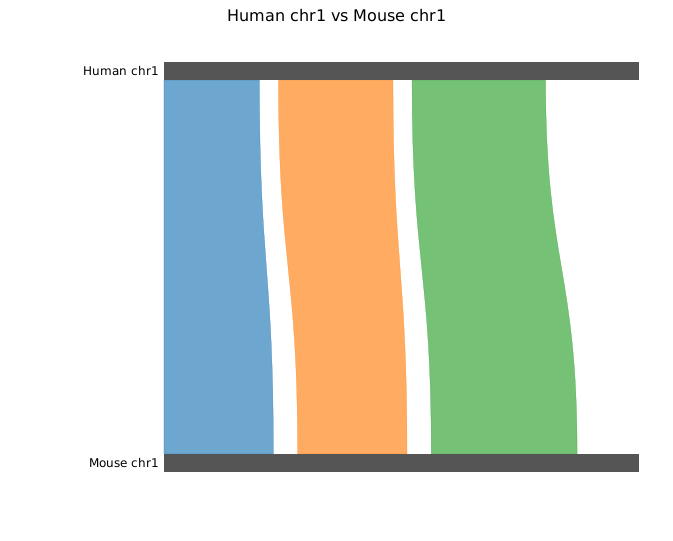
By default each bar fills the full plot width regardless of sequence length (per-sequence scale). Ribbons are drawn before bars so the bars overlay them cleanly. Labels are right-padded to the left of each bar.
Inversions
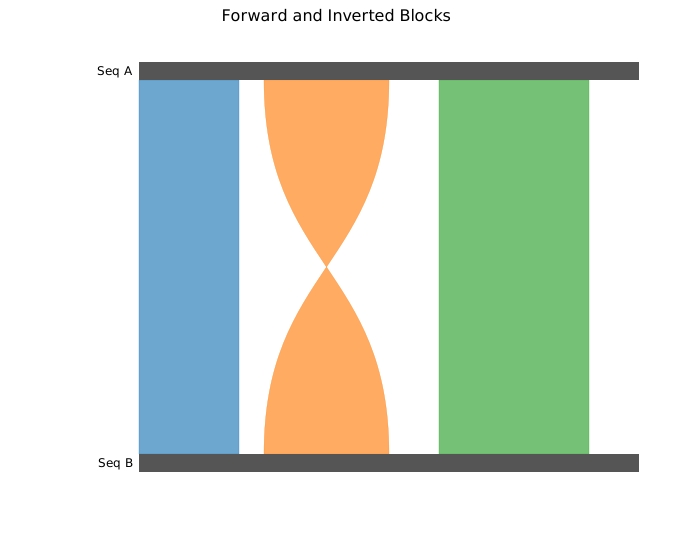
.with_inv_block() marks a region as reverse-complement: the ribbon connects the right edge of the source interval to the left edge of the target (and vice versa), producing a characteristic crossed or bowtie shape.
#![allow(unused)]
fn main() {
use kuva::plot::synteny::SyntenyPlot;
use kuva::backend::svg::SvgBackend;
use kuva::render::render::render_multiple;
use kuva::render::layout::Layout;
use kuva::render::plots::Plot;

let plot = SyntenyPlot::new()
    .with_sequences([("Seq A", 1_000_000.0), ("Seq B", 1_000_000.0)])
    .with_block(    0,       0.0, 200_000.0, 1,       0.0, 200_000.0)
    .with_inv_block(0, 250_000.0, 500_000.0, 1, 250_000.0, 500_000.0)  // inverted
    .with_block(    0, 600_000.0, 900_000.0, 1, 600_000.0, 900_000.0);

let plots = vec![Plot::Synteny(plot)];
let layout = Layout::auto_from_plots(&plots)
    .with_title("Forward and Inverted Blocks");

let svg = SvgBackend.render_scene(&render_multiple(plots, layout));
}
Multiple sequences
Add more than two sequences to show a stack of pairwise comparisons. A block can connect any two sequence indices — typically adjacent pairs for a multi-genome alignment view.
#![allow(unused)]
fn main() {
use kuva::plot::synteny::SyntenyPlot;
use kuva::backend::svg::SvgBackend;
use kuva::render::render::render_multiple;
use kuva::render::layout::Layout;
use kuva::render::plots::Plot;

let plot = SyntenyPlot::new()
    .with_sequences([
        ("Genome A", 500_000.0),
        ("Genome B", 480_000.0),
        ("Genome C", 450_000.0),
    ])
    // blocks between sequences 0 and 1
    .with_block(    0,       0.0, 100_000.0, 1,       0.0,  95_000.0)
    .with_block(    0, 150_000.0, 300_000.0, 1, 140_000.0, 280_000.0)
    // blocks between sequences 1 and 2
    .with_block(    1,       0.0, 100_000.0, 2,   5_000.0, 105_000.0)
    .with_inv_block(1, 200_000.0, 350_000.0, 2, 190_000.0, 340_000.0);

let plots = vec![Plot::Synteny(plot)];
let layout = Layout::auto_from_plots(&plots)
    .with_title("Three-way Synteny");

let svg = SvgBackend.render_scene(&render_multiple(plots, layout));
}
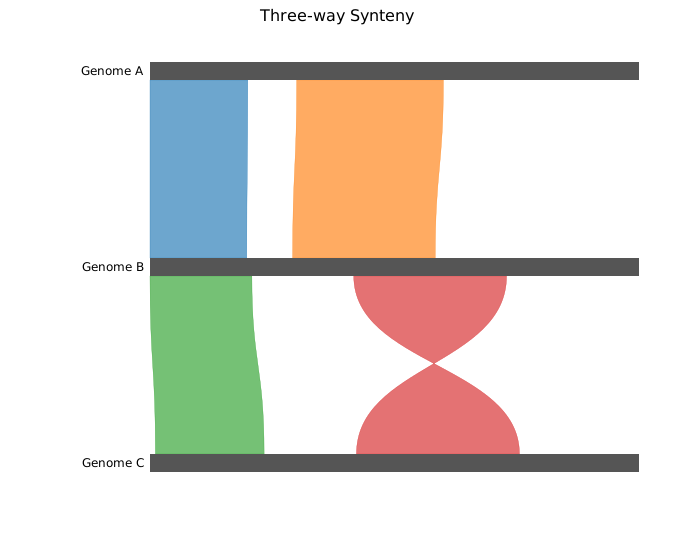
Blocks do not need to connect adjacent sequences — a block between sequences 0 and 2 will span the full height of the diagram.
Custom colors & legend
Set bar colors with .with_sequence_colors(). Override the ribbon color of individual blocks with .with_colored_block() or .with_colored_inv_block(). Call .with_legend("") to enable the legend; each sequence gets an entry labeled with its name.
#![allow(unused)]
fn main() {
use kuva::plot::synteny::SyntenyPlot;
use kuva::backend::svg::SvgBackend;
use kuva::render::render::render_multiple;
use kuva::render::layout::Layout;
use kuva::render::plots::Plot;

let plot = SyntenyPlot::new()
    .with_sequences([("Seq 1", 500_000.0), ("Seq 2", 500_000.0)])
    .with_sequence_colors(["#4393c3", "#d6604d"])          // bar fill colors
    .with_colored_block(    0,       0.0, 150_000.0,
                            1,       0.0, 150_000.0, "#2ca02c")
    .with_colored_block(    0, 200_000.0, 350_000.0,
                            1, 200_000.0, 340_000.0, "#9467bd")
    .with_colored_inv_block(0, 380_000.0, 480_000.0,
                             1, 370_000.0, 470_000.0, "#ff7f0e")
    .with_legend("Blocks");

let plots = vec![Plot::Synteny(plot)];
let layout = Layout::auto_from_plots(&plots)
    .with_title("Custom Colors & Legend");

let svg = SvgBackend.render_scene(&render_multiple(plots, layout));
}
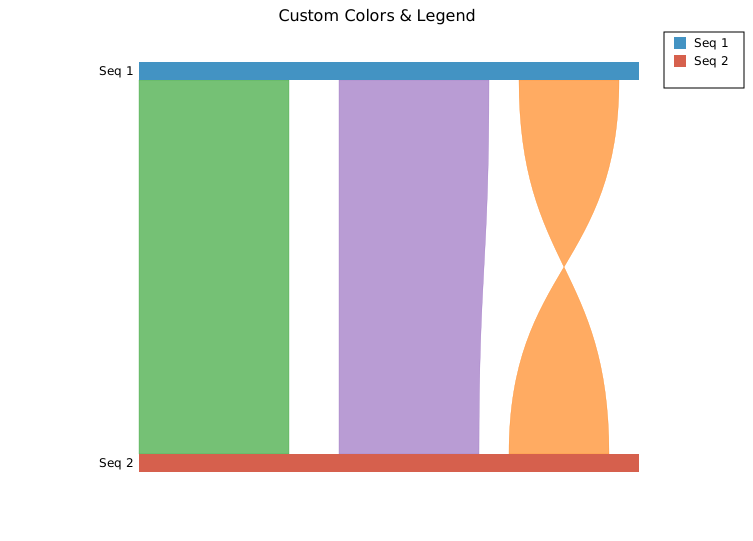
Without explicit block colors, ribbons inherit the source sequence bar color.
Shared scale
By default each bar fills the full plot width independently (per-sequence scale), which maximises detail for each sequence but hides length differences between them. Call .with_shared_scale() to use a common ruler: each bar's width is proportional to sequence_length / max_length, so relative sizes are accurately represented.
#![allow(unused)]
fn main() {
use kuva::plot::synteny::SyntenyPlot;
let plot = SyntenyPlot::new()
    .with_sequences([("Long", 1_000_000.0), ("Short", 400_000.0)])
    .with_shared_scale()                                   // shorter bar is 40% width
    .with_block(0,       0.0, 300_000.0, 1,      0.0, 300_000.0)
    .with_block(0, 350_000.0, 700_000.0, 1, 50_000.0, 380_000.0);
}
Bulk block loading
.with_blocks() accepts an iterator of pre-built SyntenyBlock structs, which is convenient when blocks come from a parsed alignment file:
#![allow(unused)]
fn main() {
use kuva::plot::synteny::{SyntenyPlot, SyntenyBlock, Strand};

let blocks: Vec<SyntenyBlock> = vec![
    SyntenyBlock { seq1: 0, start1:       0.0, end1: 100_000.0,
                   seq2: 1, start2:       0.0, end2:  95_000.0,
                   strand: Strand::Forward, color: None },
    SyntenyBlock { seq1: 0, start1: 150_000.0, end1: 300_000.0,
                   seq2: 1, start2: 140_000.0, end2: 280_000.0,
                   strand: Strand::Reverse, color: Some("#e41a1c".into()) },
];

let plot = SyntenyPlot::new()
    .with_sequences([("Ref", 500_000.0), ("Query", 480_000.0)])
    .with_blocks(blocks);
}
API reference
| Method | Description |
|---|---|
SyntenyPlot::new() | Create a synteny plot with defaults |
.with_sequences(iter) | Add sequences from (label, length) pairs |
.with_sequence_colors(iter) | Override bar fill colors (parallel to sequences) |
.with_block(s1, start1, end1, s2, start2, end2) | Add a forward collinear block |
.with_inv_block(s1, start1, end1, s2, start2, end2) | Add an inverted (crossed ribbon) block |
.with_colored_block(s1, start1, end1, s2, start2, end2, color) | Forward block with explicit ribbon color |
.with_colored_inv_block(s1, start1, end1, s2, start2, end2, color) | Inverted block with explicit ribbon color |
.with_blocks(iter) | Batch-add pre-built SyntenyBlock structs |
.with_bar_height(px) | Sequence bar height in pixels (default 18.0) |
.with_opacity(f) | Ribbon fill opacity 0.0–1.0 (default 0.65) |
.with_shared_scale() | Use a common ruler — bar width proportional to sequence length |
.with_legend("") | Enable the legend; one entry per sequence, labeled with the sequence name |
Strand variants
| Variant | Ribbon shape |
|---|---|
Forward | Parallel-sided trapezoid |
Reverse | Crossed / bowtie |
See also: Phylogenetic Tree for the evolutionary relationships between the same sequences, Brick Plot for per-base alignment detail.
CLI
Synteny / genomic alignment ribbon plot.
Input: two files:
- Sequences file (positional): TSV with sequence name and length columns.
- Blocks file (
--blocks-file): TSV with columnsseq1, start1, end1, seq2, start2, end2, strand.
# sequences.tsv
name    length
Chr1A   2800000
Chr1B   2650000

# blocks.tsv
seq1   start1  end1    seq2   start2  end2    strand
Chr1A  56000   137237  Chr1B  63958   143705  +
Chr1A  150674  271188  Chr1B  165366  303075  -
| Flag | Default | Description |
|---|---|---|
--blocks-file <FILE> | (required) | Blocks TSV file |
--bar-height <PX> | 18.0 | Sequence bar height in pixels |
--opacity <F> | 0.65 | Block ribbon opacity |
--proportional | off | Scale bar widths proportionally to sequence length |
--legend <LABEL> | — | Show legend |
kuva synteny synteny_seqs.tsv --blocks-file synteny_blocks.tsv

kuva synteny synteny_seqs.tsv --blocks-file synteny_blocks.tsv \
    --proportional --legend "synteny blocks"
See also: Shared flags — output, appearance, axes, log scale.