UpSet Plot
An UpSet plot is the scalable successor to Venn diagrams for showing set intersections when there are more than three or four sets. It uses three visual components:
- Intersection size bars (top): vertical bars showing how many elements belong to each exact intersection.
- Dot matrix (middle): a grid of circles. Filled dots indicate which sets participate in each intersection; a vertical line connects them.
- Set size bars (left, optional): horizontal bars showing the total size of each set.
Import path: kuva::plot::UpSetPlot
Basic usage
Pass (name, elements) pairs to .with_sets(). Intersection counts are computed automatically — each element is assigned to the unique combination of sets it belongs to.
#![allow(unused)]
fn main() {
use kuva::plot::UpSetPlot;
use kuva::backend::svg::SvgBackend;
use kuva::render::render::render_multiple;
use kuva::render::layout::Layout;
use kuva::render::plots::Plot;

// Overlapping differentially expressed genes across four treatment conditions
let up = UpSetPlot::new()
    .with_sets(vec![
        ("Condition A", (1u32..=40).collect::<Vec<_>>()),
        ("Condition B", (21u32..=55).collect::<Vec<_>>()),
        ("Condition C", (31u32..=58).collect::<Vec<_>>()),
        ("Condition D", (1u32..=10).chain(45..=60).collect::<Vec<_>>()),
    ]);

let plots = vec![Plot::UpSet(up)];
let layout = Layout::auto_from_plots(&plots)
    .with_title("DEG Overlap Across Treatment Conditions");

let svg = SvgBackend.render_scene(&render_multiple(plots, layout));
std::fs::write("upset.svg", svg).unwrap();
}
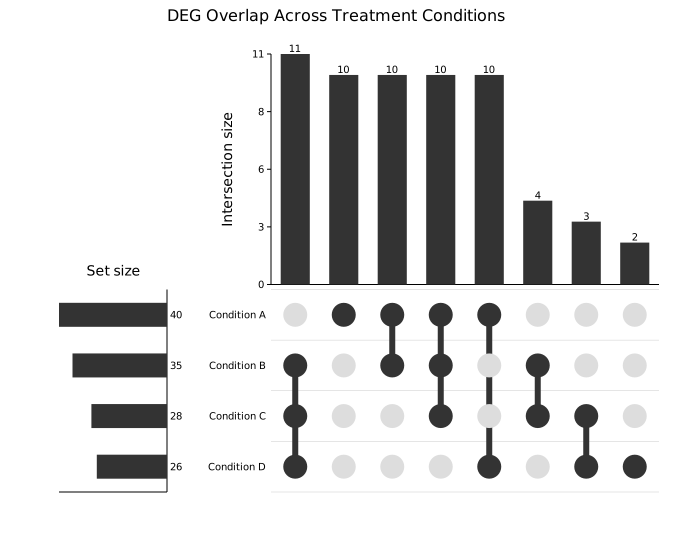
Intersections are sorted by frequency (default) so the largest bars are leftmost. The tallest bar (A∩B∩C: 10) is at the far left; the dot matrix below it shows three filled circles connected by a vertical line. The set-size bars on the left confirm Condition A has the most DEGs (40).
Precomputed data
.with_data(names, sizes, intersections) accepts precomputed counts directly when you do not have the individual elements — for example summary output from an external tool.
The third argument is an iterator of (mask, count) pairs. The mask is a bitmask: bit i is set when set_names[i] participates in that intersection.
A mask is a u64, so an UpSet plot holds at most 64 sets (UpSetPlot::MAX_SETS). Sets past the 64th have no bit of their own, so .with_sets() and .with_data() drop them rather than folding them onto an existing set; kuva upset rejects input with more than 64 columns instead, since it can report the problem.
#![allow(unused)]
fn main() {
use kuva::plot::UpSetPlot;
use kuva::render::plots::Plot;
// Three variant-calling pipelines
// bit 0 = GATK, bit 1 = FreeBayes, bit 2 = Strelka
let up = UpSetPlot::new()
    .with_data(
        ["GATK", "FreeBayes", "Strelka"],
        [280usize, 263, 249],   // total variants per pipeline
        vec![
            (0b001, 45),   // GATK only
            (0b010, 35),   // FreeBayes only
            (0b100, 28),   // Strelka only
            (0b011, 62),   // GATK ∩ FreeBayes
            (0b101, 55),   // GATK ∩ Strelka
            (0b110, 48),   // FreeBayes ∩ Strelka
            (0b111, 118),  // all three (high-confidence)
        ],
    )
    .with_max_visible(5)      // show only the top 5 intersections
    .without_set_sizes();     // hide the left set-size panel
}
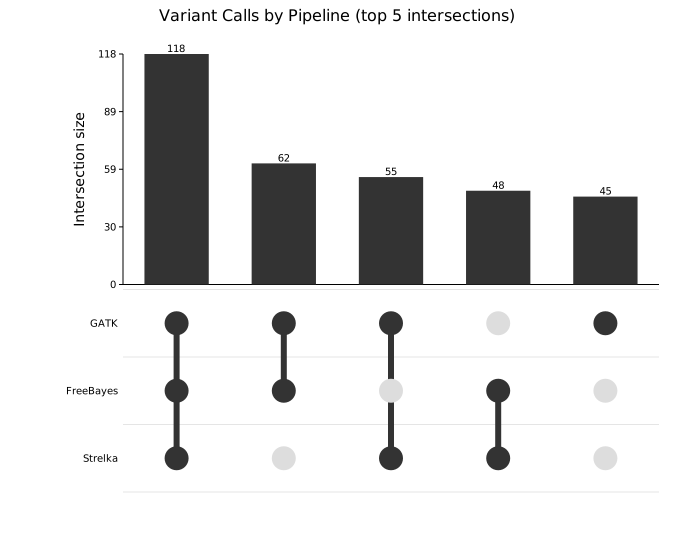
118 variants are called by all three pipelines (the high-confidence set). with_max_visible(5) caps the display to the five largest intersections after sorting; without_set_sizes() removes the left panel for a more compact layout.
Sort order
.with_sort(order) controls the left-to-right ordering of intersection columns.
| Variant | Behaviour |
|---|---|
ByFrequency | Largest bar leftmost (default) |
ByDegree | Most sets involved first, ties broken by count |
Natural | Input order preserved (useful with with_data) |
ByDegree is useful when you specifically want to highlight complex multi-set intersections rather than the most common ones:
#![allow(unused)]
fn main() {
use kuva::plot::{UpSetPlot, UpSetSort};
use kuva::render::plots::Plot;
let up = UpSetPlot::new()
    .with_sets(vec![
        ("Condition A", (1u32..=40).collect::<Vec<_>>()),
        ("Condition B", (21u32..=55).collect::<Vec<_>>()),
        ("Condition C", (31u32..=58).collect::<Vec<_>>()),
        ("Condition D", (1u32..=10).chain(45u32..=60).collect::<Vec<_>>()),
    ])
    .with_sort(UpSetSort::ByDegree)
    .with_bar_color("#1d4ed8")
    .with_dot_color("#1e3a8a");
}
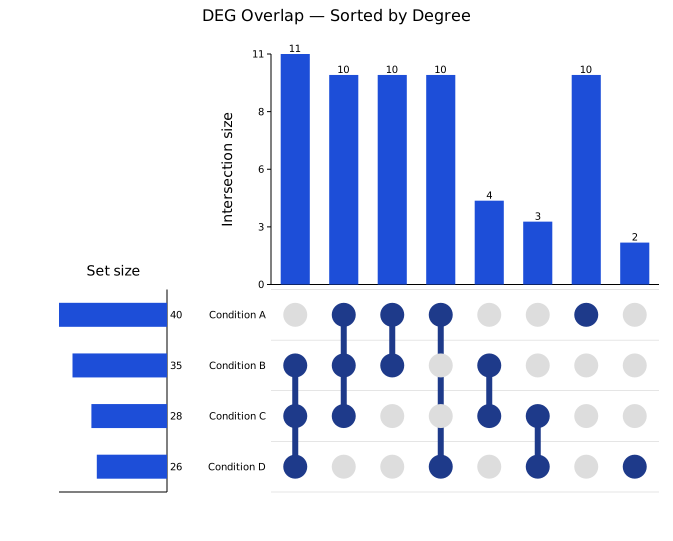
The leftmost columns now show intersections involving the most sets. Custom blue bar and dot colors make the plot match a specific color scheme.
Limiting visible intersections
.with_max_visible(n) keeps only the first n intersections after sorting. This is essential for plots with many sets — five sets have up to 31 non-empty intersections, which can be too many to read. The limit is applied after sorting, so the hidden intersections are always the smallest (or lowest-degree) ones.
#![allow(unused)]
fn main() {
use kuva::plot::UpSetPlot;
use kuva::render::plots::Plot;
let up = UpSetPlot::new()
    .with_sets(/* five sets */)
    .with_max_visible(15);
}
Hiding set-size bars
.without_set_sizes() removes the left panel showing each set's total size. Use this for a more compact layout when set sizes are already known from context or when the focus is entirely on the intersections.
Colors
| Method | Default | Description |
|---|---|---|
.with_bar_color(s) | "#333333" | Intersection and set-size bar fill |
.with_dot_color(s) | "#333333" | Filled dot color (participating set) |
Non-participating dots are always shown in light gray (#dddddd) for contrast.
API reference
| Method | Description |
|---|---|
UpSetPlot::new() | Create a plot with defaults |
.with_sets(iter) | Raw (name, elements) pairs — intersections auto-computed |
.with_data(names, sizes, masks) | Precomputed (mask, count) intersection data |
.with_sort(order) | ByFrequency (default), ByDegree, or Natural |
.with_max_visible(n) | Show only the top n intersections after sorting |
.without_set_sizes() | Hide the left set-size bar panel |
.with_bar_color(s) | Intersection and set-size bar color (default "#333333") |
.with_dot_color(s) | Filled dot color (default "#333333") |
Terminal output
UpSet plots are not yet supported in terminal mode. Running kuva upset --terminal prints a message to stderr and exits cleanly; use -o file.svg to generate an SVG instead.
See also: Venn Diagram for a small number of sets, Mosaic Plot for two-way categorical proportions.
CLI
UpSet plot for set-intersection analysis.
Input: binary (0/1) matrix — one column per set, one row per element. Column headers become set names. At most 64 columns: more than that is rejected, because an intersection is a 64-bit mask.
GWAS_hit  eQTL  Splicing_QTL  Methylation_QTL  Conservation  ClinVar
1         0     0             1                1             1
0         0     1             1                1             0
| Flag | Default | Description |
|---|---|---|
--sort <MODE> | frequency | Sort intersections: frequency, degree, natural. Ties and natural are ordered by set membership, the same order as UpSetPlot::with_sets. |
--max-visible <N> | — | Show only the top N intersections |
kuva upset upset.tsv

kuva upset upset.tsv --sort degree --max-visible 15
Terminal output: not yet supported.
kuva upset --terminalprints a message and exits cleanly; use-o file.svginstead.
See also: Shared flags — output, appearance, axes, log scale.