Volcano Plot
A volcano plot visualises differential expression results by plotting log₂ fold change (x-axis) against −log₁₀(p-value) (y-axis). Points that pass both the fold-change and p-value thresholds are colored as up-regulated (right) or down-regulated (left); all others are shown as not-significant (gray). Dashed threshold lines are drawn automatically.
Import path: kuva::plot::VolcanoPlot
Basic usage
Pass (gene_name, log2fc, pvalue) tuples to .with_points(). Default thresholds are |log2FC| > 1.0 and p < 0.05.
#![allow(unused)]
fn main() {
use kuva::plot::VolcanoPlot;
use kuva::backend::svg::SvgBackend;
use kuva::render::render::render_multiple;
use kuva::render::layout::Layout;
use kuva::render::plots::Plot;

let results: Vec<(&str, f64, f64)> = vec![
    ("AKT1",   3.5, 5e-5),
    ("EGFR",   3.2, 1e-4),
    ("VHL",   -3.0, 5e-4),
    ("P21",   -3.2, 2e-4),
    ("GAPDH",  0.3, 0.50),
    // ...
];

let vp = VolcanoPlot::new()
    .with_points(results)
    .with_legend("DEG status");

let plots = vec![Plot::Volcano(vp)];
let layout = Layout::auto_from_plots(&plots)
    .with_title("Tumour vs. Normal — Volcano Plot")
    .with_x_label("log₂ fold change")
    .with_y_label("−log₁₀(p-value)");

let svg = SvgBackend.render_scene(&render_multiple(plots, layout));
std::fs::write("volcano.svg", svg).unwrap();
}
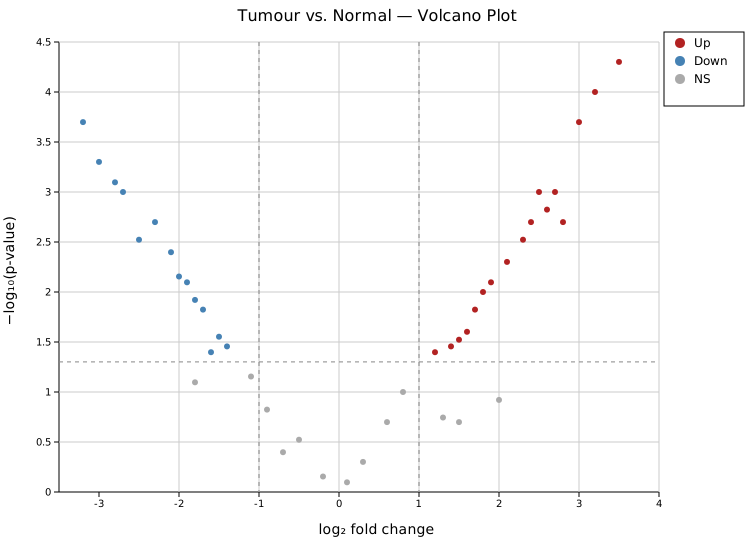
Up-regulated genes (red, right) include AKT1, EGFR, and FGFR1 at the top right. Down-regulated genes (blue, left) include P21, MLH1, and VHL. House-keeping genes (GAPDH, ACTB) and genes with large fold change but non-significant p-values (GeneC, GeneD) appear in gray. The legend shows the Up / Down / NS classification.
Gene labels
.with_label_top(n) labels the n most significant points (lowest p-values). Four placement styles are available via .with_label_style(): Nudge (default), Exact, Arrow, and Repel (force-directed, ggrepel-style, best for dense clusters).
Nudge (default)
Labels are sorted by x position and nudged vertically to reduce stacking — the best default for most datasets.
#![allow(unused)]
fn main() {
use kuva::plot::VolcanoPlot;
use kuva::render::plots::Plot;
let vp = VolcanoPlot::new()
    .with_points(results)
    .with_label_top(12);  // LabelStyle::Nudge is the default
}
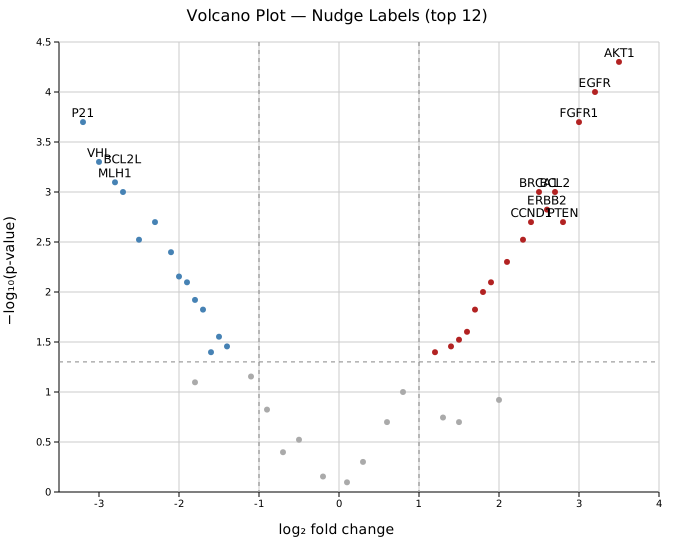
The twelve most significant genes are labeled. Labels are spread vertically to avoid overlap while staying close to their points.
Arrow
LabelStyle::Arrow { offset_x, offset_y } moves labels by the given pixel offset and draws a short gray leader line back to the point. Useful when labels would crowd the high-significance region.
#![allow(unused)]
fn main() {
use kuva::plot::{VolcanoPlot, LabelStyle};
use kuva::render::plots::Plot;
let vp = VolcanoPlot::new()
    .with_points(results)
    .with_label_top(10)
    .with_label_style(LabelStyle::Arrow { offset_x: 14.0, offset_y: 16.0 });
}
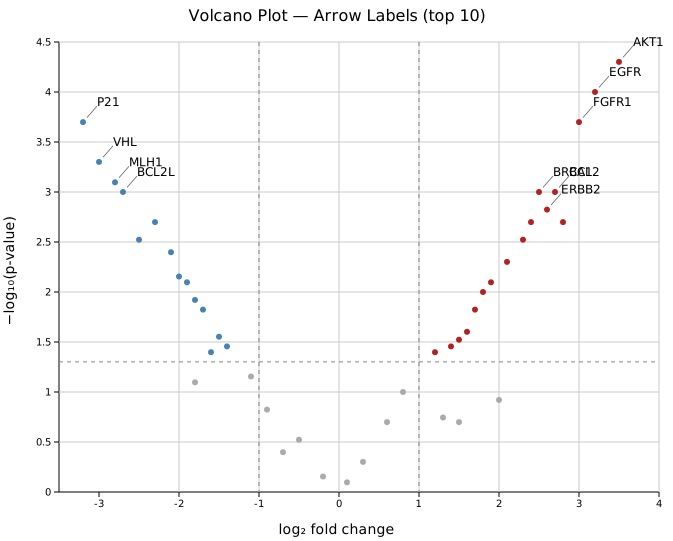
Each label is offset from its point by 14 px horizontally and 16 px vertically with a connecting line. This style works well for the top points in the upper corners where nudging alone may not provide enough separation.
Exact
LabelStyle::Exact places labels at the precise point position without adjustment. Labels may overlap on dense data; use this for sparse plots or when you will post-process the SVG.
Thresholds
.with_fc_cutoff(f) and .with_p_cutoff(f) set the classification thresholds. Dashed vertical lines appear at ±fc_cutoff; a dashed horizontal line appears at −log10(p_cutoff).
#![allow(unused)]
fn main() {
use kuva::plot::VolcanoPlot;
use kuva::render::plots::Plot;
let vp = VolcanoPlot::new()
    .with_points(results)
    .with_fc_cutoff(2.0)   // default 1.0 — require ≥ 4× fold change
    .with_p_cutoff(0.01)   // default 0.05 — stricter significance
    .with_label_top(8);
}
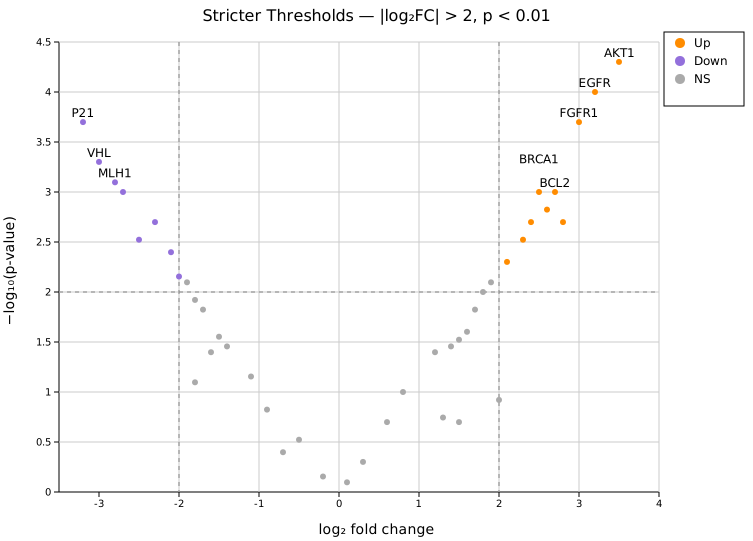
With |log2FC| > 2 and p < 0.01, fewer genes pass both filters. The threshold lines move inward on the x-axis and upward on the y-axis compared to the defaults. Orange/purple colors distinguish this comparison from the default red/blue palette.
Colors
| Method | Default | Description |
|---|---|---|
.with_color_up(s) | "firebrick" | Points with log2FC ≥ fc_cutoff and p ≤ p_cutoff |
.with_color_down(s) | "steelblue" | Points with log2FC ≤ −fc_cutoff and p ≤ p_cutoff |
.with_color_ns(s) | "#aaaaaa" | All other points |
All color methods accept any CSS color string.
Zero and extreme p-values
p-values of exactly 0.0 cannot be log-transformed. They are automatically clamped to the smallest non-zero p-value in the data. Points with a p-value outside [0, 1] (including NaN) or a non-finite fold change are not drawn or labeled, and the CLI rejects such p-values with the row number. To set an explicit ceiling (useful when comparing multiple plots on the same y-axis scale):
#![allow(unused)]
fn main() {
use kuva::plot::VolcanoPlot;
let vp = VolcanoPlot::new()
    .with_points(results)
    .with_pvalue_floor(1e-10);  // y-axis ceiling fixed at 10
}
API reference
| Method | Description |
|---|---|
VolcanoPlot::new() | Create a plot with defaults |
.with_point(name, fc, p) | Add a single point |
.with_points(iter) | Add points from a (name, log2fc, pvalue) iterator |
.with_fc_cutoff(f) | |log₂FC| threshold (default 1.0) |
.with_p_cutoff(f) | p-value significance threshold (default 0.05) |
.with_color_up(s) | Up-regulated point color (default "firebrick") |
.with_color_down(s) | Down-regulated point color (default "steelblue") |
.with_color_ns(s) | Not-significant point color (default "#aaaaaa") |
.with_point_size(f) | Circle radius in pixels (default 3.0) |
.with_label_top(n) | Label the n most significant points (default 0) |
.with_label_style(s) | Nudge (default), Exact, Arrow { offset_x, offset_y }, or Repel (force-directed) |
.with_pvalue_floor(f) | Explicit p-value floor for −log₁₀ transform |
.with_legend(s) | Show an Up / Down / NS legend box |
See also: Manhattan Plot for genome-position-based significance, Scatter Plot for the general x/y relationship it specializes.
CLI
Volcano plot for differential expression results.
Input: three columns — gene name, log₂ fold change, raw p-value.
| Flag | Default | Description |
|---|---|---|
--name-col <COL> | 0 | Gene/feature name column |
--x-col <COL> | 1 | log₂FC column |
--y-col <COL> | 2 | p-value column (raw, not −log₁₀) |
--pvalue-col-is-log | off | p-value column already contains −log₁₀(p); un-transform before plotting |
--fc-cutoff <F> | 1.0 | |log₂FC| threshold |
--p-cutoff <F> | 0.05 | p-value significance threshold |
--top-n <N> | 0 | Label the N most-significant points |
--label-style <STYLE> | nudge | Label placement: nudge, exact, or repel |
--color-up <CSS> | firebrick | Up-regulated point color |
--color-down <CSS> | steelblue | Down-regulated point color |
--color-ns <CSS> | #aaaaaa | Not-significant point color |
--point-size <PX> | 3.0 | Point radius |
--legend | off | Show Up / Down / NS legend |
kuva volcano gene_stats.tsv \
    --name-col gene --x-col log2fc --y-col pvalue \
    --top-n 20 --legend

kuva volcano gene_stats.tsv \
    --name-col gene --x-col log2fc --y-col pvalue \
    --fc-cutoff 2.0 --p-cutoff 0.01 --top-n 10

# when p-value column already holds -log10(p)
kuva volcano results.tsv --name-col gene --x-col log2fc --y-col neg_log10_p \
    --pvalue-col-is-log
See also: Shared flags — output, appearance, axes, log scale.