Density Plot
A density plot estimates the probability density of a numeric dataset via Gaussian kernel density estimation (KDE) and renders it as a smooth continuous curve. It is the continuous alternative to a histogram — it shows the same shape without the arbitrary bin boundaries, and curves from multiple groups can be overlaid naturally.
Import path: kuva::plot::DensityPlot
Basic usage
Pass raw data values with .with_data(iter). The bandwidth is chosen automatically using Silverman's rule-of-thumb.
#![allow(unused)]
fn main() {
use kuva::plot::DensityPlot;
use kuva::backend::svg::SvgBackend;
use kuva::render::render::render_multiple;
use kuva::render::layout::Layout;
use kuva::render::plots::Plot;

let data = vec![2.1, 3.4, 3.7, 2.8, 4.2, 3.9, 3.1, 2.5, 4.0, 3.3,
                2.9, 3.6, 2.7, 3.8, 3.2, 4.1, 2.6, 3.5, 3.0, 4.3];

let density = DensityPlot::new()
    .with_data(data)
    .with_color("steelblue");

let plots = vec![Plot::Density(density)];
let layout = Layout::auto_from_plots(&plots)
    .with_title("Expression Distribution")
    .with_x_label("Expression")
    .with_y_label("Density");

let scene = render_multiple(plots, layout);
let svg = SvgBackend.render_scene(&scene);
std::fs::write("density.svg", svg).unwrap();
}
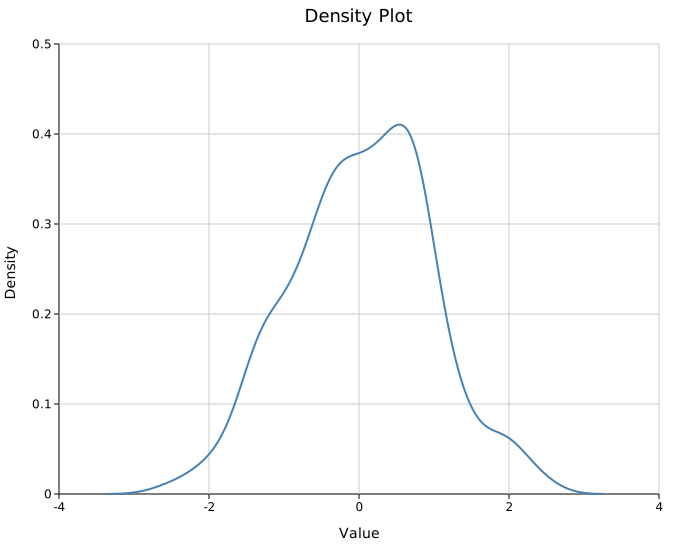
The y-axis is a proper probability density: each curve integrates to approximately 1 over the displayed range.
Tail behaviour. By default, the KDE is evaluated from
data_min − 3×bandwidthtodata_max + 3×bandwidthso the Gaussian tails taper smoothly to zero beyond the data. The x-axis auto-scales to include those tails. This matches ggplot2's defaultcut = 3behaviour and is statistically correct — the tails reflect that a distribution does not hard-stop at the outermost data point. If your data is physically bounded (see below) you should set explicit bounds to prevent the curve from extending into impossible values.
Filled area
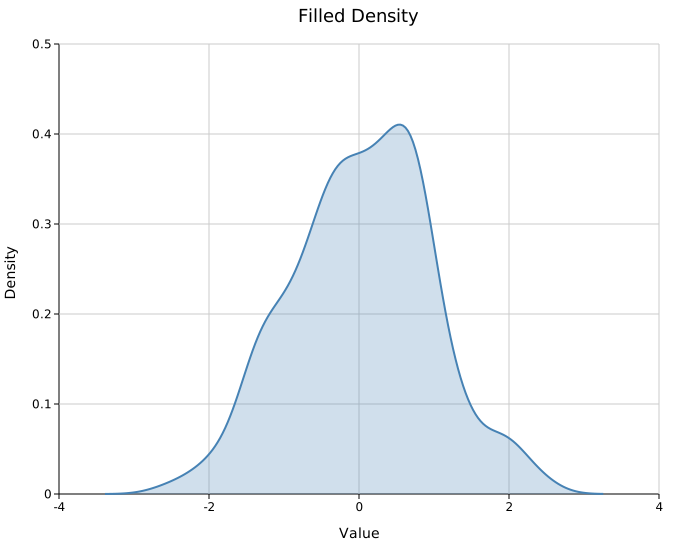
.with_filled(true) shades the area under the curve. The fill uses the same color as the stroke at a low opacity (default 0.2).
#![allow(unused)]
fn main() {
use kuva::plot::DensityPlot;
let density = DensityPlot::new()
    .with_data(data)
    .with_color("steelblue")
    .with_filled(true)
    .with_opacity(0.25);
}
Multiple groups
Use one DensityPlot per group and collect them into a single Vec<Plot>. Set .with_palette() on the layout to auto-assign colors, or assign colors and legend labels manually.
#![allow(unused)]
fn main() {
use kuva::plot::DensityPlot;
use kuva::backend::svg::SvgBackend;
use kuva::render::render::render_multiple;
use kuva::render::layout::Layout;
use kuva::render::plots::Plot;
use kuva::render::palette::Palette;

let pal = Palette::category10();

let plots = vec![
    Plot::Density(
        DensityPlot::new()
            .with_data(group_a)
            .with_color(pal[0])
            .with_filled(true)
            .with_legend("Control"),
    ),
    Plot::Density(
        DensityPlot::new()
            .with_data(group_b)
            .with_color(pal[1])
            .with_filled(true)
            .with_legend("Treatment A"),
    ),
    Plot::Density(
        DensityPlot::new()
            .with_data(group_c)
            .with_color(pal[2])
            .with_filled(true)
            .with_legend("Treatment B"),
    ),
];

let layout = Layout::auto_from_plots(&plots)
    .with_title("Expression by Group")
    .with_x_label("Expression")
    .with_y_label("Density");

let svg = SvgBackend.render_scene(&render_multiple(plots, layout));
std::fs::write("density_groups.svg", svg).unwrap();
}
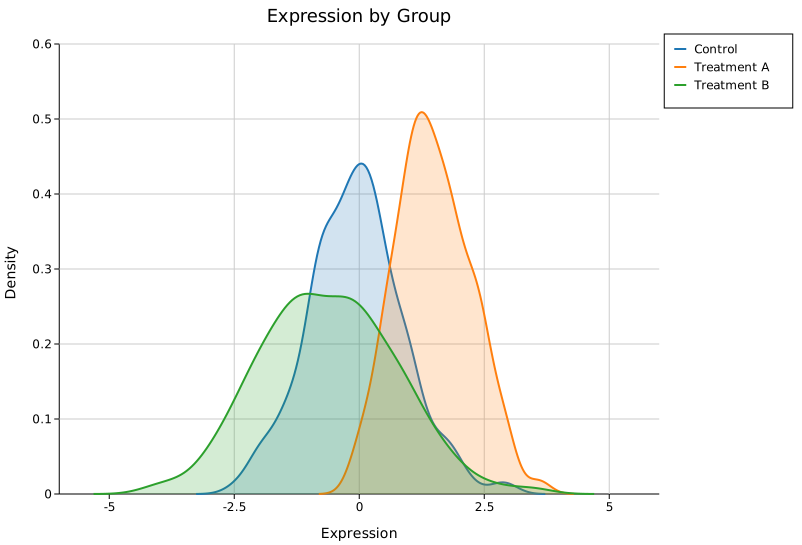
Overlapping filled curves distinguish naturally by color. Increase .with_opacity() toward 0.4 if groups are well separated, or keep it low (0.15–0.2) when they overlap heavily.
Bounded data — identity scores, β-values, frequencies
For data that is physically constrained to a fixed interval — identity scores [0, 1], methylation β-values [0, 1], allele frequencies [0, 1], percentages [0, 100] — the default KDE will extend past those limits, producing a curve that bleeds into impossible negative values or past the upper ceiling.
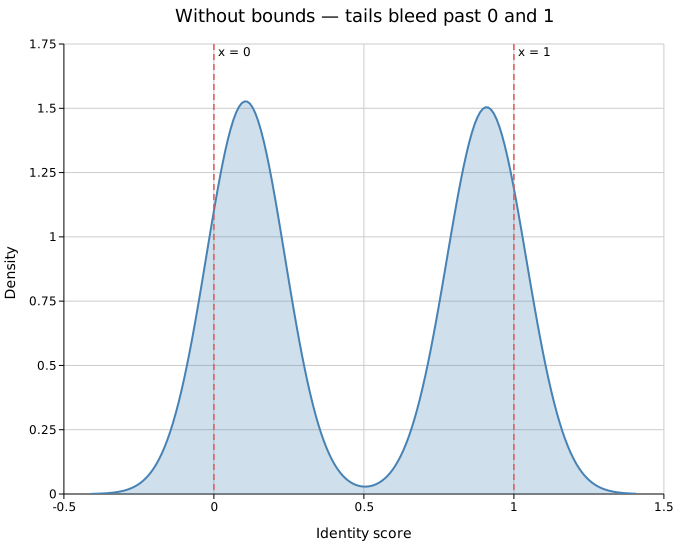 |
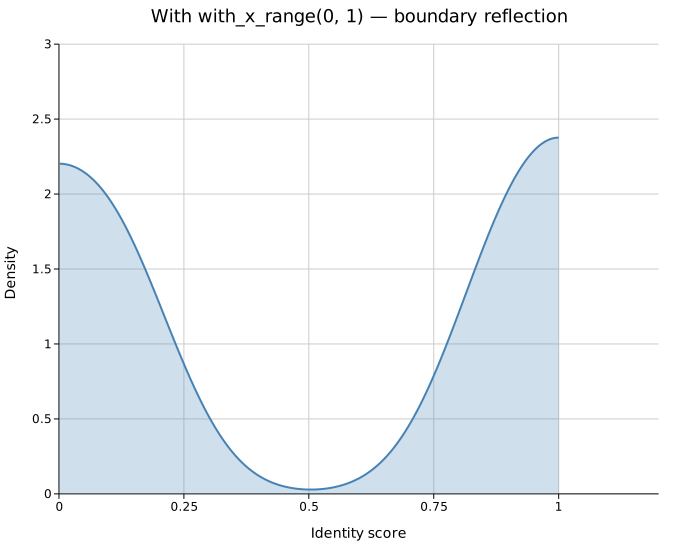 |
| Default — tails bleed past 0 and 1 | with_x_range(0, 1) — smooth taper at boundaries |
Use .with_x_range(lo, hi) to enforce both limits simultaneously:
#![allow(unused)]
fn main() {
use kuva::plot::DensityPlot;
let data = vec![0.1_f64; 10];
// Identity scores: scores cannot be negative or exceed 1.0
let density = DensityPlot::new()
    .with_data(data)
    .with_x_range(0.0, 1.0);
}
Boundary reflection. Simply truncating the evaluation range would cause the curve to cut off abruptly mid-peak wherever data is dense near a boundary. kuva instead uses the reflection method (the same approach as ggplot2 geom_density(bounds = ...) since 3.4.0): for each data point within 3×bandwidth of an active boundary a ghost point is mirrored across that boundary. The KDE is then evaluated only within [lo, hi] using the augmented dataset. The result tapers smoothly to zero at the boundary even when data is concentrated right at the edge.
One-sided bounds. If only one side is physically constrained, set just that bound:
#![allow(unused)]
fn main() {
use kuva::plot::DensityPlot;
let data = vec![0.1_f64; 10];
// Scores cannot be negative but have no known upper cap
let density = DensityPlot::new()
    .with_data(data)
    .with_x_lo(0.0); // left boundary reflected; right tail still free

// Percentages cannot exceed 100 but have no known lower cap
let density = DensityPlot::new()
    .with_data(data)
    .with_x_hi(100.0); // right boundary reflected; left tail still free
}
When only one bound is set the other tail extends 3×bandwidth past the data extreme as normal. This means a curve with only x_lo = 0 set can still extend past 1.0 on the right if the data range allows — use with_x_range(0.0, 1.0) when both sides are constrained.
In the CLI, pass --x-min and --x-max independently — either flag alone is sufficient:
# Both sides bounded — identity scores
kuva density scores.tsv --value score --x-min 0 --x-max 1

# Left side only — counts that cannot be negative
kuva density counts.tsv --value count --x-min 0
KDE bandwidth
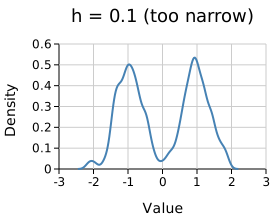
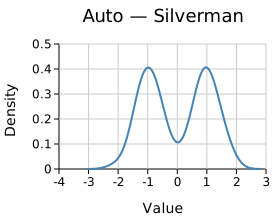
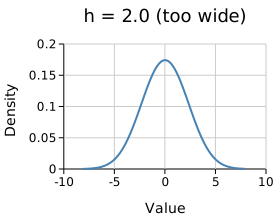
Bandwidth controls smoothing. Silverman's rule works well for roughly normal unimodal data. Set it manually with .with_bandwidth(h) when the automatic choice is too smooth (blends modes) or too rough (noisy).
#![allow(unused)]
fn main() {
use kuva::plot::DensityPlot;
// Over-smoothed — modes blend together
let d = DensityPlot::new().with_data(data.clone()).with_bandwidth(2.0);

// Automatic — Silverman's rule (default, no call needed)
let d = DensityPlot::new().with_data(data.clone());

// Under-smoothed — noisy, jagged
let d = DensityPlot::new().with_data(data.clone()).with_bandwidth(0.1);
}
 |
 |
 |
h = 0.1 (too narrow) |
Auto — Silverman | h = 2.0 (too wide) |
.with_kde_samples(n) controls how many points the curve is evaluated at (default 200). The default is smooth enough for most screen resolutions.
Dashed lines
.with_line_dash("4 2") applies an SVG stroke-dasharray. Useful when distinguishing groups in print or greyscale output.
#![allow(unused)]
fn main() {
use kuva::plot::DensityPlot;
let d = DensityPlot::new()
    .with_data(data)
    .with_color("steelblue")
    .with_stroke_width(2.0)
    .with_line_dash("6 3");
}
Pre-computed curves
DensityPlot::from_curve(x, y) accepts a pre-smoothed curve directly — useful when the density was already computed in Python or R:
#![allow(unused)]
fn main() {
use kuva::plot::DensityPlot;

// x and y computed externally (e.g. scipy.stats.gaussian_kde)
let x = vec![0.0, 0.5, 1.0, 1.5, 2.0, 2.5, 3.0];
let y = vec![0.05, 0.15, 0.40, 0.55, 0.40, 0.15, 0.05];

let density = DensityPlot::from_curve(x, y)
    .with_color("coral")
    .with_filled(true);
}
API reference
| Method | Description |
|---|---|
DensityPlot::new() | Create a density plot with defaults |
DensityPlot::from_curve(x, y) | Use a pre-computed curve; bypasses KDE |
.with_data(iter) | Set input values; accepts any Into<f64> numeric type |
.with_color(s) | Curve color (CSS color string) |
.with_filled(bool) | Fill the area under the curve (default false) |
.with_opacity(f) | Fill opacity when filled (default 0.2) |
.with_bandwidth(h) | KDE bandwidth; omit for Silverman's rule |
.with_kde_samples(n) | KDE evaluation points (default 200) |
.with_stroke_width(px) | Outline stroke width (default 1.5) |
.with_line_dash(s) | SVG stroke-dasharray, e.g. "4 2" for dashed |
.with_legend(s) | Attach a legend label |
.with_x_range(lo, hi) | Clamp KDE evaluation to [lo, hi] with boundary reflection at both ends |
.with_x_lo(lo) | Set lower bound only; boundary reflection at lo, right tail still free |
.with_x_hi(hi) | Set upper bound only; boundary reflection at hi, left tail still free |
See also: Histogram for the raw binned counts, Ridgeline Plot for stacking many densities, Violin Plot for density mirrored per category.
CLI
Kernel density estimate of a single numeric column. Produces a smooth probability density curve; optionally fills the area underneath. Multi-group plots use one curve per group with palette colors.
Input: a tabular file with at least one numeric column. When --color-by is used, an additional categorical column drives the grouping.
| Flag | Default | Description |
|---|---|---|
--value <COL> | 0 | Column of numeric values to estimate |
--y <COL>[,<COL>…] | — | Comma-separated columns; plots one curve per column (column name = legend label). Mutually exclusive with --color-by when 2+ columns given |
--color-by <COL> | — | Group by this column; one curve per unique value |
--filled | off | Fill the area under each density curve |
--bandwidth <F> | (Silverman) | KDE bandwidth override |
--x-min <F> | — | Lower bound for KDE evaluation; boundary reflection applied at this edge |
--x-max <F> | — | Upper bound for KDE evaluation; boundary reflection applied at this edge |
Either flag can be used independently. Use --x-min 0 --x-max 1 for data bounded to [0, 1] (e.g. identity scores, β-values, allele frequencies). Use --x-min 0 alone for data that cannot be negative but has no known upper cap.
kuva density samples.tsv --value expression \
    --x-label "Expression" --y-label "Density" --title "Expression distribution"

kuva density samples.tsv --value expression --color-by group --filled \
    --title "Expression by group"

# Identity scores bounded to [0, 1] — prevents KDE from extending into impossible values
kuva density scores.tsv --value score --x-min 0 --x-max 1

# Counts that cannot be negative but have no upper cap
kuva density counts.tsv --value count --x-min 0

# multi-column: one curve per column
kuva density data.tsv --y col_a,col_b,col_c --filled
See also: Shared flags — output, appearance, axes, log scale.