Histogram
A histogram bins a 1-D dataset into equal-width intervals and renders each bin as a vertical bar. It supports explicit ranges, normalization, and overlapping distributions.
Import path: kuva::plot::Histogram
Basic usage
.with_range((min, max)) is required — without it Layout::auto_from_plots cannot determine the axis extent and will produce an empty chart. Compute the range from your data before building the histogram:
#![allow(unused)]
fn main() {
use kuva::plot::Histogram;
use kuva::backend::svg::SvgBackend;
use kuva::render::render::render_multiple;
use kuva::render::layout::Layout;
use kuva::render::plots::Plot;

let data: Vec<f64> = vec![/* your samples */];

// Compute range from data first.
let min = data.iter().cloned().fold(f64::INFINITY, f64::min);
let max = data.iter().cloned().fold(f64::NEG_INFINITY, f64::max);

let hist = Histogram::new()
    .with_data(data)
    .with_bins(20)
    .with_range((min, max))   // required for auto_from_plots
    .with_color("steelblue");

let plots = vec![Plot::Histogram(hist)];
let layout = Layout::auto_from_plots(&plots)
    .with_title("Histogram")
    .with_x_label("Value")
    .with_y_label("Count");

let scene = render_multiple(plots, layout);
let svg = SvgBackend.render_scene(&scene);
std::fs::write("histogram.svg", svg).unwrap();
}
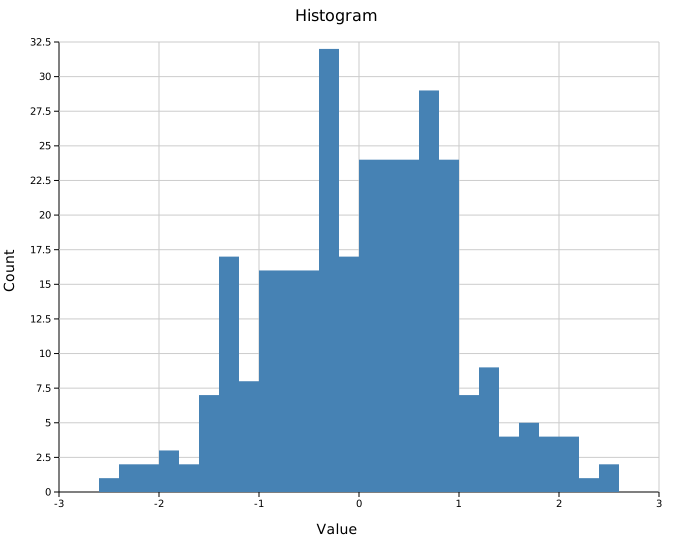
Bin count
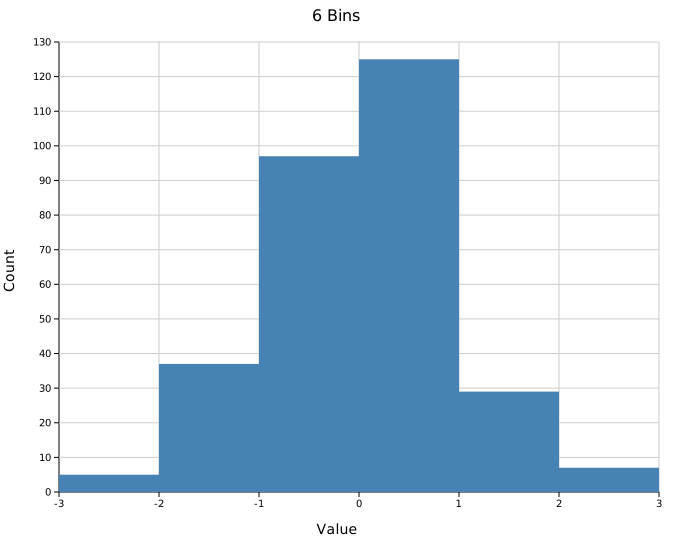
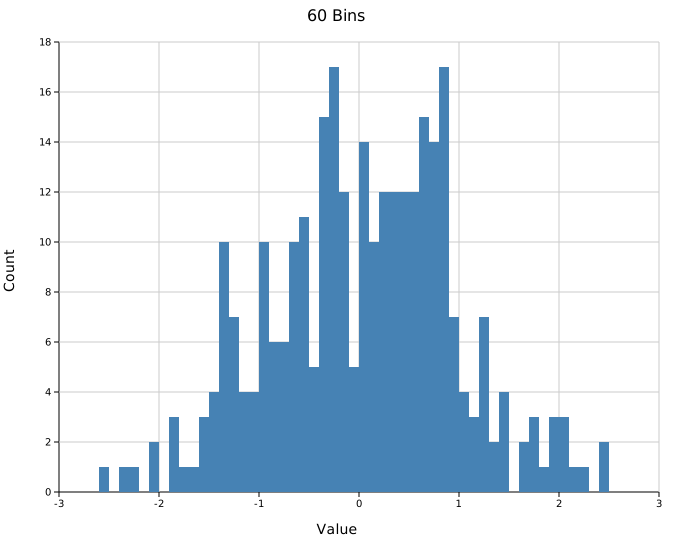
.with_bins(n) sets the number of equal-width bins (default 10). Fewer bins smooth out noise; more bins reveal finer structure at the cost of per-bin counts. The same range is used in both cases so the x-axis stays comparable.
#![allow(unused)]
fn main() {
use kuva::plot::Histogram;
// Coarse — few bins, clear shape
let hist = Histogram::new().with_data(data.clone()).with_bins(5).with_range(range);

// Fine — many bins, more detail
let hist = Histogram::new().with_data(data).with_bins(40).with_range(range);
}
 |
 |
Fixed range
Pass an explicit (min, max) to .with_range() to fix the bin edges regardless of the data. Values outside the range are silently ignored. This is useful when you want to focus on a sub-range, exclude outliers, or ensure two independent histograms cover the same x-axis scale.
#![allow(unused)]
fn main() {
use kuva::plot::Histogram;
let hist = Histogram::new()
    .with_data(data)
    .with_bins(20)
    .with_range((-3.0, 3.0))   // bins fixed to [-3, 3]; outliers ignored
    .with_color("steelblue");
}
Normalized histogram
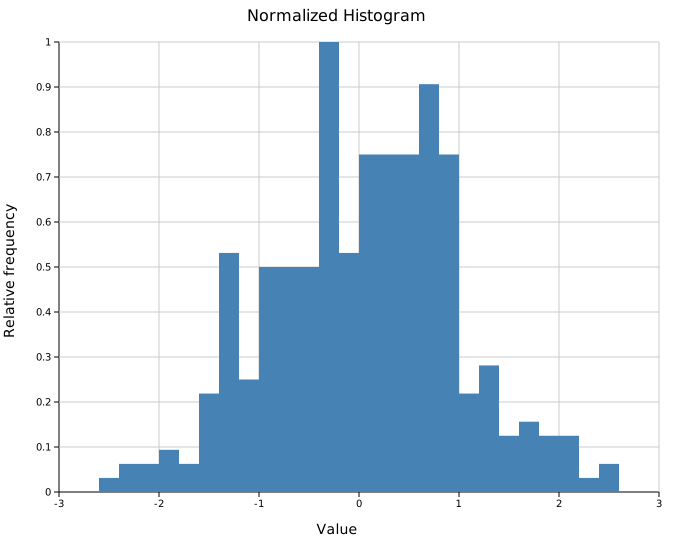
.with_normalize() rescales bar heights so the tallest bar equals 1.0. This is peak-normalization — useful for comparing the shape of distributions with different sample sizes. The y-axis shows relative frequency, not counts or probability density.
#![allow(unused)]
fn main() {
use kuva::plot::Histogram;
use kuva::backend::svg::SvgBackend;
use kuva::render::render::render_multiple;
use kuva::render::layout::Layout;
use kuva::render::plots::Plot;

let min = data.iter().cloned().fold(f64::INFINITY, f64::min);
let max = data.iter().cloned().fold(f64::NEG_INFINITY, f64::max);

let hist = Histogram::new()
    .with_data(data)
    .with_bins(20)
    .with_range((min, max))
    .with_color("steelblue")
    .with_normalize();

let plots = vec![Plot::Histogram(hist)];
let layout = Layout::auto_from_plots(&plots)
    .with_title("Normalized Histogram")
    .with_x_label("Value")
    .with_y_label("Relative frequency");
}
Overlapping distributions
Place multiple Histogram structs in the same Vec<Plot>. Since bars have no built-in opacity setting, use 8-digit hex colors (#RRGGBBAA) to make each series semi-transparent so the overlap is visible.
When overlapping, compute a shared range from the combined data so both histograms use the same bin edges and x-axis scale:
#![allow(unused)]
fn main() {
use kuva::plot::Histogram;
use kuva::backend::svg::SvgBackend;
use kuva::render::render::render_multiple;
use kuva::render::layout::Layout;
use kuva::render::plots::Plot;

// Shared range across both groups so x-axes align.
let combined_min = group_a.iter().chain(group_b.iter())
    .cloned().fold(f64::INFINITY, f64::min);
let combined_max = group_a.iter().chain(group_b.iter())
    .cloned().fold(f64::NEG_INFINITY, f64::max);
let range = (combined_min, combined_max);

// #4682b480 = steelblue at ~50% opacity
// #dc143c80 = crimson  at ~50% opacity
let hist_a = Histogram::new()
    .with_data(group_a)
    .with_bins(20)
    .with_range(range)
    .with_color("#4682b480")
    .with_legend("Group A");

let hist_b = Histogram::new()
    .with_data(group_b)
    .with_bins(20)
    .with_range(range)
    .with_color("#dc143c80")
    .with_legend("Group B");

let plots = vec![Plot::Histogram(hist_a), Plot::Histogram(hist_b)];
let layout = Layout::auto_from_plots(&plots)
    .with_title("Overlapping Distributions")
    .with_x_label("Value")
    .with_y_label("Count");

let svg = SvgBackend.render_scene(&render_multiple(plots, layout));
}
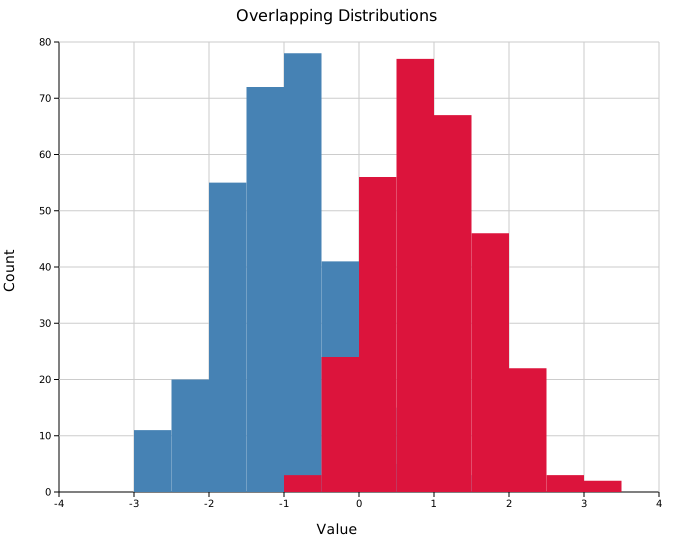
The AA byte in the hex color controls opacity: ff = fully opaque, 80 ≈ 50%, 40 ≈ 25%.
Step (outline) mode
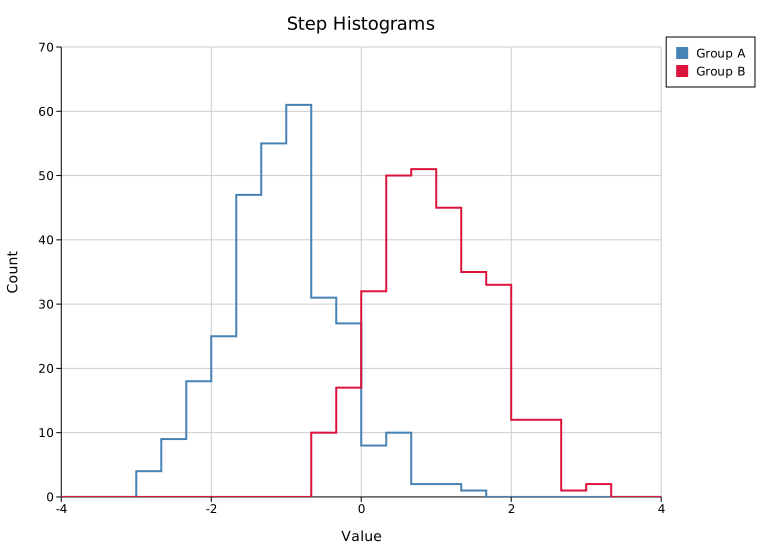
.with_step(true) draws each histogram as an outline-only staircase instead of filled bars. This is the cleanest way to overlay several distributions: the outlines never occlude each other, so you can skip the semi-transparent fills.
#![allow(unused)]
fn main() {
use kuva::plot::Histogram;
let hist_a = Histogram::new()
    .with_data(group_a).with_bins(24).with_range(range)
    .with_color("#4682b4").with_step(true).with_legend("Group A");
let hist_b = Histogram::new()
    .with_data(group_b).with_bins(24).with_range(range)
    .with_color("#dc143c").with_step(true).with_legend("Group B");
}
Cumulative mode
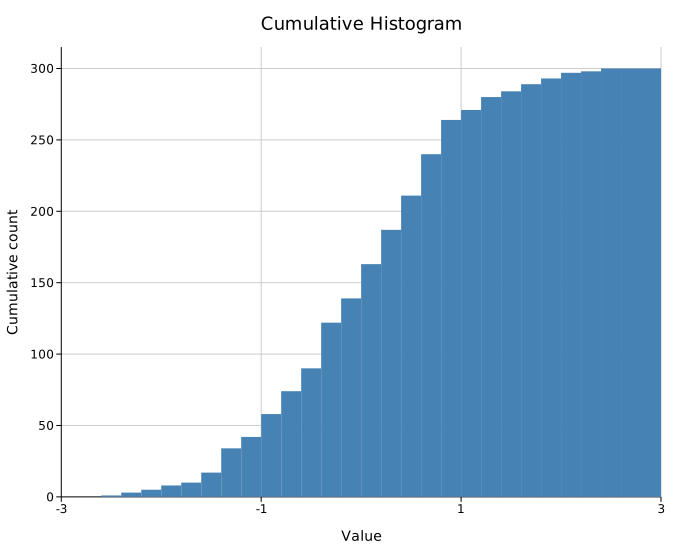
.with_cumulative(true) accumulates counts left-to-right, so each bar includes everything to its left and the final bar equals the total sample count. Combine with .with_normalize() for an empirical CDF-style view (peak scaled to 1.0).
#![allow(unused)]
fn main() {
use kuva::plot::Histogram;
let hist = Histogram::new()
    .with_data(data).with_bins(30).with_range((-3.0, 3.0))
    .with_color("steelblue").with_cumulative(true);
}
Stacked groups
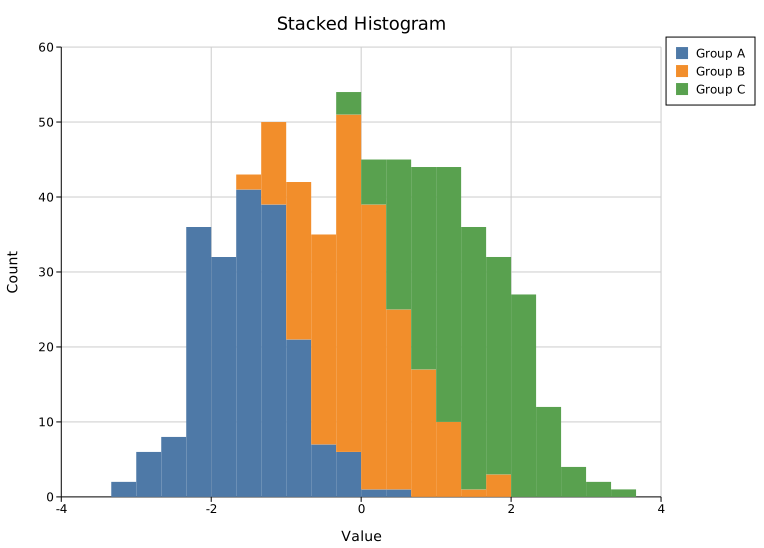
Add extra series with .with_group(data, color, label) and turn on .with_stacked(true) to sum them per bin, each group drawn on top of the one below. The primary series (from .with_data) is the bottom layer. Without .with_stacked(true), groups draw from a shared baseline (overlaid) instead.
#![allow(unused)]
fn main() {
use kuva::plot::Histogram;
let hist = Histogram::new()
    .with_data(group_a).with_bins(24).with_range(range)
    .with_color("#4e79a7").with_stacked(true).with_legend("Group A")
    .with_group(group_b, "#f28e2b", Some("Group B".to_string()))
    .with_group(group_c, "#59a14f", Some("Group C".to_string()));
}
Automatic bin count
.with_bin_method(BinMethod::…) picks the bin count from the data, overriding .with_bins. Three rules are available:
| Rule | Bin width / count | Best for |
|---|---|---|
BinMethod::Sturges | ceil(log2(n)) + 1 bins | Small, roughly Gaussian samples |
BinMethod::Scott | width 3.49·sd·n^(-1/3) | Smooth data |
BinMethod::FreedmanDiaconis | width 2·IQR·n^(-1/3) | Data with outliers (robust) |
Scott and Freedman-Diaconis fall back to Sturges on degenerate data (zero variance or IQR).
#![allow(unused)]
fn main() {
use kuva::plot::{Histogram, BinMethod};
let hist = Histogram::new()
    .with_data(data).with_range(range)
    .with_bin_method(BinMethod::FreedmanDiaconis);
}
Weighted samples
.with_weights(weights) gives each sample a weight, so it contributes its weight to its bin instead of 1. The vector length must match the data (a mismatch falls back to plain counts).
#![allow(unused)]
fn main() {
use kuva::plot::Histogram;
let hist = Histogram::new()
    .with_data(values).with_bins(20).with_range(range)
    .with_weights(weights);   // one weight per sample
}
API reference
| Method | Description |
|---|---|
Histogram::new() | Create a histogram with defaults (10 bins, color "black") |
.with_data(iter) | Set input values; accepts any Into<f64> numeric type |
.with_bins(n) | Number of equal-width bins (default 10) |
.with_range((min, max)) | Required. Sets bin edges and the layout axis extent |
.with_color(s) | Bar fill color; use 8-digit hex (#RRGGBBAA) for alpha transparency |
.with_normalize() | Scale heights so peak bar = 1.0 (relative frequency) |
.with_legend(s) | Attach a legend label to this series |
.with_step(bool) | Draw an outline-only staircase instead of filled bars |
.with_cumulative(bool) | Accumulate counts left-to-right (final bar = total) |
.with_bin_method(m) | Auto bin count (Sturges / Scott / FreedmanDiaconis); overrides .with_bins |
.with_weights(v) | Per-sample weights (length must match the data) |
.with_group(data, color, label) | Add another series, stacked or overlaid |
.with_stacked(bool) | Stack groups on the primary series instead of overlaying |
See also: Density Plot for a smoothed alternative, Ridgeline Plot for comparing many groups, Q-Q Plot for checking normality.
CLI
Frequency histogram from one or more numeric columns.
Input: one or more numeric columns per row.
| Flag | Default | Description |
|---|---|---|
--value-col <COL> | 0 | Value column (single-column mode) |
--y <COL>[,<COL>…] | — | Comma-separated columns; overlays one histogram per column over a shared x-range (overrides --value-col) |
--color <CSS> | steelblue | Bar fill color (single-column mode) |
--bins <N> | 10 | Number of bins (ignored when --bin-method is set) |
--bin-method <RULE> | — | Auto bin count: sturges, scott, or fd; overrides --bins |
--normalize | off | Normalize to probability density (area = 1) |
--step | off | Outline-only staircases instead of filled bars |
--cumulative | off | Accumulate counts left-to-right |
--stacked | off | Stack the --y columns instead of overlaying them |
--weight-col <COL> | — | Per-sample weight column (single-column mode) |
--legend | off | Show a legend entry for each series |
kuva histogram histogram.tsv --value-col value --bins 30

kuva histogram histogram.tsv --bins 20 --normalize \
    --title "Expression distribution" --y-label "Density"

# automatic bin count (Freedman-Diaconis) and a cumulative view
kuva histogram histogram.tsv --value-col value --bin-method fd --cumulative

# overlay two columns as clean step outlines
kuva histogram data.tsv --y col_a,col_b --step --legend

# stack three columns into one histogram
kuva histogram data.tsv --y col_a,col_b,col_c --stacked --legend
See also: Shared flags — output, appearance, axes, log scale.