Bar Chart
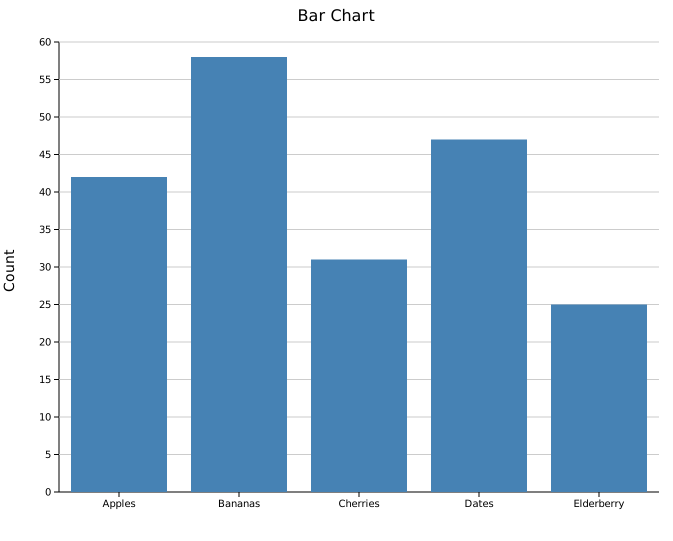
A bar chart renders categorical data as vertical bars. It has three modes — simple, grouped, and stacked — all built from the same BarPlot struct.
Import path: kuva::plot::BarPlot
Simple bar chart
Use .with_bar() or .with_bars() to add one bar per category, then .with_color() to set a uniform fill.
#![allow(unused)]
fn main() {
use kuva::plot::BarPlot;
use kuva::backend::svg::SvgBackend;
use kuva::render::render::render_multiple;
use kuva::render::layout::Layout;
use kuva::render::plots::Plot;

let plot = BarPlot::new()
    .with_bars(vec![
        ("Apples",     42.0),
        ("Bananas",    58.0),
        ("Cherries",   31.0),
        ("Dates",      47.0),
        ("Elderberry", 25.0),
    ])
    .with_color("steelblue");

let plots = vec![Plot::Bar(plot)];
let layout = Layout::auto_from_plots(&plots)
    .with_title("Bar Chart")
    .with_y_label("Count");

let scene = render_multiple(plots, layout);
let svg = SvgBackend.render_scene(&scene);
std::fs::write("bar.svg", svg).unwrap();
}
Adding bars individually
.with_bar(label, value) adds one bar at a time, which is useful when constructing data programmatically:
#![allow(unused)]
fn main() {
use kuva::plot::BarPlot;
let plot = BarPlot::new()
    .with_bar("A", 3.2)
    .with_bar("B", 4.7)
    .with_bar("C", 2.8)
    .with_color("steelblue");
}
Per-bar colors
Use .with_colored_bar() or .with_colored_bars() to give each bar its own color — useful when bars represent distinct categories such as nucleotide variants or mutation types.
#![allow(unused)]
fn main() {
use kuva::plot::BarPlot;
use kuva::backend::svg::SvgBackend;
use kuva::render::render::render_multiple;
use kuva::render::layout::Layout;
use kuva::render::plots::Plot;

let plot = BarPlot::new()
    .with_colored_bar("A2C", 42.0, "steelblue")
    .with_colored_bar("A2G", 58.0, "seagreen")
    .with_colored_bar("A2T", 31.0, "tomato")
    .with_colored_bar("C2A", 25.0, "gold");

let plots = vec![Plot::Bar(plot)];
let layout = Layout::auto_from_plots(&plots)
    .with_title("Mutation Counts")
    .with_y_label("Count");

let svg = SvgBackend.render_scene(&render_multiple(plots, layout));
}
To add many colored bars at once, pass an iterator of (label, value, color) triples to .with_colored_bars():
#![allow(unused)]
fn main() {
use kuva::plot::BarPlot;
let variants = vec![
    ("A2C", 42.0, "steelblue"),
    ("A2G", 58.0, "seagreen"),
    ("A2T", 31.0, "tomato"),
    ("C2A", 25.0, "gold"),
    ("C2G", 18.0, "orchid"),
    ("C2T", 63.0, "darkorange"),
];
let plot = BarPlot::new().with_colored_bars(variants);
}
Grouped bar chart
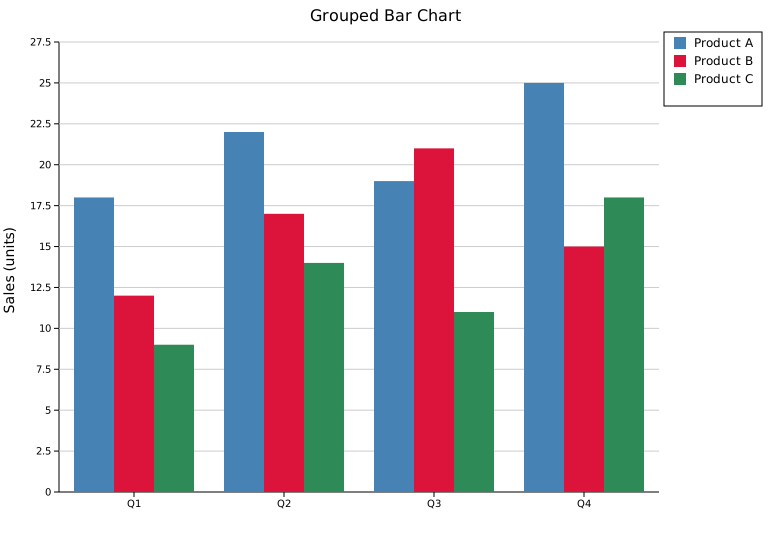
Use .with_group(label, values) to add a category with multiple side-by-side bars. Each item in values is a (value, color) pair — one per series. Call .with_legend() to label each series.
#![allow(unused)]
fn main() {
use kuva::plot::BarPlot;
use kuva::backend::svg::SvgBackend;
use kuva::render::render::render_multiple;
use kuva::render::layout::Layout;
use kuva::render::plots::Plot;

let plot = BarPlot::new()
    .with_group("Q1", vec![(18.0, "steelblue"), (12.0, "crimson"), (9.0,  "seagreen")])
    .with_group("Q2", vec![(22.0, "steelblue"), (17.0, "crimson"), (14.0, "seagreen")])
    .with_group("Q3", vec![(19.0, "steelblue"), (21.0, "crimson"), (11.0, "seagreen")])
    .with_group("Q4", vec![(25.0, "steelblue"), (15.0, "crimson"), (18.0, "seagreen")])
    .with_legend(vec!["Product A", "Product B", "Product C"]);

let plots = vec![Plot::Bar(plot)];
let layout = Layout::auto_from_plots(&plots)
    .with_title("Grouped Bar Chart")
    .with_y_label("Sales (units)");

let svg = SvgBackend.render_scene(&render_multiple(plots, layout));
}
Stacked bar chart
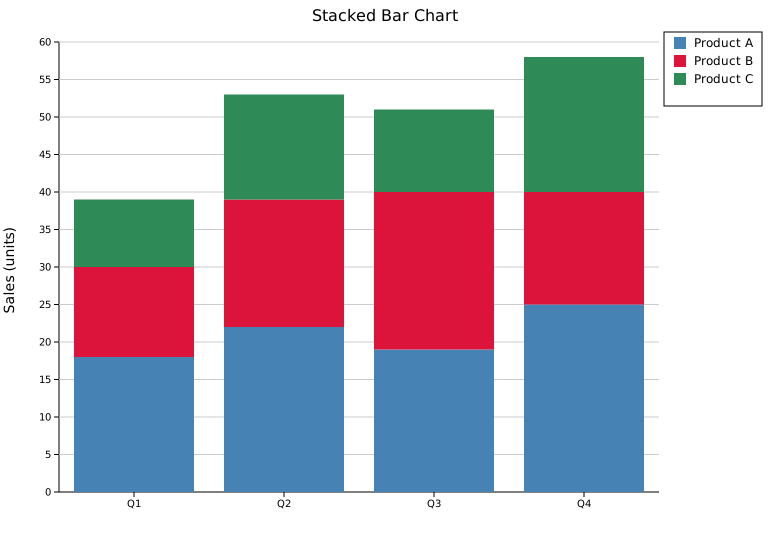
Add .with_stacked() to the same grouped structure to stack segments vertically instead of placing them side-by-side.
#![allow(unused)]
fn main() {
use kuva::plot::BarPlot;
use kuva::backend::svg::SvgBackend;
use kuva::render::render::render_multiple;
use kuva::render::layout::Layout;
use kuva::render::plots::Plot;

let plot = BarPlot::new()
    .with_group("Q1", vec![(18.0, "steelblue"), (12.0, "crimson"), (9.0,  "seagreen")])
    .with_group("Q2", vec![(22.0, "steelblue"), (17.0, "crimson"), (14.0, "seagreen")])
    .with_group("Q3", vec![(19.0, "steelblue"), (21.0, "crimson"), (11.0, "seagreen")])
    .with_group("Q4", vec![(25.0, "steelblue"), (15.0, "crimson"), (18.0, "seagreen")])
    .with_legend(vec!["Product A", "Product B", "Product C"])
    .with_stacked();

let plots = vec![Plot::Bar(plot)];
let layout = Layout::auto_from_plots(&plots)
    .with_title("Stacked Bar Chart")
    .with_y_label("Sales (units)");

let svg = SvgBackend.render_scene(&render_multiple(plots, layout));
}
Horizontal mode
.with_horizontal(true) rotates the chart so categories appear on the Y-axis and values on the X-axis. Works with all three modes (simple, grouped, stacked).
#![allow(unused)]
fn main() {
use kuva::plot::BarPlot;
use kuva::render::layout::Layout;
use kuva::render::plots::Plot;
use kuva::render::render::render_multiple;
use kuva::backend::svg::SvgBackend;

let plot = BarPlot::new()
    .with_bars(vec![
        ("Apples",     42.0),
        ("Bananas",    58.0),
        ("Cherries",   31.0),
        ("Dates",      47.0),
        ("Elderberry", 25.0),
    ])
    .with_color("steelblue")
    .with_horizontal(true);

let plots = vec![Plot::Bar(plot)];
let layout = Layout::auto_from_plots(&plots)
    .with_title("Horizontal Bar Chart")
    .with_x_label("Count");

let svg = SvgBackend.render_scene(&render_multiple(plots, layout));
}
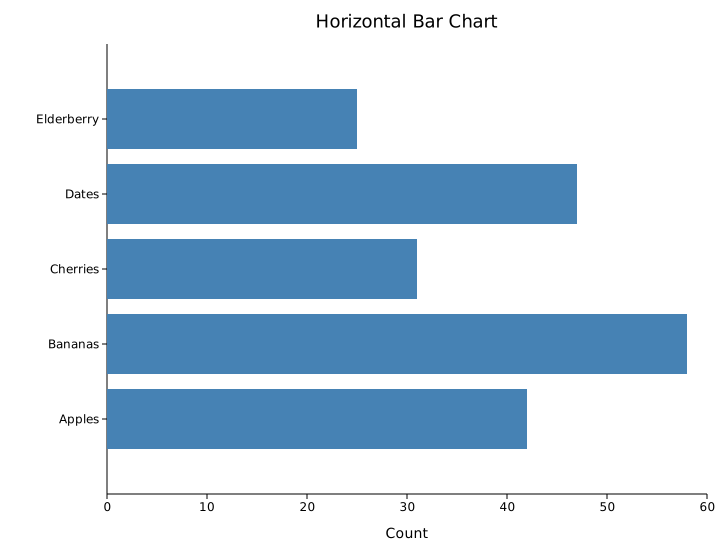
Horizontal bars are especially useful when category labels are long — they read left-to-right on the Y-axis without rotation or truncation.
Bar width
.with_width() controls how much of each category slot the bar fills. The default is 0.8; 1.0 means bars touch.
#![allow(unused)]
fn main() {
use kuva::plot::BarPlot;
let plot = BarPlot::new()
    .with_bars(vec![("A", 3.0), ("B", 5.0), ("C", 4.0)])
    .with_color("steelblue")
    .with_width(0.5);   // narrower bars with more whitespace
}
API reference
| Method | Description |
|---|---|
BarPlot::new() | Create a bar plot with defaults |
.with_bar(label, value) | Add a single bar (simple mode) |
.with_bars(vec) | Add multiple bars at once (simple mode) |
.with_colored_bar(label, value, color) | Add a single bar with an explicit color (simple mode) |
.with_colored_bars(iter) | Add multiple bars with per-bar colors; each item is (label, value, color) |
.with_color(s) | Set a uniform color across all existing bars |
.with_group(label, values) | Add a category with one bar per series (grouped / stacked mode) |
.with_legend(vec) | Set series labels; one label per bar within a group |
.with_stacked() | Stack bars vertically instead of side-by-side |
.with_width(f) | Bar width as a fraction of slot width (default 0.8) |
Choosing a mode
| Goal | Methods to use |
|---|---|
| One color, one bar per category | .with_bars() + .with_color() |
| Different color per bar | .with_colored_bar() × N or .with_colored_bars() |
| Multiple series, side-by-side | .with_group() × N + .with_legend() |
| Multiple series, stacked | .with_group() × N + .with_legend() + .with_stacked() |
See also: Lollipop Chart for a lighter-weight alternative, Pareto Chart for bars plus a cumulative-percentage line, Waterfall Chart for running-total bars.
CLI
Bar chart from label/value pairs.
Input: first column labels, second column numeric values.
| Flag | Default | Description |
|---|---|---|
--label-col <COL> | 0 | Label column |
--value-col <COL> | 1 | Value column (single-series mode) |
--y <COL>[,<COL>…] | — | Comma-separated value columns; rows are aggregated by --label-col (mean by default) and each column becomes a palette-colored series with an automatic legend |
--count-by <COL> | — | Count occurrences per unique value in this column (ignores --value-col) |
--agg <FUNC> | — | Aggregate by --label-col: mean, median, sum, min, max. Applies to both --value-col and --y multi-column mode |
--color <CSS> | steelblue | Bar fill color |
--bar-width <F> | 0.8 | Bar width as a fraction of the slot |
--color-by <COL> | — | Group rows by this column and color each series by palette, producing a grouped bar chart with an automatic legend |
--horizontal | off | Render categories on the Y-axis, values on the X-axis |
Grouped bar chart (--color-by)
--color-by pivots the data into a grouped bar chart — one colored sub-bar per unique value in the specified column, using the active palette. When every x-label maps to exactly one series value (e.g. --color-by on the same column as --label-col), kuva falls back to simple per-bar coloring so bars stay centered under their tick labels.
kuva bar bar.tsv --label-col category --value-col count --color "#4682b4"

kuva bar bar.tsv --x-label "Pathway" --y-label "Gene count" \
    -o pathways.svg

# count occurrences of each group
kuva bar scatter.tsv --count-by group --y-label "Count"

# aggregate: total abundance per species from long-format data
kuva bar data.tsv --label-col species --value-col abundance --agg sum

# mean expression per gene across samples
kuva bar expr.tsv --label-col gene --value-col tpm --agg mean \
    --y-label "Mean TPM"

# grouped bar chart: one bar per species per condition
kuva bar data.tsv --label-col species --value-col abundance \
    --color-by condition -o grouped.svg

# multi-column --y: two series from wide-format data, aggregated by group
kuva bar data.tsv --label-col group --y metric_a,metric_b --agg mean

# horizontal bar chart
kuva bar bar.tsv --label-col category --value-col count --horizontal
See also: Shared flags — output, appearance, axes, log scale.