Line Plot
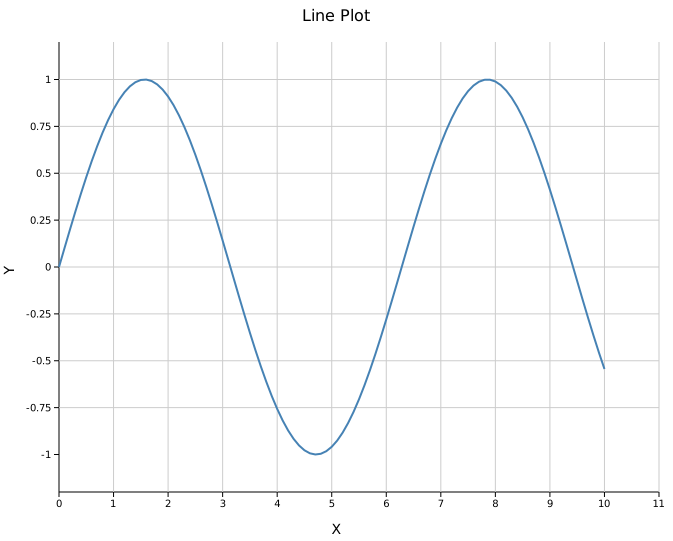
A line plot connects (x, y) data points with a continuous path. It supports four built-in stroke styles, area fills, step interpolation, confidence bands, and error bars.
Import path: kuva::plot::LinePlot
Basic usage
#![allow(unused)]
fn main() {
use kuva::plot::LinePlot;
use kuva::backend::svg::SvgBackend;
use kuva::render::render::render_multiple;
use kuva::render::layout::Layout;
use kuva::render::plots::Plot;

let data: Vec<(f64, f64)> = (0..=100)
    .map(|i| { let x = i as f64 * 0.1; (x, x.sin()) })
    .collect();

let plot = LinePlot::new()
    .with_data(data)
    .with_color("steelblue")
    .with_stroke_width(2.0);

let plots = vec![Plot::Line(plot)];
let layout = Layout::auto_from_plots(&plots)
    .with_title("Line Plot")
    .with_x_label("X")
    .with_y_label("Y");

let scene = render_multiple(plots, layout);
let svg = SvgBackend.render_scene(&scene);
std::fs::write("line.svg", svg).unwrap();
}
Line styles
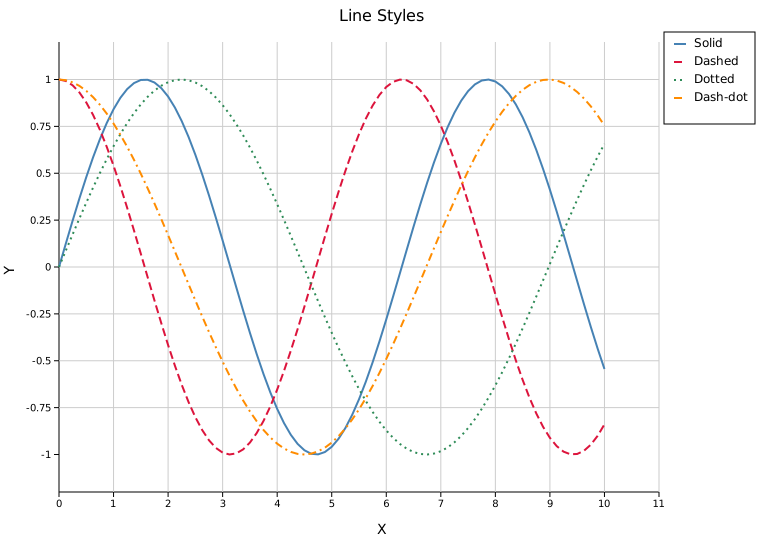
Four built-in stroke styles are available. Use the shorthand methods or pass a LineStyle variant directly.
#![allow(unused)]
fn main() {
use kuva::plot::{LinePlot, LineStyle};
use kuva::backend::svg::SvgBackend;
use kuva::render::render::render_multiple;
use kuva::render::layout::Layout;
use kuva::render::plots::Plot;

let xs: Vec<f64> = (0..=80).map(|i| i as f64 * 0.125).collect();

let plots = vec![
    Plot::Line(LinePlot::new()
        .with_data(xs.iter().map(|&x| (x, x.sin())))
        .with_color("steelblue").with_stroke_width(2.0)
        .with_line_style(LineStyle::Solid).with_legend("Solid")),

    Plot::Line(LinePlot::new()
        .with_data(xs.iter().map(|&x| (x, x.cos())))
        .with_color("crimson").with_stroke_width(2.0)
        .with_dashed().with_legend("Dashed")),

    Plot::Line(LinePlot::new()
        .with_data(xs.iter().map(|&x| (x, (x * 0.7).sin())))
        .with_color("seagreen").with_stroke_width(2.0)
        .with_dotted().with_legend("Dotted")),

    Plot::Line(LinePlot::new()
        .with_data(xs.iter().map(|&x| (x, (x * 0.7).cos())))
        .with_color("darkorange").with_stroke_width(2.0)
        .with_dashdot().with_legend("Dash-dot")),
];

let layout = Layout::auto_from_plots(&plots)
    .with_title("Line Styles")
    .with_x_label("X")
    .with_y_label("Y");

let svg = SvgBackend.render_scene(&render_multiple(plots, layout));
}
Custom dasharray
For patterns not covered by the built-in variants, use LineStyle::Custom with an SVG stroke-dasharray string:
#![allow(unused)]
fn main() {
use kuva::plot::{LinePlot, LineStyle};
let plot = LinePlot::new()
    .with_data(vec![(0.0_f64, 0.0_f64), (1.0, 1.0), (2.0, 0.5)])
    .with_line_style(LineStyle::Custom("12 3 3 3".into()));
}
Area plot
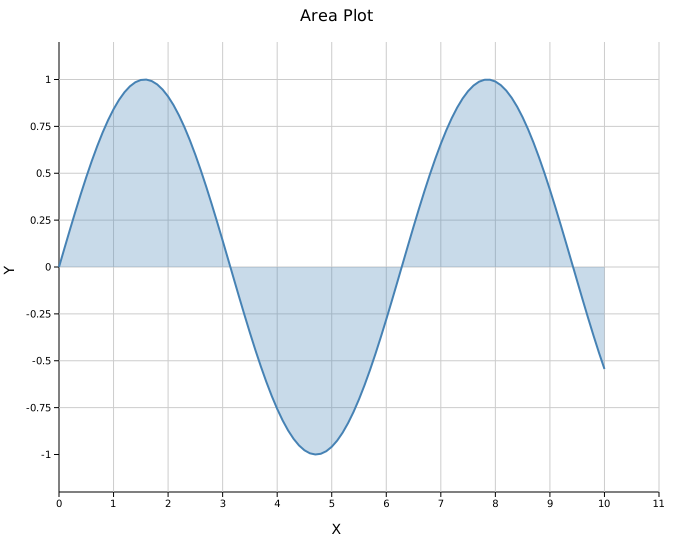
Call .with_fill() to shade the region between the line and the x-axis. The fill uses the line color at 0.3 opacity by default.
#![allow(unused)]
fn main() {
use kuva::plot::LinePlot;
use kuva::backend::svg::SvgBackend;
use kuva::render::render::render_multiple;
use kuva::render::layout::Layout;
use kuva::render::plots::Plot;

let data: Vec<(f64, f64)> = (0..=100)
    .map(|i| { let x = i as f64 * 0.1; (x, x.sin()) })
    .collect();

let plot = LinePlot::new()
    .with_data(data)
    .with_color("steelblue")
    .with_stroke_width(2.0)
    .with_fill()
    .with_fill_opacity(0.3);   // optional, 0.3 is the default

let plots = vec![Plot::Line(plot)];
let layout = Layout::auto_from_plots(&plots)
    .with_title("Area Plot")
    .with_x_label("X")
    .with_y_label("Y");

let svg = SvgBackend.render_scene(&render_multiple(plots, layout));
}
Step plot
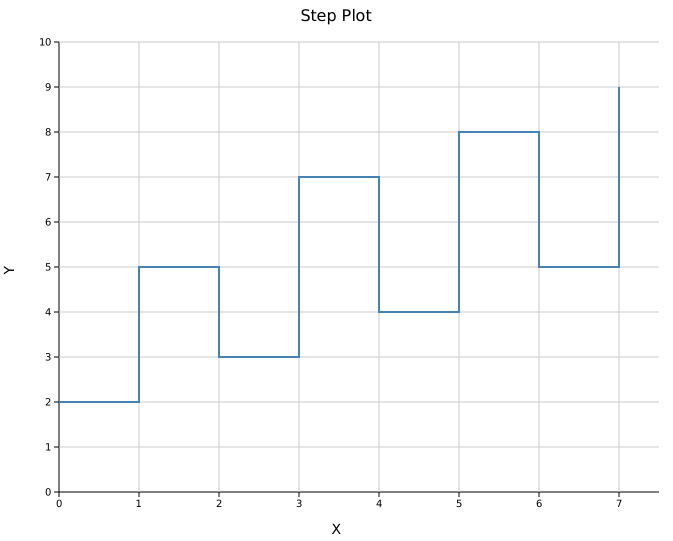
.with_step() draws horizontal-then-vertical transitions between consecutive points rather than diagonal segments. This is the standard rendering for histograms and discrete time-series data.
#![allow(unused)]
fn main() {
use kuva::plot::LinePlot;
use kuva::backend::svg::SvgBackend;
use kuva::render::render::render_multiple;
use kuva::render::layout::Layout;
use kuva::render::plots::Plot;

let data = vec![
    (0.0_f64, 2.0_f64), (1.0, 5.0), (2.0, 3.0), (3.0, 7.0),
    (4.0, 4.0), (5.0, 8.0), (6.0, 5.0), (7.0, 9.0),
];

let plot = LinePlot::new()
    .with_data(data)
    .with_color("steelblue")
    .with_stroke_width(2.0)
    .with_step();

let plots = vec![Plot::Line(plot)];
let layout = Layout::auto_from_plots(&plots)
    .with_title("Step Plot")
    .with_x_label("X")
    .with_y_label("Y");

let svg = SvgBackend.render_scene(&render_multiple(plots, layout));
}
Step and fill can be combined: .with_step().with_fill() produces a filled step area.
Confidence band
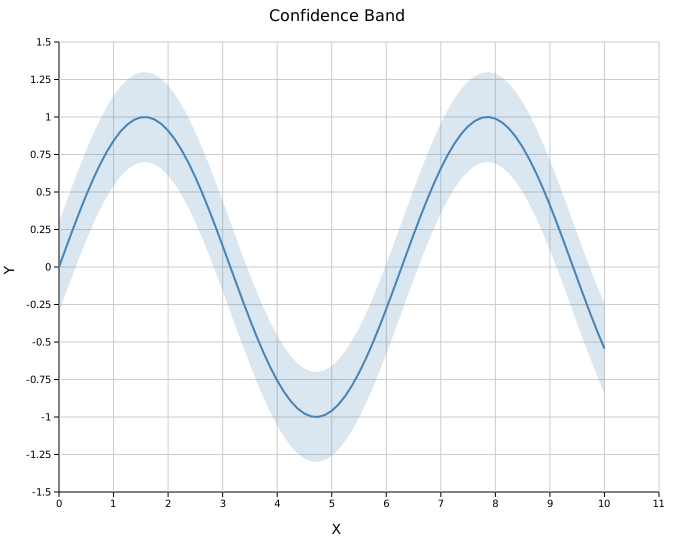
.with_band(y_lower, y_upper) draws a shaded region between two boundary series aligned to the line's x positions. The band color inherits from the line color.
#![allow(unused)]
fn main() {
use kuva::plot::LinePlot;
use kuva::backend::svg::SvgBackend;
use kuva::render::render::render_multiple;
use kuva::render::layout::Layout;
use kuva::render::plots::Plot;

let xs: Vec<f64> = (0..=80).map(|i| i as f64 * 0.125).collect();
let ys: Vec<f64> = xs.iter().map(|&x| x.sin()).collect();
let lower: Vec<f64> = ys.iter().map(|&y| y - 0.3).collect();
let upper: Vec<f64> = ys.iter().map(|&y| y + 0.3).collect();

let data: Vec<(f64, f64)> = xs.into_iter().zip(ys).collect();

let plot = LinePlot::new()
    .with_data(data)
    .with_color("steelblue")
    .with_stroke_width(2.0)
    .with_band(lower, upper);

let plots = vec![Plot::Line(plot)];
let layout = Layout::auto_from_plots(&plots)
    .with_title("Confidence Band")
    .with_x_label("X")
    .with_y_label("Y");

let svg = SvgBackend.render_scene(&render_multiple(plots, layout));
}
Error bars
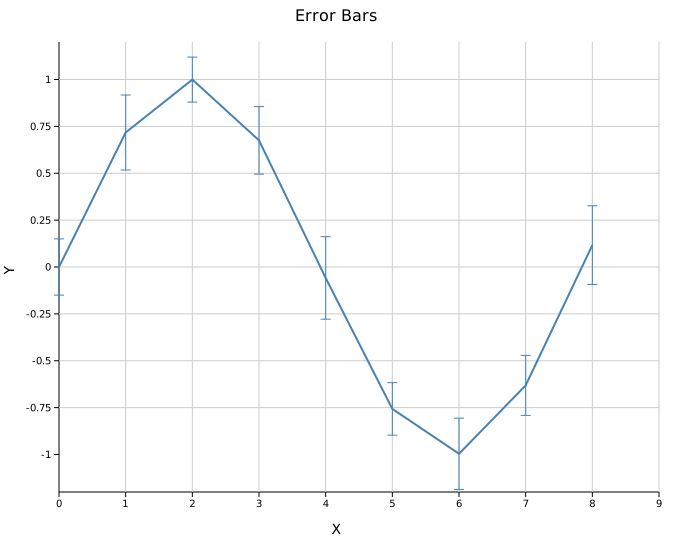
.with_y_err() and .with_x_err() attach symmetric error bars. Asymmetric variants take (negative, positive) tuples.
#![allow(unused)]
fn main() {
use kuva::plot::LinePlot;
use kuva::backend::svg::SvgBackend;
use kuva::render::render::render_multiple;
use kuva::render::layout::Layout;
use kuva::render::plots::Plot;

let data: Vec<(f64, f64)> = (0..=8)
    .map(|i| (i as f64, (i as f64 * 0.8).sin()))
    .collect();
let y_err = vec![0.15, 0.20, 0.12, 0.18, 0.22, 0.14, 0.19, 0.16, 0.21_f64];

let plot = LinePlot::new()
    .with_data(data)
    .with_y_err(y_err)
    .with_color("steelblue")
    .with_stroke_width(2.0);

let plots = vec![Plot::Line(plot)];
let layout = Layout::auto_from_plots(&plots)
    .with_title("Error Bars")
    .with_x_label("X")
    .with_y_label("Y");

let svg = SvgBackend.render_scene(&render_multiple(plots, layout));
}
Asymmetric errors
Pass (neg, pos) tuples instead of scalar values:
#![allow(unused)]
fn main() {
use kuva::plot::LinePlot;
let data: Vec<(f64, f64)> = (0..=4).map(|i| (i as f64, i as f64)).collect();
let y_err = vec![(0.1_f64, 0.3_f64), (0.2, 0.5), (0.1, 0.4), (0.3, 0.2), (0.2, 0.6)];

let plot = LinePlot::new()
    .with_data(data)
    .with_y_err_asymmetric(y_err);
}
Multiple series
Pass multiple LinePlot structs in a Vec<Plot>. Legends appear automatically when any series has a label.
#![allow(unused)]
fn main() {
use kuva::plot::LinePlot;
use kuva::backend::svg::SvgBackend;
use kuva::render::render::render_multiple;
use kuva::render::layout::Layout;
use kuva::render::plots::Plot;

let xs: Vec<f64> = (0..=60).map(|i| i as f64 * 0.1).collect();

let plots = vec![
    Plot::Line(LinePlot::new()
        .with_data(xs.iter().map(|&x| (x, x.sin())))
        .with_color("steelblue").with_legend("sin(x)")),
    Plot::Line(LinePlot::new()
        .with_data(xs.iter().map(|&x| (x, x.cos())))
        .with_color("crimson").with_legend("cos(x)")),
];

let layout = Layout::auto_from_plots(&plots)
    .with_title("Multiple Series")
    .with_x_label("X")
    .with_y_label("Y");

let svg = SvgBackend.render_scene(&render_multiple(plots, layout));
}
API reference
| Method | Description |
|---|---|
LinePlot::new() | Create a new line plot with defaults |
.with_data(iter) | Set (x, y) data; accepts any Into<f64> numeric type |
.with_color(s) | Set line color (CSS color string) |
.with_stroke_width(w) | Set stroke width in pixels (default 2.0) |
.with_legend(s) | Attach a legend label to this series |
.with_line_style(LineStyle) | Set stroke style explicitly |
.with_dashed() | Shorthand for LineStyle::Dashed |
.with_dotted() | Shorthand for LineStyle::Dotted |
.with_dashdot() | Shorthand for LineStyle::DashDot |
.with_step() | Use step interpolation |
.with_fill() | Fill area under the line |
.with_fill_opacity(f) | Set fill opacity (default 0.3) |
.with_band(lower, upper) | Confidence band aligned to line x positions |
.with_x_err(iter) | Symmetric X error bars |
.with_x_err_asymmetric(iter) | Asymmetric X error bars: (neg, pos) tuples |
.with_y_err(iter) | Symmetric Y error bars |
.with_y_err_asymmetric(iter) | Asymmetric Y error bars: (neg, pos) tuples |
LineStyle variants
Solid (default) · Dashed (8 4) · Dotted (2 4) · DashDot (8 4 2 4) · Custom(String)
See also: Scatter Plot for unconnected points, Series Plot for multiple named series on one canvas, Band Plot for an attached confidence interval.
CLI
Line plot. Identical column flags to scatter; adds line-style options.
Input: any tabular file with two numeric columns, sorted by x.
| Flag | Default | Description |
|---|---|---|
--x <COL> | 0 | X-axis column |
--y <COL> | 1 | Y-axis column |
--color-by <COL> | — | Multi-series grouping |
--color <CSS> | steelblue | Line color (single-series) |
--stroke-width <PX> | 2.0 | Line stroke width |
--dashed | off | Dashed line style |
--dotted | off | Dotted line style |
--fill | off | Fill area under the line |
--legend | off | Show legend |
--x-date-format <FMT> | — | Parse the X column as a date/time (see Date/time X axis) |
kuva line measurements.tsv --x time --y value --color-by group --legend

kuva line measurements.tsv --x time --y value --fill --color "rgba(70,130,180,0.4)"

kuva line prices.tsv --x date --y close --x-date-format "%Y-%m-%d"
See also: Shared flags — output, appearance, axes, log scale.