Scatter Plot
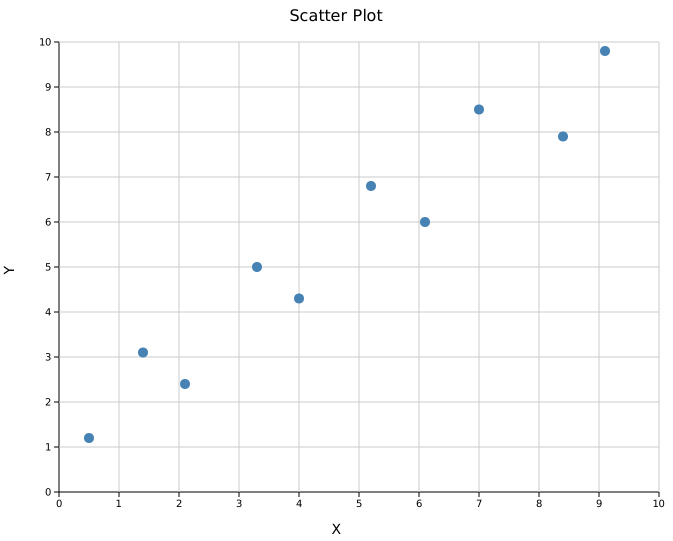
A scatter plot renders individual (x, y) data points as markers. It supports trend lines (linear and LOESS), error bars, variable point sizes, per-point colors, and ten marker shapes.
Import path: kuva::plot::scatter::ScatterPlot
Basic usage
#![allow(unused)]
fn main() {
use kuva::plot::scatter::ScatterPlot;
use kuva::backend::svg::SvgBackend;
use kuva::render::render::render_multiple;
use kuva::render::layout::Layout;
use kuva::render::plots::Plot;

let data = vec![
    (0.5_f64, 1.2_f64),
    (1.4, 3.1),
    (2.1, 2.4),
    (3.3, 5.0),
    (4.0, 4.3),
    (5.2, 6.8),
    (6.1, 6.0),
    (7.0, 8.5),
    (8.4, 7.9),
    (9.1, 9.8),
];

let plot = ScatterPlot::new()
    .with_data(data)
    .with_color("steelblue")
    .with_size(5.0);

let plots = vec![Plot::Scatter(plot)];
let layout = Layout::auto_from_plots(&plots)
    .with_title("Scatter Plot")
    .with_x_label("X")
    .with_y_label("Y");

let scene = render_multiple(plots, layout);
let svg = SvgBackend.render_scene(&scene);
std::fs::write("scatter.svg", svg).unwrap();
}
Layout options
Layout::auto_from_plots() automatically computes axis ranges from the data. You can also set ranges manually with Layout::new((x_min, x_max), (y_min, y_max)).
Trend line
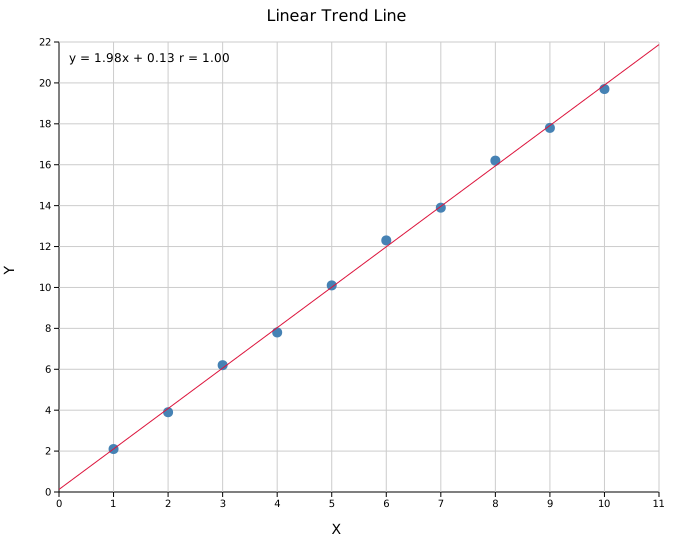
Add a linear trend line with .with_trend(TrendLine::Linear). Optionally overlay the regression equation and the signed Pearson correlation coefficient r. The fit uses ordinary least squares with an intercept and all supplied points. For this fit, the coefficient of determination is R^2 = r^2; for example, r = -1 describes a perfect descending line with R^2 = 1. The line and its annotations are omitted for fewer than two points, constant x, non-finite coordinates, or coefficients that cannot be represented as finite f64 values. Constant y keeps its flat trend line, but drops the r annotation, since the coefficient is undefined there rather than zero. An extrapolated line is omitted if either endpoint cannot be represented.
#![allow(unused)]
fn main() {
use kuva::plot::scatter::{ScatterPlot, TrendLine};
use kuva::backend::svg::SvgBackend;
use kuva::render::render::render_multiple;
use kuva::render::layout::Layout;
use kuva::render::plots::Plot;

let data = vec![
    (1.0_f64, 2.1_f64), (2.0, 3.9), (3.0, 6.2),
    (4.0, 7.8), (5.0, 10.1), (6.0, 12.3),
    (7.0, 13.9), (8.0, 16.2), (9.0, 17.8), (10.0, 19.7),
];

let plot = ScatterPlot::new()
    .with_data(data)
    .with_color("steelblue")
    .with_size(5.0)
    .with_trend(TrendLine::Linear)
    .with_trend_color("crimson")   // defaults to "black"
    .with_equation()               // show y = mx + b
    .with_correlation();           // show signed r

let plots = vec![Plot::Scatter(plot)];
let layout = Layout::auto_from_plots(&plots)
    .with_title("Linear Trend Line")
    .with_x_label("X")
    .with_y_label("Y");

let svg = SvgBackend.render_scene(&render_multiple(plots, layout));
}
Tip:
.with_equation()and.with_correlation()render the fit statistics as floating text in the data area. For a cleaner presentation — particularly with dense point clouds — consider usingLayout::with_stats_box()to display fit statistics in a bordered inset box instead. See Stats Box.
LOESS smoother
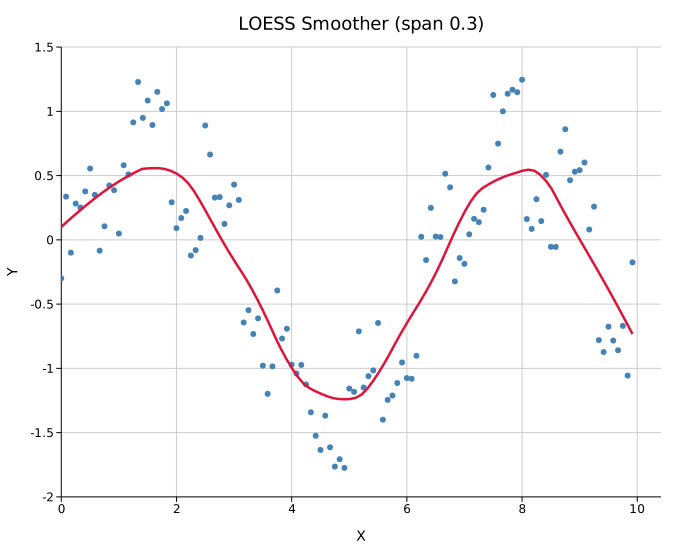
For data with a non-linear relationship, overlay a LOESS (locally-weighted regression) smoother instead of a straight line. .with_loess() uses a default span of 0.5; .with_loess_span(f) sets the span (the fraction of points in each local fit, 0.05–1.0): smaller spans follow local detail, larger spans give a smoother curve.
Each prediction fits a local straight line using distance weights. These weights do not downweight a point because its y value is an outlier. A fitted line can extend beyond the observed y range; the plot clips the curve at its axis limits. Log axes transform the drawn curve, rather than fitting logarithms of the observations.
#![allow(unused)]
fn main() {
use kuva::plot::scatter::ScatterPlot;
let plot = ScatterPlot::new()
    .with_data(data)
    .with_loess()                  // or .with_loess_span(0.2)
    .with_trend_color("crimson");
}
Equation and correlation annotations apply to the linear fit only, not to LOESS.
Confidence band
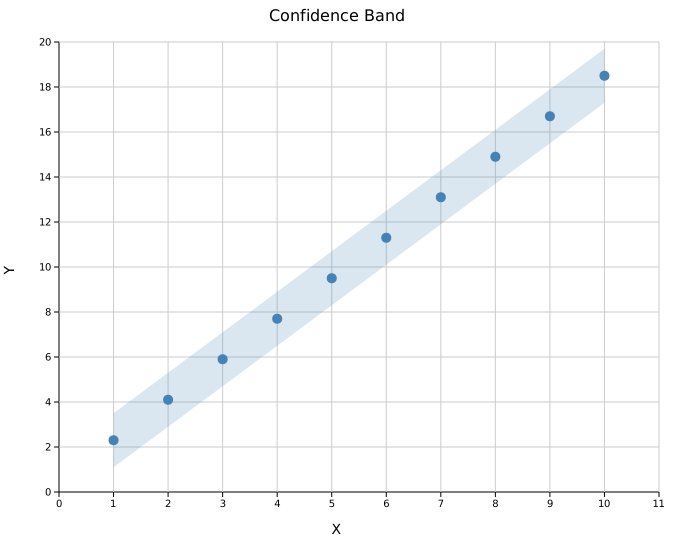
Attach a shaded uncertainty region with .with_band(y_lower, y_upper). Both slices must align with the x positions of the scatter data. The band color matches the point color.
#![allow(unused)]
fn main() {
use kuva::plot::scatter::ScatterPlot;
use kuva::backend::svg::SvgBackend;
use kuva::render::render::render_multiple;
use kuva::render::layout::Layout;
use kuva::render::plots::Plot;

let xs: Vec<f64> = (1..=10).map(|i| i as f64).collect();
let ys: Vec<f64> = xs.iter().map(|&x| x * 1.8 + 0.5).collect();
let lower: Vec<f64> = ys.iter().map(|&y| y - 1.2).collect();
let upper: Vec<f64> = ys.iter().map(|&y| y + 1.2).collect();

let data: Vec<(f64, f64)> = xs.into_iter().zip(ys).collect();

let plot = ScatterPlot::new()
    .with_data(data)
    .with_color("steelblue")
    .with_size(5.0)
    .with_band(lower, upper);

let plots = vec![Plot::Scatter(plot)];
let layout = Layout::auto_from_plots(&plots)
    .with_title("Confidence Band")
    .with_x_label("X")
    .with_y_label("Y");

let svg = SvgBackend.render_scene(&render_multiple(plots, layout));
}
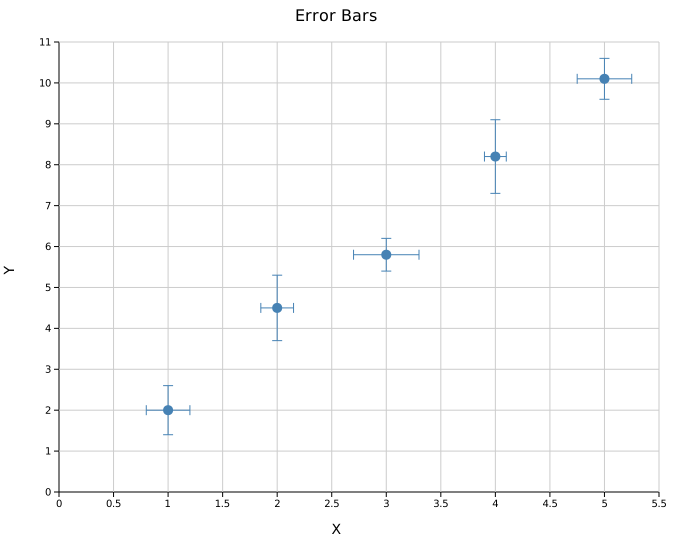
Error bars
Use .with_x_err() and .with_y_err() for symmetric error bars. Asymmetric variants accept (negative, positive) tuples.
#![allow(unused)]
fn main() {
use kuva::plot::scatter::ScatterPlot;
use kuva::backend::svg::SvgBackend;
use kuva::render::render::render_multiple;
use kuva::render::layout::Layout;
use kuva::render::plots::Plot;

let data = vec![
    (1.0_f64, 2.0_f64), (2.0, 4.5), (3.0, 5.8),
    (4.0, 8.2), (5.0, 10.1),
];
let x_err = vec![0.2_f64, 0.15, 0.3, 0.1, 0.25];  // symmetric
let y_err = vec![0.6_f64, 0.8, 0.4, 0.9, 0.5];     // symmetric

let plot = ScatterPlot::new()
    .with_data(data)
    .with_x_err(x_err)
    .with_y_err(y_err)
    .with_color("steelblue")
    .with_size(5.0);

let plots = vec![Plot::Scatter(plot)];
let layout = Layout::auto_from_plots(&plots)
    .with_title("Error Bars")
    .with_x_label("X")
    .with_y_label("Y");

let svg = SvgBackend.render_scene(&render_multiple(plots, layout));
}
Asymmetric errors
Pass (neg, pos) tuples instead of scalar values:
#![allow(unused)]
fn main() {
use kuva::plot::scatter::ScatterPlot;
let data = vec![(1.0_f64, 5.0_f64), (2.0, 6.0)];
let y_err = vec![(0.3_f64, 0.8_f64), (0.5, 1.2)];  // (neg, pos)

let plot = ScatterPlot::new()
    .with_data(data)
    .with_y_err_asymmetric(y_err);
}
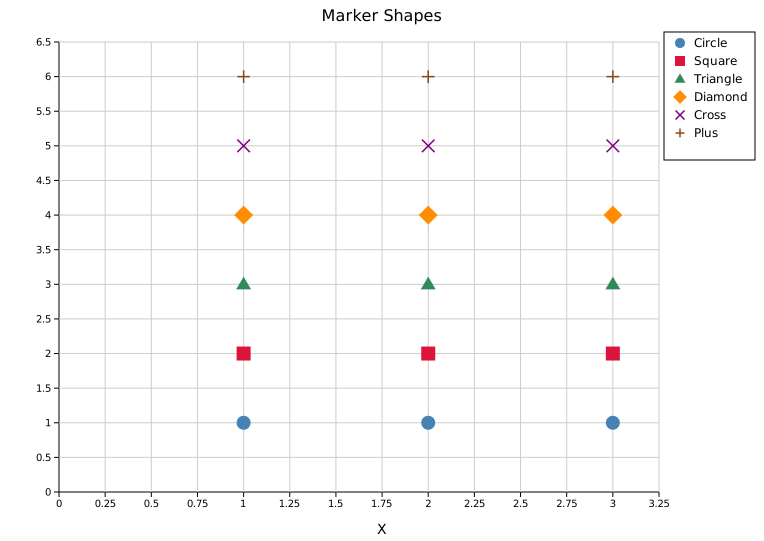
Marker shapes
Ten marker shapes are available via MarkerShape. They are particularly useful when overlaying multiple series on the same axes.
#![allow(unused)]
fn main() {
use kuva::plot::scatter::{ScatterPlot, MarkerShape};
use kuva::backend::svg::SvgBackend;
use kuva::render::render::render_multiple;
use kuva::render::layout::Layout;
use kuva::render::plots::Plot;

let plots = vec![
    Plot::Scatter(ScatterPlot::new()
        .with_data(vec![(1.0_f64, 1.0_f64), (2.0, 1.0), (3.0, 1.0)])
        .with_color("steelblue").with_size(7.0)
        .with_marker(MarkerShape::Circle).with_legend("Circle")),

    Plot::Scatter(ScatterPlot::new()
        .with_data(vec![(1.0_f64, 2.0_f64), (2.0, 2.0), (3.0, 2.0)])
        .with_color("crimson").with_size(7.0)
        .with_marker(MarkerShape::Square).with_legend("Square")),

    Plot::Scatter(ScatterPlot::new()
        .with_data(vec![(1.0_f64, 3.0_f64), (2.0, 3.0), (3.0, 3.0)])
        .with_color("seagreen").with_size(7.0)
        .with_marker(MarkerShape::Triangle).with_legend("Triangle")),
];

let layout = Layout::auto_from_plots(&plots)
    .with_title("Marker Shapes")
    .with_x_label("X")
    .with_y_label("");

let svg = SvgBackend.render_scene(&render_multiple(plots, layout));
}
Available variants: Circle (default), Square, Triangle (up), TriangleDown, Diamond, Cross, Plus, Star, Pentagon, Hexagon.
Bubble plot
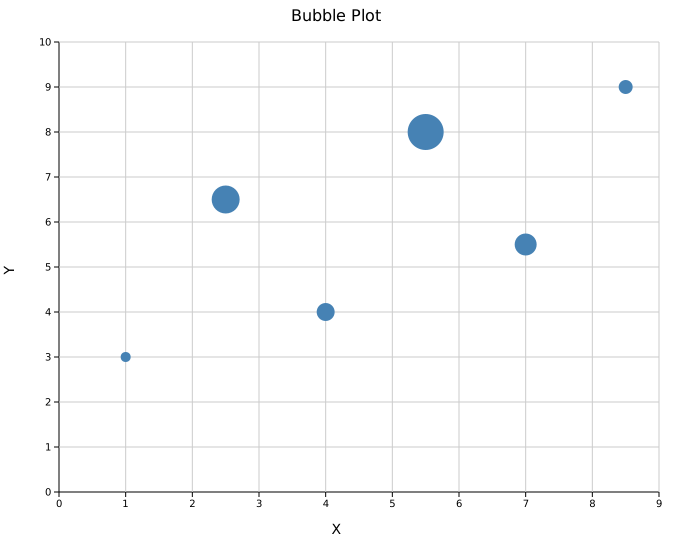
Encode a third dimension through point area using .with_sizes(). Values are point radii in pixels.
#![allow(unused)]
fn main() {
use kuva::plot::scatter::ScatterPlot;
use kuva::backend::svg::SvgBackend;
use kuva::render::render::render_multiple;
use kuva::render::layout::Layout;
use kuva::render::plots::Plot;

let data = vec![
    (1.0_f64, 3.0_f64), (2.5, 6.5), (4.0, 4.0),
    (5.5, 8.0), (7.0, 5.5), (8.5, 9.0),
];
let sizes = vec![5.0_f64, 14.0, 9.0, 18.0, 11.0, 7.0];

let plot = ScatterPlot::new()
    .with_data(data)
    .with_sizes(sizes)
    .with_color("steelblue");

let plots = vec![Plot::Scatter(plot)];
let layout = Layout::auto_from_plots(&plots)
    .with_title("Bubble Plot")
    .with_x_label("X")
    .with_y_label("Y");

let svg = SvgBackend.render_scene(&render_multiple(plots, layout));
}
Per-point colors
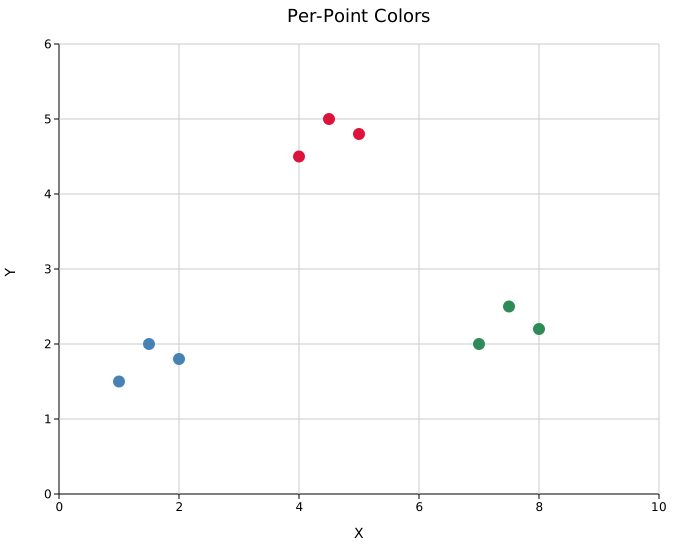
Encode a categorical grouping through color using .with_colors(). Colors are matched to points by index and fall back to the uniform .with_color() value for any point without an entry.
This is useful when your data already carries a group label and you want to avoid splitting into multiple ScatterPlot instances. The legend is not updated automatically — add .with_legend() on separate ScatterPlot instances when you need a labeled legend.
#![allow(unused)]
fn main() {
use kuva::plot::scatter::ScatterPlot;
use kuva::backend::svg::SvgBackend;
use kuva::render::render::render_multiple;
use kuva::render::layout::Layout;
use kuva::render::plots::Plot;

// Three clusters, colors assigned per point
let data = vec![
    (1.0_f64, 1.5_f64), (1.5, 2.0), (2.0, 1.8),  // cluster A
    (4.0, 4.5),         (4.5, 5.0), (5.0, 4.8),  // cluster B
    (7.0, 2.0),         (7.5, 2.5), (8.0, 2.2),  // cluster C
];
let colors = vec![
    "steelblue", "steelblue", "steelblue",
    "crimson",   "crimson",   "crimson",
    "seagreen",  "seagreen",  "seagreen",
];

let plot = ScatterPlot::new()
    .with_data(data)
    .with_colors(colors)
    .with_size(6.0);

let plots = vec![Plot::Scatter(plot)];
let layout = Layout::auto_from_plots(&plots)
    .with_title("Per-Point Colors")
    .with_x_label("X")
    .with_y_label("Y");

let svg = SvgBackend.render_scene(&render_multiple(plots, layout));
}
Marker opacity and stroke
Two builders control the visual style of markers, enabling three distinct modes useful for dense datasets:
| Mode | Setting | Use case |
|---|---|---|
| Solid (default) | no calls needed | Small N or well-separated clusters |
| Semi-transparent | opacity < 1 + stroke | Dense regions pool colour; individual points stay visible |
| Hollow | opacity = 0.0 + stroke | Very large N; overlapping rings reveal density without blobs |
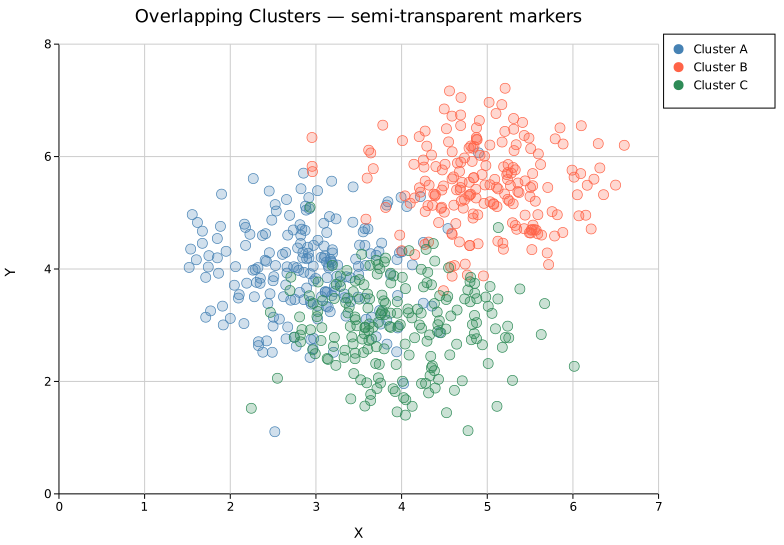
Semi-transparent markers — overlapping clusters
Three Gaussian clusters of 200 points each share a region in the centre. Solid markers at this density merge into a single opaque mass. Reducing opacity to 0.25 lets the darker overlap region show where clusters share space, while the 0.7 px stroke keeps each marker individually legible.
#![allow(unused)]
fn main() {
use kuva::plot::scatter::ScatterPlot;
use kuva::backend::svg::SvgBackend;
use kuva::render::render::render_multiple;
use kuva::render::layout::Layout;
use kuva::render::plots::Plot;

// Three clusters, 200 points each — defined as (center_x, center_y, color, label)
let series = [
    (3.0_f64, 4.0_f64, "steelblue", "Cluster A"),
    (5.0,     5.5,     "tomato",    "Cluster B"),
    (4.0,     3.0,     "seagreen",  "Cluster C"),
];

// (populate `data` from your source — each entry is 200 (x, y) points)

let data: Vec<(f64,f64)> = vec![];
let plot = ScatterPlot::new()
    .with_data(data)
    .with_color("steelblue")
    .with_size(5.0)
    .with_marker_opacity(0.25)
    .with_marker_stroke_width(0.7)
    .with_legend("Cluster A");

let plots = vec![Plot::Scatter(plot) /* , ... */];
let layout = Layout::auto_from_plots(&plots)
    .with_title("Overlapping Clusters — semi-transparent markers")
    .with_x_label("X")
    .with_y_label("Y");

let svg = SvgBackend.render_scene(&render_multiple(plots, layout));
}
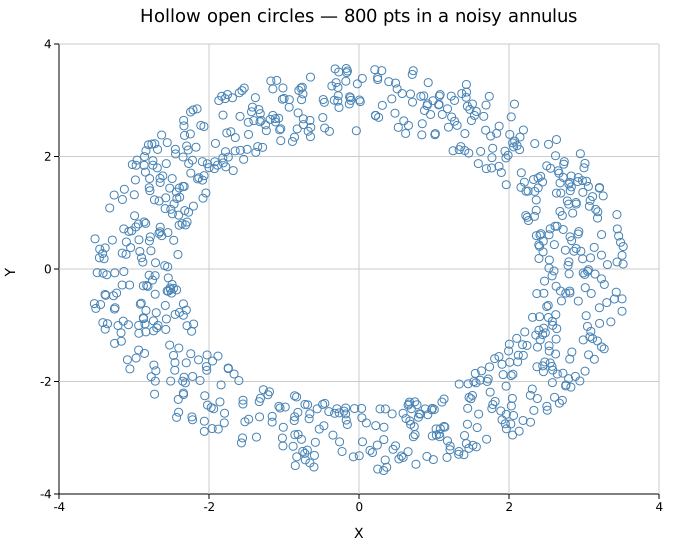
Hollow open circles — dense annular data
800 points sampled uniformly along a noisy ring. With solid fill the ring becomes a uniform band; hollow circles (opacity = 0.0) make the denser arc sections visible through the accumulation of overlapping outlines.
#![allow(unused)]
fn main() {
use kuva::plot::scatter::ScatterPlot;
use kuva::backend::svg::SvgBackend;
use kuva::render::render::render_multiple;
use kuva::render::layout::Layout;
use kuva::render::plots::Plot;

// 800 points sampled along a noisy annulus of radius ≈ 3
let data: Vec<(f64,f64)> = vec![];
let plot = ScatterPlot::new()
    .with_data(data)
    .with_color("steelblue")
    .with_size(4.0)
    .with_marker_opacity(0.0)       // fully hollow
    .with_marker_stroke_width(1.0); // only the outline is drawn

let plots = vec![Plot::Scatter(plot)];
let layout = Layout::auto_from_plots(&plots)
    .with_title("Hollow open circles — 800 pts in a noisy annulus")
    .with_x_label("X")
    .with_y_label("Y");

let svg = SvgBackend.render_scene(&render_multiple(plots, layout));
}
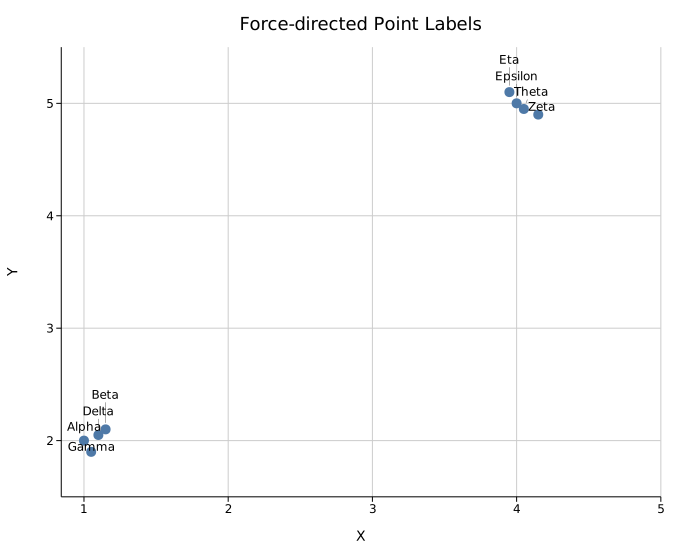
Point labels
Attach a text label to each point with .with_labels(iter) (aligned to the data by index; an empty string leaves a point unlabelled). The placement is controlled by .with_label_style(LabelStyle::…), shared with the volcano and Manhattan plots:
| Style | Placement |
|---|---|
LabelStyle::Exact | At the point, no adjustment (may overlap) |
LabelStyle::Nudge (default) | Sorted left-to-right and nudged vertically |
LabelStyle::Arrow { offset_x, offset_y } | Fixed pixel offset with a leader line |
LabelStyle::Repel | Force-directed (ggrepel / adjustText style): labels pushed off each other and off the points in 2-D, with thin leader lines |
.with_repel_labels() is shorthand for .with_label_style(LabelStyle::Repel), the best choice for dense, clustered labels.
#![allow(unused)]
fn main() {
use kuva::plot::ScatterPlot;
let plot = ScatterPlot::new()
    .with_data(data)
    .with_labels(vec!["Alpha", "Beta", "Gamma", "Delta"])
    .with_repel_labels();
}
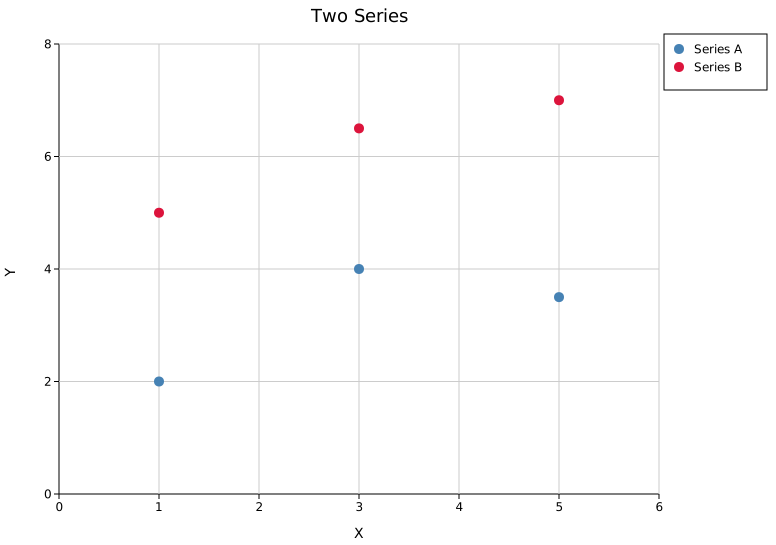
Multiple series
Wrap multiple ScatterPlot structs in a Vec<Plot> and pass them to render_multiple(). Legends are shown when any series has a label attached via .with_legend().
#![allow(unused)]
fn main() {
use kuva::plot::scatter::ScatterPlot;
use kuva::backend::svg::SvgBackend;
use kuva::render::render::render_multiple;
use kuva::render::layout::Layout;
use kuva::render::plots::Plot;

let series_a = ScatterPlot::new()
    .with_data(vec![(1.0_f64, 2.0_f64), (3.0, 4.0), (5.0, 3.5)])
    .with_color("steelblue")
    .with_legend("Series A");

let series_b = ScatterPlot::new()
    .with_data(vec![(1.0_f64, 5.0_f64), (3.0, 6.5), (5.0, 7.0)])
    .with_color("crimson")
    .with_legend("Series B");

let plots = vec![Plot::Scatter(series_a), Plot::Scatter(series_b)];
let layout = Layout::auto_from_plots(&plots)
    .with_title("Two Series")
    .with_x_label("X")
    .with_y_label("Y");

let svg = SvgBackend.render_scene(&render_multiple(plots, layout));
}
API reference
| Method | Description |
|---|---|
ScatterPlot::new() | Create a new scatter plot with defaults |
.with_data(iter) | Set (x, y) data; accepts any Into<f64> numeric type |
.with_color(s) | Set uniform point color (CSS color string, default "black") |
.with_colors(iter) | Set per-point colors; falls back to .with_color for out-of-range indices |
.with_size(r) | Set uniform point radius in pixels (default 3.0) |
.with_sizes(iter) | Set per-point radii (bubble plot); falls back to .with_size for out-of-range indices |
.with_marker(MarkerShape) | Set marker shape (default Circle) |
.with_legend(s) | Attach a legend label to this series |
.with_trend(TrendLine) | Overlay a trend line |
.with_loess() | Overlay a LOESS smoother (default span 0.5) |
.with_loess_span(f) | LOESS smoother with an explicit span (0.05–1.0) |
.with_trend_color(s) | Set trend/smoother line color |
.with_trend_width(w) | Set trend/smoother line stroke width |
.with_equation() | Annotate the plot with the regression equation |
.with_correlation() | Annotate the plot with signed Pearson r |
.with_x_err(iter) | Symmetric X error bars |
.with_x_err_asymmetric(iter) | Asymmetric X error bars: (neg, pos) tuples |
.with_y_err(iter) | Symmetric Y error bars |
.with_y_err_asymmetric(iter) | Asymmetric Y error bars: (neg, pos) tuples |
.with_band(lower, upper) | Confidence band aligned to scatter x positions |
.with_marker_opacity(f) | Fill alpha: 0.0 = hollow, 1.0 = solid (default: solid) |
.with_marker_stroke_width(w) | Outline stroke at the fill color; None = no stroke (default) |
.with_labels(iter) | Per-point text labels (aligned by index; "" skips a point) |
.with_label_style(LabelStyle) | Label placement: Exact / Nudge / Arrow / Repel |
.with_repel_labels() | Shorthand for .with_label_style(LabelStyle::Repel) |
MarkerShape variants
Circle · Square · Triangle (up) · TriangleDown · Diamond · Cross · Plus · Star · Pentagon · Hexagon
TrendLine variants
Linear: fits y = mx + b by ordinary least squares. Loess { span }: locally-weighted regression smoother for non-linear trends.
See also: Line Plot for connected/ordered data, Hexbin Plot for large-N density, Joint Plot for scatter with marginal distributions.
CLI
Scatter plot of (x, y) point pairs. Supports multi-series coloring, trend lines, log scale, and .parquet input (like every other subcommand, not just this one).
Input: any tabular file with two numeric columns.
| Flag | Default | Description |
|---|---|---|
--x <COL> | 0 | X-axis column |
--y <COL> | 1 | Y-axis column |
--color-by <COL> | — | Group by this column; each group gets a distinct color |
--color <CSS> | steelblue | Point color (single-series only) |
--size <PX> | 3.0 | Point radius in pixels |
--marker <SHAPE> | circle | Marker shape: circle, square, triangle, triangle-down, diamond, cross, plus, star, pentagon, hexagon |
--trend | off | Overlay a linear trend line |
--loess | off | Overlay a LOESS smoother (local regression) instead of a linear trend |
--loess-span <F> | 0.5 | LOESS span, 0.05–1.0 (implies --loess); smaller = wigglier |
--equation | off | Annotate with regression equation (requires --trend) |
--correlation | off | Annotate with signed Pearson r (requires --trend) |
--label-col <COL> | — | Label each point with this column (single-series mode only) |
--label-style <STYLE> | nudge | Point-label placement: nudge, exact, or repel |
--legend | off | Show legend |
--x-date-format <FMT> | — | Parse the X column as a date/time (see Date/time X axis) |
kuva scatter measurements.tsv --x time --y value --color steelblue

kuva scatter measurements.tsv --x time --y value \
    --color-by group --legend --title "Expression over time"

kuva scatter measurements.tsv --x time --y value \
    --trend --equation --correlation --log-y

# star markers with a LOESS smoother
kuva scatter measurements.tsv --x time --y value \
    --marker star --loess-span 0.3

kuva scatter prices.tsv --x date --y close --x-date-format "%Y-%m-%d"
See also: Shared flags — output, appearance, axes, log scale.