ECDF Plot
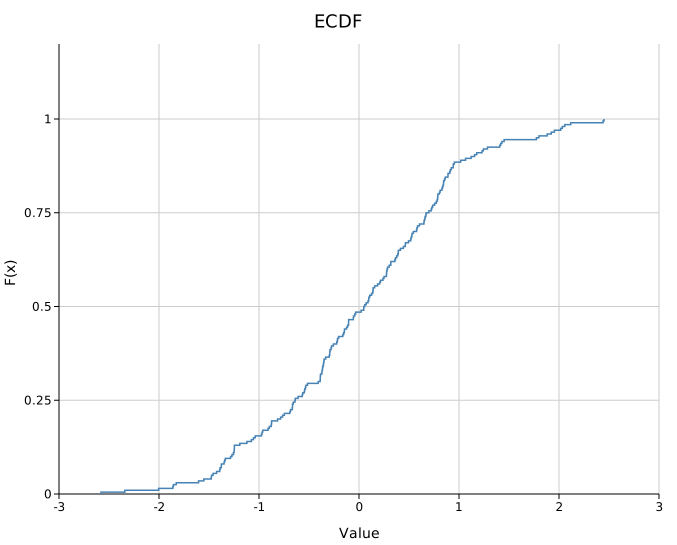
An Empirical Cumulative Distribution Function plot shows F(x) = P(X ≤ x) as a right-continuous step function. It is one of the most informative single-distribution diagnostics — no binning, no bandwidth choice, and the full distribution is visible. Multiple groups can be overlaid for direct comparison.
Import path: kuva::plot::EcdfPlot
Basic usage
#![allow(unused)]
fn main() {
use kuva::plot::EcdfPlot;
use kuva::backend::svg::SvgBackend;
use kuva::render::render::render_multiple;
use kuva::render::layout::Layout;
use kuva::render::plots::Plot;

let data: Vec<f64> = vec![1.2, 3.4, 2.1, 5.6, 4.0, 0.8, 3.3, 2.7, 4.5, 1.9];

let plot = EcdfPlot::new()
    .with_data("Sample", data)
    .with_color("steelblue");

let plots = vec![Plot::Ecdf(plot)];
let layout = Layout::auto_from_plots(&plots)
    .with_title("ECDF")
    .with_x_label("Value")
    .with_y_label("F(x)");

let svg = SvgBackend.render_scene(&render_multiple(plots, layout));
std::fs::write("ecdf.svg", svg).unwrap();
}
Multi-group comparison
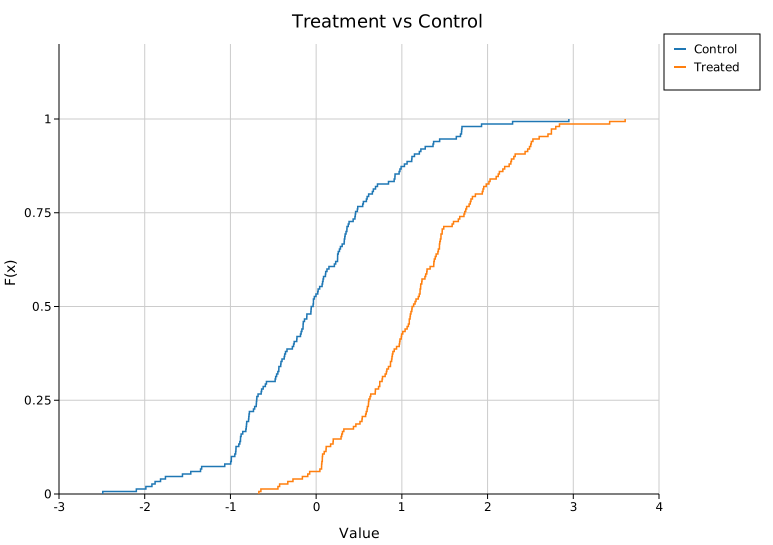
Add multiple groups to overlay ECDFs on the same axes. Call .with_legend("") to enable the legend — an empty string shows group labels without a separate title.
#![allow(unused)]
fn main() {
use kuva::plot::EcdfPlot;
use kuva::render::plots::Plot;
use kuva::render::layout::Layout;
use kuva::render::render::render_multiple;
use kuva::backend::svg::SvgBackend;
let plot = EcdfPlot::new()
    .with_data("Control", vec![1.0, 1.5, 2.0, 2.5, 3.0, 3.5, 4.0])
    .with_data("Treated", vec![2.0, 2.5, 3.0, 3.5, 4.0, 4.5, 5.0])
    .with_legend("");

let plots = vec![Plot::Ecdf(plot)];
let layout = Layout::auto_from_plots(&plots)
    .with_title("Treatment vs Control");

let svg = SvgBackend.render_scene(&render_multiple(plots, layout));
}
Complementary CDF (CCDF)
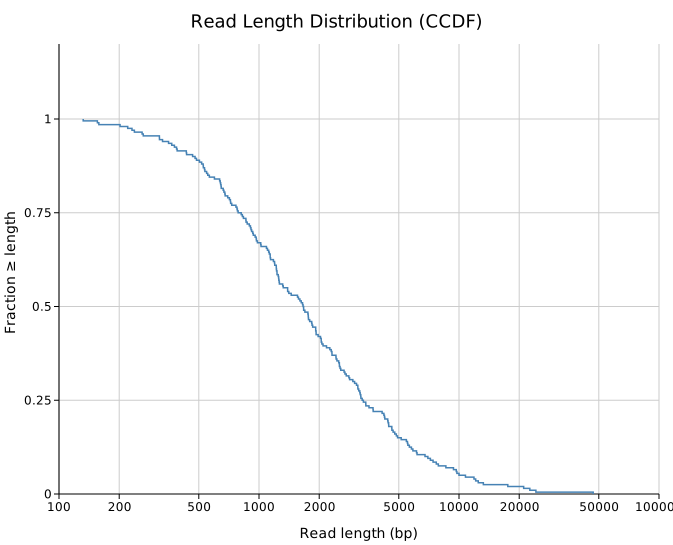
.with_complementary() flips the y-axis to 1 - F(x), which is the survival function / exceedance probability. This is the standard view for:
- Sequencing read length distributions (what fraction of reads are ≥ N bp?)
- Coverage distributions (what fraction of positions have ≥ N× depth?)
- Heavy-tailed data where you care about the tail rather than the bulk
#![allow(unused)]
fn main() {
use kuva::plot::EcdfPlot;
use kuva::render::plots::Plot;
let plot = EcdfPlot::new()
    .with_data("Nanopore run", vec![500.0, 1200.0, 3500.0, 8000.0, 15000.0])
    .with_color("steelblue")
    .with_complementary();
}
Combine with a log x-axis via Layout::with_log_x() for read-length distributions:
#![allow(unused)]
fn main() {
use kuva::plot::EcdfPlot;
use kuva::render::plots::Plot;
use kuva::render::layout::Layout;
let plot = EcdfPlot::new().with_data("", vec![1.0]);
let plots = vec![Plot::Ecdf(plot)];
let layout = Layout::auto_from_plots(&plots).with_log_x();
}
DKW confidence bands
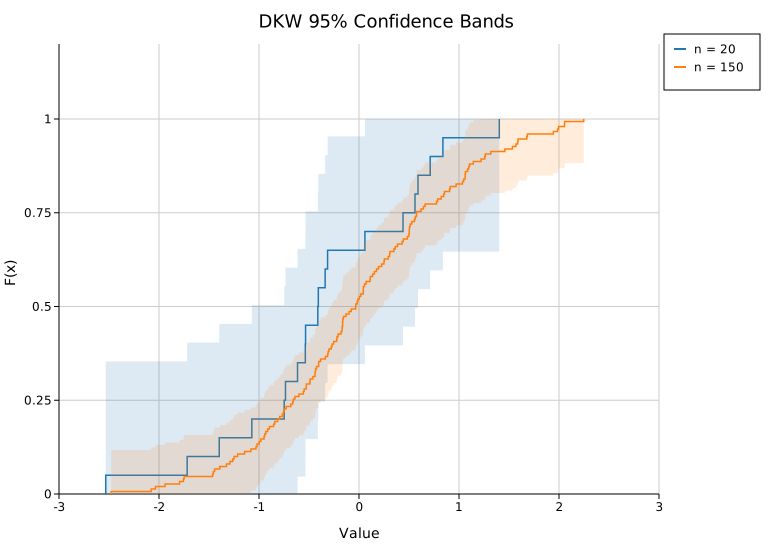
.with_confidence_band() adds a shaded DKW 95% confidence band around each curve. The band width is ε = √(ln(40) / (2n)) — wider for small n, tight for large n. This is the key diagnostic for whether two curves are statistically distinguishable:
#![allow(unused)]
fn main() {
use kuva::plot::EcdfPlot;
let plot = EcdfPlot::new()
    .with_data("n=20", (0..20).map(|i| i as f64))
    .with_data("n=100", (0..100).map(|i| i as f64))
    .with_confidence_band()
    .with_legend("");
}
Adjust the band opacity with .with_band_alpha(f) (default 0.15).
Rug plot
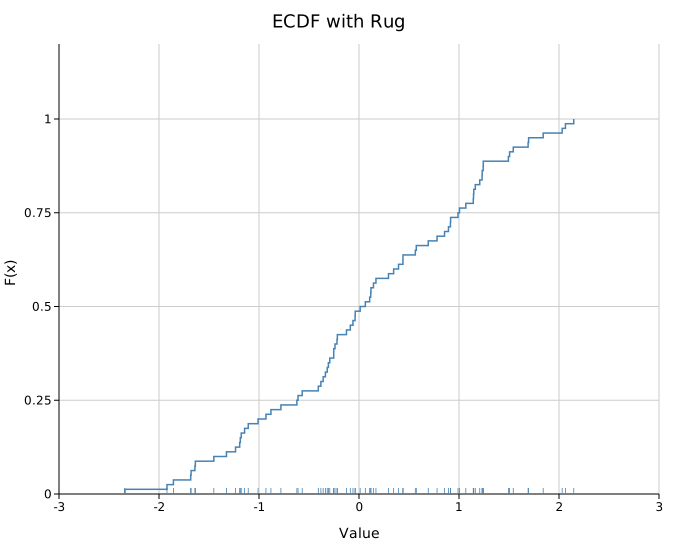
.with_rug() draws small tick marks at the bottom of the plot area at each data point's location. This shows the density and distribution of raw observations — useful for spotting clusters, gaps, and outliers that the step function alone can obscure.
#![allow(unused)]
fn main() {
use kuva::plot::EcdfPlot;
let plot = EcdfPlot::new()
    .with_data("Sample", vec![1.0, 1.1, 1.2, 3.0, 5.0, 5.1, 7.5])
    .with_color("steelblue")
    .with_rug();
}
For multi-group plots, each group's rug is offset vertically so they don't fully overlap.
Percentile reference lines
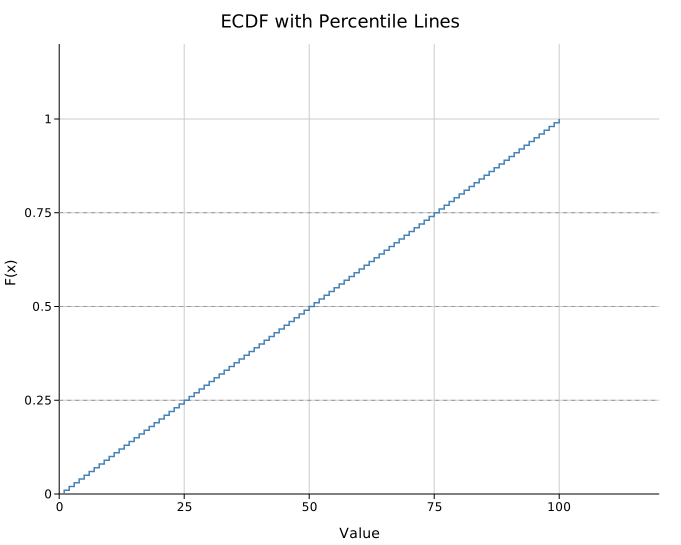
.with_percentile_lines(vec![0.25, 0.5, 0.75]) draws horizontal dashed reference lines at Q1, median, and Q3 (or any levels you specify). Labels are placed at the right edge.
#![allow(unused)]
fn main() {
use kuva::plot::EcdfPlot;
let plot = EcdfPlot::new()
    .with_data("", (1..=100).map(|i| i as f64))
    .with_color("steelblue")
    .with_percentile_lines(vec![0.25, 0.5, 0.75]);
}
Step markers
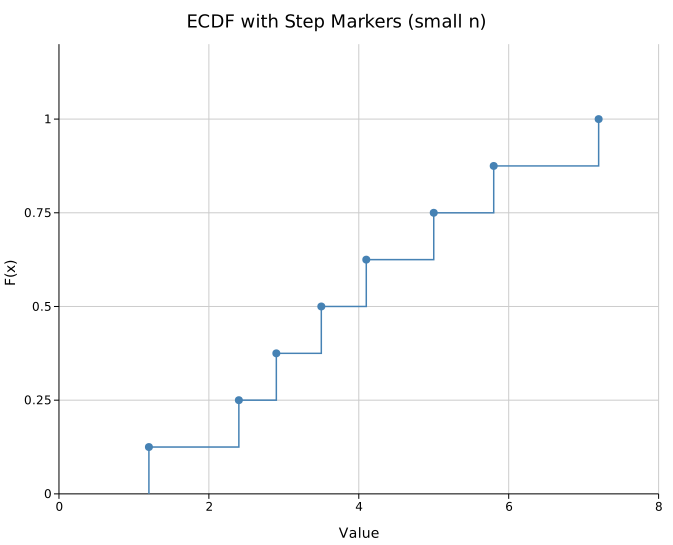
.with_markers() places a circle at each step endpoint, making the discrete nature of the ECDF explicit. Most useful for small samples (n < ~30):
#![allow(unused)]
fn main() {
use kuva::plot::EcdfPlot;
let plot = EcdfPlot::new()
    .with_data("n=8", vec![1.2, 2.4, 2.9, 3.5, 4.1, 5.0, 5.8, 7.2])
    .with_color("steelblue")
    .with_markers()
    .with_marker_size(4.0);
}
Smooth CDF
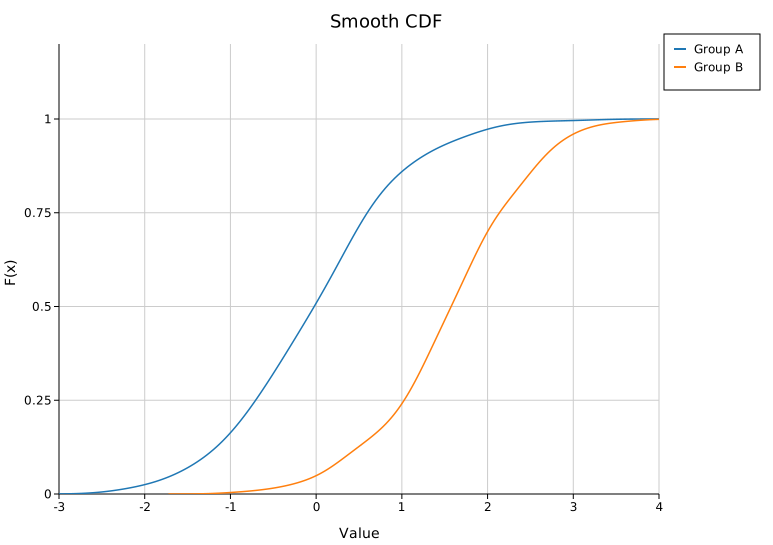
.with_smooth() replaces the step function with a KDE-integrated smooth CDF (bandwidth chosen by Silverman's rule):
#![allow(unused)]
fn main() {
use kuva::plot::EcdfPlot;
let plot = EcdfPlot::new()
    .with_data("Sample", (0..200).map(|i| (i as f64) * 0.05))
    .with_color("steelblue")
    .with_smooth();
}
Builder reference
| Method | Default | Description |
|---|---|---|
.with_data(label, iter) | — | Add a group of values |
.with_data_colored(label, iter, color) | — | Add a group with an explicit color |
.with_groups(iter of (label, iter)) | — | Add multiple groups at once |
.with_complementary() | off | Plot 1 - F(x) instead of F(x) |
.with_confidence_band() | off | DKW 95% confidence band |
.with_band_alpha(f) | 0.15 | Band fill opacity |
.with_rug() | off | Tick marks at the bottom of the plot area |
.with_rug_height(px) | 6.0 | Rug tick height in pixels |
.with_percentile_lines(vec) | — | Dashed horizontal lines at these F values (0–1) |
.with_markers() | off | Circle at each step endpoint |
.with_marker_size(px) | 3.0 | Marker radius |
.with_smooth() | off | KDE-integrated smooth CDF |
.with_smooth_samples(n) | 200 | Grid points for smooth CDF |
.with_stroke_width(f) | 1.5 | Line stroke width |
.with_color(css) | "steelblue" | Uniform color (single-group) |
.with_legend(title) | — | Enable legend; use "" for no title |
.with_line_dash(s) | — | SVG stroke-dasharray (e.g. "6,3") |
CLI
# Basic ECDF
kuva ecdf data.tsv --value score --x-label "Score" --y-label "F(x)" --title "ECDF"

# Multi-group comparison
kuva ecdf data.tsv --value expression --color-by group --confidence-band

# Complementary CDF with log x-axis (read lengths)
kuva ecdf reads.tsv --value length --complementary --rug --log-x \
    --x-label "Read length (bp)" --y-label "Fraction ≥ length"

# Percentile markers + rug
kuva ecdf data.tsv --value score --percentile-lines 0.25,0.5,0.75 --markers --rug

# Smooth CDF
kuva ecdf data.tsv --value score --color-by group --smooth
CLI flags
| Flag | Default | Description |
|---|---|---|
--value <COL> | 0 | Column of numeric values |
--color-by <COL> | — | Group by column; one curve per unique value |
--complementary | off | Plot 1 - F(x) |
--confidence-band | off | DKW 95% confidence band |
--rug | off | Rug tick marks at plot bottom |
--percentile-lines <LIST> | — | Comma-separated levels, e.g. 0.25,0.5,0.75 |
--markers | off | Dots at each step |
--smooth | off | Smooth KDE-integrated CDF |
--stroke-width <F> | 1.5 | Line stroke width |
--x-label <S> | — | X-axis label |
--y-label <S> | — | Y-axis label |
--log-x | off | Log scale on x-axis |
--log-y | off | Log scale on y-axis |
See also: Q-Q Plot for comparing against a theoretical distribution, Histogram for the binned equivalent, Density Plot for a smoothed curve.
See also: Shared flags — output, appearance, axes, log scale.