Q-Q Plot
A Q-Q (quantile-quantile) plot compares the quantile structure of a sample against a theoretical distribution — or against another sample. It is a complete distributional diagnostic: every departure from the reference line carries information about skew, heavy tails, bimodality, or systematic bias.
Import path: kuva::plot::QQPlot
Two modes are available:
| Mode | x-axis | y-axis | Use for |
|---|---|---|---|
| Normal | Theoretical standard-normal quantiles | Sample quantiles | Normality checks, tail shape, comparing distributions |
| Genomic | Expected −log₁₀(p) | Observed −log₁₀(p) | GWAS p-value calibration, λ inflation |
Normal Q-Q
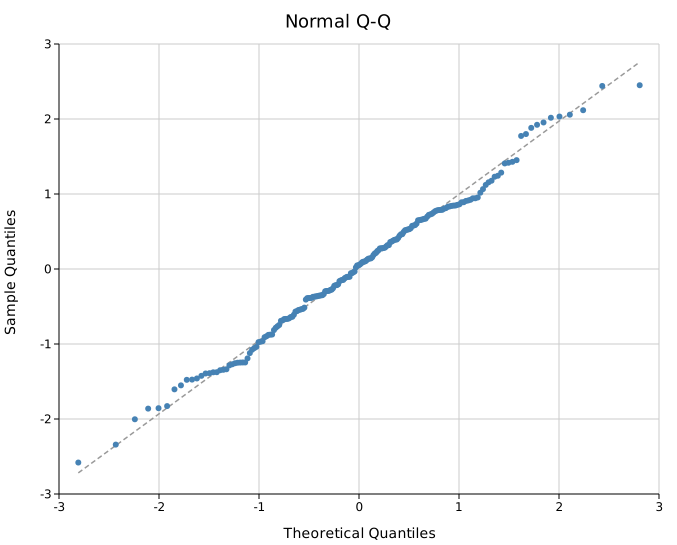
Compare a sample against the standard normal. Points on the dashed reference line indicate normally distributed data. Deviations reveal:
- S-shaped curve — skew (right or left)
- Banana / fan shape — heavy or light tails
- Parallel shift — same distribution shape, different location
#![allow(unused)]
fn main() {
use kuva::plot::QQPlot;
use kuva::backend::svg::SvgBackend;
use kuva::render::render::render_multiple;
use kuva::render::layout::Layout;
use kuva::render::plots::Plot;

let data: Vec<f64> = vec![/* your values */];

let plot = QQPlot::new()
    .with_data("Sample", data)
    .with_color("steelblue");

let plots = vec![Plot::QQ(plot)];
let layout = Layout::auto_from_plots(&plots)
    .with_title("Normal Q-Q")
    .with_x_label("Theoretical Quantiles")
    .with_y_label("Sample Quantiles");

let svg = SvgBackend.render_scene(&render_multiple(plots, layout));
}
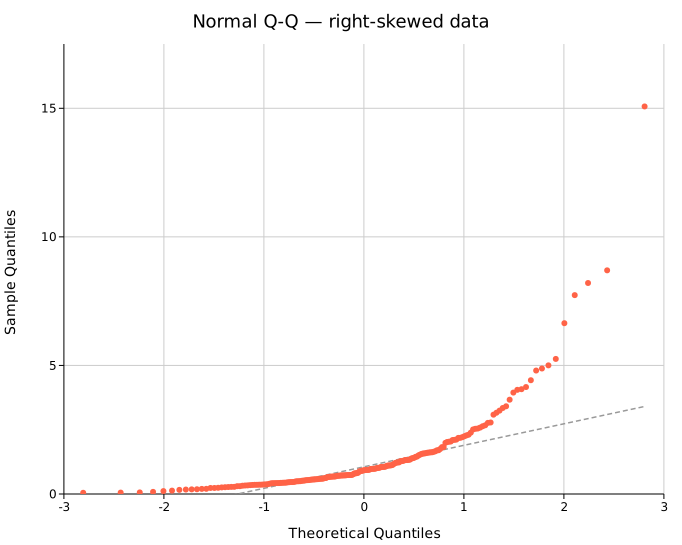
When data is right-skewed (e.g. log-normal), the upper tail curves above the reference line:
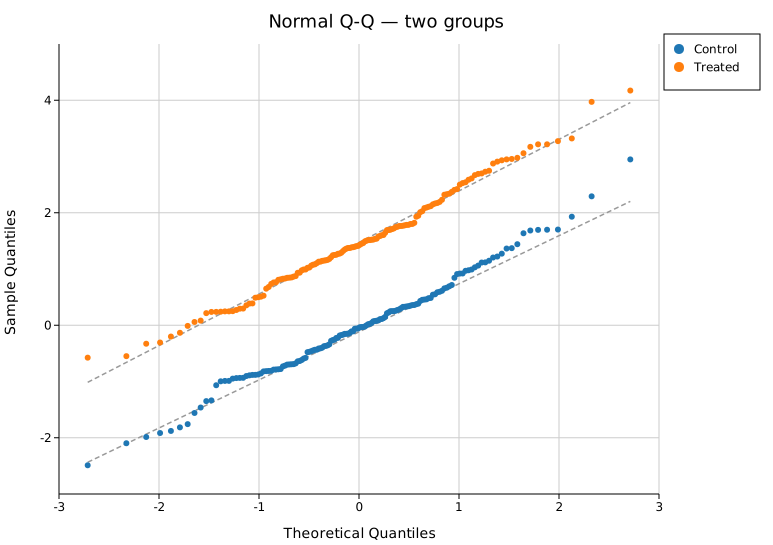
Multi-group normal Q-Q
Overlay multiple groups on the same axes to compare their distributional shapes. The reference line is drawn independently for each group (each uses its own Q1–Q3 anchored robust line):
#![allow(unused)]
fn main() {
use kuva::plot::QQPlot;
use kuva::render::plots::Plot;
use kuva::render::layout::Layout;
use kuva::render::render::render_multiple;
use kuva::backend::svg::SvgBackend;
use kuva::render::palette::Palette;
let pal = Palette::category10();

let plot = QQPlot::new()
    .with_data_colored("Control", vec![/* ... */], pal[0].to_string())
    .with_data_colored("Treated",  vec![/* ... */], pal[1].to_string())
    .with_legend("");
}
Genomic Q-Q (GWAS)
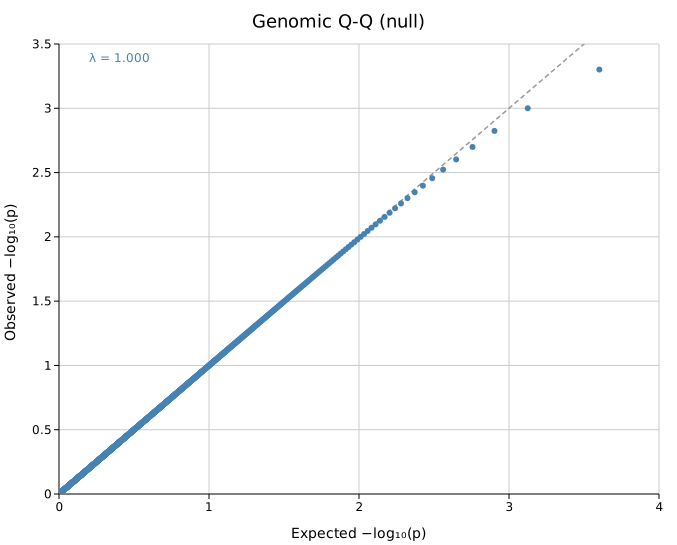
.with_pvalues() switches to genomic mode. Input values must be raw p-values in (0, 1]. The plot shows −log₁₀(observed p) vs −log₁₀(expected p) under the null hypothesis. Points on the y = x diagonal indicate well-calibrated test statistics:
#![allow(unused)]
fn main() {
use kuva::plot::QQPlot;
use kuva::render::plots::Plot;
let plot = QQPlot::new()
    .with_pvalues("GWAS study", pvalues)
    .with_lambda();   // annotate genomic inflation factor λ
}
CI band and genomic inflation factor λ
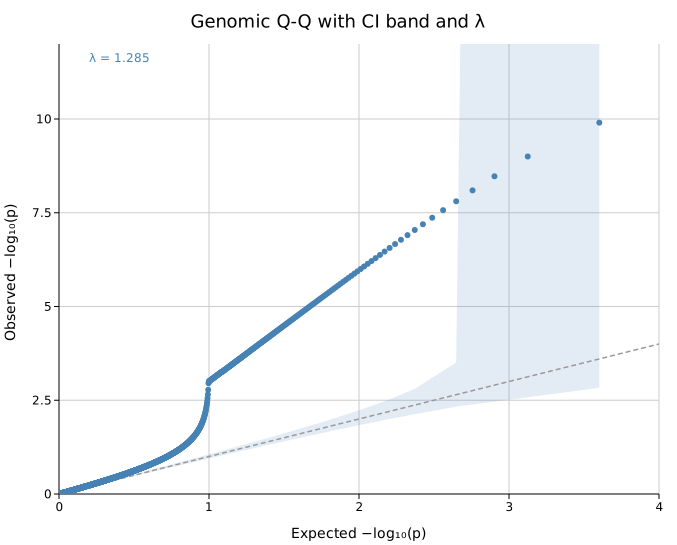
.with_ci_band() draws a shaded 95 % pointwise confidence band around the y = x diagonal. Points falling outside the band indicate more deviation from the null than expected by chance.
.with_lambda() annotates λ, the genomic inflation factor:
λ = median(χ²₁ observed) / 0.4549
A value near 1.0 means test statistics are well-calibrated. λ > 1 indicates inflation — often caused by population stratification, cryptic relatedness, or systematic batch effects:
#![allow(unused)]
fn main() {
use kuva::plot::QQPlot;
use kuva::render::plots::Plot;
let plot = QQPlot::new()
    .with_pvalues("GWAS study", pvalues)
    .with_ci_band()
    .with_lambda();
}
Multi-study genomic Q-Q
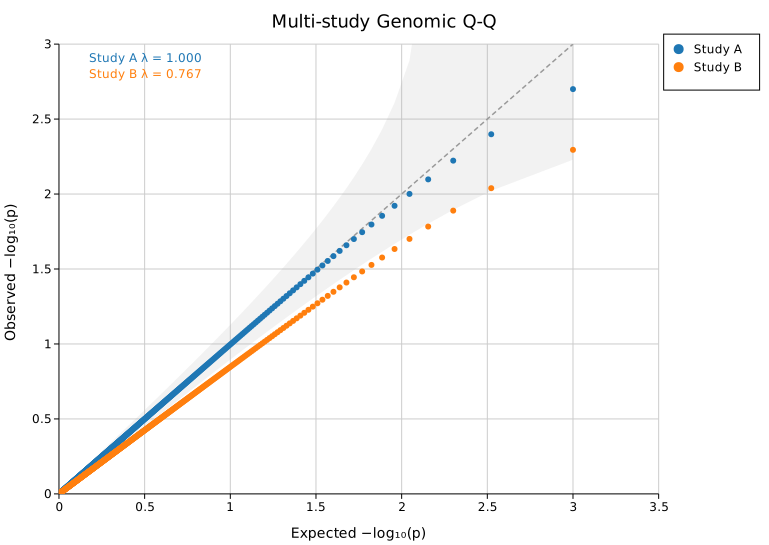
Overlay multiple GWAS datasets to compare calibration between studies or cohorts:
#![allow(unused)]
fn main() {
use kuva::plot::QQPlot;
use kuva::render::plots::Plot;
use kuva::render::palette::Palette;
let pal = Palette::category10();

let plot = QQPlot::new()
    .with_pvalues_colored("Study A", pvals_a, pal[0].to_string())
    .with_pvalues_colored("Study B", pvals_b, pal[1].to_string())
    .with_ci_band()
    .with_legend("")
    .with_lambda();
}
Builder reference
| Method | Default | Description |
|---|---|---|
.with_data(label, iter) | — | Add a group (normal mode) |
.with_data_colored(label, iter, color) | — | Add a group with explicit color |
.with_pvalues(label, iter) | — | Add p-values; switches to genomic mode |
.with_pvalues_colored(label, iter, color) | — | Same with explicit color |
.with_normal() | default | Explicitly set normal mode |
.with_genomic() | — | Explicitly set genomic mode |
.with_reference_line() | on | Show the reference line |
.without_reference_line() | — | Hide the reference line |
.with_ci_band() | off | 95 % pointwise CI band around reference diagonal |
.with_ci_alpha(f) | 0.15 | CI band fill opacity |
.with_lambda() | off | Annotate λ (genomic mode only) |
.without_lambda() | — | Hide λ annotation |
.with_marker_size(px) | 3.0 | Scatter marker radius |
.with_fill_opacity(f) | — | Marker fill opacity (useful for dense plots) |
.with_stroke_width(f) | 1.5 | Reference line stroke width |
.with_color(css) | "steelblue" | Uniform color (single-group) |
.with_legend(title) | — | Enable legend; "" for no title |
CLI
# Normal Q-Q
kuva qq data.tsv --value score --title "Normal Q-Q"

# Multi-group normal Q-Q
kuva qq data.tsv --value score --color-by group

# Genomic Q-Q from GWAS p-values
kuva qq gwas.tsv --value pvalue --genomic \
    --title "GWAS Q-Q" \
    --x-label "Expected -log10(p)" --y-label "Observed -log10(p)"

# Genomic Q-Q with CI band and lambda annotation
kuva qq gwas.tsv --value pvalue --genomic --ci-band --lambda

# Multi-study comparison
kuva qq gwas.tsv --value pvalue --color-by study --genomic --ci-band --lambda
CLI flags
| Flag | Default | Description |
|---|---|---|
--value <COL> | 0 | Column of values (raw data or p-values) |
--color-by <COL> | — | Group by column; one set of points per value |
--genomic | off | Genomic mode: input values are p-values in (0, 1] |
--ci-band | off | 95 % CI band |
--lambda | off | Annotate λ (genomic mode) |
--no-reference-line | — | Hide the reference line |
--marker-size <F> | 3.0 | Marker radius in pixels |
--fill-opacity <F> | — | Marker fill opacity |
--x-label <S> | (auto) | X-axis label |
--y-label <S> | (auto) | Y-axis label |
See also: ECDF Plot for an alternative distribution check, Manhattan Plot for genomic-inflation Q-Q use, Histogram for a simpler distribution view.
See also: Shared flags — output, appearance, axes.