2D Histogram
A 2D histogram (density map) bins scatter points (x, y) into a rectangular grid and colors each cell by its count. The colorbar labeled "Count" is added to the right margin automatically. Use it to visualize the joint distribution of two continuous variables.
Import path: kuva::plot::Histogram2D, kuva::plot::histogram2d::ColorMap
Basic usage
Pass (x, y) scatter points along with explicit axis ranges and bin counts to .with_data(). Points outside the specified ranges are silently discarded.
#![allow(unused)]
fn main() {
use kuva::plot::Histogram2D;
use kuva::backend::svg::SvgBackend;
use kuva::render::render::render_multiple;
use kuva::render::layout::Layout;
use kuva::render::plots::Plot;

// (x, y) scatter points — e.g. from a 2D measurement
let data: Vec<(f64, f64)> = vec![];  // ...your data here

let hist = Histogram2D::new()
    .with_data(data, (0.0, 30.0), (0.0, 30.0), 30, 30);

let plots = vec![Plot::Histogram2d(hist)];
let layout = Layout::auto_from_plots(&plots)
    .with_title("2D Histogram — Viridis")
    .with_x_label("X")
    .with_y_label("Y");

let svg = SvgBackend.render_scene(&render_multiple(plots, layout));
std::fs::write("hist2d.svg", svg).unwrap();
}
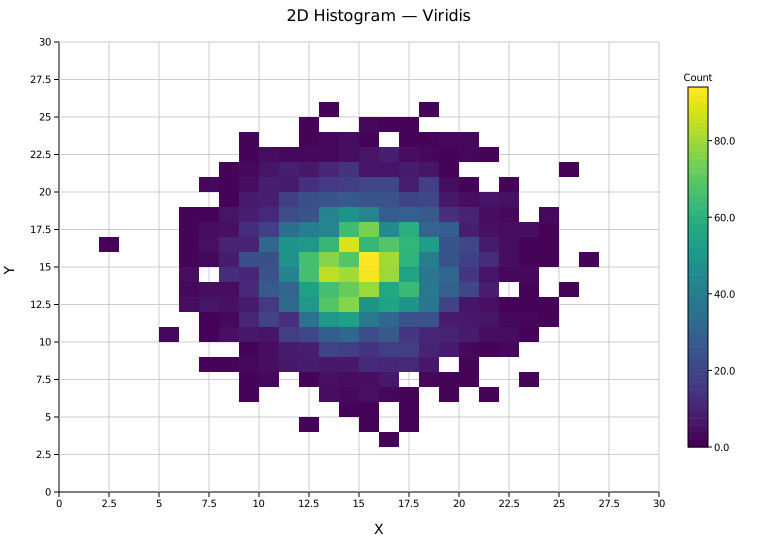
A single bivariate Gaussian cluster binned into a 30×30 grid. The Viridis colorbar on the right shows the count scale from zero (dark blue) to the maximum (yellow).
Correlation annotation
.with_correlation() computes the signed Pearson r coefficient from the raw scatter points and prints it in the top-right corner. The annotation is omitted for fewer than two points, constant x or y, or non-finite coordinates, since the coefficient is undefined.
#![allow(unused)]
fn main() {
use kuva::plot::Histogram2D;
use kuva::render::plots::Plot;
let hist = Histogram2D::new()
    .with_data(data, (0.0, 20.0), (0.0, 20.0), 25, 25)
    .with_correlation();
}
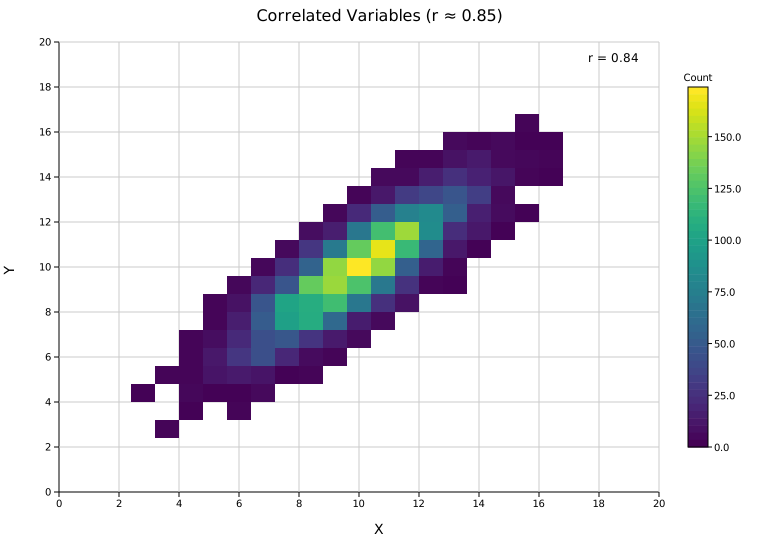
The diagonal density ridge reflects a strong positive correlation (r ≈ 0.85). The coefficient is computed from all input points, including those clipped outside the plot range.
Bimodal data — Inferno colormap
ColorMap::Inferno maps low counts to near-black and high counts to bright yellow. It is effective for high-contrast visualization of structured or multi-modal data.
#![allow(unused)]
fn main() {
use kuva::plot::Histogram2D;
use kuva::plot::histogram2d::ColorMap;
use kuva::render::plots::Plot;

let hist = Histogram2D::new()
    .with_data(data, (0.0, 30.0), (0.0, 30.0), 30, 30)
    .with_color_map(ColorMap::Inferno);
}
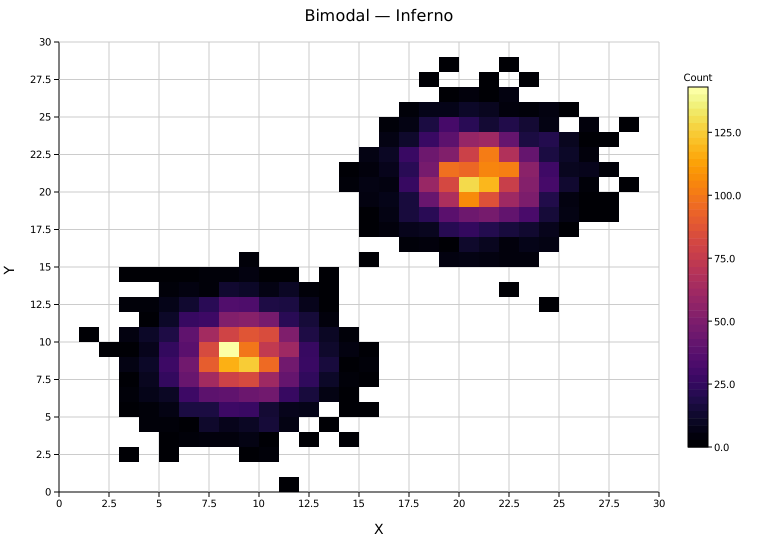
Two Gaussian clusters in opposite corners of the grid, visible as bright islands against the dark background. Empty bins are not drawn, preserving the black background of Inferno.
Bin resolution
Bin count controls the trade-off between noise and detail.
ColorMap::Grayscale maps zero to white and the maximum to black — useful for printing or publication figures.
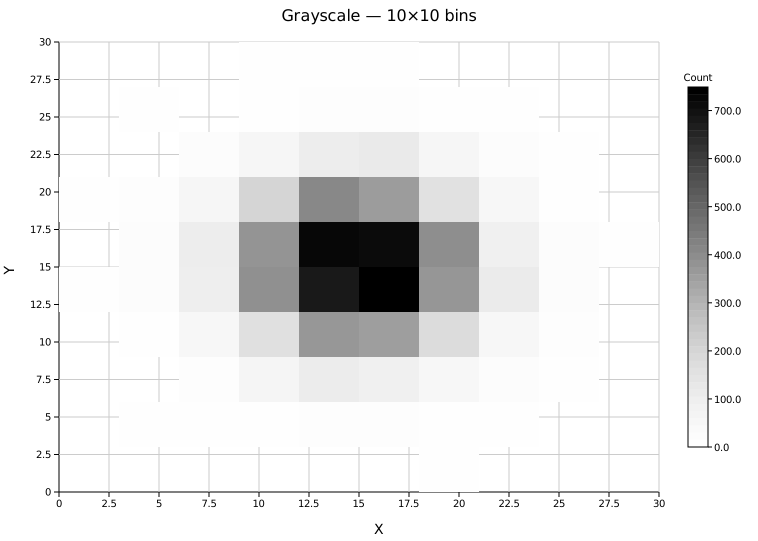
10×10 bins smooth the distribution and make the Gaussian shape immediately obvious, but lose fine-grained density structure.
ColorMap::Viridis (the default) uses a perceptually uniform blue → green → yellow scale, making density gradients easy to read at high resolution.
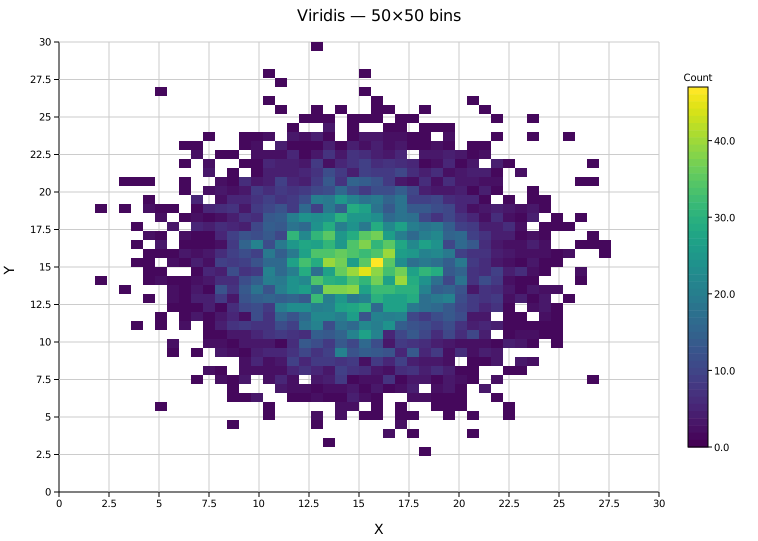
50×50 bins reveal the internal shape of the distribution, though individual cells become noisier at lower sample counts.
Range convention
The axis is calibrated directly to the physical x_range / y_range values you supply, so tick labels always show real data units regardless of bin count. Any (min, max) pair works.
| Range | bins_x | Bin width |
|---|---|---|
(0.0, 30.0) | 30 | 1.0 |
(0.0, 20.0) | 25 | 0.8 |
(5.0, 25.0) | 20 | 1.0 |
Log color scale
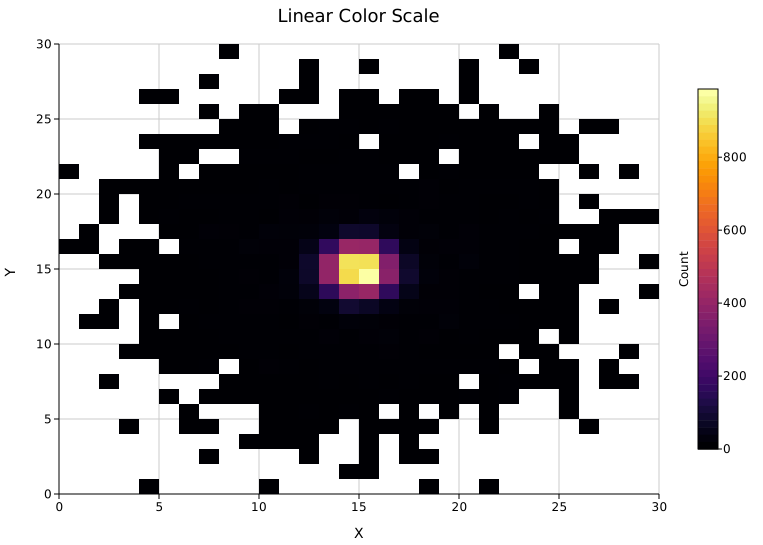
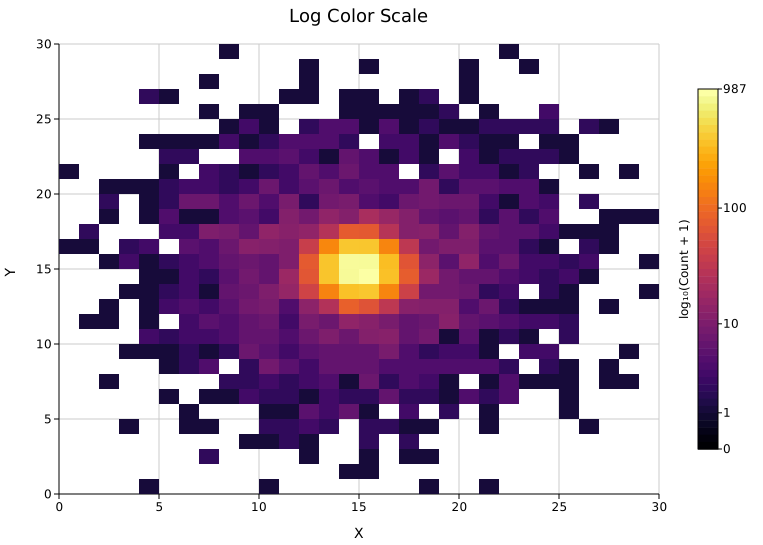
When a small number of bins dominate the count (a dense core surrounded by sparse tails), the linear color scale washes out low-density structure. .with_log_count() compresses the dynamic range via ln(count + 1), keeping both the core and the halo visible. The colorbar label updates to "log(Count)" automatically.
#![allow(unused)]
fn main() {
use kuva::plot::Histogram2D;
use kuva::plot::histogram2d::ColorMap;
use kuva::render::plots::Plot;
let hist = Histogram2D::new()
    .with_data(data, (0.0, 30.0), (0.0, 30.0), 30, 30)
    .with_color_map(ColorMap::Inferno)
    .with_log_count();
}
Linear — the dense core saturates the colormap; the surrounding halo is invisible.
Log — the same data with with_log_count(). The halo structure is now visible alongside the core.
Colorbar tick format
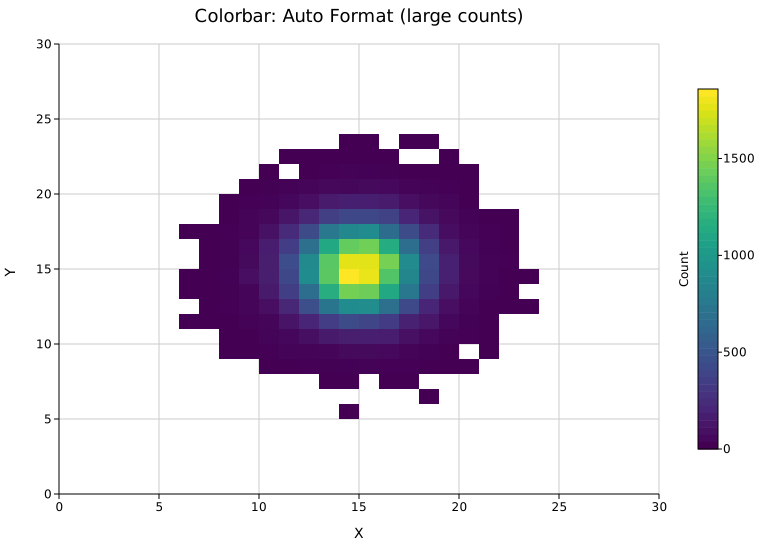
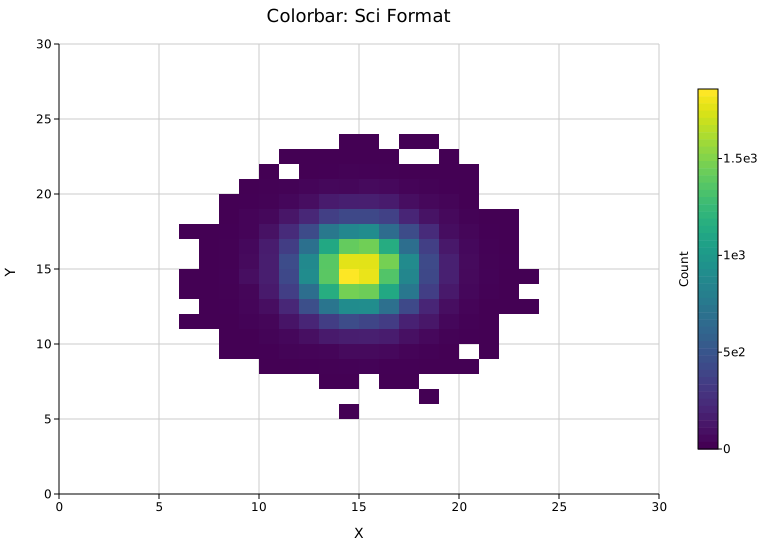
By default (TickFormat::Auto) colorbar tick labels render as plain integers and switch to scientific notation automatically when counts reach 10 000 or more. You can override this with Layout::with_colorbar_tick_format().
#![allow(unused)]
fn main() {
use kuva::plot::Histogram2D;
use kuva::render::plots::Plot;
use kuva::render::layout::{Layout, TickFormat};

let plots = vec![Plot::Histogram2d(hist)];
let layout = Layout::auto_from_plots(&plots)
    .with_colorbar_tick_format(TickFormat::Sci);   // always scientific notation
}
Auto — on a 50 000-point dataset the max bin count exceeds 10 000, so Auto switches to scientific notation automatically.
Sci — forces scientific notation at all magnitudes.
TickFormat variant | Colorbar label appearance |
|---|---|
Auto (default) | Integer counts as-is; sci notation when count ≥ 10 000 |
Sci | Always 1.23e4 style |
Integer | Rounded to nearest integer |
Fixed(n) | Exactly n decimal places |
Colormaps
ColorMap variant | Description |
|---|---|
ColorMap::Viridis | Blue → green → yellow. Perceptually uniform, colorblind-safe. (default) |
ColorMap::Inferno | Black → orange → yellow. High contrast. |
ColorMap::Grayscale | White → black. Print-friendly. |
ColorMap::Turbo | Blue → green → red. High contrast over a wide range. |
ColorMap::Custom(f) | User-supplied Arc<dyn Fn(f64) -> String>. |
API reference
| Method | Description |
|---|---|
Histogram2D::new() | Create with defaults (10×10 bins, Viridis) |
.with_data(data, x_range, y_range, bins_x, bins_y) | Load (x, y) points and bin them |
.with_color_map(cmap) | Set the colormap (default ColorMap::Viridis) |
.with_correlation() | Print Pearson r in the top-right corner |
.with_log_count() | Log-scale color mapping via ln(count+1); colorbar label → "log(Count)" |
Layout::with_colorbar_tick_format(fmt) | Control colorbar tick label format (default TickFormat::Auto) |
See also: Hexbin Plot for large-N scatter density, Scatter Plot for the un-binned points, Contour Plot for smooth density contours.
CLI
Two-dimensional histogram (density grid) from two numeric columns.
Input: two numeric columns.
| Flag | Default | Description |
|---|---|---|
--x <COL> | 0 | X-axis column |
--y <COL> | 1 | Y-axis column |
--bins-x <N> | 10 | Number of bins on the X axis |
--bins-y <N> | 10 | Number of bins on the Y axis |
--colormap <NAME> | viridis | Color map: viridis, inferno, turbo, grayscale |
--correlation | off | Overlay Pearson correlation coefficient |
--log-count | off | Log-scale the color mapping via log₁₀(count+1). Useful when a dense core dominates the color scale and hides structure in surrounding low-density regions. Colorbar label updates to "log₁₀(Count + 1)" with tick marks at actual count values (1, 10, 100, …). |
--colorbar-tick-format <FMT> | auto | Colorbar tick label format: auto, sci, integer, fixed2. auto renders integers as-is and switches to scientific notation when counts reach 10 000. |
# Basic density grid
kuva hist2d measurements.tsv --x time --y value

# Fine-grained bins with correlation annotation
kuva hist2d measurements.tsv --x time --y value \
    --bins-x 30 --bins-y 30 --colormap turbo --correlation

# Log color scale — reveals sparse structure around a dense core
kuva hist2d data.tsv --x x --y y --bins-x 30 --bins-y 30 --log-count

# Force scientific notation on the colorbar (e.g. for very large counts)
kuva hist2d data.tsv --x x --y y --colorbar-tick-format sci
See also: Shared flags — output, appearance, axes, log scale.