Hexbin Plot
A hexbin plot bins scatter points (x, y) into a regular hexagonal grid and colors each cell by its point count — or by an aggregated third variable z. Hexagonal bins tile the plane without gaps and are equidistant from all six neighbors, giving a more visually uniform density estimate than rectangular bins. A colorbar labeled "Count" (or the chosen aggregation) is added to the right margin automatically.
Import path: kuva::plot::hexbin::HexbinPlot, kuva::plot::hexbin::ZReduce, kuva::plot::ColorMap
Basic usage
Pass (x, y) scatter points to .with_data(). The plot divides the pixel canvas into hexagonal bins, counts the points in each, and applies the Viridis colormap.
#![allow(unused)]
fn main() {
use kuva::plot::hexbin::HexbinPlot;
use kuva::backend::svg::SvgBackend;
use kuva::render::render::render_multiple;
use kuva::render::layout::Layout;
use kuva::render::plots::Plot;

let x: Vec<f64> = /* your data */ vec![];
let y: Vec<f64> = /* your data */ vec![];

let plot = HexbinPlot::new().with_data(x, y);

let plots = vec![Plot::Hexbin(plot)];
let layout = Layout::auto_from_plots(&plots)
    .with_title("Hexbin Density")
    .with_x_label("X")
    .with_y_label("Y");

let svg = SvgBackend.render_scene(&render_multiple(plots, layout));
std::fs::write("hexbin.svg", svg).unwrap();
}
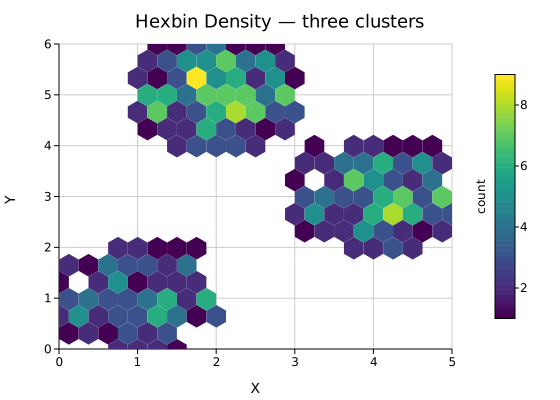
Three Gaussian clusters binned at the default resolution (20 bins across). The Viridis colorbar on the right maps bin counts from dark purple (sparse) to yellow (dense).
Bin resolution
.with_n_bins(n) sets the number of hex columns across the x-axis. More bins reveal finer density structure at the cost of noisier estimates in sparse regions.
#![allow(unused)]
fn main() {
use kuva::plot::hexbin::HexbinPlot;
use kuva::render::plots::Plot;
// Coarse — large hexes, smooth shape
let plot = HexbinPlot::new().with_data(x.clone(), y.clone()).with_n_bins(10);

// Fine — small hexes, more detail
let plot = HexbinPlot::new().with_data(x, y).with_n_bins(40);
}
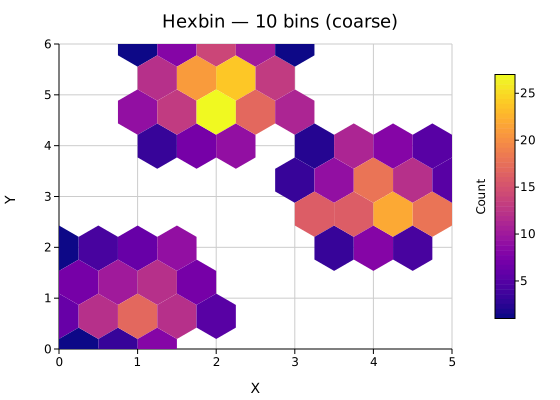
10 bins — the cluster shapes are obvious but internal density structure is lost.
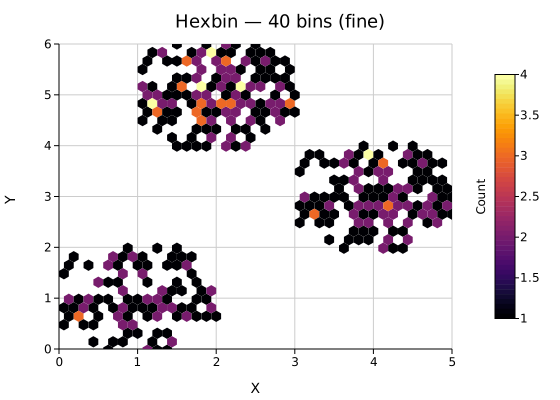
40 bins — peaks within each cluster become visible; individual bins in the periphery are noisier.
Log color scale
When a few bins dominate the count (dense core, sparse halo), the linear color scale saturates the colormap at the peak and hides structure elsewhere. .with_log_color(true) applies log₁₀(count + 1) before color mapping so both dense and sparse regions remain readable.
#![allow(unused)]
fn main() {
use kuva::plot::hexbin::HexbinPlot;
use kuva::render::plots::Plot;
let plot = HexbinPlot::new()
    .with_data(x, y)
    .with_log_color(true);
}

The colorbar tick marks show actual count values (1, 10, 100, …) while the color scale compresses high counts to reveal the low-density fringe.
Third variable — Z aggregation
.with_z(z, reduce) replaces count-based coloring with an aggregated third variable. Each bin collects the z values of the points it contains and applies the chosen ZReduce function. The colorbar label updates automatically.
#![allow(unused)]
fn main() {
use kuva::plot::hexbin::{HexbinPlot, ZReduce};
use kuva::render::plots::Plot;

// Color bins by the mean of a per-point measurement
let z: Vec<f64> = x.iter().zip(y.iter()).map(|(xi, yi)| xi + yi).collect();

let plot = HexbinPlot::new()
    .with_data(x, y)
    .with_z(z, ZReduce::Mean);
}

Bins colored by the mean of z = x + y. The gradient follows the diagonal, reflecting the additive structure of the z variable.
ZReduce variant | Colorbar label | Description |
|---|---|---|
Count (default) | Count | Number of points in the bin |
Mean | Mean | Arithmetic mean of z |
Sum | Sum | Sum of z values |
Median | Median | Median of z values |
Min | Min | Minimum z value |
Max | Max | Maximum z value |
When z values are absent, all ZReduce variants fall back to point count.
Normalized density
.with_normalize(true) divides each bin's count by the total number of input points, expressing density as a fraction in [0, 1]. The colorbar label changes to "Density".
#![allow(unused)]
fn main() {
use kuva::plot::hexbin::HexbinPlot;
use kuva::render::plots::Plot;
let plot = HexbinPlot::new()
    .with_data(x, y)
    .with_normalize(true)
    .with_colorbar_label("Density");  // optional: keep the default or override
}

Normalized density makes plots with different sample sizes comparable on the same scale.
Min count filter
.with_min_count(n) suppresses bins that contain fewer than n points. This trims noise from the periphery of a distribution, leaving only regions with meaningful density.
#![allow(unused)]
fn main() {
use kuva::plot::hexbin::HexbinPlot;
use kuva::render::plots::Plot;
// Only render bins with at least 8 points
let plot = HexbinPlot::new()
    .with_data(x, y)
    .with_n_bins(10)
    .with_min_count(8);
}

min_count = 1 — all bins are shown; peripheral singletons are visible.

min_count = 8 — only the dense cluster cores remain.
Flat-top orientation
By default hexes are pointy-top (a vertex at the top). .with_flat_top(true) rotates to flat-top orientation (a flat edge at the top), which can align better with certain data layouts or visual preferences.
#![allow(unused)]
fn main() {
use kuva::plot::hexbin::HexbinPlot;
use kuva::render::plots::Plot;
let plot = HexbinPlot::new()
    .with_data(x, y)
    .with_flat_top(true);
}

Hex outline (stroke)
.with_stroke(color) draws a CSS-colored border around each hexagon. This distinguishes individual bins in dense regions and is useful for publication figures.
#![allow(unused)]
fn main() {
use kuva::plot::hexbin::HexbinPlot;
use kuva::render::plots::Plot;
let plot = HexbinPlot::new()
    .with_data(x, y)
    .with_stroke("#333333")
    .with_stroke_width(0.8);
}

A dark outline clearly separates adjacent bins at the cost of slightly more visual noise.
Color range clamping
.with_color_range(lo, hi) pins the colormap to a fixed value interval, ignoring bins outside the range. Values below lo receive the lowest colormap color; values above hi receive the highest. Use this to compare multiple plots on the same scale or to highlight a specific density range.
#![allow(unused)]
fn main() {
use kuva::plot::hexbin::HexbinPlot;
use kuva::render::plots::Plot;
let plot = HexbinPlot::new()
    .with_data(x, y)
    .with_color_range(2.0, 8.0);
}

Axis range clipping
.with_x_range(lo, hi) and .with_y_range(lo, hi) restrict binning to a sub-region of the data and fix the corresponding axis limits. Points outside the specified window are silently discarded.
#![allow(unused)]
fn main() {
use kuva::plot::hexbin::HexbinPlot;
use kuva::render::plots::Plot;
let plot = HexbinPlot::new()
    .with_data(x, y)
    .with_x_range(-0.5, 3.0)
    .with_y_range(-2.0, 4.0);
}

Colormaps
.with_color_map(map) selects the colormap. The same ColorMap variants used by Heatmap and Histogram2D apply.
#![allow(unused)]
fn main() {
use kuva::plot::{hexbin::HexbinPlot, ColorMap};
use kuva::render::plots::Plot;
let plot = HexbinPlot::new()
    .with_data(x, y)
    .with_color_map(ColorMap::Inferno);
}

ColorMap variant | Description |
|---|---|
ColorMap::Viridis | Blue → green → yellow. Perceptually uniform, colorblind-safe. (default) |
ColorMap::Inferno | Black → orange → yellow. High contrast. |
ColorMap::Grayscale | White → black. Print-friendly. |
ColorMap::Turbo | Blue → green → red. High contrast over a wide range. |
ColorMap::Custom(f) | User-supplied Arc<dyn Fn(f64) -> String>. |
Hiding the colorbar
.with_colorbar(false) suppresses the colorbar and reclaims the right margin.
#![allow(unused)]
fn main() {
use kuva::plot::hexbin::HexbinPlot;
use kuva::render::plots::Plot;
let plot = HexbinPlot::new()
    .with_data(x, y)
    .with_colorbar(false);
}
API reference
| Method | Description |
|---|---|
HexbinPlot::new() | Create with defaults (20 bins, Viridis, Count, pointy-top, colorbar on) |
.with_data(x, y) | Load scatter data; accepts any Into<f64> iterable |
.with_z(z, reduce) | Attach a third variable and choose the ZReduce aggregation |
.with_n_bins(n) | Number of hex columns across the x-axis (default 20) |
.with_bin_size(s) | Explicit hex circumradius in pixels — overrides n_bins |
.with_color_map(m) | Colormap (default Viridis) |
.with_log_color(b) | Log₁₀ color scale — compresses high-count peaks |
.with_min_count(n) | Suppress bins with fewer than n points (default 1) |
.with_normalize(b) | Divide counts by total points; colorbar label → "Density" |
.with_colorbar(b) | Show / hide the colorbar (default true) |
.with_colorbar_label(s) | Override the auto-derived colorbar label |
.with_stroke(color) | Hex outline color (CSS string) |
.with_stroke_width(w) | Hex outline width in pixels (default 0.5) |
.with_flat_top(b) | Flat-top orientation (default false = pointy-top) |
.with_x_range(lo, hi) | Clip data and fix x-axis extent |
.with_y_range(lo, hi) | Clip data and fix y-axis extent |
.with_color_range(lo, hi) | Clamp the colorbar scale to a fixed interval |
See also: 2D Histogram for square-binned density, Scatter Plot for the un-binned points, Heatmap for an arbitrary-matrix alternative.
CLI
Hexagonal-bin density plot from two numeric columns.
Input: two numeric columns (x and y); optionally a third column for z aggregation.
| Flag | Default | Description |
|---|---|---|
--x <COL> | 0 | X-axis column (name or index) |
--y <COL> | 1 | Y-axis column (name or index) |
--z <COL> | — | Third variable column for aggregation-based coloring |
--reduce <FUNC> | count | Aggregation for z: count, mean, sum, median, min, max |
--n-bins <N> | 20 | Number of hex columns across the x-axis |
--log-color | off | Log₁₀ color scale — compresses high-count peaks |
--min-count <N> | 1 | Suppress bins with fewer than N points |
--normalize | off | Divide counts by total points (fractional density) |
--flat-top | off | Flat-top hex orientation instead of pointy-top |
--stroke <COLOR> | — | Hex outline color (CSS string, e.g. "#333333") |
--colormap <NAME> | viridis | Color map: viridis, inferno, turbo, grayscale |
--no-colorbar | off | Hide the colorbar |
# Basic density plot from two columns
kuva hexbin data.tsv --x x --y y

# More bins for finer structure
kuva hexbin data.tsv --x x --y y --n-bins 40

# Log scale — reveals sparse structure around a dense core
kuva hexbin data.tsv --x x --y y --log-color

# Suppress peripheral noise — only render bins with ≥5 points
kuva hexbin data.tsv --x x --y y --min-count 5

# Fractional density (0–1 scale)
kuva hexbin data.tsv --x x --y y --normalize

# Color by mean of a third variable
kuva hexbin data.tsv --x x --y y --z value --reduce mean

# Flat-top orientation with Inferno colormap
kuva hexbin data.tsv --x x --y y --flat-top --colormap inferno

# Add hex outlines
kuva hexbin data.tsv --x x --y y --stroke "#444444"
See also: Shared flags — output, appearance, axes, log scale.