Treemap Plot
A treemap tiles a rectangle with nested rectangles proportional to node values. Squarified layout (default) minimises worst-case aspect ratios. Supports arbitrary depth hierarchies, second-dimension coloring, and SVG hover tooltips.
Import path: kuva::plot::treemap::TreemapPlot, kuva::plot::treemap::TreemapNode, kuva::plot::treemap::TreemapColorMode, kuva::plot::treemap::TreemapLayout, kuva::plot::ColorMap
Basic usage
Pass leaf nodes to .with_node(). The plot tiles the canvas area proportionally to each node's value.
#![allow(unused)]
fn main() {
use kuva::plot::treemap::{TreemapPlot, TreemapNode};
use kuva::backend::svg::SvgBackend;
use kuva::render::render::render_multiple;
use kuva::render::layout::Layout;
use kuva::render::plots::Plot;

let plot = TreemapPlot::new()
    .with_node(TreemapNode::leaf("Rust",   40.0))
    .with_node(TreemapNode::leaf("Python", 35.0))
    .with_node(TreemapNode::leaf("Go",     25.0));

let plots = vec![Plot::Treemap(plot)];
let layout = Layout::auto_from_plots(&plots).with_title("Language usage");
let svg = SvgBackend.render_scene(&render_multiple(plots, layout));
std::fs::write("treemap.svg", svg).unwrap();
}
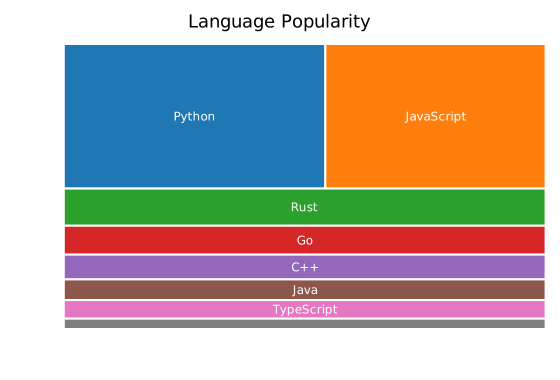
Hierarchical data
Use TreemapNode::new(label, children) for inner nodes. Values auto-sum from children when value = 0.0.
#![allow(unused)]
fn main() {
use kuva::plot::treemap::{TreemapPlot, TreemapNode};
use kuva::render::plots::Plot;
let plot = TreemapPlot::new()
    .with_node(TreemapNode::new("Languages", vec![
        TreemapNode::leaf("Rust",   40.0),
        TreemapNode::leaf("Python", 35.0),
        TreemapNode::leaf("Go",     25.0),
    ]))
    .with_node(TreemapNode::new("Databases", vec![
        TreemapNode::leaf("Postgres", 60.0),
        TreemapNode::leaf("SQLite",   30.0),
    ]));
}
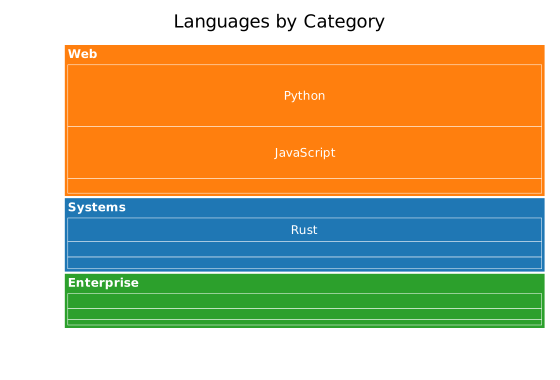
Parent cells show a group label at top-left. Children are tiled inside with padding and a label-reserve row.
Forest (multiple roots)
Pass multiple .with_node() calls — each root gets a distinct category10 color and its descendants inherit it.
#![allow(unused)]
fn main() {
use kuva::plot::treemap::{TreemapPlot, TreemapNode};
use kuva::render::plots::Plot;
let plot = TreemapPlot::new()
    .with_node(TreemapNode::new("Alpha", vec![
        TreemapNode::leaf("a1", 10.0),
        TreemapNode::leaf("a2", 20.0),
    ]))
    .with_node(TreemapNode::new("Beta", vec![
        TreemapNode::leaf("b1", 30.0),
        TreemapNode::leaf("b2", 15.0),
    ]))
    .with_node(TreemapNode::leaf("Gamma", 25.0));
}
Color modes
ByParent (default)
Each root group inherits a distinct category10 color. All descendants use the same hue.
ByValue
Color leaves by their value (or a parallel color_values vector) using a colormap.
#![allow(unused)]
fn main() {
use kuva::plot::treemap::{TreemapPlot, TreemapNode, TreemapColorMode, ColorMap};
use kuva::render::plots::Plot;

let plot = TreemapPlot::new()
    .with_node(TreemapNode::leaf("A", 10.0))
    .with_node(TreemapNode::leaf("B", 50.0))
    .with_node(TreemapNode::leaf("C", 25.0))
    .with_color_mode(TreemapColorMode::ByValue(ColorMap::Viridis));
// show_colorbar is automatically enabled when ByValue is set
}
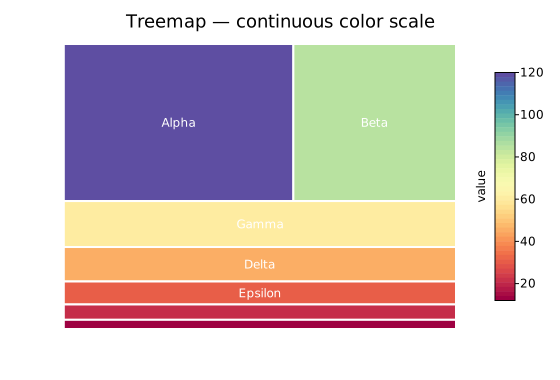
Explicit
Use the color field on each node (CSS string). Call .with_color_mode(TreemapColorMode::Explicit).
#![allow(unused)]
fn main() {
use kuva::plot::treemap::{TreemapPlot, TreemapNode, TreemapColorMode};
use kuva::render::plots::Plot;

let plot = TreemapPlot::new()
    .with_node(TreemapNode::leaf_colored("Red",  30.0, "#e74c3c"))
    .with_node(TreemapNode::leaf_colored("Blue", 20.0, "#3498db"))
    .with_color_mode(TreemapColorMode::Explicit);
}
Second-dimension coloring (GO enrichment pattern)
Use color_values to color leaves by a variable independent of size. A common bioinformatics pattern: size = gene count, color = p-value.
#![allow(unused)]
fn main() {
use kuva::plot::treemap::{TreemapPlot, TreemapNode, TreemapColorMode, ColorMap};
use kuva::render::plots::Plot;

let gene_counts = vec![120_f64, 80.0, 55.0, 40.0];
let p_values    = vec![0.001, 0.023, 0.045, 0.0001];

let plot = TreemapPlot::new()
    .with_node(TreemapNode::leaf("GO:0008150 — biological process", gene_counts[0]))
    .with_node(TreemapNode::leaf("GO:0005575 — cellular component",  gene_counts[1]))
    .with_node(TreemapNode::leaf("GO:0003674 — molecular function",  gene_counts[2]))
    .with_node(TreemapNode::leaf("GO:0006950 — response to stress",  gene_counts[3]))
    .with_color_values(p_values)
    .with_color_mode(TreemapColorMode::ByValue(ColorMap::Viridis))
    .with_colorbar_label("p-value");
}
Or use the convenience builder:
#![allow(unused)]
fn main() {
use kuva::plot::treemap::TreemapPlot;
use kuva::render::plots::Plot;

let plot = TreemapPlot::new()
    .with_go_terms(vec![
        ("GO:0008150", "biological process", 120, 0.001),
        ("GO:0005575", "cellular component",  80, 0.023),
        ("GO:0003674", "molecular function",  55, 0.045),
    ])
    .with_colorbar_label("p-value");
}

Layout algorithms
.with_layout(algo) selects the tiling strategy.
#![allow(unused)]
fn main() {
use kuva::plot::treemap::{TreemapPlot, TreemapNode, TreemapLayout};
use kuva::render::plots::Plot;

// Squarify (default): minimises worst aspect ratio
let plot = TreemapPlot::new()
    .with_layout(TreemapLayout::Squarify);

// SliceDice: alternating H/V cuts per level — fast, may produce slivers
let plot = TreemapPlot::new()
    .with_layout(TreemapLayout::SliceDice);

// Binary: balanced binary splits — good for uniform distributions
let plot = TreemapPlot::new()
    .with_layout(TreemapLayout::Binary);
}
TreemapLayout variant | Description |
|---|---|
Squarify (default) | Bruls 2000 — minimises worst aspect ratio per strip |
SliceDice | Alternating H/V slices by depth — simple and predictable |
Binary | Balanced binary splits; alternating H/V |
Padding and borders
.with_padding(px) sets the gap between a parent's border and its children. Padding halves at each depth level.
#![allow(unused)]
fn main() {
use kuva::plot::treemap::{TreemapPlot, TreemapNode};
use kuva::render::plots::Plot;
let plot = TreemapPlot::new()
    .with_padding(6.0)
    .with_border_width(0.5)
    .with_root_border_width(2.5);
}
Depth limiting
.with_max_depth(n) renders at most n levels deep (root = depth 0). Nodes at the limit are treated as leaves even if they have children.
#![allow(unused)]
fn main() {
use kuva::plot::treemap::{TreemapPlot, TreemapNode};
use kuva::render::plots::Plot;
let plot = TreemapPlot::new()
    .with_max_depth(2);  // root + 2 child levels
}
Tooltips
By default each cell emits an SVG <title> tooltip showing the breadcrumb path and value on hover. Disable with .with_tooltips(false).
#![allow(unused)]
fn main() {
use kuva::plot::treemap::{TreemapPlot, TreemapNode};
use kuva::render::plots::Plot;
// Tooltips off — smaller SVG
let plot = TreemapPlot::new()
    .with_tooltips(false);
}
API reference
| Method | Description |
|---|---|
TreemapPlot::new() | Default: 20-bin Squarify, ByParent, tooltips on |
.with_node(node) | Add a root node |
.with_children(label, children) | Add a parent node with given children |
.with_color_mode(mode) | ByParent / ByValue(cmap) / Explicit |
.with_color_values(vals) | Parallel leaf color values (depth-first order) |
.with_layout(algo) | Squarify / SliceDice / Binary |
.with_padding(px) | Padding between parent and children (default 4.0) |
.with_border_width(px) | Leaf / inner border width (default 0.5) |
.with_root_border_width(px) | Root border width (default 2.0) |
.with_min_label_area(px²) | Hide label when cell area < threshold (default 1200.0) |
.with_show_labels(bool) | Show leaf labels (default true) |
.with_show_parent_labels(bool) | Show parent labels (default true) |
.with_colorbar(bool) | Show colorbar (auto-on in ByValue mode) |
.with_colorbar_label(str) | Override colorbar label |
.with_color_range(lo, hi) | Clamp colorbar scale |
.with_max_depth(n) | Limit render depth |
.with_tooltips(bool) | SVG hover tooltips (default true) |
.with_go_terms(iter) | Convenience builder for GO enrichment |
TreemapNode constructors
| Constructor | Description |
|---|---|
TreemapNode::leaf(label, value) | Leaf node — no children |
TreemapNode::new(label, children) | Inner node — value auto-summed from children |
TreemapNode::with_value(label, value, children) | Inner node with explicit value |
TreemapNode::leaf_colored(label, value, css_color) | Leaf with explicit CSS color |
See also: Sunburst Chart for a radial version of the same hierarchy, Heatmap for a flat (non-hierarchical) matrix of values.
CLI
Input: at minimum a label column and a value column; optionally a parent column for two-level hierarchy.
| Flag | Default | Description |
|---|---|---|
--label <COL> | 0 | Label column (name or index) |
--value <COL> | 1 | Value column (name or index) |
--parent <COL> | — | Parent column → 2-level hierarchy |
--color-by <MODE> | parent | Color mode: parent, value, explicit |
--color-col <COL> | — | Color values (value mode) or CSS color strings (explicit mode) |
--colormap <NAME> | viridis | Colormap: viridis, inferno, turbo, grayscale |
--layout <NAME> | squarify | Layout: squarify, slicedice, binary |
--padding <F> | 4.0 | Padding px between parent border and children |
--colorbar | off | Show colorbar in value mode |
--colorbar-label <S> | — | Colorbar label |
--no-tooltips | off | Suppress SVG hover tooltips |
--max-depth <N> | — | Maximum depth to render |
# Flat treemap from two columns
kuva treemap data.tsv --label name --value size

# Two-level: group rows by parent column
kuva treemap data.tsv --label gene --value count --parent pathway

# Color leaves by a third column (e.g. p-value)
kuva treemap data.tsv --label term --value count --color-by value --color-col pvalue --colorbar --colorbar-label "p-value"

# Slice-and-dice layout
kuva treemap data.tsv --label name --value size --layout slicedice

# Suppress tooltips for a clean static SVG
kuva treemap data.tsv --label name --value size --no-tooltips

# Limit to two depth levels
kuva treemap data.tsv --label name --value size --parent group --max-depth 2

# Custom colormap and explicit title
kuva treemap data.tsv --label name --value size --colormap inferno -t "Category breakdown"
See also: Shared flags — output, appearance, axes.