Heatmap
A heatmap renders a two-dimensional grid where each cell's color encodes a numeric value. Values are normalized to the data range and passed through a color map. A colorbar is always shown in the right margin.
Import path: kuva::plot::Heatmap
Basic usage
Pass a 2-D array to .with_data(). The outer dimension is rows (top to bottom) and the inner dimension is columns (left to right).
#![allow(unused)]
fn main() {
use kuva::plot::Heatmap;
use kuva::backend::svg::SvgBackend;
use kuva::render::render::render_multiple;
use kuva::render::layout::Layout;
use kuva::render::plots::Plot;

let data = vec![
    vec![0.8, 0.3, 0.9, 0.2, 0.6],
    vec![0.4, 0.7, 0.1, 0.8, 0.3],
    vec![0.5, 0.9, 0.4, 0.6, 0.1],
    vec![0.2, 0.5, 0.8, 0.3, 0.7],
];

let heatmap = Heatmap::new().with_data(data);

let plots = vec![Plot::Heatmap(heatmap)];
let layout = Layout::auto_from_plots(&plots).with_title("Heatmap");

let scene = render_multiple(plots, layout);
let svg = SvgBackend.render_scene(&scene);
std::fs::write("heatmap.svg", svg).unwrap();
}
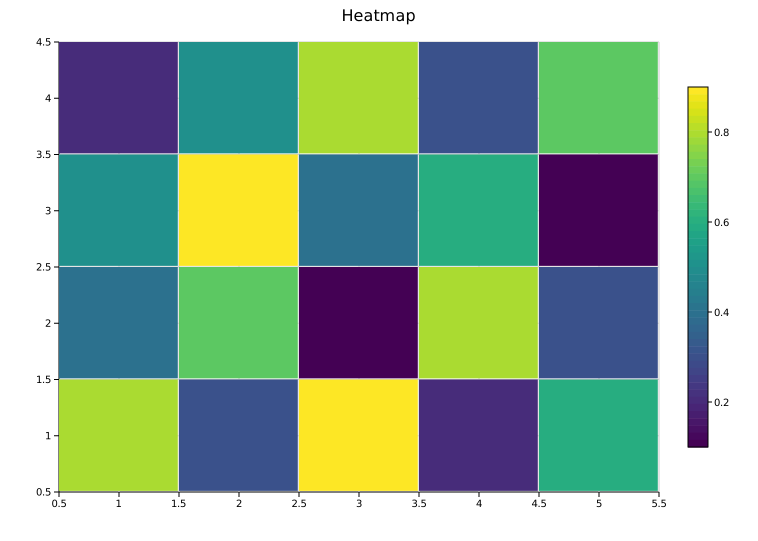
.with_data() accepts any iterable of iterables of numeric values — Vec<Vec<f64>>, slices, or any type implementing Into<f64>.
Axis labels
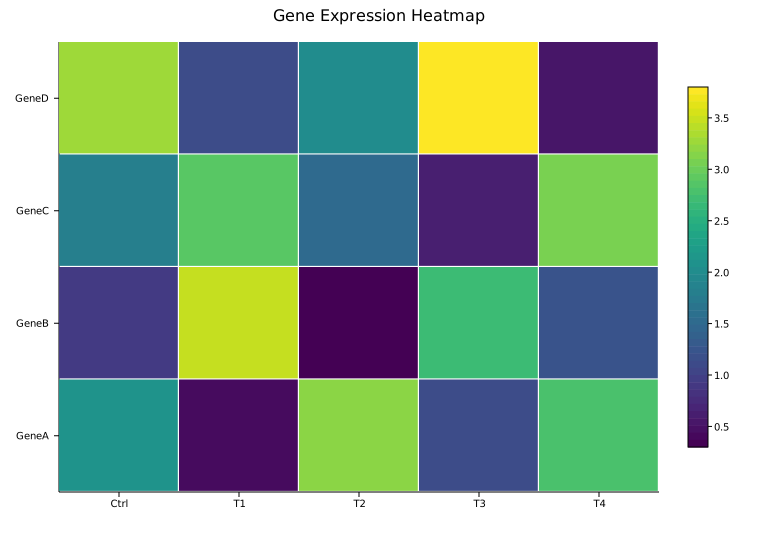
Axis labels are set on the Layout, not on the Heatmap struct. Pass column labels to .with_x_categories() and row labels to .with_y_categories().
#![allow(unused)]
fn main() {
use kuva::plot::Heatmap;
use kuva::backend::svg::SvgBackend;
use kuva::render::render::render_multiple;
use kuva::render::layout::Layout;
use kuva::render::plots::Plot;

let data = vec![
    vec![2.1, 0.4, 3.2, 1.1, 2.8],
    vec![0.9, 3.5, 0.3, 2.7, 1.2],
    vec![1.8, 2.9, 1.5, 0.6, 3.1],
    vec![3.3, 1.1, 2.0, 3.8, 0.5],
];

let col_labels = vec!["Ctrl", "T1", "T2", "T3", "T4"]
    .into_iter().map(String::from).collect::<Vec<_>>();
let row_labels = vec!["GeneA", "GeneB", "GeneC", "GeneD"]
    .into_iter().map(String::from).collect::<Vec<_>>();

let heatmap = Heatmap::new().with_data(data);
let plots = vec![Plot::Heatmap(heatmap)];
let layout = Layout::auto_from_plots(&plots)
    .with_title("Gene Expression Heatmap")
    .with_x_categories(col_labels)   // column labels on x-axis
    .with_y_categories(row_labels);  // row labels on y-axis

let svg = SvgBackend.render_scene(&render_multiple(plots, layout));
}
Value overlay
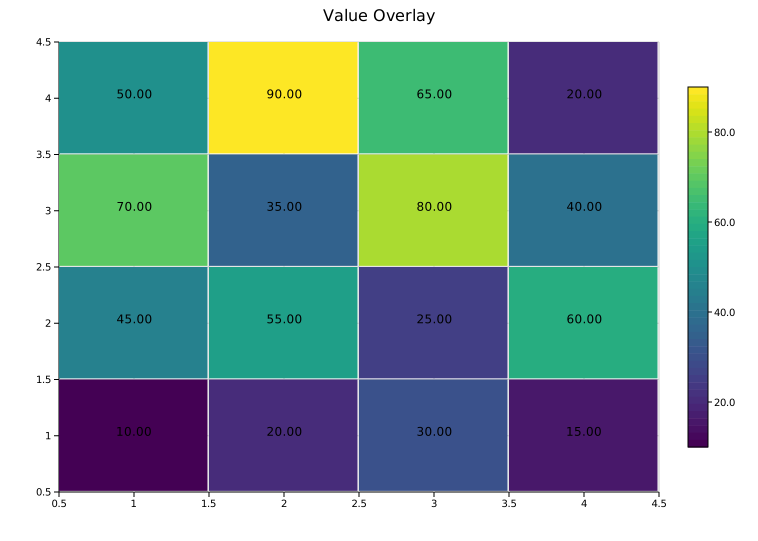
.with_values() prints each cell's raw numeric value (formatted to two decimal places) centered inside the cell. Most useful for small grids where the text remains legible.
#![allow(unused)]
fn main() {
use kuva::plot::Heatmap;
let heatmap = Heatmap::new()
    .with_data(vec![
        vec![10.0, 20.0, 30.0, 15.0],
        vec![45.0, 55.0, 25.0, 60.0],
        vec![70.0, 35.0, 80.0, 40.0],
        vec![50.0, 90.0, 65.0, 20.0],
    ])
    .with_values();
}
Color maps
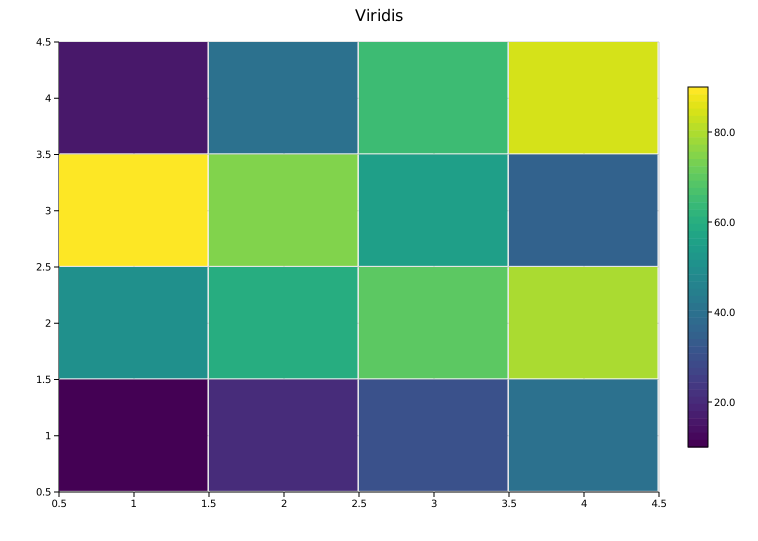
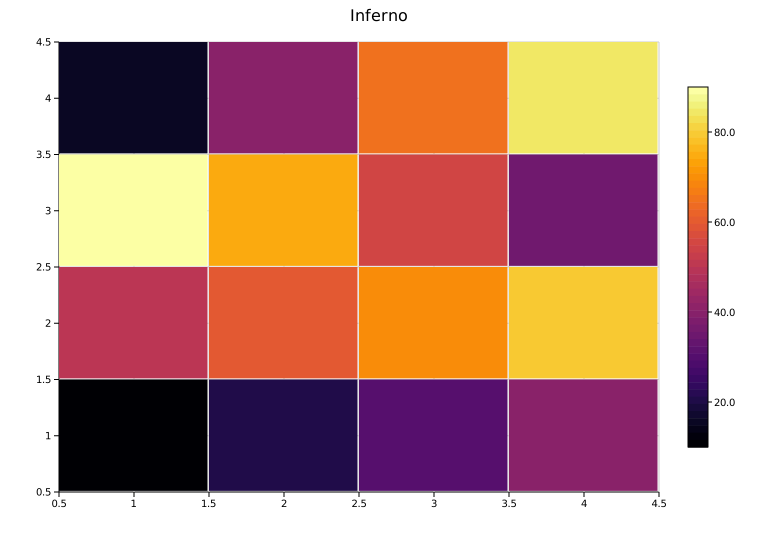
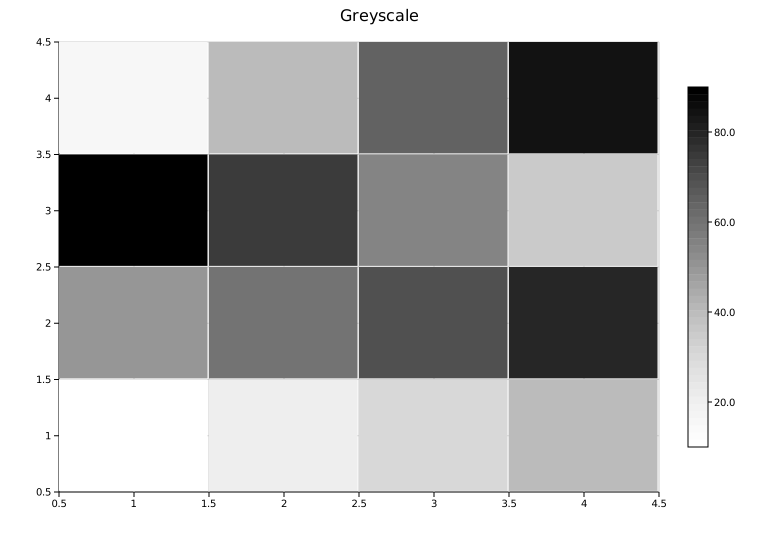
.with_color_map(ColorMap) selects the color encoding. The default is Viridis.
| Variant | Scale | Notes |
|---|---|---|
Viridis | Blue → green → yellow | Perceptually uniform; colorblind-safe. Default. |
Inferno | Black → purple → yellow | High-contrast; works in greyscale print |
Grayscale | Black → white | Clean publication style |
Custom(Arc<Fn>) | User-defined | Full control |
#![allow(unused)]
fn main() {
use kuva::plot::{Heatmap, ColorMap};
use kuva::render::plots::Plot;

let heatmap = Heatmap::new()
    .with_data(vec![vec![1.0, 2.0], vec![3.0, 4.0]])
    .with_color_map(ColorMap::Inferno);
}
 |
 |
 |
Viridis |
Inferno |
Grayscale |
Custom color map
For diverging scales or other custom encodings, use ColorMap::Custom with a closure that maps a normalized [0.0, 1.0] value to a CSS color string.
#![allow(unused)]
fn main() {
use std::sync::Arc;
use kuva::plot::{Heatmap, ColorMap};

// Blue-to-red diverging scale
let cmap = ColorMap::Custom(Arc::new(|t: f64| {
    let r = (t * 255.0) as u8;
    let b = ((1.0 - t) * 255.0) as u8;
    format!("rgb({r},0,{b})")
}));

let heatmap = Heatmap::new()
    .with_data(vec![vec![1.0, 2.0, 3.0], vec![4.0, 5.0, 6.0]])
    .with_color_map(cmap);
}
Custom axis bounds — scalar fields
By default the heatmap maps columns to [0.5, cols + 0.5] and rows to [0.5, rows + 0.5] so that integer tick values land on cell centres. Use .with_x_range() and .with_y_range() when the grid represents a physical domain and you want real-world coordinates on the axes.
#![allow(unused)]
fn main() {
use kuva::plot::{Heatmap, ColorMap};
use kuva::render::layout::Layout;
use kuva::render::plots::Plot;

// 2D Gaussian temperature field over x ∈ [-10, 10], y ∈ [-4, 4]
let data: Vec<Vec<f64>> = (0..16)
    .map(|i| {
        let y = 4.0 - (i as f64 + 0.5) * 8.0 / 16.0;
        (0..40).map(|j| {
            let x = -10.0 + (j as f64 + 0.5) * 20.0 / 40.0;
            let r2 = x * x / 16.0 + y * y / 4.0;
            (-r2 / 2.0).exp()
        }).collect()
    })
    .collect();

let hm = Heatmap::new()
    .with_data(data)
    .with_color_map(ColorMap::Inferno)
    .with_x_range(-10.0, 10.0)
    .with_y_range(-4.0, 4.0);

let plots = vec![Plot::Heatmap(hm)];
let layout = Layout::auto_from_plots(&plots)
    .with_title("Temperature Field")
    .with_x_label("x (m)")
    .with_y_label("y (m)");
}
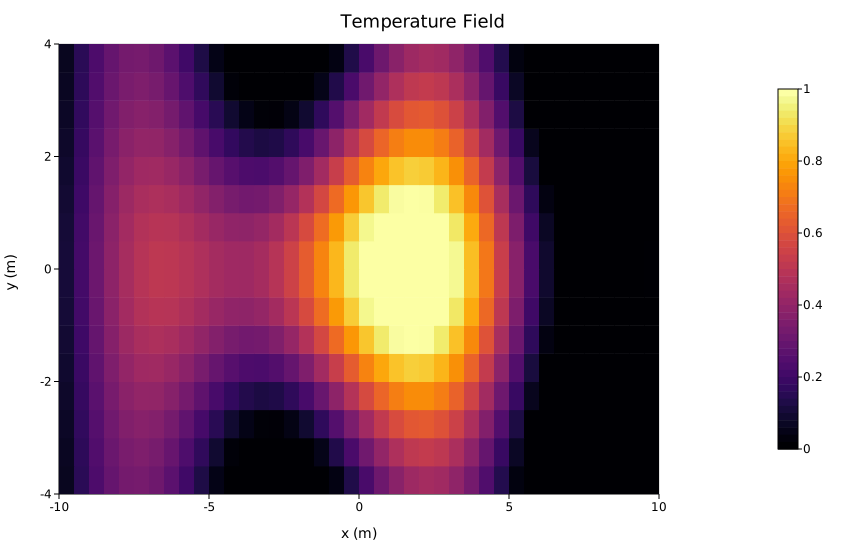
Both methods accept any numeric type via impl Into<f64>. Either range can be set independently — you can fix only the x-axis and leave the y-axis on its default integer scale, or vice versa.
Row reordering — phylogenetic alignment
When composing a heatmap alongside a PhyloTree, use with_labels + with_y_categories to reorder the heatmap rows so they match the tree's leaf order top-to-bottom.
Key points:
with_y_categories(order)treatsorderas top-to-bottom — the first label ends up at the top of the rendered heatmap.- After the call,
heatmap.row_labelsis stored in bottom-to-top order (matching the y-axis convention). Pass it directly toLayout::with_y_categories. - Use
Figure::new(1, 2)to place the tree and heatmap side by side.
#![allow(unused)]
fn main() {
use kuva::plot::{Heatmap, PhyloTree};
use kuva::render::figure::Figure;
use kuva::render::layout::Layout;
use kuva::render::plots::Plot;
use kuva::backend::svg::SvgBackend;

let labels_str = ["Wolf", "Cat", "Whale", "Human"];
let labels: Vec<String> = labels_str.iter().map(|s| s.to_string()).collect();

// Distance matrix — rows correspond to labels_str in order
let dist = vec![
    vec![0.0, 0.5, 0.9, 0.8],  // Wolf
    vec![0.5, 0.0, 0.9, 0.8],  // Cat
    vec![0.9, 0.9, 0.0, 0.7],  // Whale
    vec![0.8, 0.8, 0.7, 0.0],  // Human
];

let tree = PhyloTree::from_distance_matrix(&labels_str, &dist).with_phylogram();

// leaf_labels_top_to_bottom() returns the leaf render order, top-to-bottom
let leaf_order = tree.leaf_labels_top_to_bottom();

let heatmap = Heatmap::new()
    .with_data(dist)
    .with_labels(labels, vec![])     // associate rows with names
    .with_y_categories(leaf_order);  // first leaf → top of heatmap

// row_labels is now stored bottom-to-top — pass directly to Layout
let layout_cats = heatmap.row_labels.clone().unwrap();

let tree_plots = vec![Plot::PhyloTree(tree)];
let heatmap_plots = vec![Plot::Heatmap(heatmap)];

let tree_layout = Layout::auto_from_plots(&tree_plots).with_title("UPGMA Tree");
let heatmap_layout = Layout::auto_from_plots(&heatmap_plots)
    .with_title("Distance Matrix")
    .with_y_categories(layout_cats);

// 1 row × 2 columns: tree on left, heatmap on right
let figure = Figure::new(1, 2)
    .with_plots(vec![tree_plots, heatmap_plots])
    .with_layouts(vec![tree_layout, heatmap_layout]);

let svg = SvgBackend.render_scene(&figure.render());
std::fs::write("phylo_heatmap.svg", svg).unwrap();
}
Note:
Layout::with_y_categories()alone only changes the axis tick labels — it does not reorder the data matrix. Always callHeatmap::with_y_categories()first to permute the rows, then passrow_labelsto the layout.
Column reordering works the same way via with_x_categories. Unlike with_y_categories, column order is not reversed internally — pass the desired left-to-right order directly to both Heatmap::with_x_categories and Layout::with_x_categories.
API reference
| Method | Description |
|---|---|
Heatmap::new() | Create a heatmap with defaults |
.with_data(rows) | Set grid data; accepts any numeric iterable of iterables |
.with_color_map(map) | Color encoding: Viridis, Inferno, Grayscale, or Custom (default Viridis) |
.with_values() | Print each cell's value as text inside the cell |
.with_labels(rows, cols) | Associate rows and columns with label strings; required before calling with_y_categories / with_x_categories |
.with_y_categories(order) | Reorder rows so order[0] is at the top; stores row_labels bottom-to-top for Layout::with_y_categories |
.with_x_categories(order) | Reorder columns to match order (left-to-right); stores col_labels in the same order |
.with_x_range(lo, hi) | Set custom x-axis extent (default [0.5, cols + 0.5]) |
.with_y_range(lo, hi) | Set custom y-axis extent (default [0.5, rows + 0.5]) |
.with_cell_size(factor) | Cell fill fraction [0.5, 1.0]. Default 0.99 leaves a thin gap between cells. Pass 1.0 for flush cells with no visible boundary — useful for large grids. |
.with_legend(s) | Attach a legend label |
Layout methods used with heatmaps:
| Method | Description |
|---|---|
Layout::with_x_categories(labels) | Column labels on the x-axis (left-to-right) |
Layout::with_y_categories(labels) | Row labels on the y-axis (bottom-to-top; pass heatmap.row_labels directly after with_y_categories) |
See also: Clustermap for a hierarchically-clustered version, 2D Histogram for binned x/y density, Hexbin Plot for large scatter datasets.
CLI
Color-encoded matrix heatmap.
Input (wide format): first column is the row label, remaining columns are numeric values. The header row (if present) supplies column labels.
gene    Sample_01  Sample_02  Sample_03 …
 TP53    0.25       -1.78       1.58     …
BRCA1   0.23        0.48       1.06     …
Input (long format): use --long-format to pass (row, col, value) triples instead. Missing combinations are filled with 0. Column order defaults to 0/1/2; override with --row-col, --col-col, --value-col.
species     week  abundance
Firmicutes  1     352
Firmicutes  2     381
Bacteroidetes  1  262
| Flag | Default | Description |
|---|---|---|
--colormap <NAME> | viridis | Color map: viridis, inferno, grayscale |
--values | off | Print numeric values in each cell |
--legend <LABEL> | — | Show color bar with this label |
--long-format | off | Accept (row, col, value) triples instead of a wide matrix |
--row-col <COL> | 0 | Row-label column (with --long-format) |
--col-col <COL> | 1 | Column-label column (with --long-format) |
--value-col <COL> | 2 | Value column (with --long-format) |
# wide matrix
kuva heatmap heatmap.tsv

kuva heatmap heatmap.tsv --colormap inferno --values --legend "z-score"

# long-format: species × week abundance table
kuva heatmap data.tsv --long-format \
    --row-col species --col-col week --value-col abundance \
    --title "Abundance by Species and Week"

# long-format from a counts table with named columns
kuva heatmap counts.tsv --long-format \
    --row-col gene --col-col sample --value-col tpm \
    --legend "TPM" --colormap inferno
Custom axis bounds
Heatmap::with_x_range(lo, hi) and with_y_range(lo, hi) are available in the Rust API for representing scalar fields over a physical domain (e.g. temperature over a spatial grid with real-world coordinates). These are not yet exposed as CLI flags; use the library directly when you need them.
Cell size
Heatmap::with_cell_size(factor) controls the fraction of each cell's natural size used when drawing the cell rectangle. The default 0.99 leaves a thin gap that makes cell boundaries visible. Pass 1.0 for flush cells with no visible boundary — recommended for large grids where the gap becomes a distracting grid pattern. Not yet exposed as a CLI flag; use the library directly.
See also: Shared flags — output, appearance, axes, log scale.