Raincloud Plot
A raincloud plot (Allen et al. 2019) overlays three complementary views of each group's distribution on a shared axis:
- Cloud — a half-violin (KDE) showing the distribution shape
- Box — a narrow box-and-whisker showing the five-number summary
- Rain — jittered raw points showing every individual observation
This combination avoids the information loss of a box plot (shape is hidden), the visual clutter of a pure strip plot (structure is obscured), and the opacity of a violin (sample size is invisible). All three layers share the same y-axis so they can be compared directly.
Import path: kuva::plot::RaincloudPlot
Basic usage
Add one group per category with .with_group(label, values). Groups are rendered left-to-right in the order added.
#![allow(unused)]
fn main() {
use kuva::plot::RaincloudPlot;
use kuva::backend::svg::SvgBackend;
use kuva::render::render::render_multiple;
use kuva::render::layout::Layout;
use kuva::render::plots::Plot;

let plot = RaincloudPlot::new()
    .with_group("Control", control_values)
    .with_group("Low dose", low_dose_values)
    .with_group("High dose", high_dose_values);

let plots = vec![Plot::Raincloud(plot)];
let layout = Layout::auto_from_plots(&plots)
    .with_title("Drug response")
    .with_x_label("Treatment")
    .with_y_label("Response (AU)");

let scene = render_multiple(plots, layout);
let svg = SvgBackend.render_scene(&scene);
std::fs::write("raincloud.svg", svg).unwrap();
}
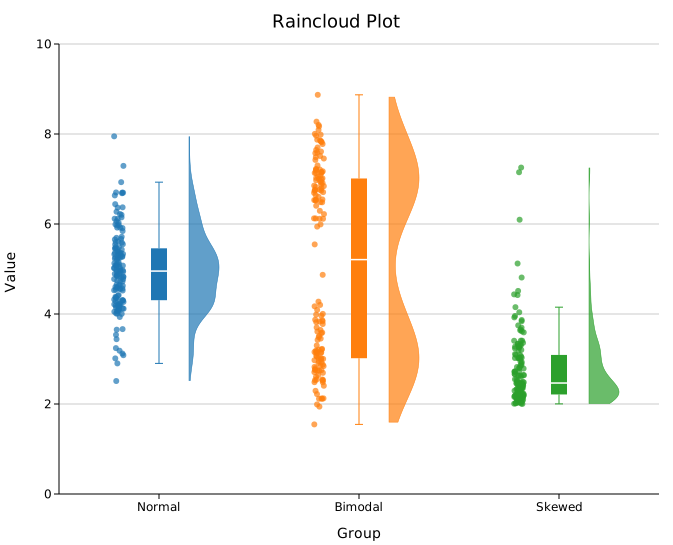
By default, multi-group plots use the category10 palette automatically. For a single group the uniform .with_color() value is used.
Toggling elements
Each of the three layers can be turned off independently. This lets you build simpler variants when not all three are needed.
#![allow(unused)]
fn main() {
use kuva::plot::RaincloudPlot;

// Cloud + box only (no raw points)
let plot = RaincloudPlot::new()
    .with_group("A", data)
    .with_rain(false);

// Cloud + rain only (no summary box)
let plot = RaincloudPlot::new()
    .with_group("A", data)
    .with_box(false);

// Box + rain only (no KDE cloud)
let plot = RaincloudPlot::new()
    .with_group("A", data)
    .with_cloud(false);
}
KDE bandwidth
The cloud shape is a kernel density estimate. By default, bandwidth is chosen automatically using Silverman's rule-of-thumb, which works well for roughly unimodal, normal-ish data but can over-smooth multimodal distributions.
Bandwidth scale
.with_bandwidth_scale(s) multiplies the auto-computed bandwidth by a factor (equivalent to ggplot2's adjust). Values below 1.0 produce a sharper, more data-sensitive curve; values above 1.0 produce a smoother curve.
#![allow(unused)]
fn main() {
use kuva::plot::RaincloudPlot;

// Tighter — reveals bimodality or shoulders
let plot = RaincloudPlot::new()
    .with_group("A", data)
    .with_bandwidth_scale(0.5);

// Wider — emphasises overall shape, less noise
let plot = RaincloudPlot::new()
    .with_group("A", data)
    .with_bandwidth_scale(2.0);
}
Explicit bandwidth
.with_bandwidth(h) sets an exact bandwidth value, overriding both Silverman's rule and .with_bandwidth_scale().
#![allow(unused)]
fn main() {
use kuva::plot::RaincloudPlot;
let plot = RaincloudPlot::new()
    .with_group("A", data)
    .with_bandwidth(0.4);
}
.with_kde_samples(n) controls how many points the KDE is evaluated at (default 200). The default is adequate for most datasets.
Flip direction
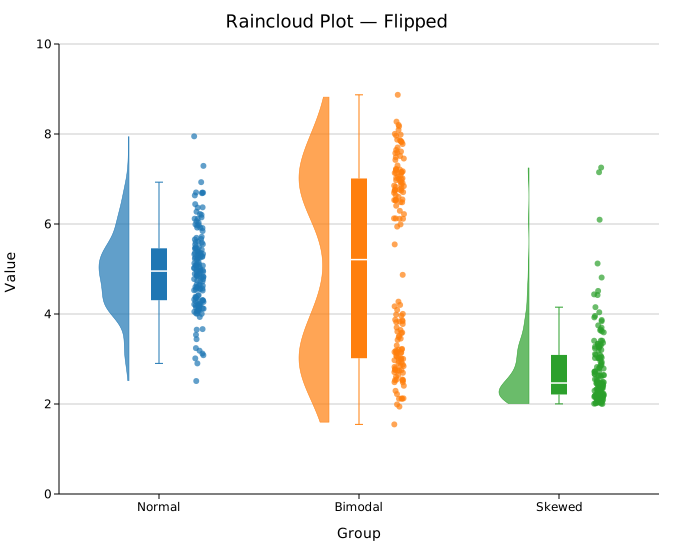
By default the cloud appears to the right of centre and rain to the left. .with_flip(true) reverses this.
#![allow(unused)]
fn main() {
use kuva::plot::RaincloudPlot;
let plot = RaincloudPlot::new()
    .with_group("A", data)
    .with_flip(true);   // cloud left, rain right
}
Per-group colors
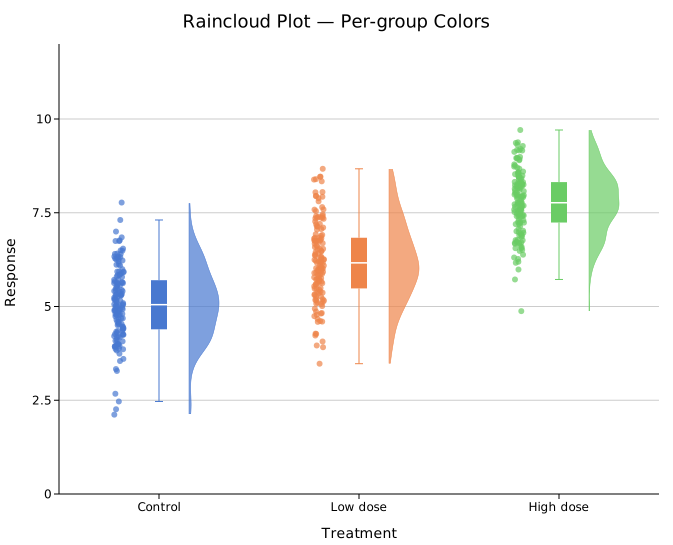
.with_group_colors() assigns colors to groups by position.
#![allow(unused)]
fn main() {
use kuva::plot::RaincloudPlot;
use kuva::backend::svg::SvgBackend;
use kuva::render::render::render_multiple;
use kuva::render::layout::Layout;
use kuva::render::plots::Plot;

let plot = RaincloudPlot::new()
    .with_group("Control",   control_values)
    .with_group("Low dose",  low_values)
    .with_group("High dose", high_values)
    .with_group_colors(["#4878d0", "#ee854a", "#6acc65"]);

let plots = vec![Plot::Raincloud(plot)];
let layout = Layout::auto_from_plots(&plots)
    .with_title("Raincloud — per-group colors")
    .with_y_label("Response");

let svg = SvgBackend.render_scene(&render_multiple(plots, layout));
}
Legend
.with_legend(label) triggers per-group legend entries. Each group's label and color appear as a separate row in the legend — the string passed to .with_legend() is not used as an entry label but serves as a signal to show the legend.
#![allow(unused)]
fn main() {
use kuva::plot::RaincloudPlot;
use kuva::render::plots::Plot;
use kuva::render::layout::Layout;
use kuva::render::render::render_multiple;
use kuva::backend::svg::SvgBackend;
let plot = RaincloudPlot::new()
    .with_group("Control", control_values)
    .with_group("Treated", treated_values)
    .with_legend("show");   // triggers per-group entries

let plots = vec![Plot::Raincloud(plot)];
let layout = Layout::auto_from_plots(&plots)
    .with_title("Treatment comparison");
let svg = SvgBackend.render_scene(&render_multiple(plots, layout));
}
Fine-tuning layout
The offsets and widths of all three elements can be adjusted if groups overlap or look too sparse.
#![allow(unused)]
fn main() {
use kuva::plot::RaincloudPlot;
let plot = RaincloudPlot::new()
    .with_group("A", data_a)
    .with_group("B", data_b)
    .with_cloud_width(40.0)    // wider cloud (default 30.0 px)
    .with_cloud_offset(0.20)   // cloud centre further from group centre (default 0.15)
    .with_rain_offset(0.25)    // rain centre further from group centre (default 0.20)
    .with_box_width(0.12)      // wider box (default 0.08, fraction of slot)
    .with_rain_size(2.5)       // smaller rain points (default 3.0 px radius)
    .with_rain_jitter(0.04)    // tighter horizontal spread (default 0.05)
    .with_cloud_alpha(0.6)     // slightly more transparent cloud (default 0.7)
    .with_rain_alpha(0.5)      // more transparent rain (default 0.7)
    .with_seed(123);           // different jitter seed (default 42)
}
Horizontal mode
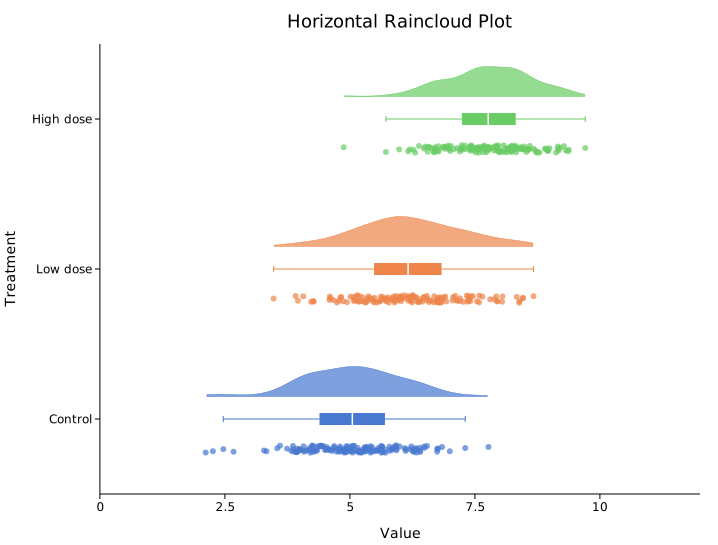
.with_horizontal(true) rotates the chart so categories appear on the Y-axis and values on the X-axis.
#![allow(unused)]
fn main() {
use kuva::plot::RaincloudPlot;
use kuva::render::layout::Layout;
use kuva::render::plots::Plot;
use kuva::render::render::render_multiple;
use kuva::backend::svg::SvgBackend;

let plot = RaincloudPlot::new()
    .with_group("Control",   control_data)
    .with_group("Low dose",  low_data)
    .with_group("High dose", high_data)
    .with_group_colors(["#4878d0", "#ee854a", "#6acc65"])
    .with_horizontal(true);

let plots = vec![Plot::Raincloud(plot)];
let layout = Layout::auto_from_plots(&plots)
    .with_title("Horizontal Raincloud Plot")
    .with_x_label("Value")
    .with_y_label("Treatment");

let svg = SvgBackend.render_scene(&render_multiple(plots, layout));
}
API reference
| Method | Description |
|---|---|
RaincloudPlot::new() | Create a raincloud plot with defaults |
.with_group(label, values) | Add a group; accepts any Vec<f64> |
.with_groups(iter) | Add multiple (label, values) pairs at once |
.with_color(s) | Uniform fill color, used for single-group plots (default "steelblue") |
.with_group_colors(iter) | Per-group fill colors matched by position |
.with_cloud(bool) | Show/hide the cloud half-violin (default true) |
.with_cloud_width(px) | Maximum pixel half-width of the cloud (default 30.0) |
.with_cloud_offset(f) | Data-axis offset of cloud centre from group centre (default 0.15) |
.with_cloud_alpha(a) | Cloud fill opacity 0–1 (default 0.7) |
.with_bandwidth(h) | Explicit KDE bandwidth; overrides Silverman + scale |
.with_bandwidth_scale(s) | Multiplier on Silverman bandwidth (default 1.0; < 1 sharper, > 1 smoother) |
.with_kde_samples(n) | KDE evaluation points (default 200) |
.with_box(bool) | Show/hide the box-and-whisker (default true) |
.with_box_width(f) | Box half-width as fraction of slot width (default 0.08) |
.with_rain(bool) | Show/hide the jitter points (default true) |
.with_rain_size(px) | Rain point radius in pixels (default 3.0) |
.with_rain_jitter(f) | Horizontal jitter spread in data units (default 0.05) |
.with_rain_alpha(a) | Rain point opacity 0–1 (default 0.7) |
.with_rain_offset(f) | Data-axis offset of rain centre from group centre (default 0.20) |
.with_flip(bool) | Swap cloud and rain sides (default false — cloud right, rain left) |
.with_seed(u64) | RNG seed for reproducible jitter (default 42) |
.with_legend(s) | Show per-group legend entries |
.with_horizontal(bool) | Rotate chart: categories on Y-axis, values on X-axis (default false) |
See also: Violin Plot, Box Plot, and Strip Plot for the three components it combines.
CLI
Raincloud plot — combines a half-violin KDE cloud, box-and-whisker, and jittered raw points in one panel per group.
Input: one row per observation with group and value columns.
| Flag | Default | Description |
|---|---|---|
--group-col <COL> | 0 | Group label column |
--value-col <COL> | 1 | Numeric value column |
--color <CSS> | — | Color for single-group plots |
--bandwidth <F> | auto | KDE bandwidth (Silverman's rule by default) |
--no-cloud | off | Hide the half-violin KDE |
--no-box | off | Hide the box-and-whisker |
--no-rain | off | Hide the jittered raw points |
--flip | off | Mirror cloud to the opposite side |
--horizontal | off | Render groups on the Y-axis, values on the X-axis |
--legend <LABEL> | — | Add legend entries (one per group) |
kuva raincloud data.tsv --group-col group --value-col score

kuva raincloud data.tsv --group-col condition --value-col response \
    --no-rain --legend "Condition" --title "Treatment Response"

# horizontal layout
kuva raincloud data.tsv --group-col group --value-col score --horizontal
See also: Shared flags — output, appearance, axes.