Waterfall Chart
A waterfall chart shows a running total as a sequence of floating bars. Each bar starts where the previous one ended — rising for positive increments (green) and falling for negative ones (red). Summary bars can be placed at any point to show accumulated subtotals.
Import path: kuva::plot::WaterfallPlot
Basic usage
Add bars with .with_delta(label, value). The chart tracks a running total from left to right — each bar floats between the previous total and the new one.
#![allow(unused)]
fn main() {
use kuva::plot::WaterfallPlot;
use kuva::backend::svg::SvgBackend;
use kuva::render::render::render_multiple;
use kuva::render::layout::Layout;
use kuva::render::plots::Plot;

let wf = WaterfallPlot::new()
    .with_delta("Revenue",        850.0)
    .with_delta("Cost of goods", -340.0)
    .with_delta("Personnel",     -180.0)
    .with_delta("Operations",     -90.0)
    .with_delta("Marketing",      -70.0)
    .with_delta("Other income",    55.0)
    .with_delta("Tax",            -85.0);

let plots = vec![Plot::Waterfall(wf)];
let layout = Layout::auto_from_plots(&plots)
    .with_title("Revenue Breakdown")
    .with_y_label("USD (thousands)");

let scene = render_multiple(plots, layout);
let svg = SvgBackend.render_scene(&scene);
std::fs::write("waterfall.svg", svg).unwrap();
}
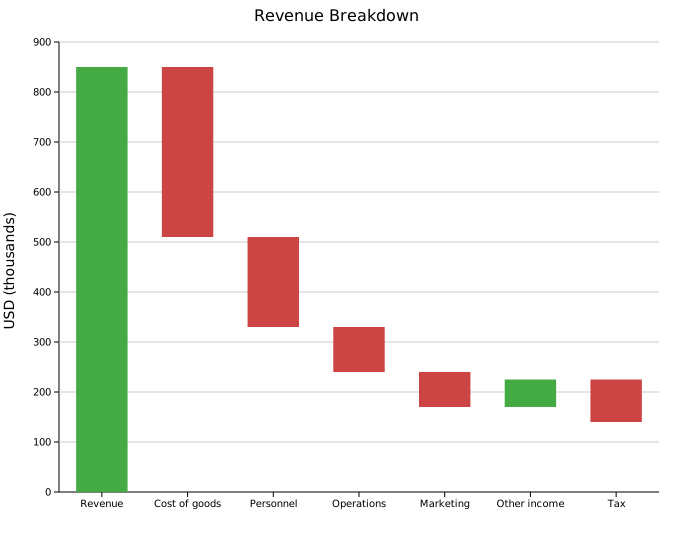
Green bars add to the running total; red bars subtract from it.
Total bars
.with_total(label) places a bar that spans from zero to the current running total, rendered in a distinct color (default "steelblue"). The value field is irrelevant — the bar height is the accumulated total at that position. Place totals after sections of delta bars to show intermediate subtotals.
#![allow(unused)]
fn main() {
use kuva::plot::WaterfallPlot;
use kuva::render::plots::Plot;
let wf = WaterfallPlot::new()
    .with_delta("Revenue",        850.0)
    .with_delta("Cost of goods", -340.0)
    .with_total("Gross profit")         // subtotal after first section
    .with_delta("Personnel",     -180.0)
    .with_delta("Operations",     -90.0)
    .with_delta("Marketing",      -70.0)
    .with_total("EBITDA")               // second subtotal
    .with_delta("Depreciation",   -40.0)
    .with_delta("Interest",       -20.0)
    .with_delta("Tax",            -65.0)
    .with_total("Net income");          // final total
}
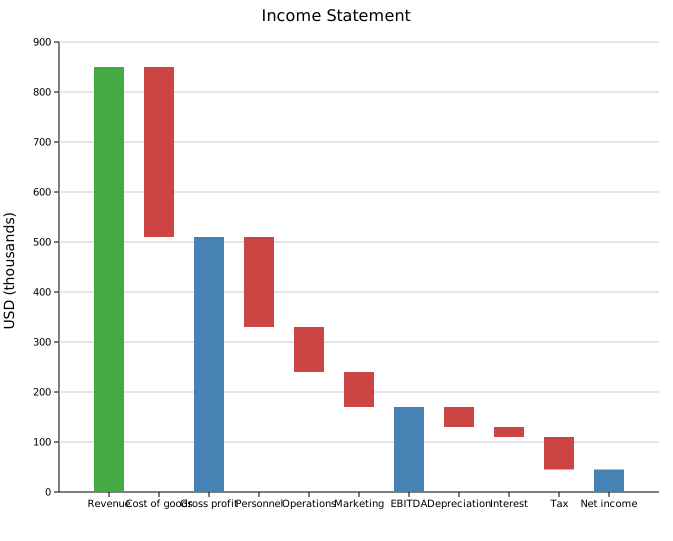
The three blue bars show gross profit, EBITDA, and net income alongside the individual line items that make them up.
Connectors and value labels
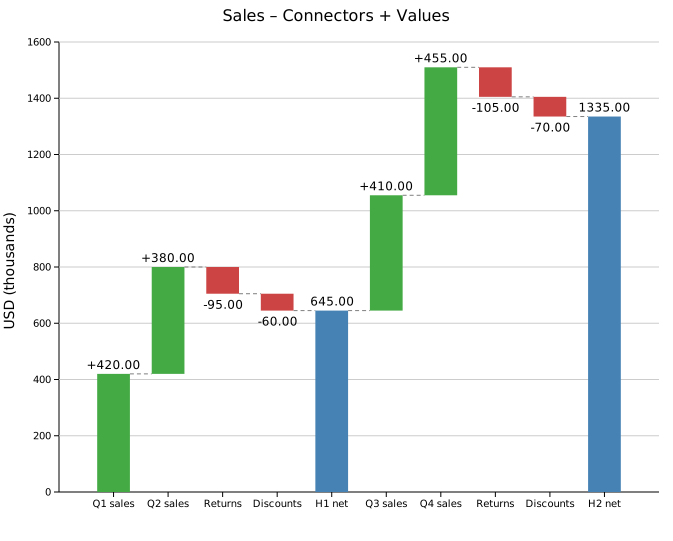
.with_connectors() draws a dashed horizontal line from the top (or bottom) of each bar to the start of the next, making the running total easier to trace across wide charts. .with_values() prints the numeric value of each bar.
#![allow(unused)]
fn main() {
use kuva::plot::WaterfallPlot;
use kuva::render::plots::Plot;
let wf = WaterfallPlot::new()
    .with_delta("Q1 sales",    420.0)
    .with_delta("Q2 sales",    380.0)
    .with_delta("Returns",     -95.0)
    .with_delta("Discounts",   -60.0)
    .with_total("H1 net")
    .with_delta("Q3 sales",   410.0)
    .with_delta("Q4 sales",   455.0)
    .with_delta("Returns",   -105.0)
    .with_delta("Discounts",  -70.0)
    .with_total("H2 net")
    .with_connectors()
    .with_values();
}
Difference bars
.with_difference(label, from, to) adds a standalone comparison bar anchored at explicit y-values rather than the running total. The bar spans [from, to] — green when to > from, red when to < from — and does not change the running total.
The clearest use is when from and to match the heights of existing Total bars, so the reader can trace the connection directly. In the example below both period totals are in the chart; the difference bar sits between those two reference levels and shows the gain between them.
#![allow(unused)]
fn main() {
use kuva::plot::WaterfallPlot;
use kuva::render::plots::Plot;

let wf = WaterfallPlot::new()
    .with_delta("Revenue",   500.0)   // running total → 500
    .with_delta("Costs",    -180.0)   // running total → 320
    .with_total("Period A")           // total bar: 0 → 320
    .with_delta("Revenue",   600.0)   // running total → 920
    .with_delta("Costs",    -190.0)   // running total → 730
    .with_total("Period B")           // total bar: 0 → 730
    // from = Period A total (320), to = Period B total (730)
    .with_difference("Period A→B", 320.0, 730.0)
    .with_values();
}
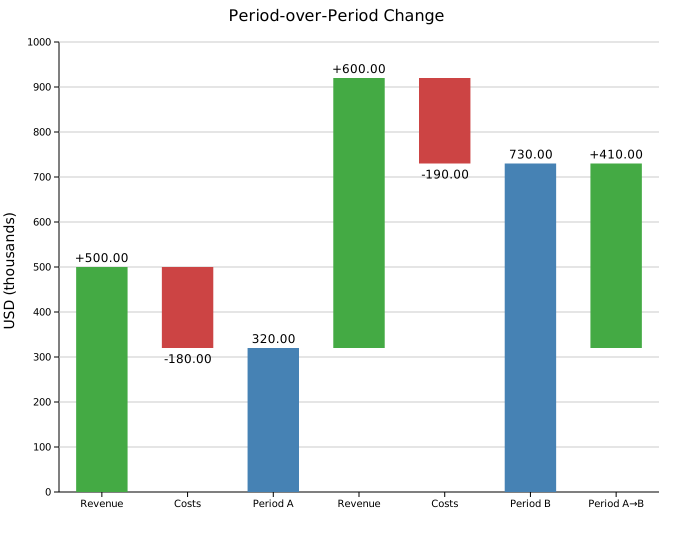
The "Period A→B" bar is anchored at 320–730 regardless of where the running total is. It does not alter the "Period B" total — it is purely a visual annotation showing the improvement between the two periods.
Custom colors
Override any of the three bar colors with CSS color strings.
#![allow(unused)]
fn main() {
use kuva::plot::WaterfallPlot;
let wf = WaterfallPlot::new()
    .with_delta("Gain",  100.0)
    .with_delta("Loss",  -40.0)
    .with_total("Net")
    .with_color_positive("darkgreen")   // default: "rgb(68,170,68)"
    .with_color_negative("crimson")     // default: "rgb(204,68,68)"
    .with_color_total("navy");          // default: "steelblue"
}
API reference
| Method | Description |
|---|---|
WaterfallPlot::new() | Create a waterfall chart with defaults |
.with_delta(label, value) | Floating increment/decrement bar; updates running total |
.with_total(label) | Summary bar from zero to current running total |
.with_difference(label, from, to) | Anchored comparison bar; does not affect running total |
.with_bar_width(f) | Bar width as a fraction of the slot (default 0.6) |
.with_color_positive(s) | Color for positive delta bars (default "rgb(68,170,68)") |
.with_color_negative(s) | Color for negative delta bars (default "rgb(204,68,68)") |
.with_color_total(s) | Color for total/subtotal bars (default "steelblue") |
.with_connectors() | Draw dashed connector lines between consecutive bars |
.with_values() | Print numeric values on each bar |
.with_legend(s) | Attach a legend label |
See also: Bar Chart for a plain (non-cumulative) comparison, Stacked Area Plot for a continuous running-total alternative.
CLI
Waterfall / bridge chart showing a running total built from incremental bars.
Input: label column + numeric value column. Mark subtotal/total bars with --total.
| Flag | Default | Description |
|---|---|---|
--label-col <COL> | 0 | Label column |
--value-col <COL> | 1 | Value column |
--total <LABEL> | — | Mark this label as a summary bar (repeatable) |
--connectors | off | Draw dashed connector lines between bars |
--values | off | Print numeric values on each bar |
--color-pos <CSS> | green | Positive delta bar color |
--color-neg <CSS> | red | Negative delta bar color |
--color-total <CSS> | steelblue | Total/subtotal bar color |
kuva waterfall waterfall.tsv --label-col process --value-col log2fc \
    --connectors --values

# mark two rows as summary bars
kuva waterfall income.tsv \
    --total "Gross profit" --total "Net income" \
    --connectors --values
See also: Shared flags — output, appearance, axes, log scale.