Dot Plot
A dot plot (bubble matrix) places circles at the intersections of two categorical axes. Each circle encodes two independent continuous variables: size (radius) and color. This makes it well suited for compact display of multi-variable summaries across a grid — the canonical use case in bioinformatics is a gene expression dot plot where size shows the fraction of cells expressing a gene and color shows the mean expression level.
Import path: kuva::plot::DotPlot
Basic usage
Pass an iterator of (x_cat, y_cat, size, color) tuples to .with_data(). Category order on each axis follows first-seen insertion order. Enable legends independently with .with_size_legend() and .with_colorbar().
#![allow(unused)]
fn main() {
use kuva::plot::DotPlot;
use kuva::backend::svg::SvgBackend;
use kuva::render::render::render_multiple;
use kuva::render::layout::Layout;
use kuva::render::plots::Plot;

let data = vec![
    // (x_cat,   y_cat,   size,  color)
    ("CD4 T",  "CD3E",  88.0_f64, 3.8_f64),
    ("CD8 T",  "CD3E",  91.0,     4.0    ),
    ("NK",     "CD3E",  12.0,     0.5    ),
    ("CD4 T",  "CD4",   85.0,     3.5    ),
    ("CD8 T",  "CD4",    8.0,     0.3    ),
    ("NK",     "CD4",    4.0,     0.2    ),
];

let dot = DotPlot::new()
    .with_data(data)
    .with_size_legend("% Expressing")
    .with_colorbar("Mean expression");

let plots = vec![Plot::DotPlot(dot)];
let layout = Layout::auto_from_plots(&plots)
    .with_title("Gene Expression")
    .with_x_label("Cell type")
    .with_y_label("Gene");

let scene = render_multiple(plots, layout);
let svg = SvgBackend.render_scene(&scene);
std::fs::write("dotplot.svg", svg).unwrap();
}
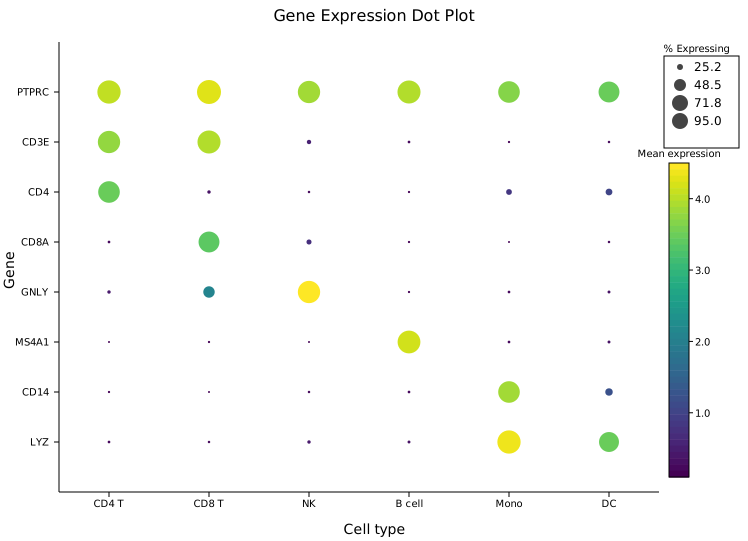
Eight immune marker genes across six cell types. Large circles show genes expressed in many cells; bright colors (Viridis: yellow) show high mean expression. The cell-type specificity of each marker is immediately legible — CD3E is large in T cells, MS4A1 only in B cells, LYZ highest in monocytes.
Matrix input
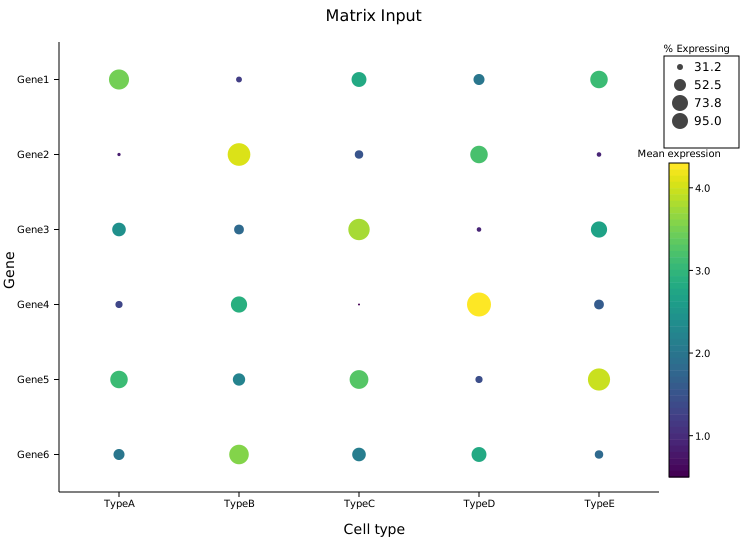
.with_matrix(x_cats, y_cats, sizes, colors) accepts dense 2-D data where every grid cell is filled. sizes[row_i][col_j] maps to y_cats[row_i] and x_cats[col_j]. Use this when your data comes from a matrix or 2-D array.
#![allow(unused)]
fn main() {
use kuva::plot::DotPlot;
use kuva::render::plots::Plot;

let x_cats = vec!["TypeA", "TypeB", "TypeC", "TypeD", "TypeE"];
let y_cats = vec!["Gene1", "Gene2", "Gene3", "Gene4", "Gene5", "Gene6"];

// sizes[row_i][col_j] → y_cats[row_i], x_cats[col_j]
let sizes = vec![
    vec![80.0, 25.0, 60.0, 45.0, 70.0],
    vec![15.0, 90.0, 35.0, 70.0, 20.0],
    // ...
];
let colors = vec![
    vec![3.5, 1.2, 2.8, 2.0, 3.1],
    vec![0.8, 4.1, 1.5, 3.2, 0.9],
    // ...
];

let dot = DotPlot::new()
    .with_matrix(x_cats, y_cats, sizes, colors)
    .with_size_legend("% Expressing")
    .with_colorbar("Mean expression");
}
Sparse data
With .with_data(), grid positions with no corresponding tuple are simply left empty — no circle is drawn at that cell. There is no need to fill missing values with zero or NaN.
#![allow(unused)]
fn main() {
use kuva::plot::DotPlot;
let dot = DotPlot::new().with_data(vec![
    ("TypeA", "GeneX", 80.0_f64, 2.5_f64),
    // ("TypeA", "GeneY") absent — no circle drawn
    ("TypeA", "GeneZ", 40.0,     1.2    ),
    ("TypeB", "GeneY", 90.0,     2.9    ),
]);
}
Legends
The size legend and colorbar are independent. Enable either, both, or neither.
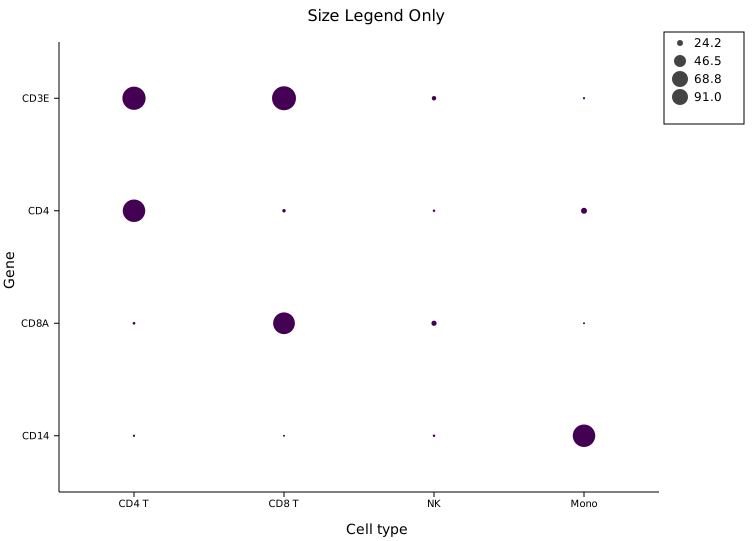
Size legend only
.with_size_legend(label) adds a key in the right margin showing representative radii with their corresponding values. Use this when color carries no additional information (or when all dots share the same constant color value).
#![allow(unused)]
fn main() {
use kuva::plot::DotPlot;
let dot = DotPlot::new()
    .with_data(data)
    .with_size_legend("% Expressing");   // only size legend; no colorbar
}
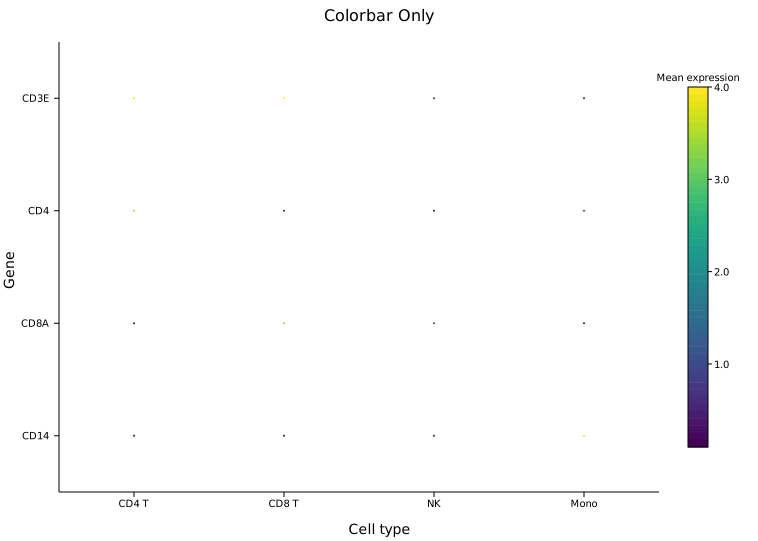
Colorbar only
.with_colorbar(label) adds a colorbar for the color encoding. Useful when all dots should be the same size (pass a constant for the size field) so the color variable is the sole focus.
#![allow(unused)]
fn main() {
use kuva::plot::DotPlot;
let dot = DotPlot::new()
    .with_data(data)
    .with_colorbar("Mean expression");   // only colorbar; no size legend
}
Both legends
When both are set, the size legend and colorbar are stacked in a single right-margin column automatically.
#![allow(unused)]
fn main() {
use kuva::plot::DotPlot;
let dot = DotPlot::new()
    .with_data(data)
    .with_size_legend("% Expressing")
    .with_colorbar("Mean expression");
}
Clamping ranges
By default the size and color encodings are normalised to the data extent automatically. Use .with_size_range() and .with_color_range() to fix an explicit [min, max] — useful for excluding outliers or keeping a consistent scale across multiple plots.
#![allow(unused)]
fn main() {
use kuva::plot::DotPlot;
let dot = DotPlot::new()
    .with_data(data)
    // Clamp size to 0–100 % regardless of data range;
    // values above 100 map to max_radius.
    .with_size_range(0.0, 100.0)
    // Fix color scale to 0–5 log-normalised expression.
    .with_color_range(0.0, 5.0);
}
Radius range
.with_max_radius(px) and .with_min_radius(px) set the pixel size limits (defaults: 12.0 and 1.0). Increase max_radius for a larger grid or reduce it for dense plots with many categories.
#![allow(unused)]
fn main() {
use kuva::plot::DotPlot;
let dot = DotPlot::new()
    .with_data(data)
    .with_max_radius(18.0)   // default 12.0
    .with_min_radius(2.0);   // default 1.0
}
Color maps
.with_color_map(ColorMap) selects the color encoding (default Viridis). The same ColorMap variants available for heatmaps apply here: Viridis, Inferno, Grayscale, and Custom.
#![allow(unused)]
fn main() {
use kuva::plot::{DotPlot, ColorMap};
use kuva::render::plots::Plot;

let dot = DotPlot::new()
    .with_data(data)
    .with_color_map(ColorMap::Inferno);
}
API reference
| Method | Description |
|---|---|
DotPlot::new() | Create a dot plot with defaults |
.with_data(iter) | Sparse input: iterator of (x_cat, y_cat, size, color) tuples |
.with_matrix(x, y, sizes, colors) | Dense input: category lists + 2-D matrices |
.with_color_map(map) | Color encoding: Viridis, Inferno, Grayscale, Custom (default Viridis) |
.with_max_radius(px) | Largest circle radius in pixels (default 12.0) |
.with_min_radius(px) | Smallest circle radius in pixels (default 1.0) |
.with_size_range(min, max) | Clamp size values before normalising (default: data extent) |
.with_color_range(min, max) | Clamp color values before normalising (default: data extent) |
.with_size_legend(label) | Add a size key in the right margin |
.with_colorbar(label) | Add a colorbar in the right margin |
See also: Heatmap for a filled-cell alternative, Bar Chart for a simpler categorical comparison, Clustermap for a clustered gene-expression view.
CLI
Dot plot encoding two variables (size and color) at categorical (x, y) positions.
Input: four columns — x category, y category, size value, color value.
| Flag | Default | Description |
|---|---|---|
--x-col <COL> | 0 | X-category column |
--y-col <COL> | 1 | Y-category column |
--size-col <COL> | 2 | Size-encoding column |
--color-col <COL> | 3 | Color-encoding column |
--colormap <NAME> | viridis | Color map |
--max-radius <PX> | 12.0 | Maximum dot radius |
--size-legend <LABEL> | — | Show size legend with this label |
--colorbar <LABEL> | — | Show color bar with this label |
kuva dot dot.tsv \
    --x-col pathway --y-col cell_type \
    --size-col pct_expressed --color-col mean_expr

kuva dot dot.tsv \
    --x-col pathway --y-col cell_type \
    --size-col pct_expressed --color-col mean_expr \
    --size-legend "% expressed" --colorbar "mean expr"
See also: Shared flags — output, appearance, axes, log scale.