Dice Plot
A dice plot places up to 6 dots in a die-face layout at each intersection of two categorical axes. Each dot position represents a third categorical variable, while dot colour and size can independently encode continuous values. This makes it ideal for compact visualisation of multivariate data across a grid — the canonical use case is displaying differential expression across multiple contrasts, tissues, or conditions in a single figure.
Ported from the ggdiceplot R package (v1.2.0).
Import path: kuva::plot::DicePlot
Categorical mode
Each input record is one observation: (x_cat, y_cat, dot_category, css_color). Dot positions are assigned by matching dot_category against the category labels. Absent positions are not drawn; tile backgrounds are white with a black border.
#![allow(unused)]
fn main() {
use kuva::plot::diceplot::DicePlot;
use kuva::backend::svg::SvgBackend;
use kuva::render::render::render_multiple;
use kuva::render::layout::Layout;
use kuva::render::plots::Plot;

let organs = vec!["Lung".into(), "Liver".into(), "Brain".into(), "Kidney".into()];
let data = vec![
    ("miR-1", "Control",    "Lung",   "#2166ac"),
    ("miR-1", "Control",    "Liver",  "#2166ac"),
    ("miR-1", "Control",    "Brain",  "#cccccc"),
    ("miR-1", "Control",    "Kidney", "#2166ac"),
    ("miR-1", "Compound_1", "Lung",   "#2166ac"),
    ("miR-1", "Compound_1", "Liver",  "#cccccc"),
    // ...
];

let dice = DicePlot::new(4)
    .with_category_labels(organs)
    .with_records(data)
    .with_dot_legend(vec![
        ("Down",      "#2166ac"),
        ("Unchanged", "#cccccc"),
        ("Up",        "#b2182b"),
    ])
    .with_position_legend("Organ");

let plots = vec![Plot::DicePlot(dice)];
let layout = Layout::auto_from_plots(&plots)
    .with_title("miRNA Compound Screening")
    .with_x_label("miRNA")
    .with_y_label("Compound");

let scene = render_multiple(plots, layout);
let svg = SvgBackend.render_scene(&scene);
std::fs::write("mirna_compound.svg", svg).unwrap();
}
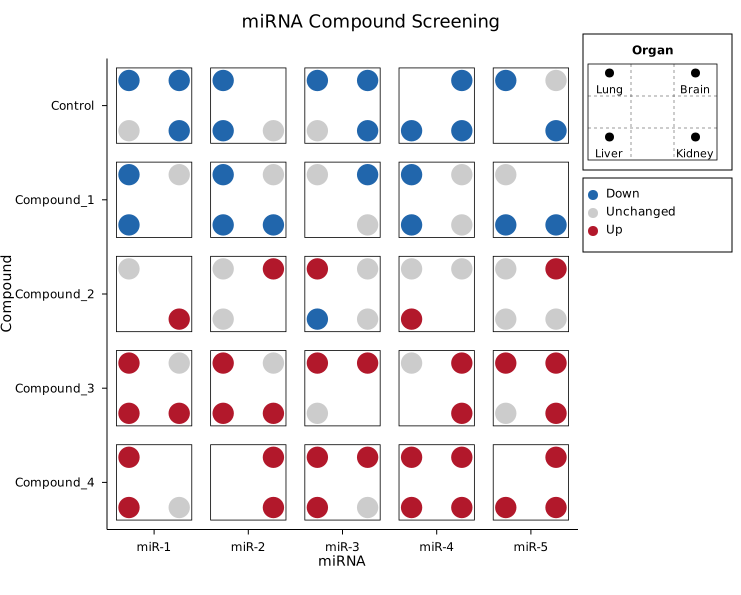
Five miRNAs across five compound treatments. Each cell shows four organ dot positions; colour encodes expression direction (down/unchanged/up). The position legend shows which dot position maps to which organ.
Per-dot continuous mode
Each record is one dot: (x_cat, y_cat, dot_index, fill, size). Each dot gets its own colourmap fill and proportional radius. This is the mode used for ZEBRA-style domino plots where fill encodes log fold change and size encodes significance.
#![allow(unused)]
fn main() {
use std::sync::Arc;
use kuva::plot::diceplot::DicePlot;
use kuva::plot::heatmap::ColorMap;
use kuva::render::plots::Plot;

let diseases = vec![
    "Caries".into(), "Periodontitis".into(), "Healthy".into(), "Gingivitis".into(),
];

let data = vec![
    ("C. showae", "Saliva", 0_usize, Some(2.55), Some(4.82)),
    ("C. showae", "Saliva", 1,       Some(-0.67), Some(1.30)),
    // ...
];

// ggdiceplot's purple-white-green diverging scale
let cmap = ColorMap::Custom(Arc::new(|t: f64| {
    let (r, g, b) = if t < 0.5 {
        let s = t * 2.0;
        (0x40 as f64 + s * (255.0 - 0x40 as f64),
         s * 255.0,
         0x4B as f64 + s * (255.0 - 0x4B as f64))
    } else {
        let s = (t - 0.5) * 2.0;
        (255.0 * (1.0 - s),
         255.0 + s * (0x44 as f64 - 255.0),
         255.0 + s * (0x1B as f64 - 255.0))
    };
    format!("rgb({},{},{})", r as u8, g as u8, b as u8)
}));

let dice = DicePlot::new(4)
    .with_category_labels(diseases)
    .with_dot_data(data)
    .with_color_map(cmap)
    .with_fill_legend("Log2FC")
    .with_size_legend("q-value")
    .with_position_legend("Disease");
}
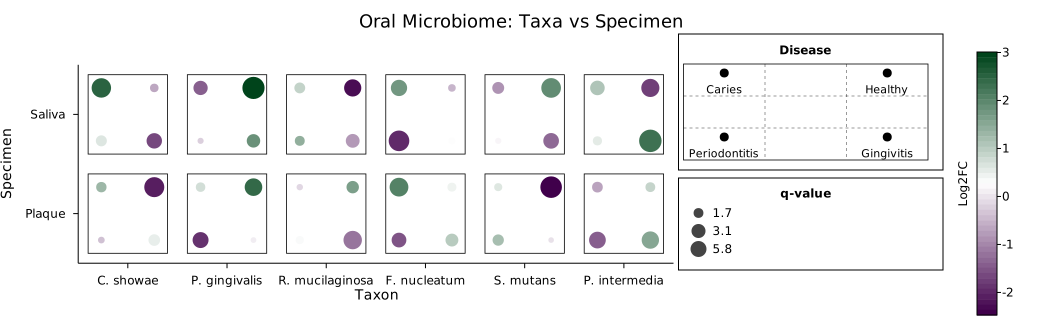
Six oral bacteria across two specimen types. Each dot represents a disease condition; purple-to-green fill encodes log fold change, dot size encodes statistical significance.
ZEBRA domino plot
The per-dot continuous mode scales to larger grids. This example reproduces the ZEBRA sex DEGs domino plot: 9 genes across 5 cell types with 5 disease contrasts per cell.
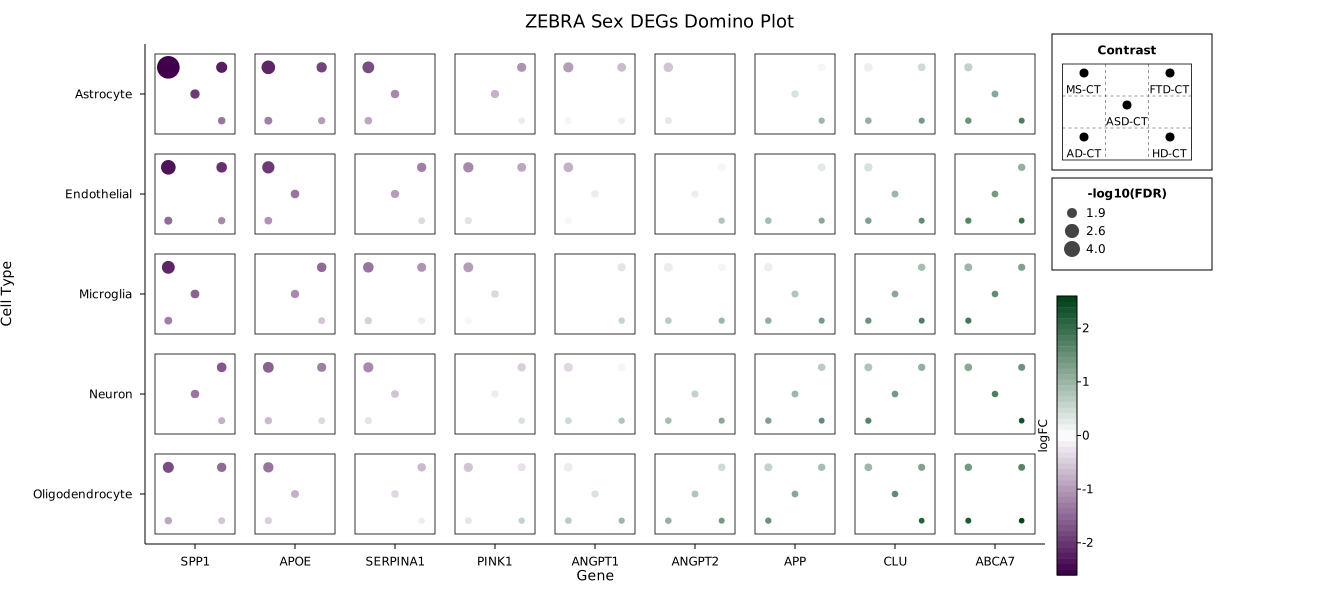
Each die face shows five contrasts (MS-CT, AD-CT, ASD-CT, FTD-CT, HD-CT). Fill encodes logFC (purple = down, green = up), size encodes -log10(FDR). Missing dots indicate non-significant results for that contrast.
Continuous tile mode
One record per grid cell via with_points(iter of (x, y, present_vec, fill, size)). The tile background is coloured via the colour map; dot radius encodes a second continuous variable. Present dots are filled black; absent positions show as small hollow outlines.
#![allow(unused)]
fn main() {
use kuva::plot::diceplot::DicePlot;
let data = vec![
    ("Gene_A", "Sample_1", vec![0, 1, 2, 3], Some(0.8), Some(5.0)),
    ("Gene_A", "Sample_2", vec![0, 2],       Some(0.3), Some(2.0)),
    // ...
];

let dice = DicePlot::new(4)
    .with_points(data)
    .with_fill_legend("Expression")
    .with_size_legend("Significance");
}
Legends
DicePlot supports three independent legend sections, stacked vertically in the right margin:
- Position legend (
.with_position_legend("Title")) — mini die faces showing which dot position maps to which category - Colour legend (
.with_dot_legend(entries)) — colour swatches for categorical mode - Size legend (
.with_size_legend("Title")) — representative circles at 25%, 50%, 100% of max radius
A colorbar is added via .with_fill_legend("Label") for continuous fill modes.
Pip sizing
Pip (dot) radius is computed using the ggdiceplot 1.2.0 tight-packing algorithm:
- Compute minimum inter-pip distance and maximum offset from tile center
- Find the scale factor (
s_tight) where pips simultaneously touch each other and tile borders - Maximum pip radius =
min(border_clearance, inter_pip_gap / 2) - Default
pip_scale = 0.75— pips fill 75% of available space - When pips would overflow, their positions are shifted toward the tile center
Override with .with_dot_radius(px) for a fixed radius.
API reference
| Method | Description |
|---|---|
DicePlot::new(ndots) | Create with 1–6 dot positions per cell |
.with_records(iter) | Categorical input: (x, y, dot_category, css_color) |
.with_points(iter) | Continuous tile input: (x, y, present_vec, fill, size) |
.with_dot_data(iter) | Per-dot continuous input: (x, y, dot_idx, fill, size) |
.with_category_labels(vec) | Set legend labels for each dot position |
.with_x_categories(vec) | Override x-axis category order |
.with_y_categories(vec) | Override y-axis category order |
.with_color_map(map) | Colour encoding: Viridis, Inferno, Grayscale, Custom |
.with_fill_range(min, max) | Clamp fill values before normalising |
.with_size_range(min, max) | Clamp size values before normalising |
.with_fill_legend(label) | Add a colorbar in the right margin |
.with_size_legend(label) | Add a size legend in the right margin |
.with_dot_legend(entries) | Categorical colour legend: [(label, css_color)] |
.with_position_legend(title) | Spatial-position legend with mini die faces |
.with_dot_radius(px) | Fixed dot radius (0.0 = auto) |
.with_cell_size(w, h) | Tile size as fraction of cell (default 0.8, 0.8) |
.with_pad(pad) | Intra-tile padding fraction (default 0.1) |
See also: Dot Plot for the simpler size/color grid it extends, Mosaic Plot for another multivariate categorical grid.