Stacked Area Plot
A stacked area chart places multiple series on top of each other so the reader can see both the individual contribution of each series and the combined total at any x position. It is well suited for showing how a whole is composed of parts over a continuous axis — typically time.
Import path: kuva::plot::StackedAreaPlot
Basic usage
Set the x values with .with_x(), then add series one at a time with .with_series(). Call .with_color() and .with_legend() immediately after each series to configure it — these methods always operate on the most recently added series.
#![allow(unused)]
fn main() {
use kuva::plot::StackedAreaPlot;
use kuva::backend::svg::SvgBackend;
use kuva::render::render::render_multiple;
use kuva::render::layout::Layout;
use kuva::render::plots::Plot;

let months: Vec<f64> = (1..=12).map(|m| m as f64).collect();

let sa = StackedAreaPlot::new()
    .with_x(months)
    .with_series([420.0, 445.0, 398.0, 510.0, 488.0, 501.0,
                  467.0, 523.0, 495.0, 540.0, 518.0, 555.0])
    .with_color("steelblue").with_legend("SNVs")
    .with_series([ 95.0, 102.0,  88.0, 115.0, 108.0, 112.0,
                   98.0, 125.0, 118.0, 130.0, 122.0, 140.0])
    .with_color("orange").with_legend("Indels")
    .with_series([ 22.0,  25.0,  20.0,  28.0,  26.0,  27.0,
                   24.0,  31.0,  28.0,  33.0,  30.0,  35.0])
    .with_color("mediumseagreen").with_legend("SVs")
    .with_series([ 15.0,  17.0,  14.0,  19.0,  18.0,  18.0,
                   16.0,  21.0,  19.0,  23.0,  21.0,  24.0])
    .with_color("tomato").with_legend("CNVs");

let plots = vec![Plot::StackedArea(sa)];
let layout = Layout::auto_from_plots(&plots)
    .with_title("Monthly Variant Counts by Type")
    .with_x_label("Month")
    .with_y_label("Variant count");

let svg = SvgBackend.render_scene(&render_multiple(plots, layout));
std::fs::write("stacked_area.svg", svg).unwrap();
}
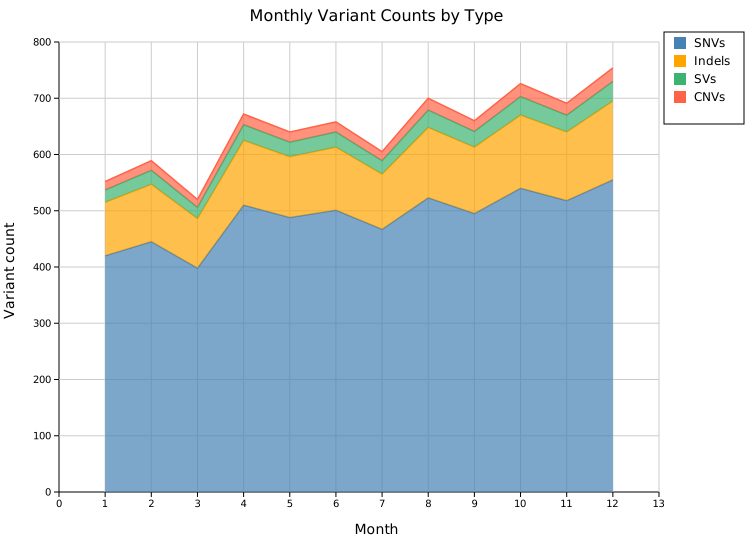
Four variant types are stacked so the total height of each column shows the aggregate monthly count while the coloured bands show how much each type contributes. The growing trend in SNVs lifts all upper bands over time.
Normalized (100 % stacking)
.with_normalized() rescales each column so all series sum to 100 %, shifting the y-axis to span 0–100 %. Use this when you want to emphasise proportional composition rather than absolute magnitude.
#![allow(unused)]
fn main() {
use kuva::plot::StackedAreaPlot;
let sa = StackedAreaPlot::new()
    .with_x(months)
    // ... add series ...
    .with_normalized();
}
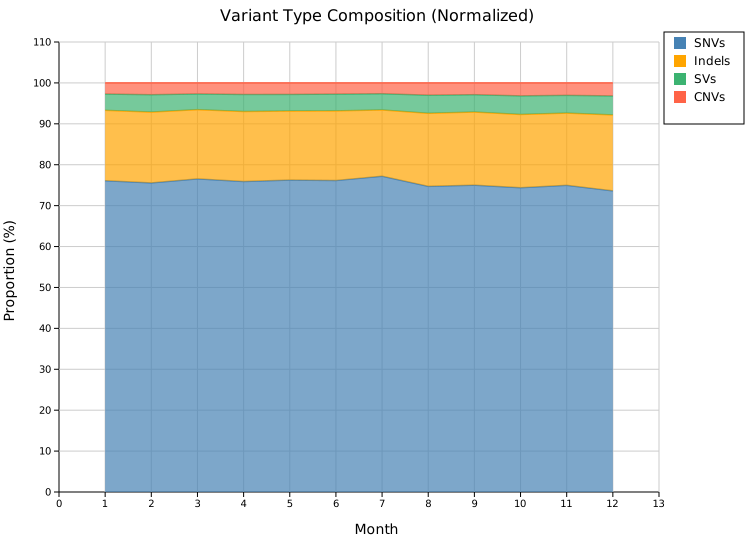
The relative dominance of SNVs (~77 %) is immediately clear and the slight month-to-month shifts in variant-type mix become visible — information that was hidden in the absolute chart by the large SNV counts.
Stroke lines
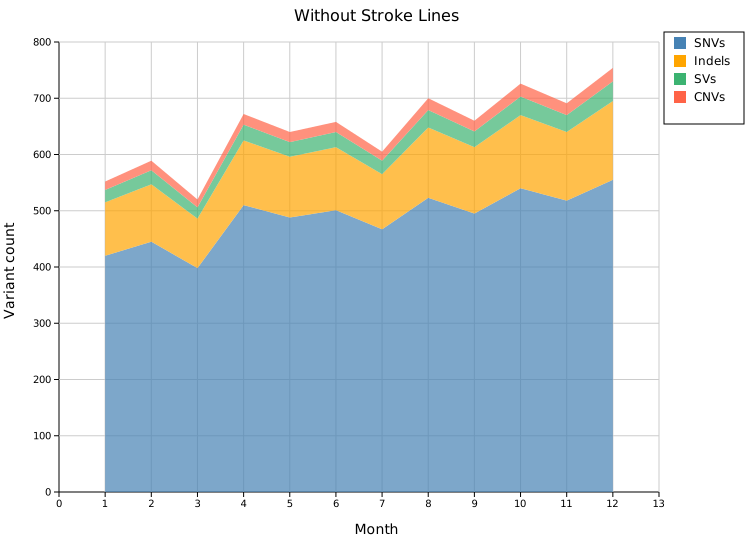
By default a stroke is drawn along the top edge of each band. .with_strokes(false) removes all outlines for a softer, flat appearance — useful when the colors provide enough contrast.
#![allow(unused)]
fn main() {
use kuva::plot::StackedAreaPlot;
let sa = StackedAreaPlot::new()
    .with_x(months)
    // ... add series ...
    .with_strokes(false);
}
Legend position
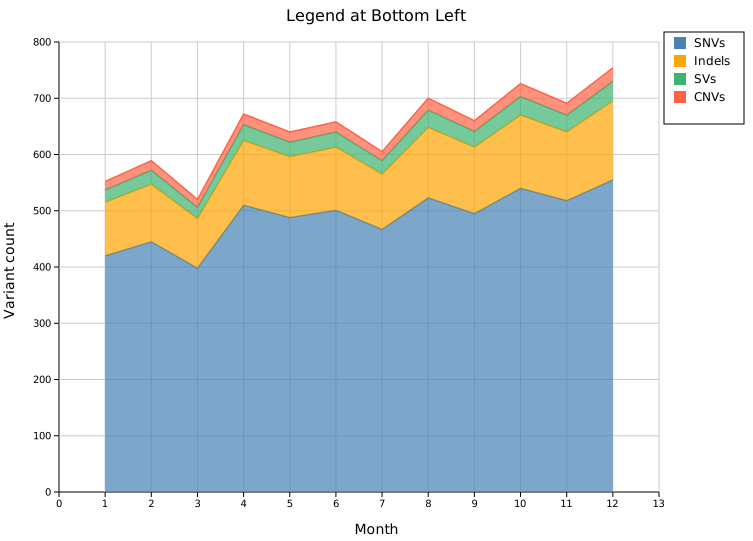
.with_legend_position(pos) accepts any LegendPosition variant. The most useful choices for stacked-area plots:
| Variant | Description |
|---|---|
OutsideRightTop | Right margin, top-aligned (default) |
InsideTopRight | Overlay — upper-right of the data area |
InsideTopLeft | Overlay — upper-left of the data area |
InsideBottomRight | Overlay — lower-right of the data area |
InsideBottomLeft | Overlay — lower-left of the data area |
#![allow(unused)]
fn main() {
use kuva::plot::{StackedAreaPlot, LegendPosition};

let sa = StackedAreaPlot::new()
    .with_x(months)
    // ... add series ...
    .with_legend_position(LegendPosition::InsideBottomLeft);
}
Styling
Fill opacity
.with_fill_opacity(f) sets the transparency of every band (default 0.7, range 0.0–1.0). Lower values let background grid lines show through; 1.0 gives fully opaque fills.
Stroke width
.with_stroke_width(px) sets the thickness of the top-edge strokes (default 1.5). Has no effect when .with_strokes(false) is set.
#![allow(unused)]
fn main() {
use kuva::plot::StackedAreaPlot;
let sa = StackedAreaPlot::new()
    .with_x(months)
    // ... add series ...
    .with_fill_opacity(0.9)   // nearly opaque bands
    .with_stroke_width(2.5);  // thicker border lines
}
Colors
If no color is set for a series the built-in fallback palette is used (cycling when there are more than eight series):
steelblue, orange, green, red, purple, brown, pink, gray
Set an explicit color by calling .with_color() immediately after .with_series():
#![allow(unused)]
fn main() {
use kuva::plot::StackedAreaPlot;
let sa = StackedAreaPlot::new()
    .with_x([1.0, 2.0, 3.0])
    .with_series([10.0, 20.0, 15.0]).with_color("#2c7bb6").with_legend("Group A")
    .with_series([ 5.0,  8.0,  6.0]).with_color("#d7191c").with_legend("Group B");
}
API reference
| Method | Description |
|---|---|
StackedAreaPlot::new() | Create a plot with defaults |
.with_x(iter) | Set shared x-axis values |
.with_series(iter) | Append a new y series |
.with_color(s) | Fill color of the most recently added series |
.with_legend(s) | Legend label of the most recently added series |
.with_fill_opacity(f) | Band transparency — 0.0 to 1.0 (default 0.7) |
.with_stroke_width(px) | Top-edge stroke thickness (default 1.5) |
.with_strokes(bool) | Show/hide top-edge strokes (default true) |
.with_normalized() | Enable 100 % percent-stacking |
.with_legend_position(pos) | Any LegendPosition variant (default OutsideRightTop) |
See also: Streamgraph for a zero-centered alternative, Waterfall Chart for running-total (non-stacked) data.
CLI
Stacked area chart in long format.
Input: three columns — x value, group label, y value — one observation per row. Rows are grouped by the group column; within each group the x/y pairs are collected in order.
| Flag | Default | Description |
|---|---|---|
--x-col <COL> | 0 | X-axis column |
--group-col <COL> | 1 | Series group column |
--y-col <COL> | 2 | Y-axis column |
--normalize | off | Normalize each x-position to 100 % |
--fill-opacity <F> | 0.7 | Fill opacity for each band |
kuva stacked-area stacked_area.tsv \
    --x-col week --group-col species --y-col abundance

kuva stacked-area stacked_area.tsv \
    --x-col week --group-col species --y-col abundance \
    --normalize --y-label "Relative abundance (%)"
See also: Shared flags — output, appearance, axes, log scale.