Layout & Axes
Layout is the single configuration struct passed to every render function. It controls axis ranges, labels, tick marks, log scale, canvas size, annotations, and typography. Every plot type goes through a Layout before becoming an SVG.
Import path: kuva::render::layout::Layout
Constructors
Layout::auto_from_plots()
The recommended starting point. Inspects the data in a Vec<Plot> and automatically computes axis ranges, padding, legend visibility, and colorbar presence.
#![allow(unused)]
fn main() {
use kuva::render::layout::Layout;
use kuva::render::plots::Plot;
let plots: Vec<Plot> = vec![];
let layout = Layout::auto_from_plots(&plots)
    .with_title("My Plot")
    .with_x_label("X")
    .with_y_label("Y");
}
Layout::new()
Sets explicit axis ranges. Use this when you need precise control — for example, when comparing multiple plots that must share the same scale, or when the auto-range would include unwanted padding.
#![allow(unused)]
fn main() {
use kuva::render::layout::Layout;
// x from 0 to 100, y from -1 to 1
let layout = Layout::new((0.0, 100.0), (-1.0, 1.0))
    .with_title("Fixed Range")
    .with_x_label("Time (ms)")
    .with_y_label("Amplitude");
}
Labels and title
#![allow(unused)]
fn main() {
use kuva::render::layout::Layout;
use kuva::render::plots::Plot;
let plots: Vec<Plot> = vec![];
let layout = Layout::auto_from_plots(&plots)
    .with_title("My Plot")              // text above the plot area
    .with_subtitle("n = 1,234 cells")   // smaller, muted line under the title
    .with_x_label("Concentration")      // label below the x-axis
    .with_y_label("Response (%)");      // label left of the y-axis
}
with_subtitle draws a second line centred under the title — useful for a one-line data summary. By default it is sized at round(0.7 × title_size) (override with with_subtitle_size) and coloured by muting the title colour toward the background, so it adapts to light and dark themes. Like the title, it stays on one line unless you set a wrap width — with_subtitle_wrap wraps it independently of the title — and the title block reserves the extra height automatically. CLI: --subtitle and --subtitle-wrap.
Canvas size
The default canvas is 600 × 450 pixels for the plot area, with margins computed automatically from the title, tick labels, and legend. Override either dimension:
#![allow(unused)]
fn main() {
use kuva::render::layout::Layout;
use kuva::render::plots::Plot;
let plots: Vec<Plot> = vec![];
let layout = Layout::auto_from_plots(&plots)
    .with_width(800.0)   // total SVG width in pixels
    .with_height(300.0); // total SVG height in pixels
}
Ticks
The number of tick marks is chosen automatically based on the canvas size. Override it with .with_ticks():
#![allow(unused)]
fn main() {
use kuva::render::layout::Layout;
use kuva::render::plots::Plot;
let plots: Vec<Plot> = vec![];
let layout = Layout::auto_from_plots(&plots)
    .with_ticks(8);  // request approximately 8 tick intervals
}
Tick formats
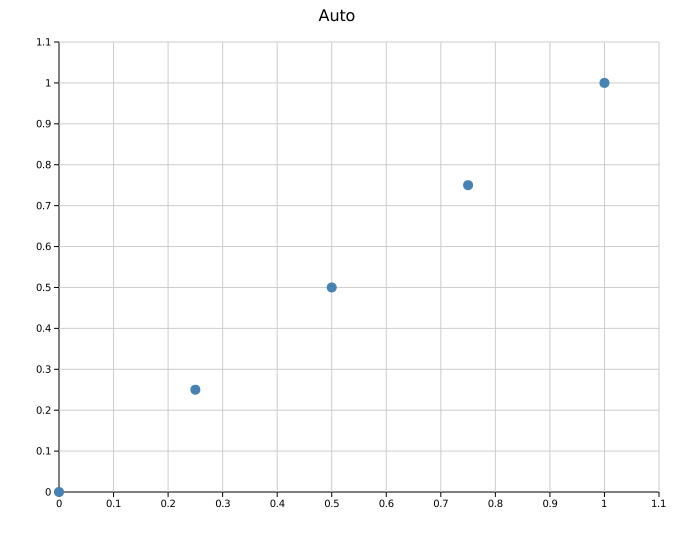
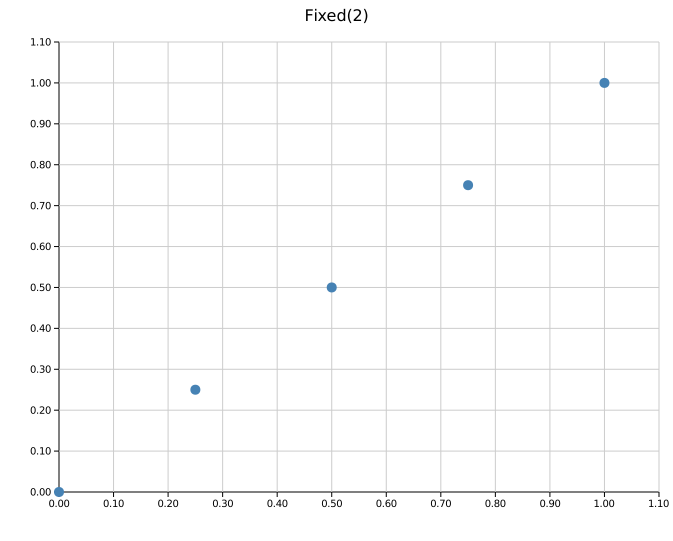
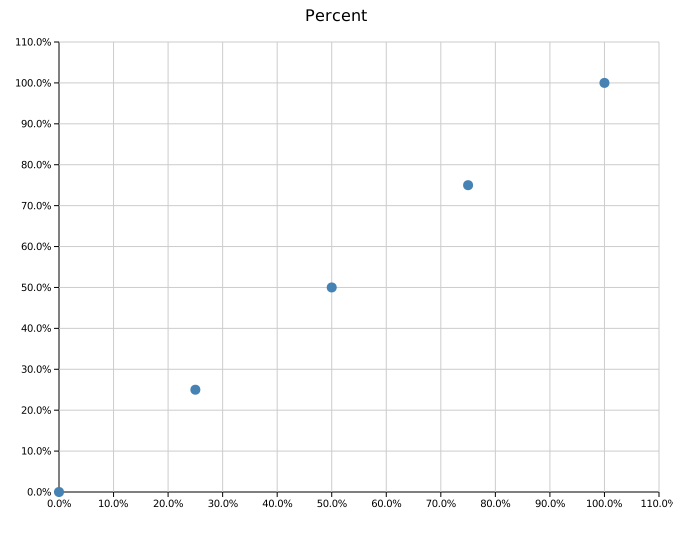
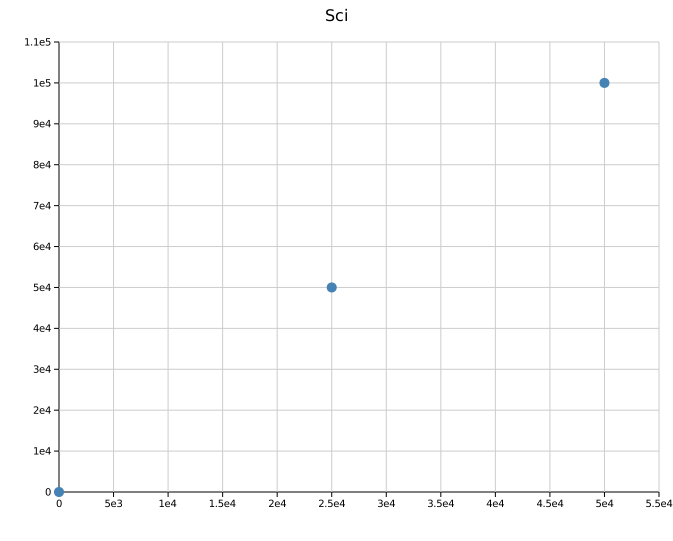
TickFormat controls how numeric tick labels are rendered. Import it from kuva::TickFormat.
| Variant | Example output | Use case |
|---|---|---|
Auto (default) | 5, 3.14, 1.2e5 | General purpose — integers without .0, minimal decimals, sci notation for extremes |
Fixed(n) | 3.14 (n=2) | Fixed decimal places |
Integer | 5 | Round to nearest integer |
Sci | 1.23e4 | Always scientific notation |
Percent | 45.0% | Multiply by 100 and append % — for data in the range 0–1 |
Custom(fn) | anything | Provide your own fn(f64) -> String |
Auto uses scientific notation for small nonzero values instead of rounding them to a zero label. Integer and Fixed(n) still use the rounding you request.
Apply the same format to both axes, or set them independently:
#![allow(unused)]
fn main() {
use kuva::TickFormat;
use kuva::render::layout::Layout;
use kuva::render::plots::Plot;
let plots: Vec<Plot> = vec![];

// Same format on both axes
let layout = Layout::auto_from_plots(&plots)
    .with_tick_format(TickFormat::Fixed(2));

// Independent formats
let layout = Layout::auto_from_plots(&plots)
    .with_x_tick_format(TickFormat::Percent)
    .with_y_tick_format(TickFormat::Sci);

// Custom formatter — append a unit suffix
let layout = Layout::auto_from_plots(&plots)
    .with_y_tick_format(TickFormat::Custom(
        std::sync::Arc::new(|v| format!("{:.0} ms", v))
    ));
}
 |
 |
Auto |
Fixed(2) |
 |
 |
Percent |
Sci |
Tick rotation
Rotate x-axis tick labels when category names are long:
#![allow(unused)]
fn main() {
use kuva::render::layout::Layout;
use kuva::render::plots::Plot;
let plots: Vec<Plot> = vec![];
let layout = Layout::auto_from_plots(&plots)
    .with_x_tick_rotate(45.0);  // degrees; 45 or 90 are common
}
Label overlap
When x-axis tick labels are densely packed they can overprint each other.
with_x_label_overlap controls how collisions are resolved:
#![allow(unused)]
fn main() {
use kuva::AxisLabelOverlap;
use kuva::render::layout::Layout;
use kuva::render::plots::Plot;
let plots: Vec<Plot> = vec![];

// Thin — skip labels that would overlap the previous one
let layout = Layout::auto_from_plots(&plots)
    .with_x_label_overlap(AxisLabelOverlap::Thin);

// Stagger — place colliding labels in an alternating second row
let layout = Layout::auto_from_plots(&plots)
    .with_x_label_overlap(AxisLabelOverlap::Stagger);
}
The default is Allow — every label is drawn regardless of overlap. Stagger
expands margin_bottom by one tick_size automatically to make room for the
second row.
AxisLabelOverlap applies to standard numeric and category axes, and to
Manhattan chromosome labels. On a Manhattan plot Thin drops narrow
chromosomes whose labels would collide; Stagger keeps all of them and
alternates the row instead.
CLI: --x-label-overlap allow|thin|stagger
Log scale
Enable logarithmic axes for data spanning multiple orders of magnitude. Ticks are placed at powers of 10; narrow ranges add 2× and 5× sub-ticks automatically.
#![allow(unused)]
fn main() {
use kuva::render::layout::Layout;
use kuva::render::plots::Plot;
let plots: Vec<Plot> = vec![];
// Both axes log
let layout = Layout::auto_from_plots(&plots).with_log_scale();

// X axis only
let layout = Layout::auto_from_plots(&plots).with_log_x();

// Y axis only
let layout = Layout::auto_from_plots(&plots).with_log_y();
}
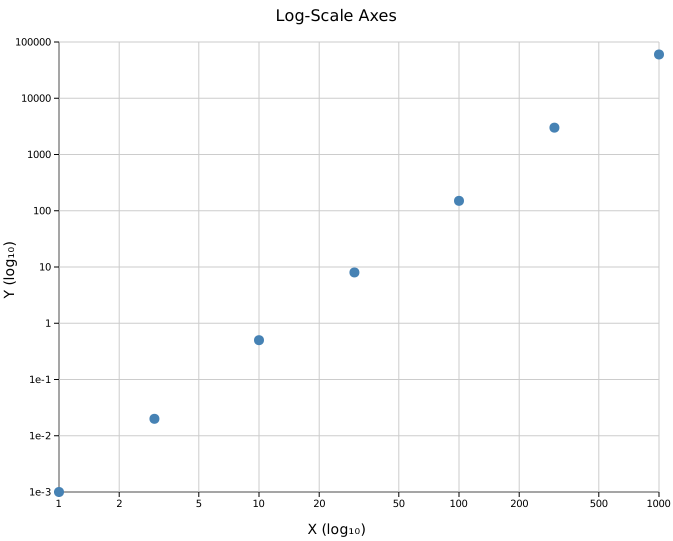
All data values must be positive when using a log axis. auto_from_plots uses the raw data range (before padding) to compute log-scale tick positions, so zero-inclusive ranges are handled safely.
Grid
The grid is shown by default. Disable it with:
#![allow(unused)]
fn main() {
use kuva::render::layout::Layout;
use kuva::render::plots::Plot;
let plots: Vec<Plot> = vec![];
let layout = Layout::auto_from_plots(&plots)
    .with_show_grid(false);
}
Some plot types (Manhattan, UpSet) suppress the grid automatically.
Axis and stroke widths
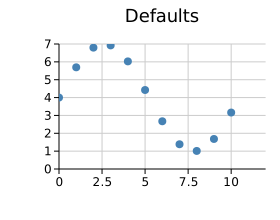
Four independent builders control the stroke thickness of every axis chrome element. All values are in pixels at scale = 1.0 and multiply by the current with_scale factor automatically.
| Builder | Controls | Default |
|---|---|---|
.with_axis_line_width(px) | X and Y border lines | 1.0 |
.with_tick_width(px) | All tick mark strokes | 1.0 |
.with_tick_length(px) | Major tick length (minor = 60 %) | 5.0 |
.with_grid_line_width(px) | All grid lines (both axes) | 1.0 |
#![allow(unused)]
fn main() {
use kuva::render::layout::Layout;
use kuva::render::plots::Plot;
let plots: Vec<Plot> = vec![];
let layout = Layout::auto_from_plots(&plots)
    .with_axis_line_width(2.0)   // heavier axis borders
    .with_tick_width(1.5)        // slightly heavier ticks
    .with_tick_length(8.0)       // longer tick marks
    .with_grid_line_width(0.5);  // lighter grid
}
Each control is fully independent — setting with_grid_line_width does not affect tick strokes, and vice versa. Axis border lines always render on top of grid lines in the SVG, so thick grid lines never visually cut across the axis border.
with_tick_length also affects margins: the left and bottom margins grow automatically to keep tick labels outside the tick marks at any tick length.
 |
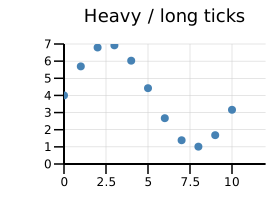 |
| Defaults — axis 1 px, ticks 1 px / 5 px, grid 1 px | axis_line_width=2, tick_width=1.5, tick_length=10, grid_line_width=0.5 |
SVG tooltips
Any plot type that supports .with_tooltips() wraps each data element in a <g class="tt"><title>…</title>…</g> group in the SVG output. Browsers display the <title> as a native hover tooltip, and a small CSS block injected into the SVG dims the hovered element:
#![allow(unused)]
fn main() {
use kuva::plot::{ScatterPlot, BarPlot};
use kuva::render::plots::Plot;

// Auto-generated tooltip text per element
let scatter = ScatterPlot::new()
    .with_data(vec![(1.0f64, 2.0f64), (3.0, 4.0)])
    .with_tooltips();

// Custom tooltip strings (one per data point, in order)
let bar = BarPlot::new()
    .with_bar("A", 10.0, "steelblue")
    .with_bar("B", 25.0, "crimson")
    .with_tooltip_labels(["Category A: 10 reads", "Category B: 25 reads"]);
}
Supported plot types: Scatter, Bar, Histogram, Pie, Heatmap, Strip, Waterfall, Volcano, Manhattan, DotPlot, Candlestick, Polar, Ternary.
Auto-generated text varies by plot type — for example, Scatter shows (x, y), Bar shows label: value, Volcano shows gene (log2fc, −log10p).
Terminal, PNG, and PDF backends silently ignore the tooltip groups — the <title> element and class attribute have no effect outside SVG.
Browser behaviour: tooltips appear after 1 second or so. This is standard browser behaviour for SVG
<title>elements.
Deferred (Tier 3)
LinePlot (needs invisible hit-circles added over the path), BoxPlot, ViolinPlot, SankeyPlot, ChordPlot, BrickPlot.
Annotations
Three types of annotation are available, all added via the Layout builder. Any number of each can be chained.
Text annotation
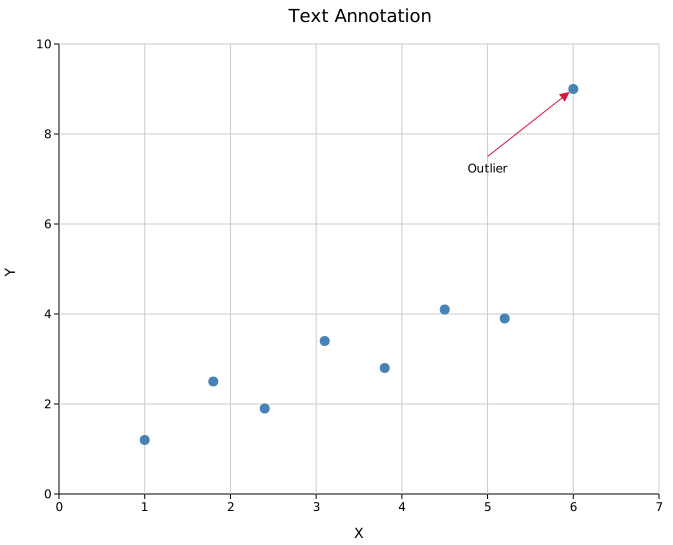
Places a text label at a data coordinate. Optionally draws an arrow pointing to a different coordinate.
#![allow(unused)]
fn main() {
use kuva::render::annotations::TextAnnotation;
use kuva::render::layout::Layout;
use kuva::render::plots::Plot;
let plots: Vec<Plot> = vec![];

let layout = Layout::auto_from_plots(&plots)
    .with_annotation(
        TextAnnotation::new("Outlier", 5.0, 7.5)   // text at (5, 7.5)
            .with_arrow(6.0, 9.0)                   // arrow points to (6, 9)
            .with_color("crimson")
            .with_font_size(12),                    // optional, default 12
    );
}
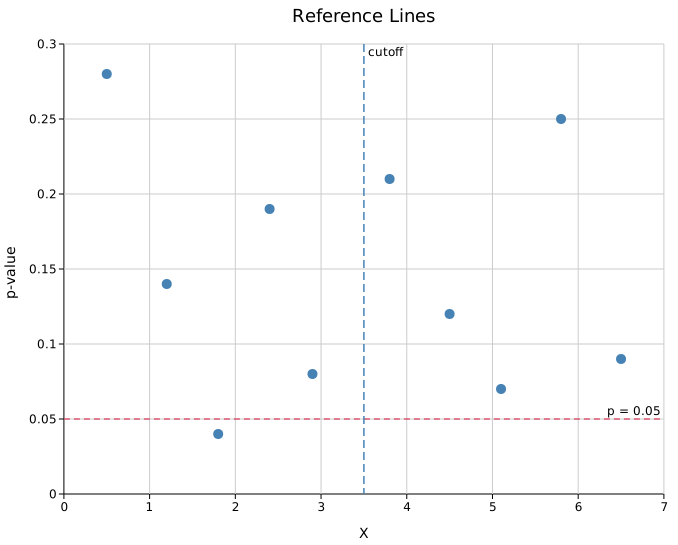
Reference line
Draws a dashed line across the full plot area at a fixed x or y value.
#![allow(unused)]
fn main() {
use kuva::render::annotations::ReferenceLine;
use kuva::render::layout::Layout;
use kuva::render::plots::Plot;
let plots: Vec<Plot> = vec![];

let layout = Layout::auto_from_plots(&plots)
    .with_reference_line(
        ReferenceLine::horizontal(0.05)     // y = 0.05
            .with_color("crimson")
            .with_label("p = 0.05"),        // optional label at right edge
    )
    .with_reference_line(
        ReferenceLine::vertical(3.5)        // x = 3.5
            .with_color("steelblue")
            .with_label("cutoff")
            .with_stroke_width(1.5)         // optional, default 1.0
            .with_dasharray("8 4"),         // optional, default "6 4"
    );
}
Shaded region
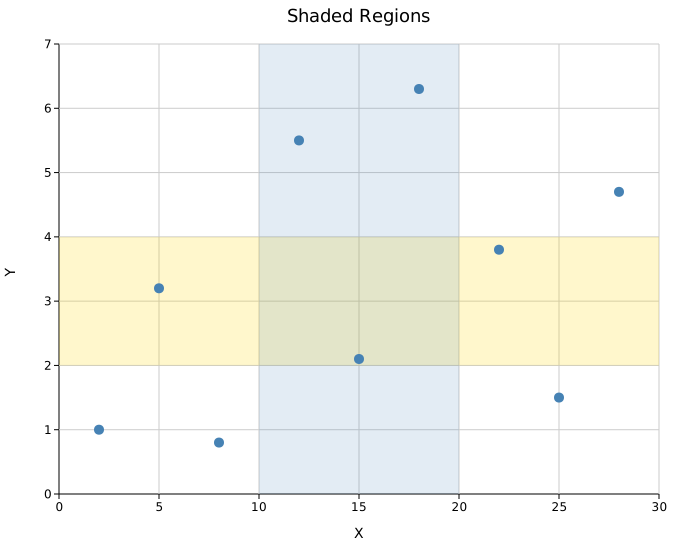
Fills a horizontal or vertical band across the plot area.
#![allow(unused)]
fn main() {
use kuva::render::annotations::ShadedRegion;
use kuva::render::layout::Layout;
use kuva::render::plots::Plot;
let plots: Vec<Plot> = vec![];

let layout = Layout::auto_from_plots(&plots)
    .with_shaded_region(
        ShadedRegion::horizontal(2.0, 4.0)  // y band from 2 to 4
            .with_color("gold")
            .with_opacity(0.2),
    )
    .with_shaded_region(
        ShadedRegion::vertical(10.0, 20.0)  // x band from 10 to 20
            .with_color("steelblue")
            .with_opacity(0.15),
    );
}
Equal aspect ratio
.with_equal_aspect() expands the shorter axis so that 1 data unit maps to the same number of pixels on both x and y. This is useful for plots where spatial distance matters — scatter plots of geographic coordinates, orbit diagrams, or any visualisation where distorting the axes would be misleading.
#![allow(unused)]
fn main() {
use kuva::render::layout::Layout;
use kuva::render::plots::Plot;
let plots: Vec<Plot> = vec![];
let layout = Layout::auto_from_plots(&plots)
    .with_equal_aspect();
}
with_equal_aspect is a no-op on log-scale axes and on pixel-space plots (polar, ternary, pie, chord, etc.) where kuva controls the coordinate system directly. It also guards against degenerate zero-width ranges.
Scale
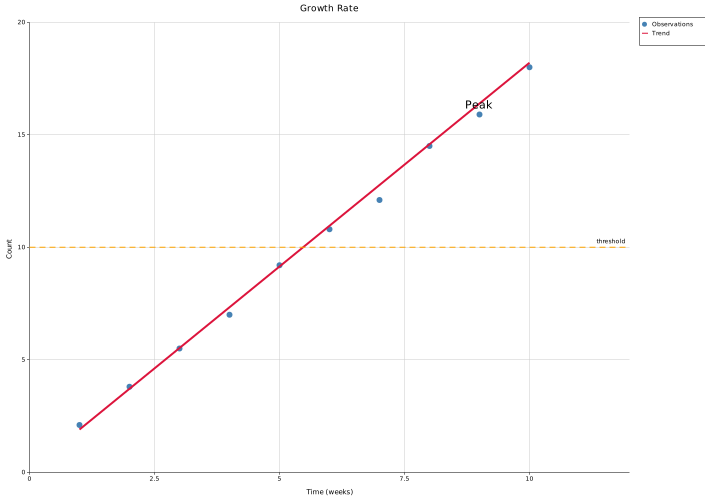
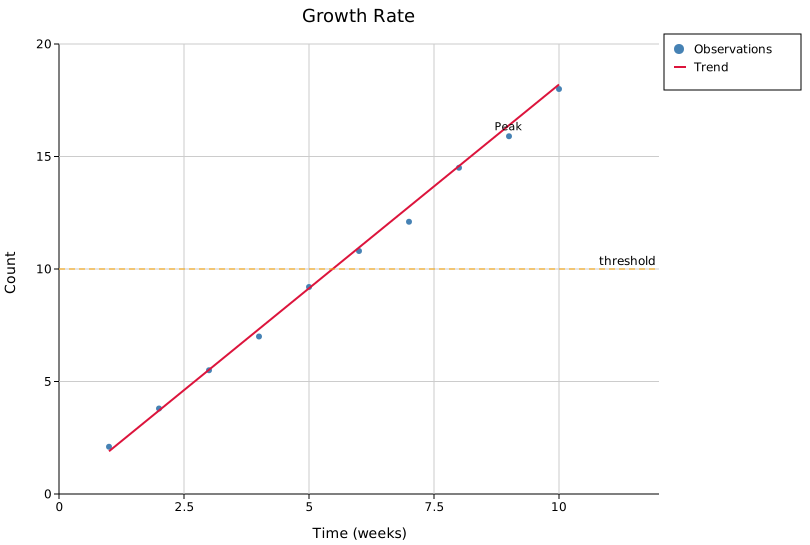
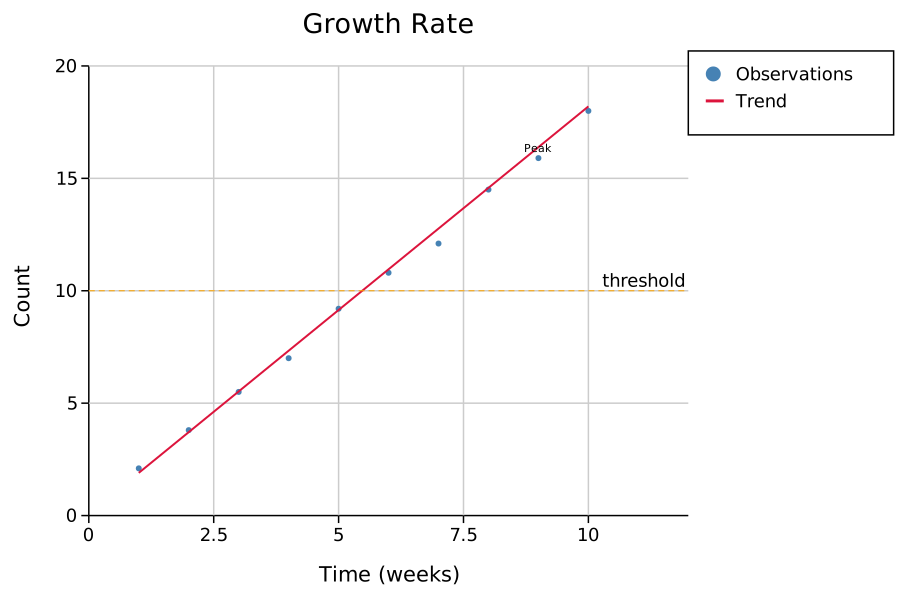
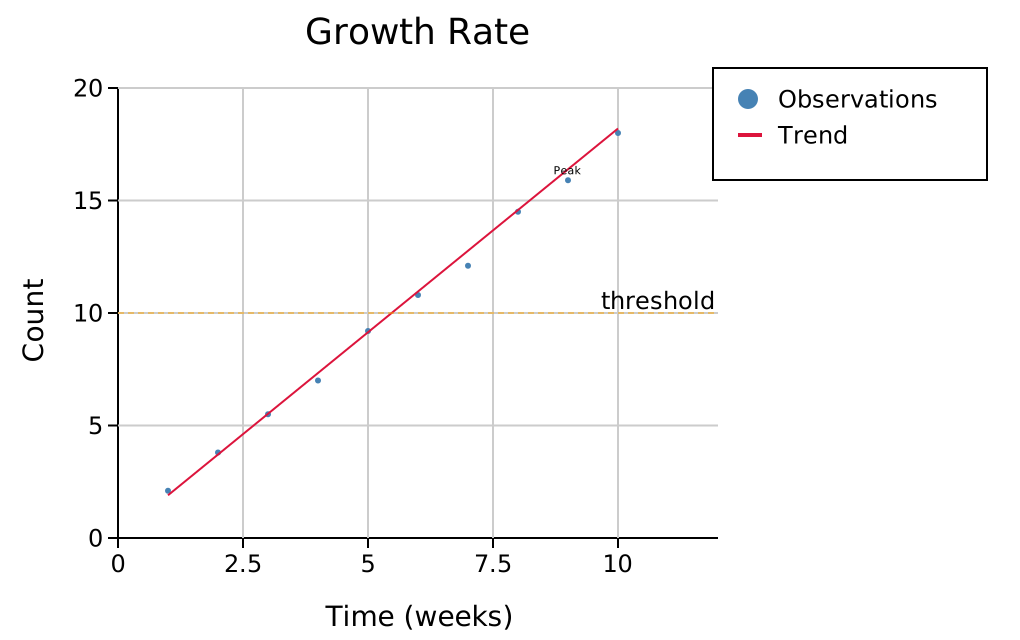
with_scale(f) applies a single multiplier to every piece of plot chrome — font sizes, margins, tick mark lengths, stroke widths, legend padding and swatch geometry, and annotation arrow sizes. The default is 1.0 (no change). The canvas width and height are not affected.
#![allow(unused)]
fn main() {
use kuva::render::layout::Layout;
use kuva::render::plots::Plot;
let plots: Vec<Plot> = vec![];
let layout = Layout::auto_from_plots(&plots)
    .with_title("Growth Rate")
    .with_x_label("Time (weeks)")
    .with_y_label("Count")
    .with_scale(2.0);  // everything twice as large
}
The four scale levels below all use the same default canvas size (600 × 450 plot area). Notice how at 0.5× the chrome feels cramped while at 2.0× tick labels and the legend are clearly legible even when the SVG is scaled down in a browser:
 |
 |
.with_scale(0.5) |
.with_scale(1.0) — default |
 |
 |
.with_scale(1.5) |
.with_scale(2.0) |
Combining scale with canvas size
with_scale makes the chrome proportionally larger but keeps the plot area the same size. At 2.0× the default canvas will feel tight because the margins (which scale) eat into the fixed-size plot area. To keep the same visual balance as the default, scale the canvas dimensions by the same factor:
#![allow(unused)]
fn main() {
use kuva::render::layout::Layout;
use kuva::render::plots::Plot;
let plots: Vec<Plot> = vec![];
let scale = 2.0_f64;
let layout = Layout::auto_from_plots(&plots)
    .with_scale(scale)
    .with_width(1200.0)   // 600 * scale
    .with_height(900.0);  // 450 * scale
}
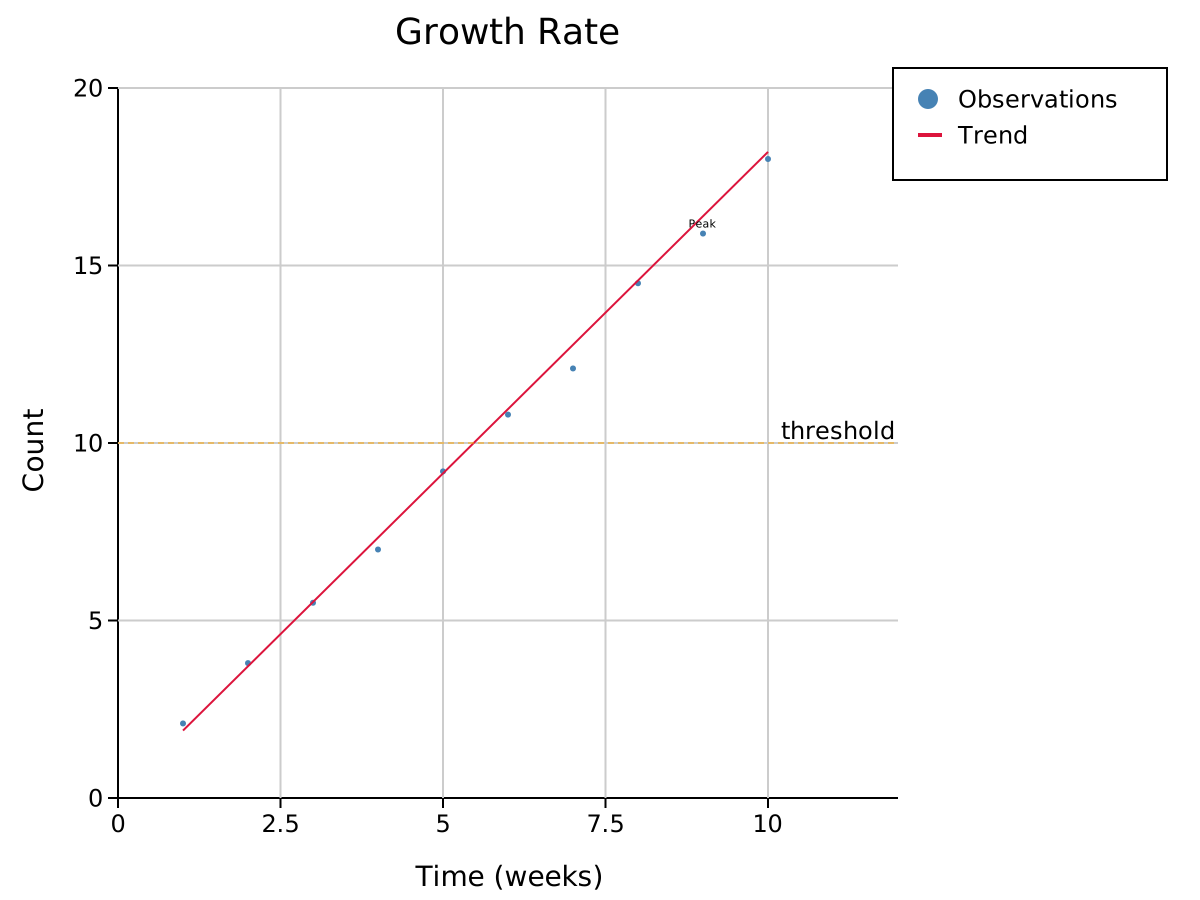
The result has the same data density as the default but every pixel measurement is doubled — useful for publication figures that will be embedded at a reduced size.
Limitations — what you must adjust manually
Two categories of user-set values are not auto-scaled because they are specified explicitly when constructing the object, not derived from Layout:
1. TextAnnotation::font_size
TextAnnotation has its own font_size field (default 12). When you call .with_scale(2.0), the annotation arrow and its stroke scale automatically, but the text does not. Scale it in the constructor:
#![allow(unused)]
fn main() {
use kuva::render::layout::Layout;
use kuva::render::plots::Plot;
use kuva::render::annotations::TextAnnotation;
let plots: Vec<Plot> = vec![];
let scale = 2.0_f64;
let layout = Layout::auto_from_plots(&plots)
    .with_annotation(
        TextAnnotation::new("Peak", 9.0, 16.0)
            .with_arrow(9.0, 16.0)
            .with_font_size((11.0 * scale).round() as u32),  // scale manually
    )
    .with_scale(scale);
}
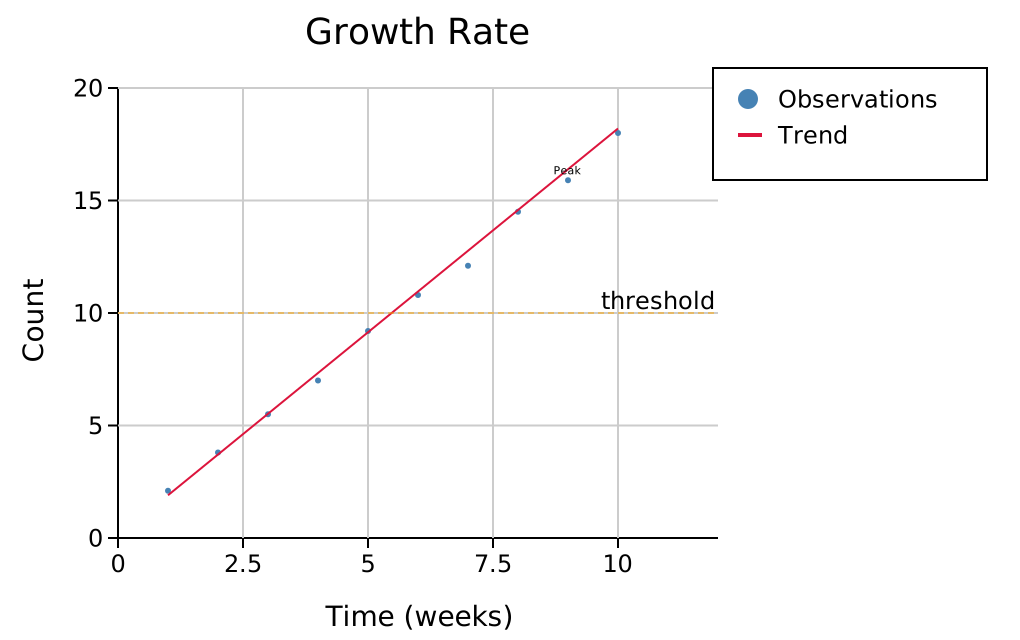
The two SVGs below use with_scale(2.0). In the left one the annotation font is the default 11px regardless of scale; in the right one it has been multiplied by 2.0:
 |
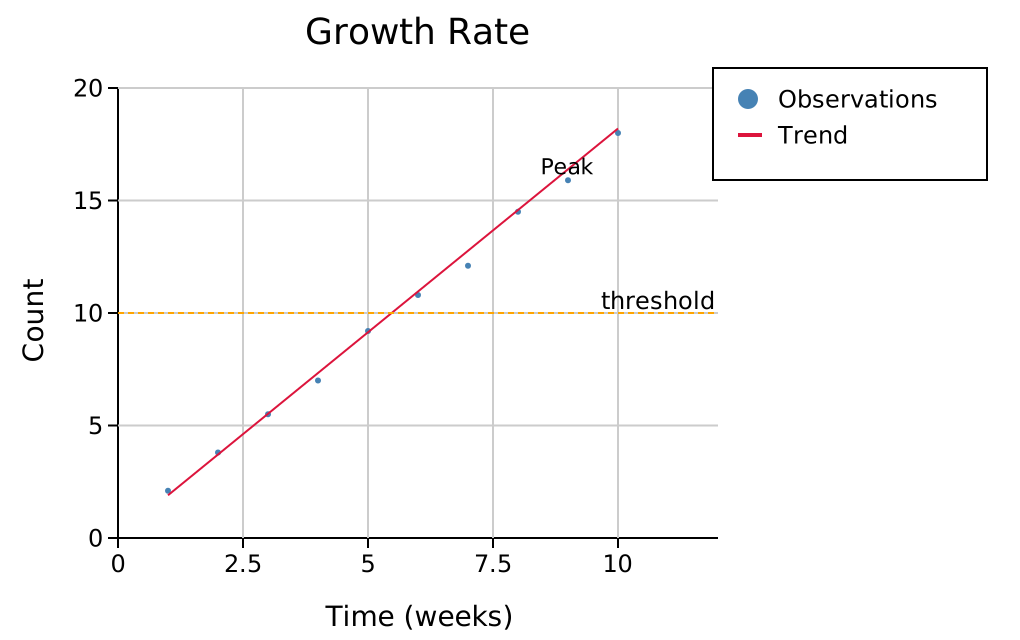 |
| annotation font unchanged (11 px) | annotation font doubled (22 px) |
2. ReferenceLine::stroke_width
ReferenceLine stores its own stroke_width (default 1.0). The line is drawn at exactly that pixel width regardless of with_scale. Multiply it manually:
#![allow(unused)]
fn main() {
use kuva::render::layout::Layout;
use kuva::render::plots::Plot;
use kuva::render::annotations::ReferenceLine;
let plots: Vec<Plot> = vec![];
let scale = 2.0_f64;
let layout = Layout::auto_from_plots(&plots)
    .with_reference_line(
        ReferenceLine::horizontal(10.0)
            .with_stroke_width(1.0 * scale),  // scale manually
    )
    .with_scale(scale);
}
3. PNG raster output — use DPI scale instead
For raster output, RasterBackend has its own DPI multiplier:
#![allow(unused)]
fn main() {
use kuva::render::layout::Layout;
use kuva::render::plots::Plot;
use kuva::render::render::render_multiple;
let plots: Vec<Plot> = vec![];
let layout = Layout::auto_from_plots(&plots);
#[cfg(feature = "png")]
{
    use kuva::backend::raster::RasterBackend;
    let scene = render_multiple(plots, layout);
    // Render at 3× pixel density — no need for with_scale
    let png = RasterBackend::new().with_scale(3.0).render_scene(&scene);
}
}
The two mechanisms are independent and can be combined, but doing so is rarely necessary. Use Layout::with_scale when you want a larger SVG; use RasterBackend::with_scale when you want a higher-DPI PNG from an unchanged SVG layout.
Typography
Font family and sizes for all text elements. Sizes are in pixels.
#![allow(unused)]
fn main() {
use kuva::render::layout::Layout;
use kuva::render::plots::Plot;
let plots: Vec<Plot> = vec![];
let layout = Layout::auto_from_plots(&plots)
    .with_font_family("Arial, sans-serif")  // default: "DejaVu Sans, Verdana, Liberation Sans, Arial, sans-serif"
    .with_title_size(20)                    // default: 18
    .with_label_size(14)                    // default: 14  (axis labels)
    .with_tick_size(11)                     // default: 12  (tick labels)
    .with_body_size(12);                    // default: 12  (legend, annotations)
}
These can also be set via a Theme — see the Themes reference.
For greyscale/print-safe or color-vision-deficient-accessible rendering, see Black & White / Accessibility Mode — Layout::with_bw_mode() replaces palette colors with grey shades, hatch patterns, dash styles, and marker shapes.
Tick label font
with_tick_font_family sets the font family of the axis tick labels only, leaving titles, axis labels, and legends in the main family. Use it for fixed-width category labels such as sequence contexts:
#![allow(unused)]
fn main() {
use kuva::render::layout::Layout;
use kuva::render::plots::Plot;
let plots: Vec<Plot> = vec![];
let layout = Layout::auto_from_plots(&plots)
    .with_x_tick_rotate(-90.0)
    .with_tick_font_family("monospace");
}
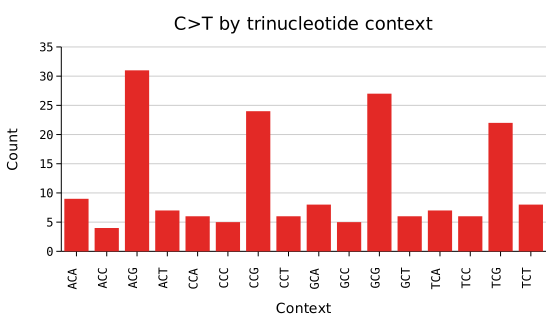
It applies to rotated and upright labels wherever kuva draws a tick label:
| Covered | Not covered (these are titles, and keep the main family) |
|---|---|
| x, y, secondary x and y axis ticks | Plot title and subtitle |
| Manhattan chromosome labels | x, y and secondary axis labels |
| Polar ring (r) values and theta spokes | Ternary corner labels |
| Ternary edge percentages | Parallel-coordinates axis names |
| Radar ring values and spoke names | 3D axis labels |
| Parallel-coordinates per-axis values | Colorbar label |
| 3D x, y and z axis ticks | Legend entries |
| Colorbar tick labels | Data labels (bar values, point labels, gene names) |
Width reservation follows the face: kuva measures a monospace tick label against the bundled DejaVu Sans Mono advance widths, not the sans ones. This matters more than it sounds. A fixed-width face is narrower than DejaVu Sans for digits (0.602 em against 0.636 em) but much wider for thin glyphs: . goes from 0.318 em to 0.602 em, so a decimal y-axis measured with sans metrics reserves a gutter several pixels short and clips its own labels. Setting with_font_family("monospace") (no tick-specific family) reserves tick labels the same way, since they render in that face too.
The family itself decides this, not the presence of the option: a family carrying mono or monospace as a word ("DejaVu Sans Mono", "ui-monospace") or one of the common fixed-width faces that do not ("Consolas", "Fira Code", "Menlo", "Courier New") measures as monospace; anything else keeps the sans metrics. Only the first family in the list counts, the one a renderer picks when it has it.
Backends. SVG and PDF honour the option; the PDF backend resolves the generic monospace family to the bundled DejaVu Sans Mono, so it renders the same on every system. PNG and terminal output ignore it and draw ticks in the bundled DejaVu Sans, exactly as they already ignore with_font_family: kuva rasterises PNG itself rather than handing the SVG to a system font stack. A figure exported both ways will therefore show monospace ticks in the SVG or PDF and sans ticks in the PNG.
Genome browser. A TrackStack builds its own layout per track, so it carries the option itself: TrackStack::with_tick_font_family (and CoveragePlot::with_tick_font_family) applies it to the shared genomic x-axis and to every track's y-axis ticks at once, leaving track names and the axis label alone.
Text wrapping
Long titles, axis labels, and legend entries can be word-wrapped at a character limit instead of forcing the canvas to expand. Wrapping is opt-in — nothing wraps unless you set a character width.
Global wrap
Set all text elements at once. Per-element overrides take precedence when called after with_wrap:
#![allow(unused)]
fn main() {
use kuva::render::layout::Layout;
use kuva::render::plots::Plot;
let plots: Vec<Plot> = vec![];
let layout = Layout::auto_from_plots(&plots)
    .with_title("A very long title that would normally make the top margin huge")
    .with_wrap(30);  // wrap everything at ~30 characters
}
Per-element wrap
Override the character width for individual elements:
#![allow(unused)]
fn main() {
use kuva::render::layout::Layout;
use kuva::render::plots::Plot;
let plots: Vec<Plot> = vec![];
let layout = Layout::auto_from_plots(&plots)
    .with_title("A very long title")
    .with_x_label("A very long x-axis label")
    .with_wrap(30)            // global default
    .with_title_wrap(50)      // title gets more room
    .with_legend_wrap(20);    // legend is narrower
}
CLI flags
| Flag | Description |
|---|---|
--wrap <N> | Wrap all text at N characters |
--title-wrap <N> | Wrap title only |
--subtitle-wrap <N> | Wrap subtitle only |
--x-label-wrap <N> | Wrap x-axis label only |
--y-label-wrap <N> | Wrap y-axis label only |
--y2-label-wrap <N> | Wrap secondary y-axis label only |
--legend-wrap <N> | Wrap legend labels and titles only |
What happens when wrapping is enabled
- Title wraps into centred lines;
margin_topgrows to fit. - Subtitle wraps into centred lines below the title;
margin_topgrows to fit. - X label wraps into centred lines;
margin_bottomgrows. - Y label wraps into multiple rotated lines stacked horizontally;
margin_leftgrows. - Y2 label same as y-label but on the right side.
- Legend labels wrap into continuation lines (swatch stays on the first line). The legend box grows taller and the width is capped at
N * 7.2 + 35pixels, preventing the right margin from expanding. - Legend titles and group titles wrap the same way.
Wrapping splits at whitespace boundaries. A single word longer than the limit is hard-broken.
Quick reference
Layout constructors
| Method | Description |
|---|---|
Layout::new(x_range, y_range) | Explicit axis ranges |
Layout::auto_from_plots(&plots) | Auto-compute ranges and layout from data |
Axes and labels
| Method | Description |
|---|---|
.with_title(s) | Plot title |
.with_subtitle(s) | Muted second line under the title (.with_subtitle_size(n) overrides its size) |
.with_x_label(s) | X-axis label |
.with_y_label(s) | Y-axis label |
.with_ticks(n) | Approximate number of tick intervals |
.with_tick_format(fmt) | Same TickFormat for both axes |
.with_x_tick_format(fmt) | TickFormat for x-axis only |
.with_y_tick_format(fmt) | TickFormat for y-axis only |
.with_x_tick_rotate(deg) | Rotate x tick labels by deg degrees |
.with_x_label_overlap(s) | AxisLabelOverlap strategy for dense x tick labels |
.with_log_x() | Logarithmic x-axis |
.with_log_y() | Logarithmic y-axis |
.with_log_scale() | Logarithmic on both axes |
.with_show_grid(bool) | Show or hide grid lines (default true) |
Axis and stroke widths
| Method | Default | Description |
|---|---|---|
.with_axis_line_width(px) | 1.0 | X and Y axis border line stroke width |
.with_tick_width(px) | 1.0 | Tick mark stroke width |
.with_tick_length(px) | 5.0 | Major tick length; minor ticks are 60 % of this |
.with_grid_line_width(px) | 1.0 | Grid line stroke width (both axes) |
Canvas and scale
| Method | Description |
|---|---|
.with_width(px) | Total SVG width in pixels |
.with_height(px) | Total SVG height in pixels |
.with_scale(f) | Uniform scale factor for all plot chrome (default 1.0). Font sizes, margins, tick marks, legend geometry, and arrow sizes all multiply by f. Canvas size is unaffected. TextAnnotation::font_size and ReferenceLine::stroke_width must be scaled manually. |
.with_equal_aspect() | Expand the shorter axis so 1 data unit maps to the same pixel count on both axes. No-op on log axes and pixel-space plots. |
Annotations
| Method | Description |
|---|---|
.with_annotation(TextAnnotation) | Text label with optional arrow |
.with_reference_line(ReferenceLine) | Horizontal or vertical dashed line |
.with_shaded_region(ShadedRegion) | Horizontal or vertical filled band |
Legend
| Method | Description |
|---|---|
.with_legend_entries(Vec<LegendEntry>) | Supply entries directly, bypassing auto-collection; auto-sizes legend_width |
.with_legend_at(x, y) | Place legend at absolute SVG pixel coordinates (Custom variant); no margin reserved |
.with_legend_at_data(x, y) | Place legend at data-space coordinates, mapped through axes at render time |
.with_legend_position(LegendPosition) | Choose a preset legend placement |
.with_legend_box(bool) | Show or hide the legend background and border box (default true) |
.with_legend_title(s) | Render a bold title row above all legend entries |
.with_legend_group(title, entries) | Add a labelled group of entries; multiple calls stack |
.with_legend_width(px) | Override the auto-computed legend box width |
.with_legend_height(px) | Override the auto-computed legend box height |
.with_legend_wrap(n) | Word-wrap legend labels/titles at n characters |
Text wrapping
| Method | Description |
|---|---|
.with_wrap(n) | Wrap all text elements at n characters (title, labels, legend). Call before per-element overrides. |
.with_title_wrap(n) | Wrap title at n characters |
.with_subtitle_wrap(n) | Wrap subtitle at n characters (independent of the title) |
.with_x_label_wrap(n) | Wrap x-axis label at n characters |
.with_y_label_wrap(n) | Wrap y-axis label at n characters |
.with_y2_label_wrap(n) | Wrap secondary y-axis label at n characters |
.with_legend_wrap(n) | Wrap legend labels and titles at n characters |
LegendPosition variants (grouped by placement zone):
Inside the plot axes — overlaid on the data area, 8 px inset from the axis edges:
| Variant | Corner |
|---|---|
InsideTopRight | Upper-right |
InsideTopLeft | Upper-left |
InsideBottomRight | Lower-right |
InsideBottomLeft | Lower-left |
InsideTopCenter | Top edge, centred |
InsideBottomCenter | Bottom edge, centred |
Outside the plot axes — placed in a margin; the canvas expands to accommodate:
| Variant | Placement |
|---|---|
OutsideRightTop (default) | Right margin, top-aligned |
OutsideRightMiddle | Right margin, vertically centred |
OutsideRightBottom | Right margin, bottom-aligned |
OutsideLeftTop | Left margin, top-aligned |
OutsideLeftMiddle | Left margin, vertically centred |
OutsideLeftBottom | Left margin, bottom-aligned |
OutsideTopLeft | Top margin, left-aligned |
OutsideTopCenter | Top margin, centred |
OutsideTopRight | Top margin, right-aligned |
OutsideBottomLeft | Bottom margin, left-aligned |
OutsideBottomCenter | Bottom margin, centred |
OutsideBottomRight | Bottom margin, right-aligned |
OutsideBottomColumns | Bottom margin, auto-packed multi-column grid; canvas height extends to fit all entries |
Freeform — no margin change; you control the position:
| Variant | Placement |
|---|---|
Custom(x, y) | Absolute SVG canvas pixel coordinates |
DataCoords(x, y) | Data-space coordinates mapped through map_x/map_y at render time |
Legend sizing overrides
The legend box dimensions are computed automatically — width from the longest label (at ~8.5 px per character), height from the number of entries and groups. If the auto-sizing is off for your data, override either dimension explicitly:
#![allow(unused)]
fn main() {
use kuva::render::layout::Layout;
use kuva::render::plots::Plot;
let plots: Vec<Plot> = vec![];
let layout = Layout::auto_from_plots(&plots)
    .with_legend_width(180.0)   // wider box for long labels
    .with_legend_height(120.0); // taller box for manual height control
}
Typography
| Method | Default | Description |
|---|---|---|
.with_font_family(s) | "DejaVu Sans, Verdana, Liberation Sans, Arial, sans-serif" | CSS font-family string |
.with_tick_font_family(s) | inherits with_font_family | CSS font-family string for axis tick labels only |
.with_title_size(n) | 18 | Title font size (px) |
.with_subtitle_size(n) | 0.7 × title | Subtitle font size (px) |
.with_label_size(n) | 14 | Axis label font size (px) |
.with_tick_size(n) | 12 | Tick label font size (px) |
.with_body_size(n) | 12 | Body text font size (px) |
AxisLabelOverlap strategies
| Variant | Behaviour |
|---|---|
Allow (default) | Every label drawn; may overlap on dense axes |
Thin | Overlapping labels skipped; non-overlapping ones kept |
Stagger | All labels drawn; colliding ones offset to a second row |
TickFormat variants
| Variant | Output example |
|---|---|
Auto | 5, 3.14, 1.2e5 |
Fixed(n) | 3.14 |
Integer | 5 |
Sci | 1.23e4 |
Percent | 45.0% |
Custom(Arc<dyn Fn(f64) -> String>) | user-defined |