Legends
Legends are assembled automatically from the plot data and attached to the canvas via the Layout. Every aspect — position, appearance, content, and sizing — can be overridden with builder methods.
Import paths:
kuva::render::layout::Layout— position and appearance builderskuva::plot::legend::{LegendEntry, LegendShape, LegendPosition, LegendGroup}— entry types
Auto-collected legends
When you call .with_legend("label") on a plot, kuva records the entry automatically. A single Layout::auto_from_plots() call collects all entries and the legend is rendered alongside the canvas.
#![allow(unused)]
fn main() {
use kuva::prelude::*;

let plots: Vec<Plot> = vec![
    ScatterPlot::new()
        .with_data([(1.1, 2.3), (1.9, 3.1), (2.4, 2.7), (3.0, 3.8), (3.6, 3.2)])
        .with_color("steelblue").with_legend("Cluster A").with_size(6.0)
        .into(),
    ScatterPlot::new()
        .with_data([(4.0, 1.2), (4.8, 1.8), (5.3, 1.4), (6.0, 2.0), (6.5, 1.6)])
        .with_color("orange").with_legend("Cluster B").with_size(6.0)
        .into(),
    ScatterPlot::new()
        .with_data([(2.0, 5.5), (2.8, 6.1), (3.5, 5.8), (4.3, 6.5), (5.0, 6.0)])
        .with_color("mediumseagreen").with_legend("Cluster C").with_size(6.0)
        .into(),
];

let layout = Layout::auto_from_plots(&plots)
    .with_title("Auto-Collected Legend")
    .with_x_label("X")
    .with_y_label("Y");

let svg = SvgBackend.render_scene(&render_multiple(plots, layout));
}
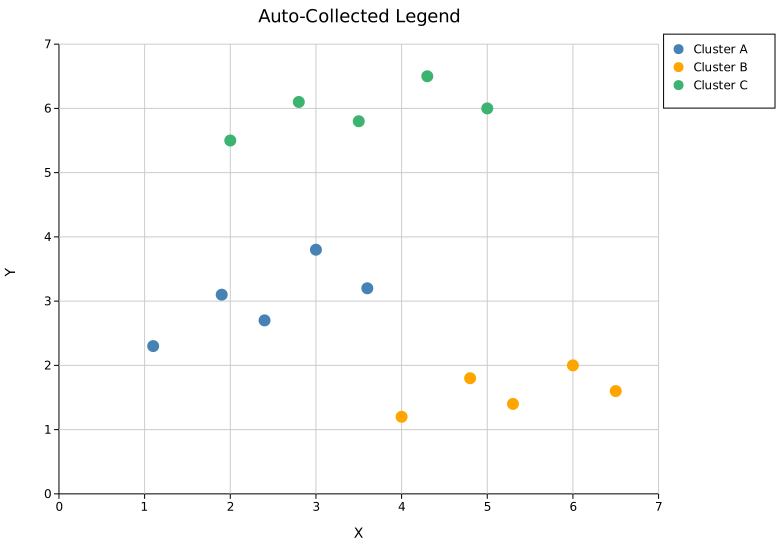
The legend appears to the right of the plot area by default (OutsideRightTop). The canvas widens automatically to fit it — no manual sizing needed.
Legend position
Default — OutsideRightTop
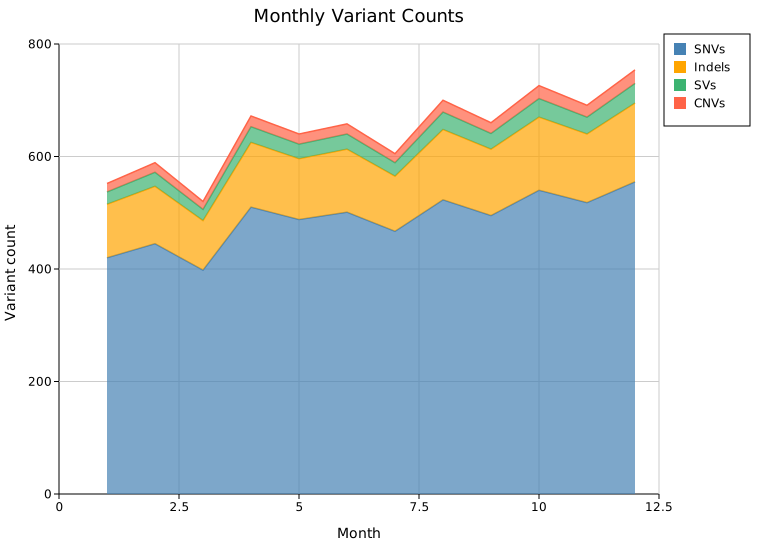
The default position places the legend in the right margin, top-aligned. Call .with_legend_position() on the Layout to change it.
#![allow(unused)]
fn main() {
use kuva::prelude::*;
use kuva::plot::legend::LegendPosition;

let layout = Layout::auto_from_plots(&plots)
    .with_legend_position(LegendPosition::OutsideRightTop); // default — no call needed
}
Inside positions
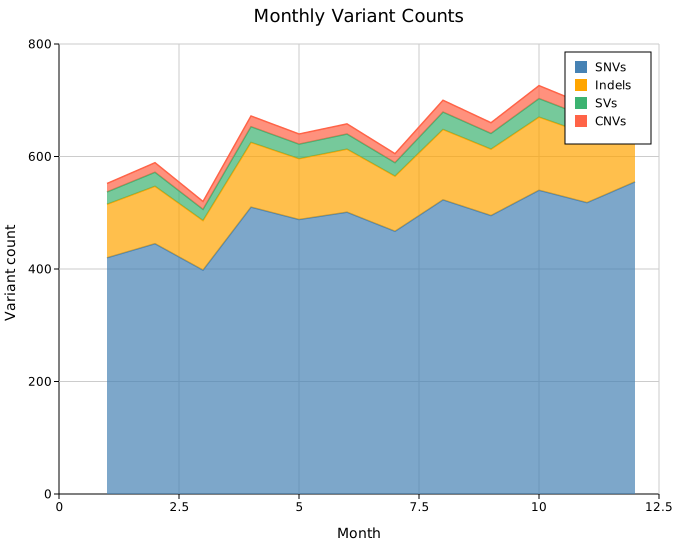
Inside* variants overlay the legend on top of the data area with an 8 px inset from the axes. No extra canvas margin is added. Use these when the data has a corner with enough whitespace to accommodate the legend.
#![allow(unused)]
fn main() {
use kuva::prelude::*;
use kuva::plot::legend::LegendPosition;

// Upper-right of the data area
let layout = Layout::auto_from_plots(&plots)
    .with_legend_position(LegendPosition::InsideTopRight);
}
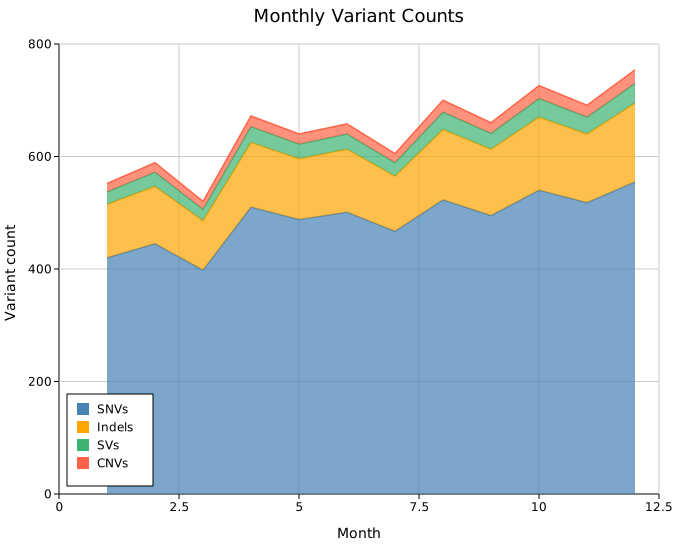
#![allow(unused)]
fn main() {
// Lower-left of the data area
let layout = Layout::auto_from_plots(&plots)
    .with_legend_position(LegendPosition::InsideBottomLeft);
}
All six Inside* variants:
| Variant | Corner |
|---|---|
InsideTopRight | Upper-right |
InsideTopLeft | Upper-left |
InsideBottomRight | Lower-right |
InsideBottomLeft | Lower-left |
InsideTopCenter | Top edge, centred |
InsideBottomCenter | Bottom edge, centred |
Outside positions
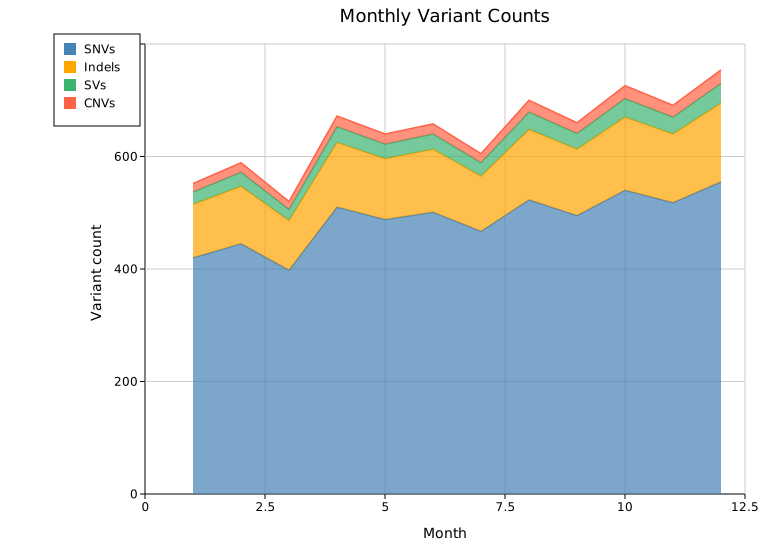
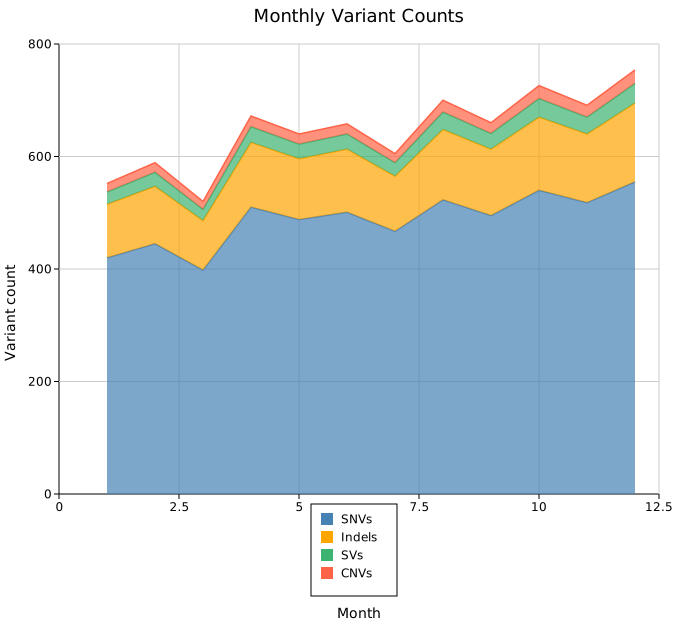
Outside* variants place the legend in a margin outside the plot axes. The canvas expands automatically to fit; each group of variants expands the corresponding edge.
Left margin:
#![allow(unused)]
fn main() {
use kuva::prelude::*;
use kuva::plot::legend::LegendPosition;

let layout = Layout::auto_from_plots(&plots)
    .with_legend_position(LegendPosition::OutsideLeftTop);
}
Bottom margin:
#![allow(unused)]
fn main() {
let layout = Layout::auto_from_plots(&plots)
    .with_legend_position(LegendPosition::OutsideBottomCenter);
}
Full set of outside variants:
| Variant | Placement |
|---|---|
OutsideRightTop (default) | Right margin, top-aligned |
OutsideRightMiddle | Right margin, vertically centred |
OutsideRightBottom | Right margin, bottom-aligned |
OutsideLeftTop | Left margin, top-aligned |
OutsideLeftMiddle | Left margin, vertically centred |
OutsideLeftBottom | Left margin, bottom-aligned |
OutsideTopLeft | Top margin, left-aligned |
OutsideTopCenter | Top margin, centred |
OutsideTopRight | Top margin, right-aligned |
OutsideBottomLeft | Bottom margin, left-aligned |
OutsideBottomCenter | Bottom margin, centred |
OutsideBottomRight | Bottom margin, right-aligned |
OutsideBottomColumns | Bottom margin, auto-packed multi-column grid; canvas height extends to fit all entries |
Freeform positions
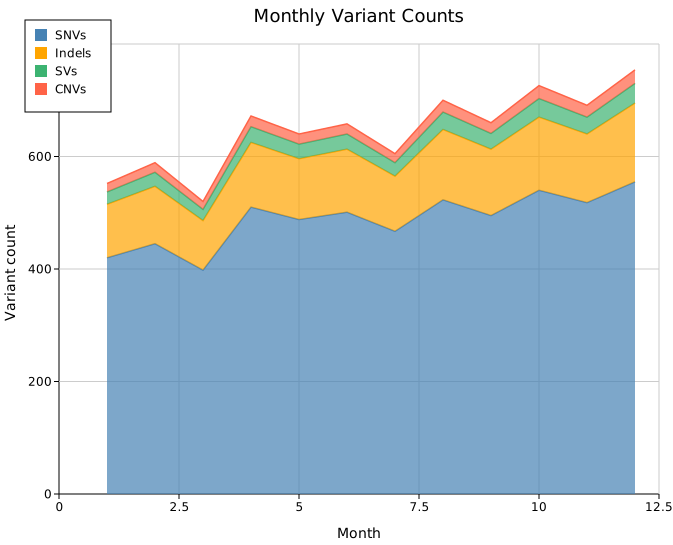
with_legend_at(x, y) — absolute pixel coordinates
Places the legend at a fixed SVG canvas pixel coordinate. No extra margin is reserved; the legend can land anywhere on the canvas, including inside the data area.
#![allow(unused)]
fn main() {
use kuva::prelude::*;

// Top-left corner of the SVG canvas
let layout = Layout::auto_from_plots(&plots)
    .with_legend_at(30.0, 30.0);
}
with_legend_at_data(x, y) — data-space coordinates
Places the legend at a position specified in data coordinates. The coordinates are mapped through the axis transforms at render time — the legend tracks the data regardless of the axis range or scale.
#![allow(unused)]
fn main() {
use kuva::prelude::*;

// At month=7, count=450 in data space
let layout = Layout::auto_from_plots(&plots)
    .with_legend_at_data(7.0, 450.0);
}
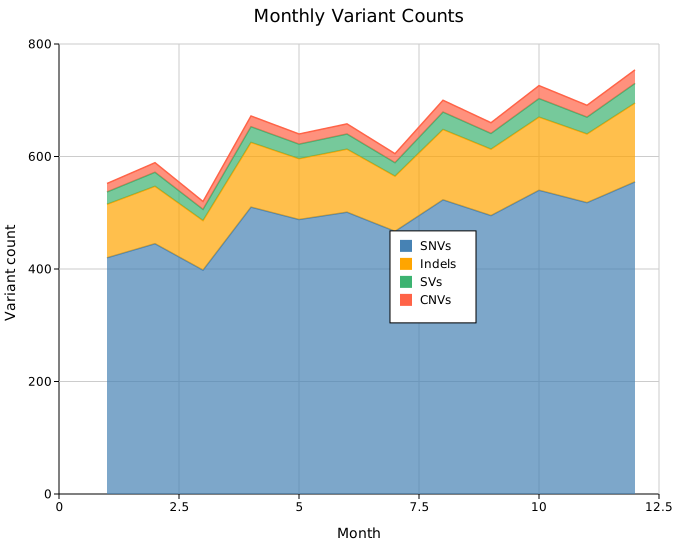
DataCoords is best suited for axis-space plots (scatter, line, bar, etc.). For pixel-space plots such as chord diagrams, Sankey, or phylogenetic trees, use Custom instead.
Appearance
Suppress the box
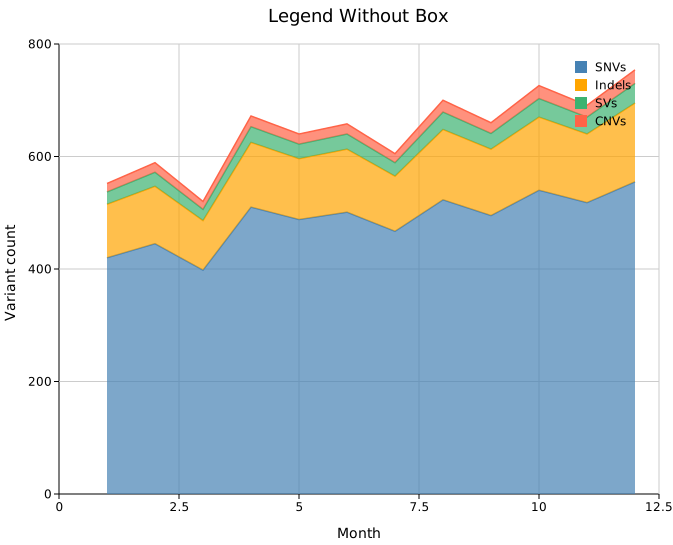
By default the legend has a filled background and a thin border. .with_legend_box(false) hides both rects while keeping the swatches and labels. This works well with Inside* positions where a box can feel heavy over busy data.
#![allow(unused)]
fn main() {
use kuva::prelude::*;
use kuva::plot::legend::LegendPosition;

let layout = Layout::auto_from_plots(&plots)
    .with_legend_position(LegendPosition::InsideTopRight)
    .with_legend_box(false);
}
Legend title
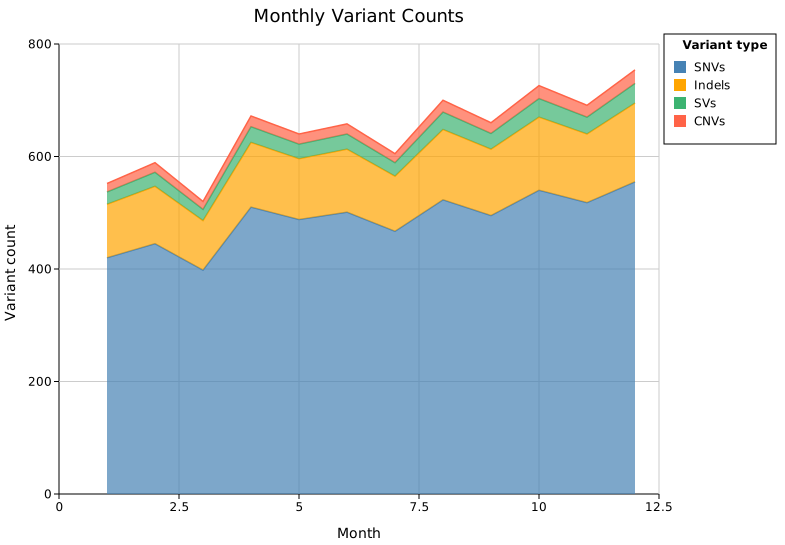
.with_legend_title(s) renders a bold header row above all entries.
#![allow(unused)]
fn main() {
use kuva::prelude::*;

let layout = Layout::auto_from_plots(&plots)
    .with_legend_title("Variant type");
}
Content
Grouped entries
.with_legend_group(title, entries) divides the legend into named sections. Each call appends a group; multiple calls stack in order. Groups take priority over auto-collected entries and .with_legend_entries().
#![allow(unused)]
fn main() {
use kuva::prelude::*;
use kuva::plot::legend::{LegendEntry, LegendShape, LegendGroup};

let ctrl_entries = vec![
    LegendEntry { label: "Control-A".into(),   color: "steelblue".into(), shape: LegendShape::Circle, dasharray: None },
    LegendEntry { label: "Control-B".into(),   color: "#4e9fd4".into(),   shape: LegendShape::Circle, dasharray: None },
];
let trt_entries = vec![
    LegendEntry { label: "Treatment-A".into(), color: "tomato".into(),    shape: LegendShape::Circle, dasharray: None },
    LegendEntry { label: "Treatment-B".into(), color: "#e06060".into(),   shape: LegendShape::Circle, dasharray: None },
];

let layout = Layout::auto_from_plots(&plots)
    .with_legend_group("Controls", ctrl_entries)
    .with_legend_group("Treatments", trt_entries);
}
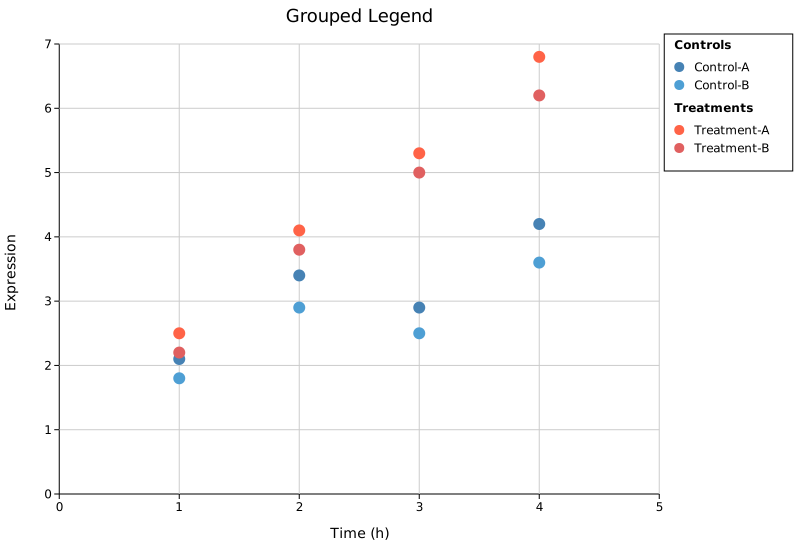
Group titles are rendered in bold. A half-line gap separates consecutive groups.
Manual entries
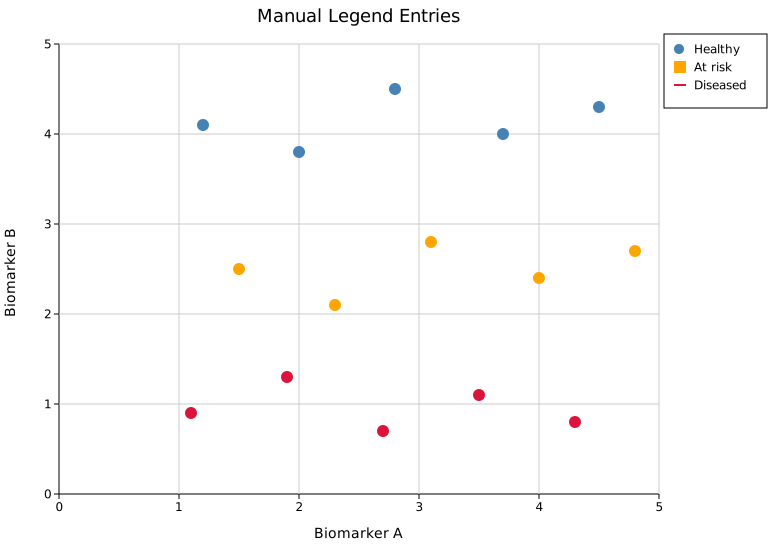
.with_legend_entries(entries) replaces auto-collected entries with a list you supply directly. Use this when the auto-collected legend is wrong or incomplete — for example, when you want to show a line swatch for a scatter series.
LegendShape controls the swatch drawn next to each label:
| Shape | Appearance |
|---|---|
Rect | Filled rectangle (default for bar/area plots) |
Circle | Filled circle |
Line | Short horizontal line |
Marker(MarkerShape) | Point marker (Square, Triangle, Diamond, Cross) |
CircleSize(f64) | Sized circle (used by dot-plot size legend) |
#![allow(unused)]
fn main() {
use kuva::prelude::*;
use kuva::plot::legend::{LegendEntry, LegendShape};

let entries = vec![
    LegendEntry { label: "Healthy".into(),  color: "steelblue".into(), shape: LegendShape::Circle, dasharray: None },
    LegendEntry { label: "At risk".into(),  color: "orange".into(),    shape: LegendShape::Rect,   dasharray: None },
    LegendEntry { label: "Diseased".into(), color: "crimson".into(),   shape: LegendShape::Line,   dasharray: None },
];

let layout = Layout::auto_from_plots(&plots)
    .with_legend_entries(entries);
}
Sizing
Legend dimensions are auto-computed: width from the longest label (~8.5 px per character) and height from the entry count. Override either when the defaults are off for your data.
Width override — long labels
#![allow(unused)]
fn main() {
use kuva::prelude::*;

let layout = Layout::auto_from_plots(&plots)
    .with_legend_width(230.0);
}
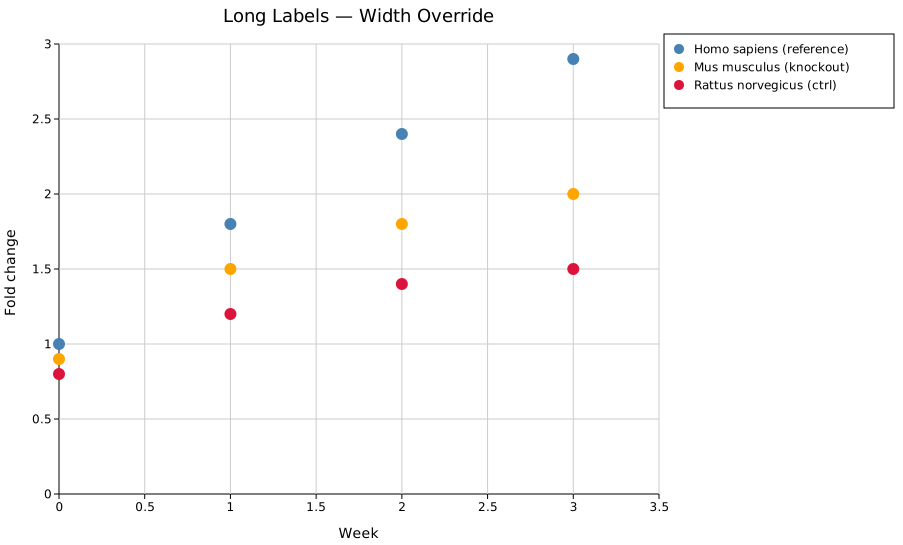
.with_legend_height(px) is the corresponding height override. Both are escape hatches — you rarely need them with ordinary label lengths.
Shared legend in a Figure
When a Figure contains multiple panels with the same series, use .with_shared_legend() to collect all entries into a single figure-level legend. Per-panel legends are suppressed automatically.
#![allow(unused)]
fn main() {
use kuva::prelude::*;

let scene = Figure::new(1, 2)
    .with_plots(vec![panel_a, panel_b])
    .with_layouts(vec![layout_a, layout_b])
    .with_shared_legend()   // collects entries from all panels; legend to the right
    .render();
}
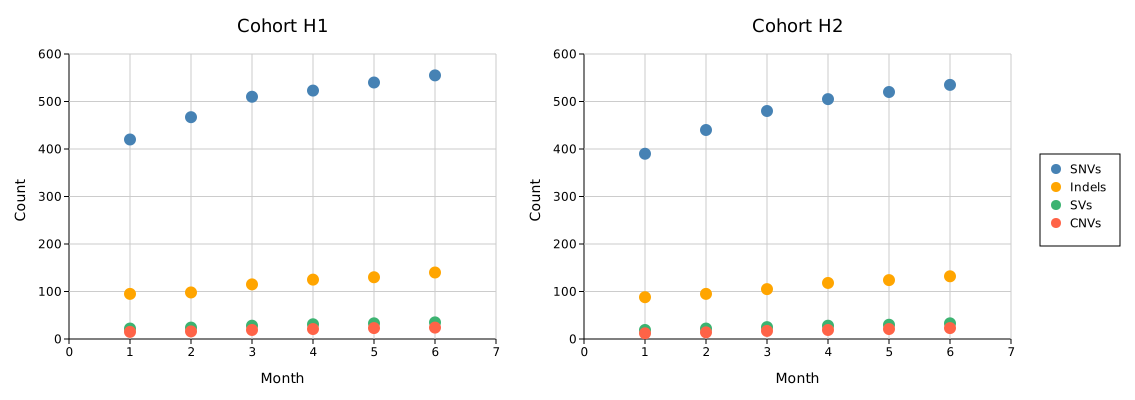
.with_shared_legend_bottom() places the legend below the grid instead. To supply manual entries for the shared legend:
#![allow(unused)]
fn main() {
use kuva::plot::legend::{LegendEntry, LegendShape};

figure.with_shared_legend_entries(vec![
    LegendEntry { label: "SNVs".into(),   color: "steelblue".into(),      shape: LegendShape::Circle, dasharray: None },
    LegendEntry { label: "Indels".into(), color: "orange".into(),         shape: LegendShape::Circle, dasharray: None },
    LegendEntry { label: "SVs".into(),    color: "mediumseagreen".into(), shape: LegendShape::Circle, dasharray: None },
    LegendEntry { label: "CNVs".into(),   color: "tomato".into(),         shape: LegendShape::Circle, dasharray: None },
])
}
API quick reference
Position builders on Layout
| Method | Description |
|---|---|
.with_legend_position(LegendPosition) | Choose any preset position variant |
.with_legend_at(x, y) | Absolute SVG canvas pixel coordinates (Custom variant) |
.with_legend_at_data(x, y) | Data-space coordinates mapped through axes at render time |
Appearance builders on Layout
| Method | Default | Description |
|---|---|---|
.with_legend_box(bool) | true | Show or hide the background and border rects |
.with_legend_title(s) | — | Bold header row above all entries |
.with_legend_width(px) | auto | Override the auto-computed legend box width |
.with_legend_height(px) | auto | Override the auto-computed legend box height |
Content builders on Layout
| Method | Priority | Description |
|---|---|---|
.with_legend_group(title, entries) | Highest | Add a named group; multiple calls stack |
.with_legend_entries(Vec<LegendEntry>) | Medium | Replace auto-collection with a flat list |
| (auto-collection from plot data) | Lowest | Default; uses .with_legend("label") calls on plots |
LegendPosition variants
Inside (overlay, 8 px inset from axes — no margin added):
InsideTopRight, InsideTopLeft, InsideBottomRight, InsideBottomLeft, InsideTopCenter, InsideBottomCenter
Outside (canvas expands to fit):
OutsideRightTop (default), OutsideRightMiddle, OutsideRightBottom,
OutsideLeftTop, OutsideLeftMiddle, OutsideLeftBottom,
OutsideTopLeft, OutsideTopCenter, OutsideTopRight,
OutsideBottomLeft, OutsideBottomCenter, OutsideBottomRight,
OutsideBottomColumns
Freeform (no margin change):
Custom(f64, f64) — pixel coordinates; DataCoords(f64, f64) — data coordinates