Slope Chart
A slope chart (also called a dumbbell plot or connected dot plot) displays how a numeric value changes between two timepoints or conditions for a set of labelled entities. Each row shows:
- A dot at the before (left) value
- A dot at the after (right) value
- A connecting horizontal segment
By default, the segment and dots are coloured green when the value increases and red when it decreases, making trends immediately apparent at a glance.
Slope charts are a compact alternative to grouped bar charts when you want to emphasise change rather than absolute magnitude.
Import path: kuva::plot::slope::{SlopePlot, SlopePoint, SlopeValueFormat}
Basic usage
#![allow(unused)]
fn main() {
use kuva::plot::slope::SlopePlot;
use kuva::backend::svg::SvgBackend;
use kuva::render::render::render_multiple;
use kuva::render::layout::Layout;
use kuva::render::plots::Plot;

let sp = SlopePlot::new()
    .with_before_label("2015")
    .with_after_label("2023")
    .with_point("Germany",     68.2, 71.5)
    .with_point("France",      70.1, 68.9)
    .with_point("Italy",       65.3, 69.1)
    .with_point("Spain",       72.4, 74.8)
    .with_point("Poland",      58.6, 63.2)
    .with_point("Netherlands", 74.3, 76.1)
    .with_legend("Direction");

let plots = vec![Plot::Slope(sp)];
let layout = Layout::auto_from_plots(&plots)
    .with_title("Employment Rate 2015–2023")
    .with_x_label("Employment rate (%)");

let scene = render_multiple(plots, layout);
let svg = SvgBackend.render_scene(&scene);
std::fs::write("slope.svg", svg).unwrap();
}
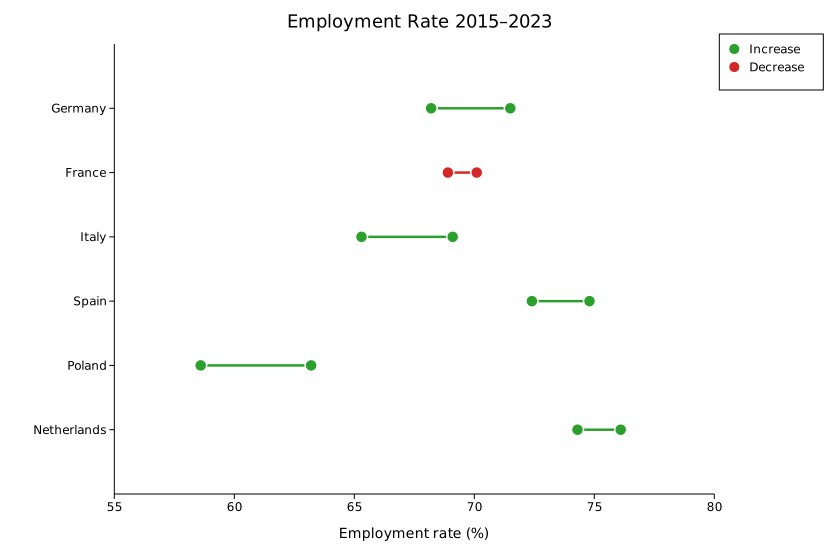
The legend shows "Increase" and "Decrease" entries when color_by_direction is enabled (the default).
Showing numeric labels
Use .with_values(true) to render a label beside each dot showing the raw value.
#![allow(unused)]
fn main() {
use kuva::plot::slope::SlopePlot;
use kuva::render::plots::Plot;
let sp = SlopePlot::new()
    .with_before_label("2015")
    .with_after_label("2023")
    .with_point("Germany", 68.2, 71.5)
    // ... more rows ...
    .with_values(true);
}
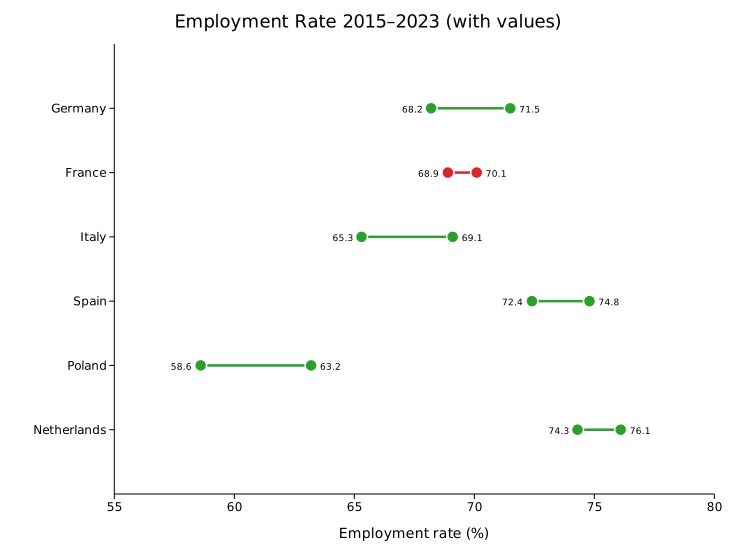
The default format (SlopeValueFormat::Auto) shows integers without a decimal point and drops trailing zeros for fractional values. Use SlopeValueFormat::Fixed(n) for a fixed number of decimal places or SlopeValueFormat::Integer to always round to the nearest integer.
Bioinformatics example: gene expression
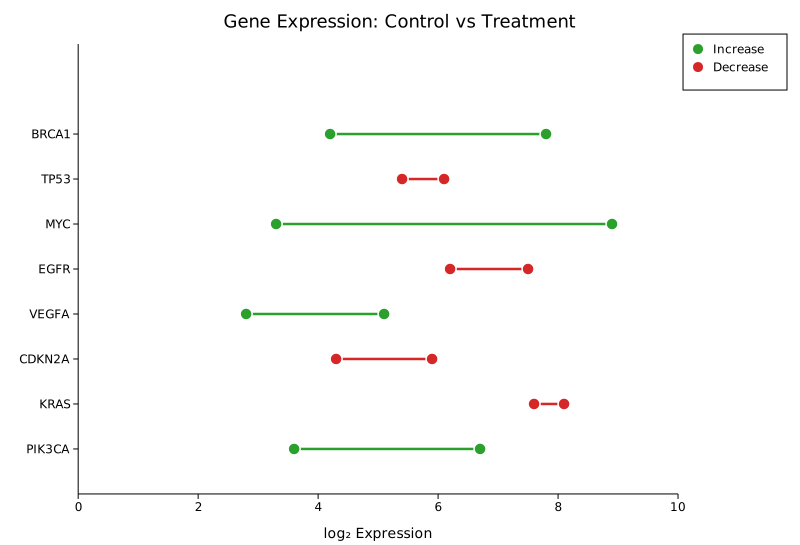
Slope charts are well-suited to before/after comparisons in differential expression data.
#![allow(unused)]
fn main() {
use kuva::plot::slope::SlopePlot;
use kuva::render::plots::Plot;
let sp = SlopePlot::new()
    .with_before_label("Control")
    .with_after_label("Treatment")
    .with_point("BRCA1",  4.2, 7.8)
    .with_point("TP53",   6.1, 5.4)
    .with_point("MYC",    3.3, 8.9)
    .with_point("EGFR",   7.5, 6.2)
    .with_point("VEGFA",  2.8, 5.1)
    .with_point("CDKN2A", 5.9, 4.3)
    .with_legend("Direction");
}
Uniform color
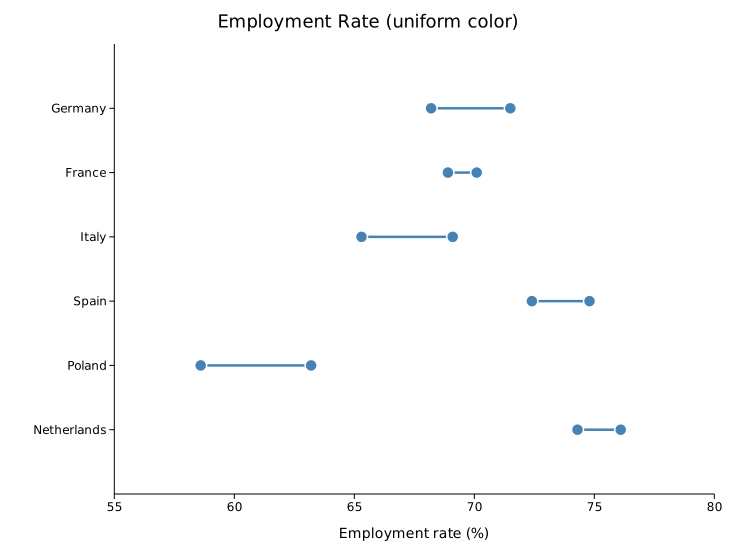
Turn off direction-based coloring with .with_direction_colors(false) and supply a single CSS color via .with_color().
#![allow(unused)]
fn main() {
use kuva::plot::slope::SlopePlot;
use kuva::render::plots::Plot;
let sp = SlopePlot::new()
    .with_direction_colors(false)
    .with_color("steelblue")
    .with_point("Germany",     68.2, 71.5)
    .with_point("France",      70.1, 68.9);
}
Per-group color override
Supply one color per row via .with_group_colors(). When set, these take precedence over both direction coloring and the uniform color field.
#![allow(unused)]
fn main() {
use kuva::plot::slope::SlopePlot;
use kuva::render::plots::Plot;
let sp = SlopePlot::new()
    .with_group_colors(["#e41a1c", "#377eb8", "#4daf4a"])
    .with_point("A", 10.0, 15.0)
    .with_point("B", 20.0, 18.0)
    .with_point("C", 30.0, 35.0);
}
API reference
SlopePlot builder methods
| Method | Default | Description |
|---|---|---|
with_point(label, before, after) | — | Add a single row. |
with_points(iter) | — | Add rows from an iterator of (label, before, after). |
with_before_label(s) | None | Column header for the left endpoint, drawn above the plot. |
with_after_label(s) | None | Column header for the right endpoint, drawn above the plot. |
with_color_up(s) | "#2ca02c" | Color when after > before (direction mode). |
with_color_down(s) | "#d62728" | Color when after < before (direction mode). |
with_color_flat(s) | "#aaaaaa" | Color when after == before (direction mode). |
with_direction_colors(bool) | true | Toggle direction-based coloring. |
with_color(s) | "steelblue" | Uniform color used when color_by_direction = false. |
with_group_colors(iter) | None | Per-row color overrides. Indexed by row order. |
with_dot_radius(f64) | 6.0 | Dot radius in pixels. |
with_line_width(f64) | 2.5 | Connecting segment stroke width in pixels. |
with_dot_opacity(f64) | 1.0 | Dot fill opacity. |
with_line_opacity(f64) | 0.7 | Connecting segment stroke opacity. |
with_values(bool) | false | Show numeric labels beside each dot. |
with_value_format(fmt) | Auto | Format for value labels. |
with_legend(s) | None | Enable legend; title string is passed as the trigger. |
SlopeValueFormat variants
| Variant | Behaviour |
|---|---|
Auto | Integers displayed without decimal point; trailing zeros stripped for floats. |
Fixed(n) | Exactly n decimal places. |
Integer | Round to the nearest integer ({:.0} format). |
See also: Lollipop Chart for ranked single-value comparisons, Bump Chart for rank change across more than two time points, Parallel Coordinates for more than two dimensions.
CLI
Slope chart — compare paired before/after values for multiple items on two axes.
Input: one row per item with columns for label, before value, and after value.
| Flag | Default | Description |
|---|---|---|
--label-col <COL> | 0 | Item label column |
--before-col <COL> | 1 | Before (left axis) value column |
--after-col <COL> | 2 | After (right axis) value column |
--before-label <TEXT> | Before | Left axis label |
--after-label <TEXT> | After | Right axis label |
--color-up <CSS> | steelblue | Color for items that increased |
--color-down <CSS> | firebrick | Color for items that decreased |
--no-direction-colors | off | Use a single uniform color for all lines |
--show-values | off | Show value labels at each endpoint |
--line-width <PX> | 1.5 | Stroke width of slope lines |
--dot-radius <PX> | 4.0 | Radius of endpoint dots |
kuva slope data.tsv --label-col label --before-col before --after-col after

kuva slope data.tsv --label-col label --before-col q1 --after-col q2 \
    --before-label "Q1 2024" --after-label "Q2 2024" \
    --show-values --title "Quarterly Change"
See also: Shared flags — output, appearance, axes.