Lollipop Chart
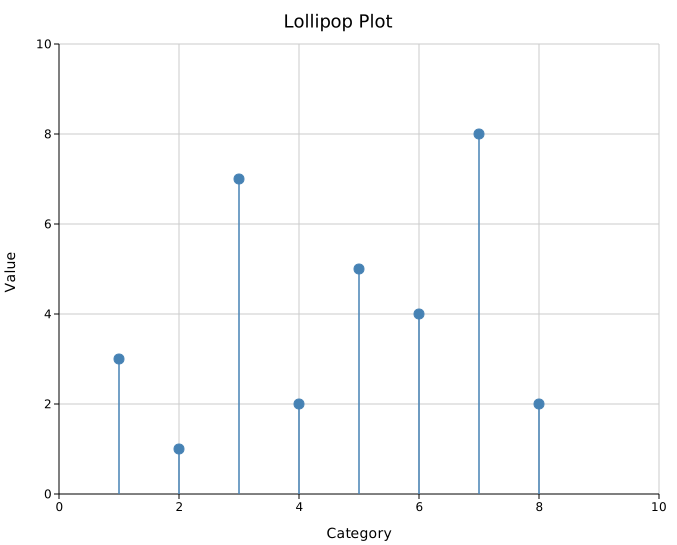
A lollipop chart displays discrete data points as vertical stems (lines) topped with filled circles. It conveys the same information as a bar chart while being less visually heavy — the empty space between stems makes it easier to compare the heights of nearby points.
A distinctive feature of lollipop charts is the optional domain annotation: colored rectangles drawn behind the stems along the x-axis. This makes them the standard format for mutation landscape plots in molecular biology, where each lollipop shows a mutation count and colored bands below the axis indicate protein functional domains.
Import path: kuva::plot::lollipop::LollipopPlot
Basic usage
Add points with .with_point(x, y). All stems originate from the baseline (y = 0 by default).
#![allow(unused)]
fn main() {
use kuva::plot::lollipop::LollipopPlot;
use kuva::backend::svg::SvgBackend;
use kuva::render::render::render_multiple;
use kuva::render::layout::Layout;
use kuva::render::plots::Plot;

let plot = LollipopPlot::new()
    .with_point(1.0,  4.0)
    .with_point(3.0,  7.0)
    .with_point(5.0,  3.0)
    .with_point(7.0,  9.0)
    .with_point(9.0,  5.0)
    .with_point(11.0, 2.0)
    .with_point(13.0, 8.0)
    .with_color("steelblue");

let plots = vec![Plot::Lollipop(plot)];
let layout = Layout::auto_from_plots(&plots)
    .with_title("Gene Expression Rank")
    .with_x_label("Gene index")
    .with_y_label("Expression (log₂ TPM)");

let svg = SvgBackend.render_scene(&render_multiple(plots, layout));
std::fs::write("lollipop.svg", svg).unwrap();
}
Labels and per-point colors
.with_labeled_point() places a text label above (or below, for negative values) the dot. .with_colored_point() and .with_labeled_colored_point() allow per-point color overrides for highlighting specific items.
#![allow(unused)]
fn main() {
use kuva::plot::lollipop::LollipopPlot;
use kuva::render::plots::Plot;
use kuva::render::layout::Layout;
use kuva::render::render::render_multiple;

let plot = LollipopPlot::new()
    .with_point(5.0, 2.0)
    .with_point(15.0, 3.0)
    .with_labeled_colored_point(28.0, 12.0, "TP53",  "#d62728")
    .with_point(35.0, 4.0)
    .with_labeled_colored_point(47.0,  9.0, "KRAS",  "#ff7f0e")
    .with_point(62.0, 2.0)
    .with_labeled_colored_point(75.0, 14.0, "BRCA1", "#9467bd")
    .with_point(88.0, 3.0)
    .with_dot_radius(5.5);

let plots = vec![Plot::Lollipop(plot)];
}

Mutation landscape with domain annotations
.with_domain() draws a colored rectangle behind the stems, anchored below the baseline. This is the standard presentation for protein mutation landscapes, where domains (functional regions) are annotated along the sequence.
#![allow(unused)]
fn main() {
use kuva::plot::lollipop::LollipopPlot;
use kuva::backend::svg::SvgBackend;
use kuva::render::render::render_multiple;
use kuva::render::layout::Layout;
use kuva::render::plots::Plot;

let plot = LollipopPlot::new()
    // Missense mutations
    .with_labeled_colored_point( 12.0, 3.0, "R12H",   "#1f77b4")
    .with_labeled_colored_point( 35.0, 8.0, "G35V",   "#d62728")
    .with_labeled_colored_point( 67.0, 2.0, "K67R",   "#1f77b4")
    .with_labeled_colored_point( 94.0, 5.0, "P94L",   "#d62728")
    .with_labeled_colored_point(118.0, 11.0, "R118*", "#d62728")
    .with_labeled_colored_point(145.0, 4.0, "T145A",  "#1f77b4")
    .with_labeled_colored_point(173.0, 7.0, "D173N",  "#d62728")
    .with_labeled_colored_point(201.0, 3.0, "E201K",  "#1f77b4")
    // Domain annotations
    .with_domain(  1.0,  55.0, Some("N-term"),   "#4e79a7")
    .with_domain( 56.0, 130.0, Some("Kinase"),   "#f28e2b")
    .with_domain(131.0, 195.0, Some("SH2"),      "#59a14f")
    .with_domain(196.0, 240.0, Some("C-term"),   "#b07aa1")
    .with_domain_height(0.8)
    .with_stem_width(1.5)
    .with_dot_radius(5.0);

let plots = vec![Plot::Lollipop(plot)];
let layout = Layout::auto_from_plots(&plots)
    .with_title("TP53 Mutation Landscape")
    .with_x_label("Amino acid position")
    .with_y_label("Count");

let svg = SvgBackend.render_scene(&render_multiple(plots, layout));
}

Negative values and custom baseline
The baseline defaults to y = 0. Set a different baseline with .with_baseline(). Points below the baseline have their stems drawn downward and labels placed below the dot.
#![allow(unused)]
fn main() {
use kuva::plot::lollipop::LollipopPlot;
use kuva::render::plots::Plot;
use kuva::render::layout::Layout;
use kuva::render::render::render_multiple;

// Log2 fold-change: positive = upregulated, negative = downregulated
let plot = LollipopPlot::new()
    .with_point( 1.0,  2.3)
    .with_point( 2.0, -1.8)
    .with_point( 3.0,  0.5)
    .with_point( 4.0, -3.1)
    .with_point( 5.0,  1.9)
    .with_point( 6.0, -0.7)
    .with_point( 7.0,  4.2)
    .with_baseline(0.0)
    .with_baseline_dash("4 3");

let plots = vec![Plot::Lollipop(plot)];
}
LollipopPlot API reference
LollipopPlot builders
| Method | Default | Description |
|---|---|---|
LollipopPlot::new() | — | Create a lollipop chart with default settings |
.with_point(x, y) | — | Add a point with no label |
.with_labeled_point(x, y, label) | — | Add a point with a text label |
.with_colored_point(x, y, color) | — | Add a point with a per-point color override |
.with_labeled_colored_point(x, y, label, color) | — | Add a labeled point with a per-point color |
.with_points(iter) | — | Add multiple (x, y) pairs at once |
.with_color(css) | "steelblue" | Default stem and dot color |
.with_baseline(v) | 0.0 | Y value where stems originate |
.with_stem_width(px) | 1.5 | Stem stroke width |
.with_dot_radius(px) | 5.0 | Dot radius |
.with_dot_stroke(css) | fill color | Dot outline color |
.with_dot_stroke_width(px) | 1.0 | Dot outline width |
.with_show_baseline(bool) | true | Draw a horizontal baseline line |
.with_baseline_color(css) | "#888888" | Baseline line color |
.with_baseline_width(px) | 1.0 | Baseline line stroke width |
.with_baseline_dash(s) | — | Baseline dasharray (e.g. "4 3") |
.with_domain(x0, x1, label, color) | — | Add a domain annotation rect |
.with_domain_opacity(x0, x1, label, color, opacity) | — | Domain rect with explicit opacity |
.with_domain_height(h) | 0.5 | Domain rect height in data units below the baseline |
.with_legend(label) | — | Attach a legend (colored circle entry) |
See also: Bar Chart for the classic filled version, Slope Chart for before/after comparisons, Pareto Chart for ranked bars with a cumulative line.
CLI
Lollipop chart — dot-and-stem alternative to bar charts, useful for emphasising individual values.
Input: one row per data point with x (numeric or categorical) and y value columns.
| Flag | Default | Description |
|---|---|---|
--x-col <COL> | 0 | X-value column (numeric or string; strings become categorical) |
--y-col <COL> | 1 | Y-value column |
--label-col <COL> | — | Optional label column (shown at each dot) |
--color <CSS> | steelblue | Stem and dot color |
--baseline <F> | 0.0 | Value at which stems originate |
--stem-width <PX> | 1.5 | Stem stroke width |
--dot-radius <PX> | 5.0 | Dot radius |
--no-baseline-line | off | Hide the horizontal baseline rule |
--legend <LABEL> | — | Add a legend entry |
kuva lollipop data.tsv --x-col gene --y-col expression

kuva lollipop data.tsv --x-col gene --y-col log2fc \
    --baseline 0 --color "#e15759" \
    --label-col gene --title "Differentially Expressed Genes"
See also: Shared flags — output, appearance, axes.