3D Surface Plot
Renders a 2D grid of Z values as a depth-sorted quadrilateral mesh with orthographic projection. Each grid cell becomes a filled quad, optionally colored by its average Z value through a colormap. Uses the same open-box wireframe, back-pane fills, and rotated tick labels as the 3D scatter plot.
Import path: kuva::plot::surface3d::Surface3DPlot
Basic usage
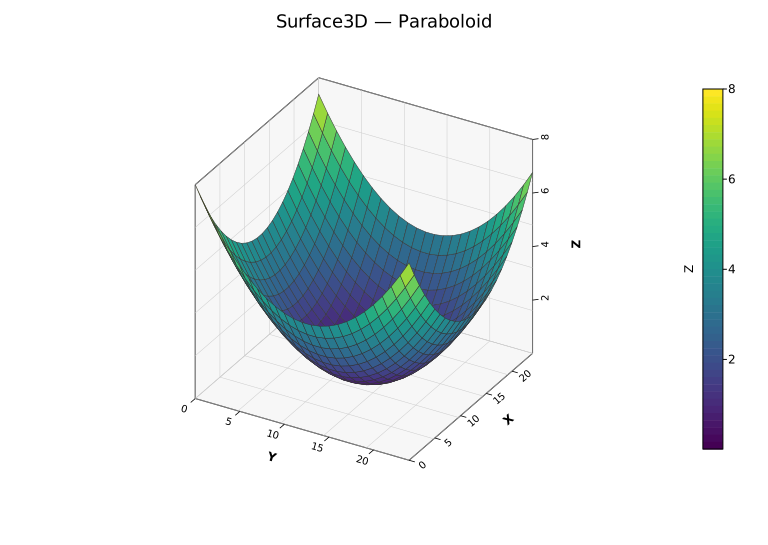
Pass a 2D grid of Z values (z_data[row][col]):
#![allow(unused)]
fn main() {
use kuva::plot::surface3d::Surface3DPlot;
use kuva::plot::heatmap::ColorMap;
use kuva::backend::svg::SvgBackend;
use kuva::render::render::render_multiple;
use kuva::render::layout::Layout;
use kuva::render::plots::Plot;

let z_data: Vec<Vec<f64>> = (0..20).map(|i| {
    (0..20).map(|j| {
        let x = (i as f64 - 10.0) / 5.0;
        let y = (j as f64 - 10.0) / 5.0;
        x * x + y * y
    }).collect()
}).collect();

let surface = Surface3DPlot::new(z_data)
    .with_z_colormap(ColorMap::Viridis)
    .with_x_label("X")
    .with_y_label("Y")
    .with_z_label("Z");

let plots = vec![Plot::Surface3D(surface)];
let layout = Layout::auto_from_plots(&plots).with_title("Paraboloid");

let scene = render_multiple(plots, layout);
let svg = SvgBackend.render_scene(&scene);
std::fs::write("surface3d.svg", svg).unwrap();
}
When with_z_colormap() is set, a colorbar is rendered automatically. with_z_label() also labels the colorbar.
From a function
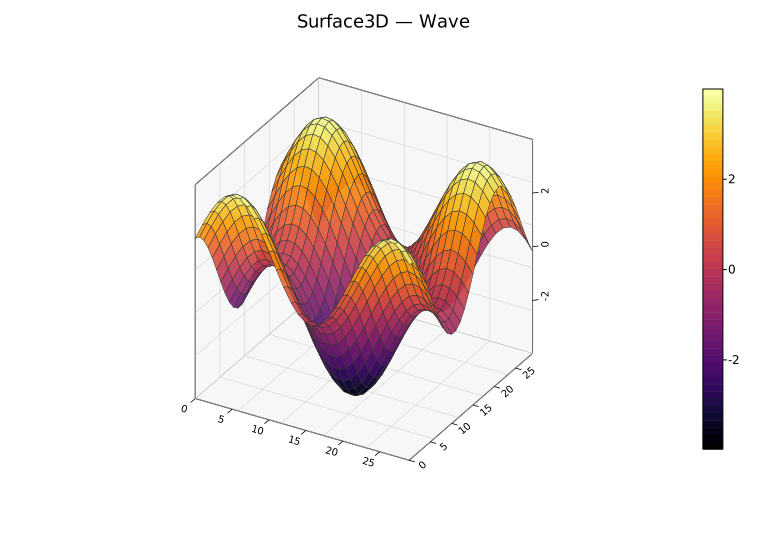
Generate a surface from a math function over a coordinate range:
#![allow(unused)]
fn main() {
use kuva::plot::surface3d::Surface3DPlot;
use kuva::plot::heatmap::ColorMap;
let surface = Surface3DPlot::new(vec![])
    .with_data_fn(
        |x, y| (x * x + y * y).sqrt().sin(),
        -3.0..=3.0, -3.0..=3.0, 50, 50,
    )
    .with_z_colormap(ColorMap::Viridis);
}
The last two arguments are grid resolution (x_res, y_res). Higher values produce smoother surfaces at the cost of more SVG paths.
Explicit coordinates
By default axes are labeled 0..nrows / 0..ncols. Supply real coordinates with with_x_coords and with_y_coords:
#![allow(unused)]
fn main() {
use kuva::plot::surface3d::Surface3DPlot;
use kuva::plot::heatmap::ColorMap;
let xs: Vec<f64> = (-5..=5).map(|i| i as f64 * 0.5).collect();
let ys: Vec<f64> = (-5..=5).map(|i| i as f64 * 0.5).collect();
let z_data: Vec<Vec<f64>> = ys.iter()
    .map(|&y| xs.iter().map(|&x| (x * x + y * y).sqrt().sin()).collect())
    .collect();

let surface = Surface3DPlot::new(z_data)
    .with_x_coords(xs)
    .with_y_coords(ys)
    .with_z_colormap(ColorMap::Viridis);
}
Wireframe and transparency
The wireframe is on by default. Disable it with with_no_wireframe(), or combine it with transparency:
#![allow(unused)]
fn main() {
use kuva::plot::surface3d::Surface3DPlot;
use kuva::plot::heatmap::ColorMap;
// Semi-transparent with fine wireframe
let surface = Surface3DPlot::new(vec![])
    .with_data_fn(|x, y| x * y, -2.0..=2.0, -2.0..=2.0, 20, 20)
    .with_z_colormap(ColorMap::Viridis)
    .with_alpha(0.8)
    .with_wireframe_color("#222222")
    .with_wireframe_width(0.3);

// No wireframe — clean filled surface
let surface2 = Surface3DPlot::new(vec![])
    .with_data_fn(|x, y| x * y, -2.0..=2.0, -2.0..=2.0, 20, 20)
    .with_z_colormap(ColorMap::Inferno)
    .with_no_wireframe();
}
Builder reference
| Method | Default | Description |
|---|---|---|
.with_z_data(grid) | — | Set Z value grid directly |
.with_x_coords(vec) | 0..ncols | Explicit X coordinate per column |
.with_y_coords(vec) | 0..nrows | Explicit Y coordinate per row |
.with_data_fn(f, xr, yr, xn, yn) | — | Generate grid from f(x, y) -> z |
.with_color(css) | "steelblue" | Uniform surface color (when no colormap) |
.with_z_colormap(map) | — | Color faces by average Z; renders a colorbar automatically |
.with_no_wireframe() | wireframe on | Hide wireframe edges |
.with_wireframe_color(css) | "#333333" | Wireframe edge color |
.with_wireframe_width(px) | 0.5 | Wireframe stroke width |
.with_alpha(f) | 1.0 | Surface opacity (0.0–1.0) |
.with_azimuth(deg) | -60.0 | Horizontal viewing angle |
.with_elevation(deg) | 30.0 | Vertical viewing angle |
.with_view(View3D) | — | Set azimuth and elevation together |
.with_x_label(s) | — | X-axis label |
.with_y_label(s) | — | Y-axis label |
.with_z_label(s) | — | Z-axis label (also labels the colorbar) |
.with_no_grid() | grid on | Hide grid lines on back walls |
.with_no_box() | box on | Hide the wireframe bounding box |
.with_grid_lines(n) | 5 | Number of grid/tick divisions per axis |
.with_z_axis_right(bool) | auto | Force Z axis to right (true) or left (false) |
.with_z_axis_auto() | — | Reset to automatic placement (default) |
.with_legend(s) | — | Legend entry label |
CLI
The CLI accepts long format (x, y, z columns) or matrix format (--matrix, one row of Z values per line).
# Long format with colormap
kuva surface3d data.tsv --x x --y y --z z --z-color viridis \
    --title "3D Surface" --x-label "X" --y-label "Y" --z-label "Z"

# Upsample a coarse grid to 50×50 with bilinear interpolation
kuva surface3d data.tsv --x x --y y --z z \
    --z-color inferno --resolution 50

# Matrix format (no header, each row = one row of Z values)
kuva surface3d matrix.tsv --matrix --z-color viridis --no-header

# Semi-transparent surface, no wireframe
kuva surface3d data.tsv --x x --y y --z z \
    --z-color viridis --alpha 0.8 --no-wireframe

# Custom view
kuva surface3d data.tsv --x x --y y --z z \
    --z-color viridis --azimuth 45 --elevation 45
CLI flags
| Flag | Default | Description |
|---|---|---|
--x <COL> | 0 | X value column (long format) |
--y <COL> | 1 | Y value column (long format) |
--z <COL> | 2 | Z value column (long format) |
--matrix | off | Read input as a matrix of Z values |
--z-color <MAP> | — | Colormap: viridis, inferno, grayscale |
--color <CSS> | steelblue | Uniform surface color (when no colormap) |
--alpha <F> | 1.0 | Surface opacity (0.0–1.0) |
--resolution <N> | — | Upsample grid to N×N via bilinear interpolation |
--no-wireframe | wireframe on | Hide wireframe edges |
--azimuth <DEG> | -60 | Horizontal viewing angle |
--elevation <DEG> | 30 | Vertical viewing angle |
--x-label <S> | — | X-axis label |
--y-label <S> | — | Y-axis label |
--z-label <S> | — | Z-axis label |
--no-grid | grid on | Hide back-wall grid lines |
--no-box | box on | Hide wireframe bounding box |
--grid-lines <N> | 5 | Grid/tick divisions per axis |
--z-axis-left | auto | Force Z axis to the left side |
See also: 3D Scatter Plot for discrete points instead of a continuous surface, Contour Plot for a 2D projection of similar gridded data, Heatmap for a flat matrix-of-values view.
See also: Shared flags — output, appearance, axes.