Twin-Y Plot
A twin-Y (dual-axis) plot renders two independent sets of data on the same x-axis with separate y-axes — the primary axis on the left and the secondary axis on the right. This is useful when two related series have incompatible scales (e.g. temperature in °C and rainfall in mm) or different units that would otherwise force one series into a thin band near zero.
Render function: kuva::render::render::render_twin_y
Basic usage
Pass two separate Vec<Plot> to render_twin_y — one for the left axis, one for the right. Use Layout::auto_from_twin_y_plots to compute axis ranges for both sides automatically.
#![allow(unused)]
fn main() {
use kuva::plot::LinePlot;
use kuva::backend::svg::SvgBackend;
use kuva::render::render::render_twin_y;
use kuva::render::layout::Layout;
use kuva::render::plots::Plot;

let temp: Vec<(f64, f64)> = vec![
    (1.0, 5.0), (2.0, 8.0), (3.0, 14.0), (4.0, 20.0), (5.0, 24.0), (6.0, 22.0),
];
let rain: Vec<(f64, f64)> = vec![
    (1.0, 80.0), (2.0, 60.0), (3.0, 45.0), (4.0, 30.0), (5.0, 20.0), (6.0, 35.0),
];

let primary   = vec![Plot::Line(LinePlot::new().with_data(temp).with_legend("Temperature (°C)"))];
let secondary = vec![Plot::Line(LinePlot::new().with_data(rain).with_legend("Rainfall (mm)"))];

let layout = Layout::auto_from_twin_y_plots(&primary, &secondary)
    .with_title("Temperature & Rainfall")
    .with_x_label("Month")
    .with_y_label("Temperature (°C)")
    .with_y2_label("Rainfall (mm)");

let scene = render_twin_y(primary, secondary, layout);
let svg = SvgBackend.render_scene(&scene);
std::fs::write("twin_y.svg", svg).unwrap();
}
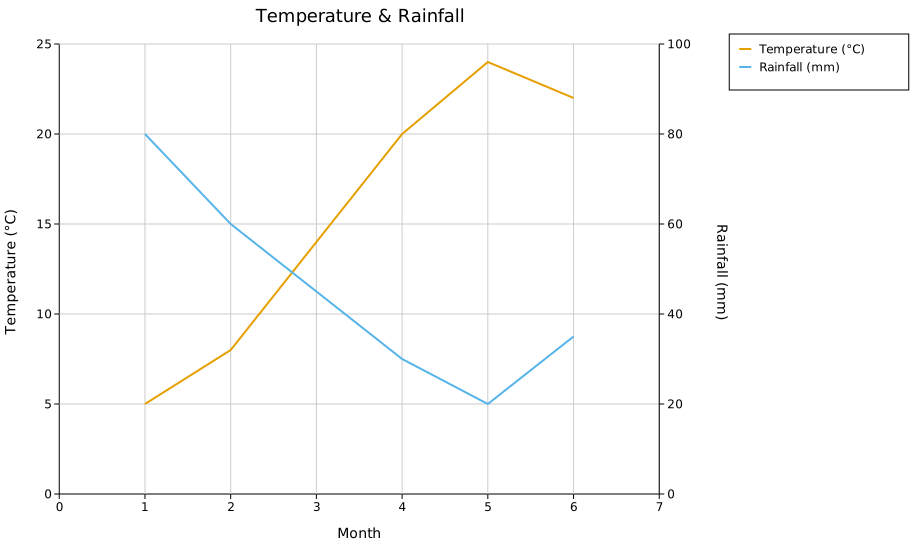
The left axis scales to the primary plots only; the right axis scales to the secondary plots only. Both axes share the same x range.
Axis labels and legend
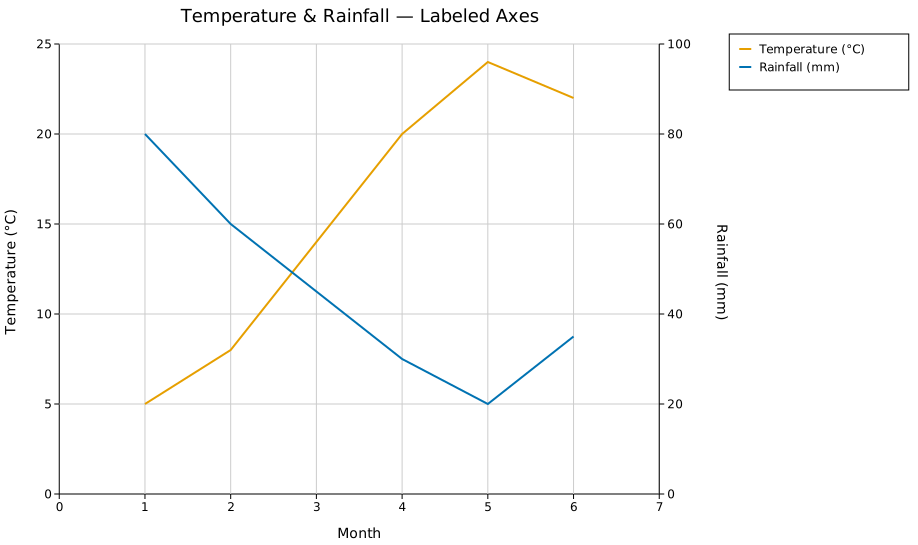
.with_y_label(s) labels the left axis; .with_y2_label(s) labels the right axis. Both rotate 90° and sit outside their respective tick marks. Legend entries from all plots — primary and secondary — are collected into a single legend.
#![allow(unused)]
fn main() {
use kuva::plot::{LinePlot, LegendPosition};
use kuva::render::render::render_twin_y;
use kuva::render::layout::Layout;
use kuva::render::plots::Plot;

let primary   = vec![Plot::Line(LinePlot::new().with_data(temp).with_color("#e69f00").with_legend("Temperature (°C)"))];
let secondary = vec![Plot::Line(LinePlot::new().with_data(rain).with_color("#0072b2").with_legend("Rainfall (mm)"))];

let layout = Layout::auto_from_twin_y_plots(&primary, &secondary)
    .with_title("Temperature & Rainfall")
    .with_x_label("Month")
    .with_y_label("Temperature (°C)")
    .with_y2_label("Rainfall (mm)")
    .with_legend_position(LegendPosition::OutsideRightTop);
}
Log scale on the secondary axis
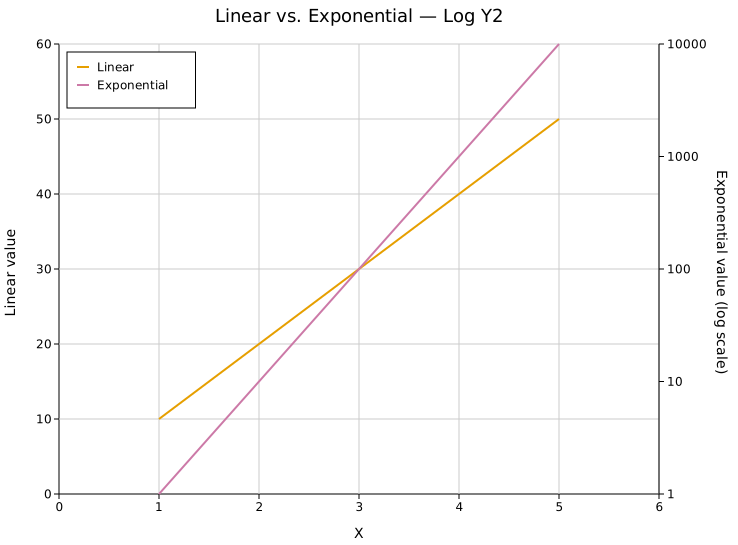
.with_log_y2() switches the right axis to a log₁₀ scale. The left axis is unaffected. Useful when the secondary series spans orders of magnitude (e.g. p-values, read counts) while the primary series is linear.
#![allow(unused)]
fn main() {
use kuva::render::layout::Layout;
use kuva::render::plots::Plot;
use kuva::plot::LinePlot;
let layout = Layout::auto_from_twin_y_plots(&primary, &secondary)
    .with_y2_label("Exponential value (log scale)")
    .with_log_y2();
}
Mixing plot types
Both the primary and secondary Vec<Plot> accept any combination of supported plot types. The example below mirrors a typical WGS GC bias QC chart: a precomputed Histogram and a ScatterPlot on the left (Normalized Coverage), with two LinePlots on the right (Base Quality).
#![allow(unused)]
fn main() {
use kuva::plot::{LinePlot, LegendPosition};
use kuva::plot::scatter::ScatterPlot;
use kuva::plot::histogram::Histogram;
use kuva::backend::svg::SvgBackend;
use kuva::render::render::render_twin_y;
use kuva::render::layout::Layout;
use kuva::render::plots::Plot;

// Genome GC distribution — precomputed bell-curve histogram (y 0–0.5)
let genome_gc = Plot::Histogram(
    Histogram::from_bins(gc_edges, gc_counts)
        .with_color("#a8d8f0")
        .with_legend("Genome GC"),
);

// Normalized coverage — U-shaped scatter, saturates to 2.0 at extreme GC
let coverage = Plot::Scatter(
    ScatterPlot::new()
        .with_data(coverage_pts)
        .with_color("#4e90d9")
        .with_size(5.0)
        .with_legend("Coverage"),
);

// Base quality lines on the secondary axis (0–40)
let reported = Plot::Line(LinePlot::new().with_data(reported_bq).with_color("#2ca02c").with_legend("Reported BQ"));
let empirical = Plot::Line(LinePlot::new().with_data(empirical_bq).with_color("#17becf").with_legend("Empirical BQ"));

let primary   = vec![genome_gc, coverage];
let secondary = vec![reported, empirical];

let layout = Layout::auto_from_twin_y_plots(&primary, &secondary)
    .with_title("GC Bias")
    .with_x_label("GC%")
    .with_y_label("Normalized Coverage")
    .with_y2_label("Base Quality")
    .with_legend_position(LegendPosition::OutsideRightTop);

let scene = render_twin_y(primary, secondary, layout);
let svg = SvgBackend.render_scene(&scene);
std::fs::write("gc_bias.svg", svg).unwrap();
}
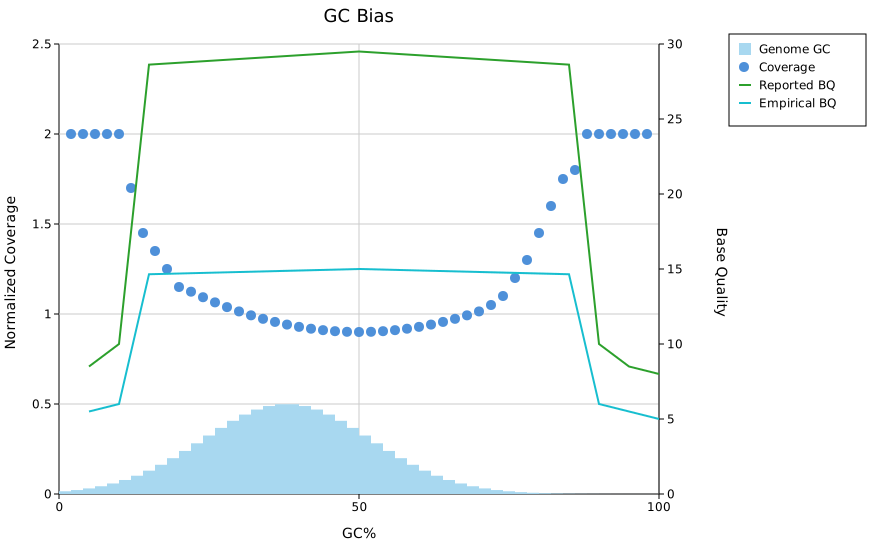
Supported plot types on both axes: Line, Scatter, Series, Band, Bar, Histogram, Box, Violin, Strip, Density, StackedArea, Waterfall, Candlestick.
Palette auto-assignment
.with_palette(palette) cycles colors across all primary and secondary plots in order, left-to-right through primary then secondary. Attach .with_legend(s) to each plot to identify them.
#![allow(unused)]
fn main() {
use kuva::render::layout::Layout;
use kuva::Palette;
let layout = Layout::auto_from_twin_y_plots(&primary, &secondary)
    .with_palette(Palette::wong());
}
Manual axis ranges
The auto-computed ranges can be overridden independently for each axis:
#![allow(unused)]
fn main() {
use kuva::render::layout::Layout;
let layout = Layout::auto_from_twin_y_plots(&primary, &secondary)
    .with_y_axis_min(0.0).with_y_axis_max(2.0)   // left axis
    .with_y2_range(0.0, 40.0);                    // right axis
}
API reference
| Method | Description |
|---|---|
render_twin_y(primary, secondary, layout) | Render a twin-y scene; returns a Scene |
Layout::auto_from_twin_y_plots(primary, secondary) | Compute axis ranges for both sides automatically |
.with_y_label(s) | Left (primary) axis label |
.with_y2_label(s) | Right (secondary) axis label |
.with_y2_label_offset(dx, dy) | Nudge the right axis label position in pixels |
.with_log_y2() | Log₁₀ scale on the secondary axis |
.with_y2_range(min, max) | Suggest a secondary y-axis range; still nice-rounded and capped near the secondary plots' own data (same path as the auto-computed range), so a request far outside that data can end up largely ignored |
.with_y2_axis_min(v) / .with_y2_axis_max(v) | Unconditionally override the secondary y-axis lower/upper bound after auto-ranging — the y2 counterparts to with_y_axis_min/with_y_axis_max. Prefer these over with_y2_range when the requested bound is far from the data |
.with_y2_tick_format(fmt) | Tick format for the secondary axis |
.with_palette(palette) | Auto-assign colors across all primary + secondary plots |
See also: Line Plot and Series Plot for the single-axis building blocks a twin-Y plot combines.
CLI
Input: a tabular file with a shared X column plus one Y column for the primary (left) axis and one for the secondary (right) axis.
Currently supports line and scatter as the plot type on either axis — the two plot types that take plain (x, y) numeric pairs, matching how --x/--y/--y2 select columns. For anything more elaborate (multiple series per axis, bar/histogram/box/etc. on an axis, mixed plot types), build the two Vec<Plot> directly with the Rust API above and call render_twin_y — see the "Mixing plot types" section earlier on this page.
| Flag | Default | Description |
|---|---|---|
--x <COL> | 0 | X-axis column, shared by both series |
--y <COL> | 1 | Primary (left-axis) Y column |
--y2 <COL> | 2 | Secondary (right-axis) Y column |
--primary-type <TYPE> | line | Plot type for the primary series: line or scatter |
--secondary-type <TYPE> | line | Plot type for the secondary series: line or scatter |
--primary-color <CSS> | steelblue | Primary series color |
--secondary-color <CSS> | firebrick | Secondary series color |
--primary-legend <TEXT> | (column name) | Legend label for the primary series (used when --legend is set) |
--secondary-legend <TEXT> | (column name) | Legend label for the secondary series (used when --legend is set) |
--legend | off | Show a legend identifying the primary and secondary series |
kuva twin-y weather.tsv --x month --y temp --y2 rain \
    --y-label "Temperature (C)" --y2-label "Rainfall (mm)"

kuva twin-y weather.tsv --x month --y temp --y2 rain \
    --primary-color "#e69f00" --secondary-color "#0072b2" \
    --primary-legend "Temperature" --secondary-legend "Rainfall" --legend

kuva twin-y weather.tsv --x month --y temp --y2 rain \
    --primary-type scatter --secondary-type line
See also: Shared flags — output, appearance, axes, secondary Y axis.